Search  for anything...

Logitech MX Master 4 for Mac, Ergonomic Bluetooth Mouse with Advanced Performance Haptic Feedback, Ultra-Fast Scrolling, USB-C Charging, MacOS, iPadOS, Windows - Space Black

  • Based on 0 reviews
Condition: New
Checking for the best price...
$119.99 Why this price?

Buy Now, Pay Later


As low as $20.00 / mo
  • – 6-month term
  • – No impact on credit
  • – Instant approval decision
  • – Secure and straightforward checkout

Ready to go? Add this product to your cart and select a plan during checkout.

Payment plans are offered through our trusted finance partners Klarna, Affirm, Afterpay, Apple Pay, and PayTomorrow. No-credit-needed leasing options through Acima may also be available at checkout.

Learn more about financing & leasing here.

Selected Option

Free shipping on this product

FREE 30-day refund/replacement

To qualify for a full refund, items must be returned in their original, unused condition. If an item is returned in a used, damaged, or materially different state, you may be granted a partial refund.

To initiate a return, please visit our Returns Center.

View our full returns policy here.


Availability: Only 10 left in stock, order soon!
Fulfilled by Amazon

Arrives Tuesday, Mar 17
Order within 11 hours and 59 minutes
Available payment plans shown during checkout

Protection Plan Protect Your Purchase
Checking for protection plans...

Color: Space Black


Pattern Name: Mouse


Features

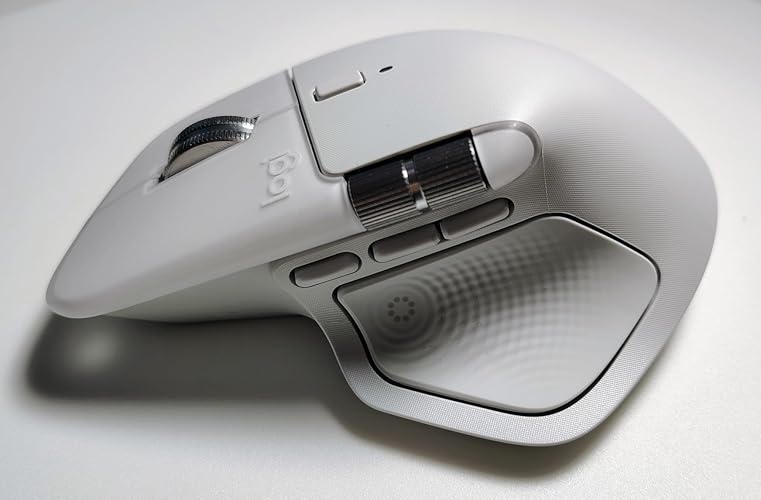
  • Mastered for Mac: With matching Apple finishes, Logi Options+ functions for macOS (1), USB-C charging while you work (cable not included), MX Master 4 for Mac makes for a perfect fit with your Apple setup
  • Precision you can feel with the Haptic Sense Panel; customizable (1) haptic feedback on specific actions, shortcuts, notifications enhancing productivity on this wireless Bluetooth mouse
  • Effortlessly access favorite tools with Actions Ring (2) on this MX Series mousea dynamic, customizable overlay adapts to each app, placing most used filters, adjustments, and shortcuts at your cursor
  • Scroll 1,000 lines per second and stop on a pixel with the MagSpeed scroll wheelLogitechs fastest (3), quietest, and most precise (4) scrolling experience
  • Ergonomic mouse designed for comfort, MX Master 4 for Mac keeps you in flow with a natural tilt, intuitive buttons, and a thumb scroll wheel that reduces hand stress for fluid navigation
  • Quiet Clicks on MX Master 4 for Mac reduce noise and distractions, offering a satisfying feel with 90% less click noise (7) perfect for focused workflows
  • Get a complimentary 1-month Adobe Creative Cloud subscription with your purchase of MX Master 4 for Mac
  • Designed for a positive future: Plastic parts include recycled plastic - 54% Space Black; 48% White Silver (12); 100% recycled cobalt in the battery; Built to last with improved stain resistance (7)

Description

The Logitech MX Master 4 for Mac brings immersive control and precision you can feel with haptic feedback. Experience haptic feedback on specific actions, shortcuts, notifications like switching desktops, slider adjustments and more. Customize vibration intensity with Logi Options+ (1). With Actions Ring shortcuts and MX Master 4 for Mac, save up to 33% of your time (2) by accessing tools and filters at your cursor and reducing repetitive movements by up to 63%. (2) Experience uninterrupted performance with 2X more powerful connectivity, powered by an advanced radio chip, optimized antenna placement, and a new USB-C dongle (not included). (7) Scroll 1,000 lines per second with Logitech's fastest MagSpeed wheel, switching between hyper-fast and pixel- perfect scrolling for ultimate precision. The 8k DPI sensor tracks on any surface—even glass. (5) Designed for comfort, it keeps your hand in a natural posture, and quiet clicks that reduce noise by 90% (8). Stay powered up with up to 70 days of battery life, plus three hours of use from a one-minute charge, charging cable not included (10). Built sustainably, it incorporates recycled materials: plastic parts include recycled plastic - 54% Space Black; 48% White Silver (12); 100% recycled cobalt in the battery; Built to last with improved stain resistance (7) Compatible with Windows, macOS, Linux, Chrome OS, iPadOS, and Android. Requires Logi Options+ app for advanced customization.

Brand: Logitech


Color: Space Black


Connectivity Technology: Bluetooth, Radio Frequency, USB


Special Feature: Lightweight, Programmable Buttons, Rechargeable, Soundless, Wireless


Movement Detection Technology: Optical


Brand: ‎Logitech


Series: ‎Logitech MX Master 4


Item model number: ‎910-007575


Hardware Platform: ‎Mac, PC


Operating System: ‎Android, Chrome OS, Linux, Windows, iPadOS, macOS


Item Weight: ‎9.6 ounces


Product Dimensions: ‎6.5 x 5.6 x 0.04 inches


Item Dimensions LxWxH: ‎6.5 x 5.6 x 0.04 inches


Color: ‎Space Black


Power Source: ‎Battery Powered


Batteries: ‎1 Nonstandard Battery batteries required. (included)


Manufacturer: ‎Logitech


Date First Available: ‎September 30, 2025


Frequently asked questions

If you place your order now, the estimated arrival date for this product is: Tuesday, Mar 17

Yes, absolutely! You may return this product for a full refund within 30 days of receiving it.

To initiate a return, please visit our Returns Center.

View our full returns policy here.

  • Klarna Financing
  • Affirm Pay in 4
  • Affirm Financing
  • Afterpay Financing
  • PayTomorrow Financing
  • Financing through Apple Pay
Leasing options through Acima may also be available during checkout.

Learn more about financing & leasing here.

Top Amazon Reviews
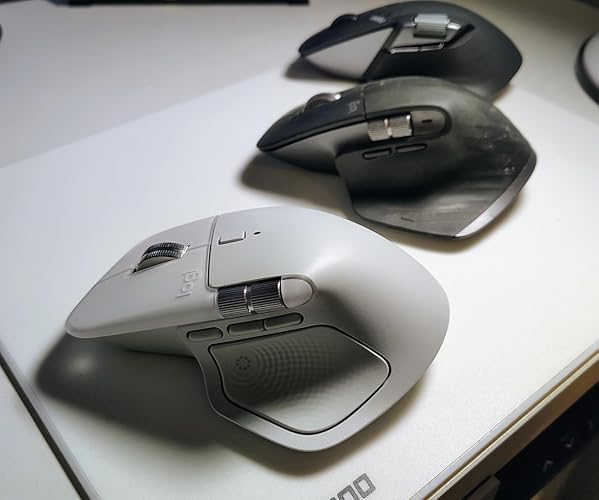

  • the ergonomic design
Color: Space Black Pattern Name: Mouse
I’ve been using the MX Master 4 for Mac for a few weeks now, and it has completely upgraded my workflow. First of all, the ergonomic design is amazing — it fits naturally in my hand, so even after long hours of editing and multitasking, there’s zero discomfort. The performance is just as impressive. The tracking is extremely precise, and the scroll wheel is unbelievably smooth. I also love how quietly it operates; I can work late at night without any clicking noise distracting me or anyone else in the room. Pairing it with my Mac was effortless, and the controls are super intuitive. The customizable buttons make all my daily tasks so much faster. Battery life is excellent too — I barely need to charge it. If you spend a lot of time on your computer and want something reliable, comfortable, and premium, this mouse is totally worth it. ... show more
Reviewed in the United States on November 14, 2025 by Olha Shynova Olha Shynova

  • The best mouse for Mac just got better
Color: White Silver Pattern Name: Mouse
I’ve been using the Logitech MX Master 4 for Mac for a few weeks now, and it works flawlessly with my workflow. What I love: • Connectivity: It connected instantly to my MacBook via Bluetooth without needing a dongle. No lag at all. • The Haptics: The new customizable haptic feedback is a game-changer. You can actually "feel" your actions, which makes editing and scrolling incredibly precise. • The "Actions Ring": This new feature saves me so much time. Having my most-used shortcuts right at the cursor is something I didn't know I needed until now. • Build Quality: The new matte finish feels more premium than the rubber on the previous versions and seems like it won't get sticky over time. ... show more
Reviewed in the United States on December 9, 2025 by g.rendon.a

  • Perfect Mac Productivity Mouse – Great Upgrade from G502 Hero
Color: Space Black Pattern Name: Mouse
Here’s a **short, clean Amazon-style review** you can copy-paste: > ⭐⭐⭐⭐⭐ Great upgrade from the G502 Hero. The battery charges super fast and lasts a long time, so I rarely worry about plugging it in. The ergonomic design is very comfortable for long work sessions, especially on Mac. Smooth, precise, and perfect for productivity. Highly recommended. ... show more
Reviewed in the United States on February 6, 2026 by Khishigbaatar Khishigbaatar

  • Excellent, but not perfect
Color: White Silver Pattern Name: Mouse
Overall, this is worth the upgrade from the MX 3S for a couple of new features and what I believe will be improved durability. The biggest feature addition is the action ring accessed using the the large thumb button. It's fully customizable and offers time-saving access to many functions. I didn't expect to like the haptic feedback, but I find it helpful as an indicator of activation of the action ring, after setting the intensity to "subtle". My only real complaint about the MX 3S was that the somewhat tacky, rubberized finish was very hard to keep clean; over time, frankly impossible. I think the new version, with it's smoother plastic finish, will be easier in that regard. That said, for anyone coming from the MX 3S, the MX 4 takes a little getting used to. As others have noted, it does feel a bit slippery when lifting, and it's a bit heavier, which makes it more noticeable. I find that the slippery effect is on the large thumb button, as the opposite side of the mouse provides better grip. For me, it only took a couple of days to get used to those things, and I have no problems now. My biggest complaint is with the "For Mac" version. It's virtually identical (slight color variation and the words "for Mac" on the underside) except for one major omission - no 2.4 Ghz dongle. That makes no sense to me, and appears to be just a rip-off of Mac users. ... show more
Reviewed in the United States on November 3, 2025 by Mark Baker

  • Incredible!
Color: Space Black Pattern Name: Mouse
This thing is INCREDIBLE! The selectable scroll wheel to freewheel or have detents is amazing, especially for working with long documents. Has a nice weight and quality feel. The haptics are great, especially being in an Apple ecosystem, haptics have come to be an expectation. I got tired of my trackball's clunky loud click buttons and crappy scroll wheel, this thing's quiet buttons are amazing. Time will tell how it all holds up, but the initial usage is impressive! ... show more
Reviewed in the United States on February 3, 2026 by Big Mac

  • Great mouse!
Color: Space Black Pattern Name: Mouse
My MX Master 3 started flaking out so I upgraded to this mouse. Its nice and smooth and I like the bigger thumb button for switching apps on my mac. I also have it connected to my iPad and to my Fedora Linux computer and it works perfectly. I don't use the Bolt dongle and just connect via bluetooth. There were some comments that this is heavier than the MX Master 3 and that is true. Took be about 1 week to get used to it but now I don't notice. ... show more
Reviewed in the United States on February 7, 2026 by Mike

  • Don't get the for-mac version. Ripoff alert
Color: Space Black Pattern Name: Mouse
Great mouse, but do not get the for mac version. It's the exact same mouse as the normal version, for the same price but without the USB included. You can still connect Bluetooth on the 'non-mac' version, they are literally the same mouse. Total ripoff, now I have to either return this mouse to get the normal one or waste another $15 getting the USB receiver that should have been included to begin with. I guess this is what I get for not paying attention. ... show more
Reviewed in the United States on December 14, 2025 by Artem S.

  • Great Product and Design
Color: White Silver Pattern Name: Mouse
I love it, and and wrists love it! The haptic feedback is nice feature, and the customization options are nice to have. I've never used shortcuts before this, but they've come in handy during moments when I want to quickly access certain apps/folders/keybinds. Even being able to customize the feel of the scroll wheel is insanely cool! I also appreciate having the horizontal scroll wheel as well (I use it all the time in my projects) It glides smoothly and accurately, It's large, but still portable to bring with you on the go. I like how it connected quickly to the laptop and it functioned pretty much out of the box. I think the value was worth it for what the mouse can offer with QOL improvements and the battery life is great. I havent had any technical issues setting up or using this mouse with my Macbook Pro. In addition, before owning this mouse, I chose this one because I had been experiencing mild symptoms of carpal tunnel (I play also play instruments and use electronics often) I'm certain that the design of this mouse has been helping a ton with managing the strain on my wrists when I need to spend time at my desk. ... show more
Reviewed in the United States on February 12, 2026 by Joey

Can't find a product?

Find it on Amazon first, then paste the link below.
Checking for best price...