Search  for anything...

Microsoft Surface Pro Signature Keyboard with Slim Pen 2 - Black

  • Based on 1,361 reviews
Condition: New
Checking for the best price...
$214.99 Why this price?
Save $5.21 was $220.20

Buy Now, Pay Later


As low as $35.83 / mo
  • – 6-month term
  • – No impact on credit to apply
  • – Instant approval decision
  • – Secure and straightforward checkout

Ready to go? Add this product to your cart and select a plan during checkout.

Payment plans are offered through our trusted finance partners Klarna, Affirm, Afterpay, Zip, Apple Pay, and Google Pay. No-credit-needed leasing options through Acima may also be available at checkout.

Learn more about financing & leasing here.

Selected Option

Free shipping on this product

30-day refund/replacement

To qualify for a full refund, items must be returned in their original, unused condition. If an item is returned in a used, damaged, or materially different state, you may be granted a partial refund.

To initiate a return, please visit our Returns Center.

View our full returns policy here.


Availability: Only 2 left in stock, order soon!
Fulfilled by Tek-Go, Corp - RFRB

Arrives Tuesday, Oct 27
Order within 3 hours and 48 minutes
Available payment plans shown during checkout

Protection Plan Protect Your Purchase
Checking for protection plans...

Color: Black


Features

  • Choose your keyboard color: Red, Ice Blue, Platinum, and Black.(1)
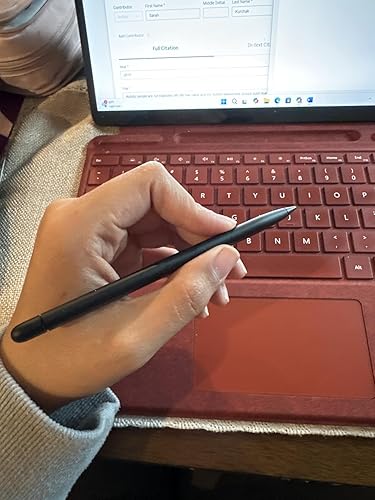
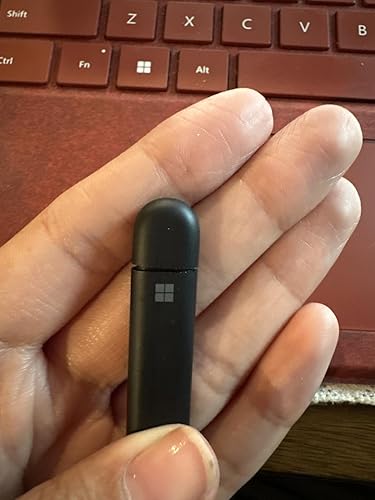
  • Always ready at your fingertips. Surface Slim Pen 2 recharges in the built-in storage tray.
  • Take notes naturally. The haptic motor in Surface Slim Pen 2 brings the feeling of writing and drawing on paper when used with Surface Pro 8.(2)
  • Features a full mechanical keyset, backlit keys, and large trackpad for precise navigation and control
  • Typing and writing in one without the bulk, Surface Pro Signature Keyboard delivers fast and accurate typing like a traditional, full-size keyboard, plus natural on-screen writing

Description

Store, charge, type, and write. Next-level versatility comes in the perfect, premium keyboard, featuring a large glass trackpad and luxurious, Alcantara material covering. Ready to pair with Surface Pro 8 and Surface Pro X.

Brand: Microsoft


Compatible Devices: Surface Pro 8, Surface Pro X


Connectivity Technology: Bluetooth


Keyboard Description: Backlit, mechanical keyboard with a built-in storage tray for the Surface Slim Pen 2, compatible with Surface Pro 8 and Surface Pro X. See more


Recommended Uses For Product: Business


Special Feature: Integrated Surface Slim Pen 2 storage and charging, full mechanical keyset, and backlit keys


Color: Black


Keyboard backlighting color support: Single Color


Style: Contemporary


Product Dimensions: 11.38"L x 8.9"W x 0.19"H


Compatible Devices: Surface Pro 8, Surface Pro X


Connectivity Technology: Bluetooth


Additional Features: Integrated Surface Slim Pen 2 storage and charging, full mechanical keyset, and backlit keys


Keyboard Backlighting Color Support: Single Color


Language: English


Power Source: Battery Powered


Switch Type: Mechanical


Keyboard Layout: QWERTY


Hand Orientation: Ambidextrous


Button Quantity: 78


Minimum Required Operating System Version: Windows 10


Compatible Operating System Family: Windows


Compatible Tablet Computer Models: Microsoft Surface Pro 8, Microsoft Surface Pro X


Number of Keys: 78


Color: Black


Style Name: Contemporary


Item Dimensions L x W x H: 11.38"L x 8.9"W x 0.19"H


Enclosure Material: Acrylonitrile Butadiene Styrene


Brand: Microsoft


Keyboard Description: Backlit, mechanical keyboard with a built-in storage tray for the Surface Slim Pen 2, compatible with Surface Pro 8 and Surface Pro X.


Antenna Location: Business


Built-In Media: USB Cable


Model Number: 8X6


Model Name: Surface Pro Signature Keyboard


Series Number: 8


Manufacturer: Microsoft


Number of Packs: 1


UPC: 889842772500


Number of Items: 1


Generation: 8


Item Weight: 1.1 pounds


Mfr Part Number: 8X6-00001


Warranty Description: 1 year manufacturer


Frequently asked questions

If you place your order now, the estimated arrival date for this product is: Tuesday, Oct 27

Yes, absolutely! You may return this product for a full refund within 30 days of receiving it.

To initiate a return, please visit our Returns Center.

View our full returns policy here.

  • Klarna Financing
  • Affirm Pay in 4
  • Affirm Financing
  • Afterpay Financing
  • Zip Pay in 4
  • Financing through Apple Pay
  • Financing through Google Pay
Leasing options through Acima may also be available during checkout.

Learn more about financing & leasing here.

Top Amazon Reviews


  • On sale it's great
Color: Poppy Red
I wouldn't feel as pleased with this at full price, but at just over 200 bucks for the keyboard AND the pen, it's worth it. I like the simplicity. I've got a few other Surface devices and a Brydge for an older one, and a MS keyboard for my Surface Pro 4. They work well, but this one feels better. I like the key responsiveness. A good positive feel for every single key press, which is critical for someone like myself who touch types very quickly. Sturdy, even when I have it in the tilted position slightly so there is air underneath it and it tilts down forwards to me. Backlight works well. I also like the function lock ease. No BIOS needed like the HP Spectre this Surface Pro 9 is replacing. Pen works well. I've been dealing with Microsoft touch devices since the days of Windows XP Tablet Edition. I even won a few Microsoft MVP awards in the technology. And this is the best it's been so far. The not round pen takes a bit of getting used to, but not much. And I love the charging in the dock in the keyboard, and how it's just always there, but not hanging off the side like older Surface devices did. I kept having them get knocked off going in and out of my laptop bags. Trackpad is smooth, consistent. Press to click works across it in all areas, no spot is dead or less responsive. On sale, worth every penny. ... show more
Reviewed in the United States on December 1, 2022 by LegoDude

  • Responsive, Backlight is OK, Easily connects to Surface Pro 9, Holds pen securely
Color: Poppy Red
I upgraded from the Surface Pro 6 to the Surface Pro 9 and bought this keyboard for it since it was less expensive than the one offered on the Microsoft site even though it is the same keyboard. I chose Poppy Red since red is my favorite color and it was also the least expensive of the color choices. Since I also have the Microsoft keyboard from my Surface Pro 6, can compare the two. Since this keyboard comes with no user manual, some of the features must be figured out on the fly. For example, the keyboard backlight must be turned on with the F1 key and the light intensity is adjustable by pressing this key multiple times. There are 3 backlight intensities to choose from. The color of the poppy red keyboard is darker than what shows on the sales page. It is a dark red that is mottled with black. I still like it, but it's not what I expected. I liked the color of the red keyboard for my Surface 6 better. I do very much like that the pen is stored in a slot on the keyboard rather than attached to the side of the tablet as it was on the Surface Pro 6. This helps to prevent the pen from being lost and holds the pen securely when not in use. I also like that the touchpad is very responsive and can be efficiently used when a mouse is not available. Overall, I am happy with this keyboard. I hope this review was helpful for you. ... show more
Reviewed in the United States on November 11, 2023 by Judy L.

  • Vividly Bold and AMAZING
Color: Poppy Red
The keyboard is sturdy and soft, it has a slot for the pen and it hides it to prevent loss. The keyboard does function as intended the keys are pretty quiet and the track pad works flawlessly. The track pad is touch sensitive but also click sensitive. The keyboard stays in place the magnet is super strong in both the pencil part and the part that holds onto the actual surface. It’s super lively in color and bold! The pen has click buttons on top at the “eraser” and on the side which come in useful for editing pictures etc. the colors work beautifully together they’re vibrant and bold the red is a real statement piece. Also plus side to all of it, the whole thing is self charging and doesn’t require an additional charger to function. ... show more
Reviewed in the United States on May 2, 2025 by Monica Zamora Barragan

  • Quality keyboard without the ugly wear marks of your fingers polishing keys
Color: Black
This keyboard is superb both in function and in durability. It is well worth the value over other competitive keyboards for the Surface Pro. It enables quick use of the touch keys on my lap by rotating the Surface and just letting the keyboard hang over my knees. The hinged keyboard enables me to hold the Surface steady with my palm with fingers stopped at the edge of the hinge to use the touch swipe keying with my other hand. With the quick touch of the Fn lock key with its light status, I can change to use the function keys for Microsoft apps such as Excel. The key coating is designed with quality; as a touch typist I do not see the wear of my fingers polishing the keys with an ugly shine. What I hate on many of my previous computers is to see a new computer with a worn polished keyboard; it just diminishes the worth of the computer. This keyboard retains its cleanliness and quality look. It's superb! ... show more
Reviewed in the United States on July 10, 2023 by BWLee

  • It's all the same and then some.
Color: Poppy Red
11/22/24 Microsoft Surface Pro Signature Keyboard Surface Slim Pen 2 - Poppy Red Used with Surface Pro 9 and Surface Pro 11 I can not say it's pricey anymore since the price has always been the about same amount since release of the surface, but sales/discounts happen all the time with these. there are other great wireless keyboards. This is a great keyboard, the board does flex a bit and take some getting used to. but after typing a while you'll get speedy. In comparison to the flex keyboard I do not have a frame of reference, but the option to remove the keyboard to use, I have not found the necessity. Meaning, I have not needed to remove the keyboard unless it's to just use the pad and pen. the keyboard light sometimes forgets it's settings. I do miss the days of proximity lighting. I never understood why Microsoft does not include the keyboard, it is a necessity when using the pad as a pc. ... show more
Reviewed in the United States on November 22, 2024 by The Reviewer

  • Excelente
Color: Platinum
Excelente
Reviewed in the United States on April 23, 2026 by Diana

  • Features along made this a good buy
Color: Platinum
I was looking at the off-brand keyboards for my Surface Pro 9. Getting the off-brand and then buying a pen almost came out to the same price as the official keyboard/slim pen 2 combo price. On MS, this item is way overprice compared to what you can get it here. For a couple more $$, I went with the convenience of not have extra cables to charge the keyboard and pen. Connect the cable to the Pro 9 and it powers/charges the keyboard/Slim Pen 2 with no other cables. That alone makes it a great deal. Keyboard feels nice to type on and having a doc that charges the pen is bonus. If you don't mind multiple cables to charge your keyboard and pen, get the off-brand, if you don't like clutter, get the official one. ... show more
Reviewed in the United States on January 29, 2024 by Islasian

  • Seller recommended
Color: Black
The best product I’ve ever received, in a good condition
Reviewed in the United States on June 8, 2026 by Julián Vargas Arenas

Can't find a product?

Find it on Amazon first, then paste the link below.
Checking for best price...