Search  for anything...

Logitech MX Ink Mixed-Reality (MR) Stylus with Charging Dock Combo, high Precision and Pressure Sensitive, Transforming Ideas in MR from 2D to 3D, for Meta Quest 2, Meta Quest 3, Meta Quest 3S

  • Based on 30 reviews
Condition: New
Checking for the best price...
$144.99 Why this price?
Save $25.00 was $169.99

Buy Now, Pay Later


As low as $24.17 / mo
  • – 6-month term
  • – No impact on credit to apply
  • – Instant approval decision
  • – Secure and straightforward checkout

Ready to go? Add this product to your cart and select a plan during checkout.

Payment plans are offered through our trusted finance partners Klarna, Affirm, Afterpay, Apple Pay, and PayTomorrow. No-credit-needed leasing options through Acima may also be available at checkout.

Learn more about financing & leasing here.

Selected Option

Free shipping on this product

FREE 30-day refund/replacement

To qualify for a full refund, items must be returned in their original, unused condition. If an item is returned in a used, damaged, or materially different state, you may be granted a partial refund.

To initiate a return, please visit our Returns Center.

View our full returns policy here.


Availability: Only 3 left in stock, order soon!
Fulfilled by Amazon

Arrives Thursday, Jul 16
Order within 8 hours and 4 minutes
Available payment plans shown during checkout

Protection Plan Protect Your Purchase
Checking for protection plans...

Style: Stylus + Cradle


Features

  • Experience high-precision creations and operations in Mixed Reality (MR) with the familiar feel of a pen; say goodbye to learning curves, save time, and stay seamlessly in your workflow
  • Easily recharge the wireless MX Ink stylus by simply placing it in the included MX Inkwell Charging Dock or with a USB-C cable (not included)
  • MX Ink MR Stylus is designed and built to effortlessly connect with your Meta Quest and work alongside your Meta Touch Controllers; transition smoothly from 2D to 3D, then back again without disrupting your workflow
  • Enjoy high-precision creativity and control with a pressure-sensitive tip (1 fine tip/ 1 wide tip included) and main button of this stylus; sketch, grab, move, and manipulate fluidly in mixed reality (MR)
  • Deep integration in Meta Settings lets you tailor your control, pressure curves, activation forces; select right or left-handed control, and configure button mapping
  • High-accuracy 6DoF with balanced button feel, pressure, tactility, and haptics achieves seamless spatial tracking; a must for MR applications
  • Last up to 7 hours in a typical workflow; battery life varies significantly based on headset and applications; parameters based on Meta Quest 3 usage estimates

Description

MX Ink is a crafted control device with perfected pressure sensitivity and organic form - a tool you do not need to learn. Dive into your creations, in 3D and 2D, with frictionless ease. Pair and control leveraging Meta Horizon app and Meta Settings. Simple and elegant charging with the MX Inkwell Charging Dock. MX Ink was designed to be intuitive and give a masterfully fine-tuned and immersive experience.

Color: Black


Brand: Logitech


Material: Plastic


Number of Batteries: 1 Lithium Polymer batteries required. (included)


Item Weight: 1.02 Ounces


Battery Average Life Standby: 7 Hours


Compatible Devices: Meta Quest 2, Meta Quest 3, Meta Quest App, Meta Quest OS V69 or Later


Item dimensions L x W x H: 6.46 x 0.72 x 0.72 inches


Are Batteries Included: Yes


Batteries Required?: Yes


Number of Batteries: 1 Lithium Polymer batteries required. (included)


Battery Average Life Standby: 7 Hours


Compatible Devices: Meta Quest 2, Meta Quest 3, Meta Quest App, Meta Quest OS V69 or Later


Battery Description: Lithium-Ion Polymer


Minimum Required Operating System Version: Android 12.0


Item Weight: 1.02 Ounces


Item Dimensions: 6.46 x 0.72 x 0.72 inches


Item Diameter: 0.72 Inches


Color: Black


Enclosure Material: Plastic


Brand: Logitech


Model Number: 914-000087


Are Batteries Included: Yes


Are Batteries Required: Yes


UPC: 097855200068


Unit Count: 1.0 Count


Manufacturer: Logitech


Mfr Part Number: 914-000087


Warranty Description: 1 Year Limited Hardware Warranty


Frequently asked questions

If you place your order now, the estimated arrival date for this product is: Thursday, Jul 16

Yes, absolutely! You may return this product for a full refund within 30 days of receiving it.

To initiate a return, please visit our Returns Center.

View our full returns policy here.

  • Klarna Financing
  • Affirm Pay in 4
  • Affirm Financing
  • Afterpay Financing
  • PayTomorrow Financing
  • Financing through Apple Pay
Leasing options through Acima may also be available during checkout.

Learn more about financing & leasing here.

Top Amazon Reviews


  • One of the best things for the Quest
Style: Stylus + Cradle
I can't wait to do a bigger review of this online. This is amazing, I never thought a 3D stylus could be this intuitive. And the precision is incredible.
Reviewed in the United States on December 20, 2024 by MeInTX

  • I've had enough of this thing constantly failing...
Style: Stylus + Cradle
It's about time I wrote a review for the mx ink. I've owned this pen for nearly a year now, and every time I turn it on, it dies on me within 20 to 30 seconds, leaving me to power it down and back on, over and over again. It will not remain connected no matter what I do, when it works within the 20-30 second time span, it's a rather impressive piece of hardware, but I paid for both the stylus and dock, and it fails to stay connected 100% of the time. Sometimes it will reset itself if I hold down the meta button long enough before it powers down, still, after a few seconds it dies again. It's been this way since I bought it, I've always been patient hoping my quest 3 would eventually update the firmware, but it has never done so, if it has there's never been any notification. I'm considering grabbing another stylus and throwing this one away on the account that I need it for the kind work I do, but maybe I bought a defective or first gen model, I hope I did, but I'm going to consider the next possible purchase very carefully. ... show more
Reviewed in the United States on October 28, 2025 by M-1

  • Just a game-changer. The future is now.
Style: Stylus + Cradle
I spent NYE drawing in mixed reality, passthrough, with my best friend in the living room using Multi/OpenBrush on our Meta Quest 3 & Pro headsets. It was insane. I got the pad that goes with this pen. We 3D painted and sculpted and then I sat at the table with the pad and transitioned seamlessly to textured 2D planar art. The pressure sensitivity, almost fully parallel button possibilities makes this feature rich AND an interesting Quest controller. I also used this pen to virtually DJ in TribeXR to precisely grip the sound controller knobs, as well as a combined mouse + joystick half/half combo using a regular Quest controller in left hand plus this pen in right hand—playing Path of Exile 2 on PC in Virtual Desktop with this pen was very fun and interesting to me. Think of it as not just an art pencil, but a stylus wand replacement for the Quest controller itself. Many apps already feature a this pen’s features into the control options or take advantage of the pressure sensitivity. I highly recommend getting this pen, it’s such a cool invention and the possibilities for creativity and game control are endless! ... show more
Reviewed in the United States on January 14, 2025 by J. Johnson

  • Worth every penny for drawing
Style: Stylus + Cradle
I love this pen! I use it with Vermillion on the Quest 3s and it truly feels like I'm using a paintbrush. I wish it had a few more buttons to make it a bit easier to navigate when using it as a temporary controller, but it works very well for it's intended purposes. Future suggestion: make it a bit more difficult to interact with the center button. I constantly hit it on accident. ... show more
Reviewed in the United States on March 19, 2025 by Deeptraks

  • LogiMX Ink for meta3s uses LogiMX Ink for meta3s uses
Style: Stylus + Cradle
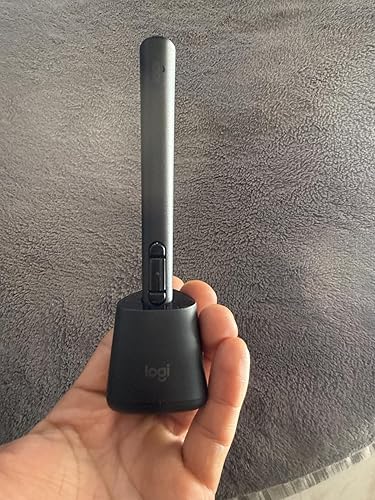
Cool to have but it can be difficult to learn on each platform. The weight is nice to feel, it’s very smooth to touch though something to grip it or maybe a loop hole for a wrist string in case it slips out of hand. I haven’t found attachments like a grip of pen box case would be nice for the 130$ price. I use mine for my meta 3s on vr sketch, connected quick, the mx ink app itself is cool for doodles and starter users . I’m sure there will be more uses on vr software wise not not much yet for use with this pen. More buttons to simplify adjusting things would be nice instead of the vr’s click/hold then scroll selection option. The pics show the ports for the type C chargers on the pen and on the base. The base has prongs for pen to charge on, the pen sits in it doesn’t stick in and hold by magnet so if your tip the base, the pen will fall out. I haven’t dropped mine on the floor yet so I can speak about durability yet. Take care ... show more
Reviewed in the United States on March 8, 2026 Reviewed in the United States on March 8, 2026 by Rivera

  • Perfect!!
Style: Stylus + Cradle
can’t get enough of this stylus, takes a little getting used to but this is perfect!!
Reviewed in the United States on January 9, 2025 by CecIl

  • Save your money for the Steam Frame
Style: Stylus + Cradle
Very little compatibility and control mapping so it's not very useful for drawing or writing. Also the tracking is poor and is obscured by your fingers. It's OK as a basic pointer for Youtube in the browser and that's basically it. I wanted to use it in VRChat for drawing but no luck.
Reviewed in the United States on December 8, 2025 by seth

  • Amazing from Amazon
Style: Stylus + Cradle
Este producto es excelente lo recomiendo
Reviewed in the United States on March 20, 2025 by Antonio

Can't find a product?

Find it on Amazon first, then paste the link below.
Checking for best price...