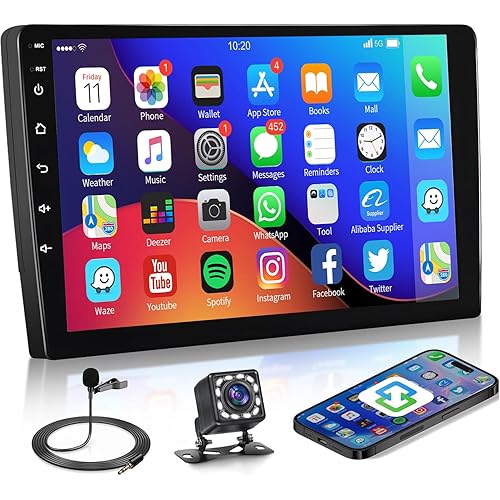
KOASON 10.25" Blueray Antiglare Screen Display Monitor Upgrade Wireless CarPlay Android Auto Multimedia Player GPS Navigation for BMW X5 X6 X5M X6M E70 E71 (2011-2013) CIC


Buy Now, Pay Later
- – Up to 36-month term if approved
- – No impact on credit to apply
- – Instant approval decision
- – Secure and straightforward checkout
Ready to go? Add this product to your cart and select a plan during checkout.
Payment plans are offered through our trusted finance partners Klarna, Affirm, Afterpay, Zip, Apple Pay, and Google Pay. No-credit-needed leasing options through Acima may also be available at checkout.
Learn more about financing & leasing here.
Selected Option
FREE refund/replacement until Jan 31, 2027 Learn more
To qualify for a full refund, items must be returned in their original, unused condition. If an item is returned in a used, damaged, or materially different state, you may be granted a partial refund.
To initiate a return, please visit our Returns Center.
View our full returns policy here.



At a glance
- Condition
- New
- Color
- Android 13 4+64 CIC
- Model
- KS-W808
- Storage
- 64 GB
- Screen size
- 10.25 in
- Dimensions
- 11.2"L x 2.75"W x 5.7"H
- Vehicle Service Type
- Car
- In the box
- Cables and Base stand
- Warranty
- One year warranty from purchase
- Works with
- iPhone
Features 3
- Qualcomm Snapdragon 8core CPU662 , Android OS13 , 4GB RAM, 64GB ROM, Full lamination blueray antiglare screen 10.25inch LG HD IPS LCD resolution 1920*720, Clear G+G touchscreen , Working temperatures: -30C-+70C.
- It is to replace original screen with 10.25inch android screen upgrade and keep original OEM radio/CD head unit, No need coding or programming, Nondestructive installation. Retain and compatible original radio features such as iDrive Knob control, Bluetooth , Radio, OEM rear camera , OEM 360 camera, Radar, steering wheel control. after screen upgrade, can use both original radio and android system features by easy switch.
- Wireless and wired CarPlay and Android auto builtin; need to connect mobile bluetooth with android screen first, then choose the Z-link App inside and it enter into CarPlay menu. Please check the electronic PDF user manual app "Adobe Acrobat" inside apps for operation.
Description
iDrive knob control not work (1) check if optic fiber relocation is correct. (2)check if "CAN Protocol" chosen correct in setting. OEM system show a clock For vehicles with OEM screen,Uncheck “ Car without OEM monitor” (this option is for car without OEM screen)in Factory Settings - Vehicle. OEM camera not work Just need to choose "Original camera" in android setting-rear camera type, no need wiring. How to use the Carplay? Enable the Bluetooth on your iPhone , Pair it with the android screen, Turn on the app "ZLINK". Why WIFI and Bluetooth show closed? After enter into CarPlay, the Wifi and Bluetooth showed closed, it is normal as CarPlay use the channel of Wifi and Bluetooth.
Specs 30
| Brand | Koason |
|---|---|
| Vehicle Service Type | Car |
| Screen Size | 10.25 inches |
| Special Feature | Bluetooth |
| Connectivity Technology | USB |
| Map Type | North America |
| Audio Output Mode | AUX |
| Mounting Type | Dashboard Mount |
| Resolution | 720 x 1080 |
| Compatible with Vehicle Type | Car |
| Additional Features | Bluetooth |
| Map Types | North America |
| Operating System | Android |
| Memory Storage Capacity | 64 GB |
| Touch Screen Type | Capacitive |
| Display Type | LCD |
| Human-Interface Input | Touchscreen |
| Control Method | Touch |
| Supported Satellite Navigation System | GPS |
| Compatible Flash Memory Type | SD |
| Software Update Supported to Date | unknown |
| Built-In Media | Cables and Base stand |
| Model Year | 2011 |
| UPC | 778716206015 |
| Manufacturer | Koason auto |
| Number of Items | 1 |
| Item Type Name | android screen gps |
| Model Number | KS-W808 |
| Mfr Part Number | KS-W808 |
| Item Dimensions L x W x H | 11.2"L x 2.75"W x 5.7"H |
No specs match.
Frequently asked questions
To initiate a return, please visit our Returns Center.
View our full returns policy here.
- Klarna Financing
- Affirm Pay in 4
- Affirm Financing
- Afterpay Financing
- Zip Pay in 4
- Financing through Apple Pay
- Financing through Google Pay
Learn more about financing & leasing here.