Search  for anything...

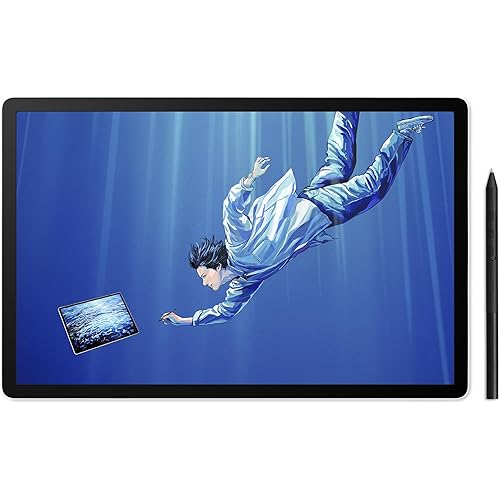
HUION KAMVAS Pro 27 (144Hz) 4K UHD Drawing Tablet with Screen, PenTech 4.0 Stylus 16384 Pen Pressure, Canvas Glass 3.0 △E<1 Graphic Tablet 98% Adobe RGB Multi-Touch Drawing Monitor with Keydial Remote

  • Based on 1,918 reviews
Condition: New
Checking for the best price...
$2,199.00 Why this price?
Save $9.98 was $2,208.98

Buy Now, Pay Later


As low as / mo
  • – Up to 36-month term if approved
  • – No impact on credit to apply
  • – Instant approval decision
  • – Secure and straightforward checkout

Ready to go? Add this product to your cart and select a plan during checkout.

Payment plans are offered through our trusted finance partners Klarna, Affirm, Afterpay, Zip, Apple Pay, and Google Pay. No-credit-needed leasing options through Acima may also be available at checkout.

Learn more about financing & leasing here.

Selected Option

Free shipping on this product

FREE 30-day refund/replacement

To qualify for a full refund, items must be returned in their original, unused condition. If an item is returned in a used, damaged, or materially different state, you may be granted a partial refund.

To initiate a return, please visit our Returns Center.

View our full returns policy here.


Availability: In Stock.
Fulfilled by Amazon

Arrives Sunday, Jul 26
Order within 21 hours and 58 minutes
Available payment plans shown during checkout

Protection Plan Protect Your Purchase
Checking for protection plans...

Size: 27-Inch


Style: Black


Features

  • HUION's First 27-Inch 4K & 144Hz Display: The Kamvas Pro 27 (144Hz) art tablet combines a 4K UHD (3840x2160) screen with a 144Hz high refresh rate, ensuring exceptionally smooth and clear visuals that deliver the precision and immersion required for dynamic creative workflows. With a 140% increase in line display speed, every pen stroke is captured instantly and displayed without any lag
  • Vivid Colors: Thanks to Quantum Dot technology, the Kamvas Pro 27 (144Hz) digital drawing tablet delivers a vibrant color gamut and 16.7 million colors for an enhanced visual experience. The computer graphics tablets boast professional-grade color accuracy, covering 99% sRGB/98% Adobe RGB/98% DCI-P3, and 98% Display P3. A dedicated black-and-white mode also helps distinguish light/dark contrast and reduce eye strain from high-saturation content
  • Reliable Color Accuracy: Each Kamvas Pro 27(144Hz) digital art tablet undergoes professional hardware color calibration with a 3D LUT, ensuring E<1 and preventing color fading. A factory calibration report is also included, so you can use the animation tablet with confidence
  • The Newest Pentech 4.0: Unleash your creativity with the PW600 stylus featuring 3 custom keys, and the ultra-thin and lightweight PW600S. Both models offer 16,384 pen pressure levels, 2g initial active force, and a tilt function. The small nib design minimizes cursor blockage, ensuring uninterrupted precision and accuracy. They boast an eraser and a dust-proof silicone grip for unparalleled comfort and utility
  • The revolutionary Pen Tech 4.0 optimizes the retraction distance from its predecessor by no more than 0.35mm, making the pen tip more stable and solid. The edge precision of the screen was enhanced, and tilt auto-alignment decreased the cursor offset issues
  • All-New Canvas Glass 3.0: Coated with the all-new nano-etched tech, Canvas Glass 3.0 not only reduces glare in bright light but also minimizes graininess on solid backgrounds, enhancing display clarity by 14%. The LCD panel is fully laminated with glass, improving brightness and color accuracy while extending its lifespan. Also, an anti-fingerprint coating is applied to prevent fingerprints and keep the display clean
  • Multi-Touch Function: The multi-touch interaction enables you to use gestures like swipe and rotate, enhancing your overall user experience by making navigation and interaction more fluid. The keydial remote keypad minimizes the screen's footprint on your desk while offering a variety of convenient shortcuts
  • Strong Compatibility: Kamvas Pro 27 (144Hz) drawing tablet for pc supports a variety of mainstream software on the market. The drawing pad for computer is compatible with Windows 10 or later, macOS 10.12 or later, Android devices that support USB3.1 GEN1 and DP1.2 and Linux OS(Ubuntu 20.04 LTS)
  • Ready to unlock your ultimate creative setup? Kamvas Pro 27 144Hz graphic design tablet comes complete with HUION's new customizable Keydial Remote. It includes the professional-grade G1 Colorimeter (a limited-edition gift)empowering you with seamless control and studio-grade color accuracy right out of the box
  • Please Note: Kamvas Pro 27 (144Hz) Pen Display is not a standalone product; this device must be connected to a computer/laptop to work

Description

Founded in 2011, Huion has always been dedicated to providing high-quality pen tablets, pen displays, and pen computers to creative users. And our products not only help artists, designers, and animators to create fantastic digital masterpieces, but also bring digital ink solutions to many people around the world, changing the way they create, learn and work. We believe the world is in your hands. Visit the Store Visit the Store Visit the Store Visit the Store New release-Kamvas 13 (Gen 3) Special Edition Visit the Store Visit the Store Visit the Store Visit the Store Visit the Store Visit the Store It's compatible with most mainstream monitors and is widely used in graphic design, web design, illustration, and game design, helping to minimize color inaccuracies. The Adobe RGB color space offers a wider gamut than sRGB, covering the CMYK color space, making it ideal for commercial printing and photo editing. It has more vivid red and green tones, with a higher gamma, making it perfect for low-light environments, such as visual effects post-production. Based on DCI-P3, Display P3 adjusts the gamma and white point to match the real-world environment, closely aligning with the color profiles of Apple devices. You can switch to black & white mode with a single keystroke by setting up a hotkey in the driver settings. This helps you quickly distinguish light and dark contrasts and alleviate eye strain from high-saturation reading. Kamvas Pro 27 (144Hz) supports a wide range of mainstream software on the market. You can customize shortcuts, pressure sensitivity, and working area settings through the driver to enhance your experience.

Brand: HUION


Connectivity Technology: DP, HDMI, USB-C to USB-C


Pressure Sensitivity: 16384 Levels


Operating System: Android 6.0 or later,, Linux(Ubuntu 20.04 LTS), Windows 10 or later,, macOS 10.12 or later,


Special Feature: Canvas Glass 3.0, Full Lamination, HUION Keydial Remote, Multi-Touch Screen, PenTech 4.0


Brand: HUION


Model Name: Kamvas Pro 27 (144Hz)


Built-In Media: Anti-touch Glove, Cleaning Cloth, Quick Start Guide, Digital Pen PW600 / PW600S, Pen Box, 15 pcs Standard Pen Nib, 5 pcs Felt Pen Nib, HDMI Cable, USB-C to USB-C cable, USB-A to USB-C cable, Power Adapter, Power Cable, DC Power Adapter Connector, DP Cable, HUION Keydial Remote One-handed Keyboard, Pen Display, G1 Colorimeter (Limited edition gift)


Target Audience: Artist, Designer, Student, animator, modeler


Model Number: GT2702


Manufacturer: ShenZhen Huion Animation Technology Co., LTD


Warranty Description: 1 Year


Connectivity Technology: DP, HDMI, USB-C to USB-C


Pressure Sensitivity: 16384 Levels


Operating System: Android 6.0 or later,, Linux(Ubuntu 20.04 LTS), Windows 10 or later,, macOS 10.12 or later,


Additional Features: Canvas Glass 3.0, Full Lamination, HUION Keydial Remote, Multi-Touch Screen, PenTech 4.0


Specific Uses For Product: 3D Modelling, Animation, Designing


Compatible Devices: Desktop, Laptop, Smartphone, Tablet


Native Resolution: 3840x2160


Screen Size: 27 Inches


Item Dimensions L x W: 25.83"L x 15.94"W


Frequently asked questions

If you place your order now, the estimated arrival date for this product is: Sunday, Jul 26

Yes, absolutely! You may return this product for a full refund within 30 days of receiving it.

To initiate a return, please visit our Returns Center.

View our full returns policy here.

  • Klarna Financing
  • Affirm Pay in 4
  • Affirm Financing
  • Afterpay Financing
  • Zip Pay in 4
  • Financing through Apple Pay
  • Financing through Google Pay
Leasing options through Acima may also be available during checkout.

Learn more about financing & leasing here.

Top Amazon Reviews


  • Reliable, Sturdy, Great alternative
For an alternative to Expensive Drawing tablets, This was one of the best purchases I made. I've been wanting a Drawing tablet with a screen for so long now. I had a Wacom Bamboo and was using that for the longest time to do digital drawings. It would take me hours to get used to the hand eye coordination needed to do anything. This would lead me to leaving my tablet plugged into my computer and not drawing anything. After a while it became harder and harder to go back to digital drawings when I was having a much better time doing physical work. I was gonna change that by getting a Tablet with a Screen and was Initially gonna go for a WACOM Cintiq DTK1300, cause I thought that was the standard I should get that. But at $800 it was gonna be a long time before I saved up enough to get that. My friend told me there was a review on Youtube for the Huion GT191 and once I watched that I was convinced and said I would give it a shot. I AM NOT DISAPPOINTED $300 Less than a 13 inch tablet. this one is 19 inches and its the perfect size of a computer monitor. That disconnect I had with digitally drawing something is gone. I bought this a month ago and its taken me hours less to Line, Color, Shade, and Shine a drawing. I can complete a drawing in a 1/4 of the time it took me to draw something on my wacom. (this is more to encourage any artists that are wanting to go for a screen tablet and they feel like they are losing touch with digital drawings to go for it.) This tablet feels fluid, it feels natural to draw the way I want to. The install is a bit finicky but now that I look back on it, it wasn't so bad. (Just follow the instructions as best you can and if all else fails contact their customer service they have been very helpful.) The pen has to be charged up, which doesn't take long, and the charge holds For...... I dunno how long it hasn't gone out yet.(Mind you I've completed a couple drawings here and there.) (Plus this comes a second pen.) Screen is the perfect size in my opinion, no delayed responses. The program that comes with it to configure the tablet and pen is amazingly simple and effective. The whole thing seems very sturdy and tough (Please don't test by throwing it at something.) I was worried that weight was gonna be a bother to the screen but it has been resilient (Arm weight). So far the only quick select buttons, are on the pen stylus, two buttons to configure how you want. (Though I have never configured quick select buttons to be honest.) The stylus pen is awesome, the pressure and sensitivity feels like how much pressure you would use on an actual pen, which can be configured to your preferences of pressure sensitivity. This has been one of the best purchases I have made, I would have still been waiting to get a Wacom, This is a great Alternative it has all I need no extra features that seem useless or unneeded. I've used Clip Studio Paint and Paint tool Sai and they have both worked perfectly. Also remember when installing, UNINSTALL YOUR OTHER DRAWING TABLET DRIVERS! I can't stress that enough. I love this Tablet and I'm glad that there are reliable alternatives, I think I might stick with Huion for some time now. ... show more
Reviewed in the United States on January 15, 2018 by David Kapphahn (Sciscer)

  • Yes, it's a great tablet
I've only had it for a couple of weeks but so far I'm a very happy camper. While I had originally planned to use it strictly as a drawing tablet, after a few days it became my primary display. It's like I have a 19" laptop on my desk for everyday tasks that can also be tilted down for drawing. Graphics pros will probably want to adjust the colors, contrast, et al to their liking, but to a retiree's eyes it actually looked pretty good with the factory presets. Ditto for the display's parallax -- I don't consider it an issue but I suppose an art pro with better eyes or more experience might disagree. I will however echo the many voices advising you ditch the screen protector. As to the physical configuration, I had no problems drawing with the stand set on the lowest notch (24 degree slope) although I've found I'm personally more comfortable drawing on a steeper incline. My guess is that those users reporting problems getting the angle lower than 45 degrees might be using the thickish HDMI cable Huion includes -- I needed a 10-foot HDMI cable for my desk setup and I've had no issues using a thinner HDMI cable: PERLESMITH 2-Pack 10 Feet Ultra-Slim HDMI Cables 3D & 4K Rated with Ethernet - Bonus a Right Angle Adapter and 3 PCS Cable Tie Driving the display with a GTX-1080 Ti video card via that thin HDMI cable I haven't seen ghosting or other issues. No problems in viewing 1080p movies or in playing games. Admittedly I haven't stress tested the tablet with recent top-end games, but if you're a serious gamer you're probably not looking at a 1080p device as your next display purchase anyway. I was a little concerned by reported software compatibility questions mentioned on the Reddit Krita forum, but I've had no problems. Given that I'm using the month-old June 2018 V2 driver for Windows from Huion's website, it's quite possible the previously noted problems were fixed in the latest driver. So far my noodling (technical term) with SketchBook and Krita has revealed no issues. I did have to crank up the sensitivity a couple of steps in the Huion configuration app to make brushes work to my liking, however. Final verdict: this is a great value at the current price and a bargain if you catch it on Cyber Monday or a similar deal. I'm happy with it as a drawing tablet and was pleasantly surprised by its performance for other computer uses. Again, I'll grant that art/graphics professionals might object to some fine points I'm not catching, but as an amateur artist I absolutely love it. Enough so that it replaced my old 22" display on the desktop. ... show more
Reviewed in the United States on August 1, 2018 by Olde Coyote

  • Revisiting the Huion GT-191 Revisiting the Huion GT-191
This review reflects years of use, speculation, and finally, testing of a variety of products that led me to this purchase decision. The Decision: After hearing about the Wacom Cintiq in 2013, and testing various models of drawing tablets and screens, I knew that one thing meant the most to me: Does it work? Does the device support what do with my style of art? Does the device make sense for me to purchase? In other words, will my experience with the Intous Pro that I have used for so long transfer flawlessly to this new type of device? Does it fit my budget? Does me using this equipment for my everyday work justify the cost of the device, or do what I have already (Intous Pro in this case) adequate to do my work as a digital painter? The Crit of the Intous Pro 16 vs Huion GT-191: I was pleasantly surprised to see alternatives to the much critically acclaimed Wacom Cintiq years down the line in the middle of my research. But I was "comfortable" with what I had, which led me to buying Cintiq Pro 15.6" (or whatever size it is), to which I was very underwhelmed when I saw the low contrast, and oddly enough, the same feel as using the Intous Pro. I guess I was really expecting that grain texture of the surface of the screen, But those things didn't dampen my taste in the device, it was the price. Even for a refurbished model I could not justify the cost for an experience I've had once before for a whooping $1303.45. I returned it. (There was also a defect in the device that left one of the leds to shine brighter than the rest of the screen) It wasn't long, but for a concentrated period of time I overhauled on my research into getting not just Huion but Ugee, XP-Pen, and many others and weighed out the benefits of each device. What was most important to me? What will I do if this purchase doesn't pan out? What were other people saying? Those questions put me over the threshold. I made the purchase once a saw a repeat review for the same device the Huion GT-221 which I also considered purchasing. With the bad taste left in my mouth by a Wacom fanboy, I decided on this device because it had been out the longest. and therefore much more feedback and support. Whats the verdict? Contrast. Even with adjustments in Nvidia Display Adapter, got the colors looking good, but can't quite get those high and low darks you would expect from a normal monitor. Calibration. A pain at first, but once you determine hand placement for each point you calibrate your pen to where hand lays naturally when you draw, you should be golden. The Build. Freaking Awesome, no complaints. I'm a 360 lb man drawing on this surface and it does not budge. HOWEVER: (Fixed) The software is EXTREMELY finicky, often times overwriting my pen pressure settings which forces me to unfortunately reinstall the Huion software. After having the device for less than a week and having to do this twice is making it quite tempting to go back to my Intous Pro. JUST SAYING! I will be contacting Huion over this and I will update this review. UPDATE 7/3/18: Three days ago I tried using Adobe Illustrator, and to my horror the pressure sensitivity doesn't work. I've been hearing that there is a temporary fix using an Wacom driver, but I've yet to find out which one, and if its true or not. I've been trying to make contact with Huion, but to no avail. Getting in contact with them is almost like playing a game of cat and mouse unfortunately, but I will give them the benefit of the doubt, I have been contacting them in the wee hours of the night. Unfortunately, this product is moving from 4/5 to 3/5 stars because of it's lack of support over this specific issue that other users are also having. This is an investment, and a company that sells these kinds of products, even as a cheap alternative, need to understand that the user base is paying attention when they don't respond to these kinds of issues with their investment. UPDATE 7/4/18: I received a response this morning from Huion, but I was again disappointed by their lack of support for their own product. I was told to run in "administrator mode" and "turn windows ink" off in the pen settings, assign "switch brush" to one of my pen buttons, and update to a new driver, which I already had, which they would've known if they were paying attention to my messages. UPDATE 7/5/18: They just got back to me this morning with an updated driver that wasn't available on their website, and that seemed to do the trick. 4/5 stars again. Conclusion: (Updated 7/17/18) My overall user experience/customer service experience with this device has been nothing short of amazing. Aside from a few small hiccups with the driver not working properly with Adobe Illustrator CC, and it being bit of a chore to calibrate the screen with the new driver, I cannot recommend this device more for the artist that wants to break into the drawing monitor scene. I will be giving this a 5/5, because in the end, Huion did reach out to me EVERYTIME I had a problem, and were proactive to solving my issues correctly. My one comment would be for the new 14.5.0 driver to come up with some sort of guide as to get the best results possible without having to reverse engineer the calibration process (see attached link). ~Christopher Ahearn 11/22/2019 After a long time with this machine, I am underwhelmed by the whole drawing tablet experience. I've since now switched to my Intous Pro that I got back in 2013, and I am glad to say I am much happier with the free desk space. It wasn't a bad experience. It was something that left to be desired with all the re-calibrating until I got that settings that felt just right. Overall it didn't feel natural to me in a confined space like I had, and the screen size and resolution also left something to be desired. My workflow changed, it worked, and then some personal stuff happened to me throughout the year and it felt the setting up to paint became a drudgery instead of an experience I was hoping to get out of this device. It's good for it's purpose, but honestly painting for me was never about the tool, but whatever I could create out of my surroundings. I still support Huion because Wacom is just too damn expensive for an experience that concentrated more about the technology than what you could get out of it. In other words, the experience a pen tablet could be to someone with different tastes and needs could lead to an epiphany of creative juices to the same man or woman can get out of an pencil an paper. I really wanted this to work out. But on a side note, I tried the Apple Pencil and Ipad Pro and that to me felt like a better experience. ... show more
Reviewed in the United States on May 28, 2018 Reviewed in the United States on May 28, 2018 by Christopher Ahearn

  • Not perfect, but pretty darned good. Not perfect, but pretty darned good.
EDIT 4/27/2018: In case anyone's curious, I just want to say that several months later, I still love this tablet. I've had a couple minor issues which I'll address briefly, and one major issue. As far as the minor issues, I found that the cabling was a royal pain - the awkward angle of the cables can stress them out - and I already lost an HDMI/Displayport adapter because of this. My solution has been simple - tape the everloving crap out of the cables so that they don't have room to move or bend any further. Simple enough. Another minor issue is that the driver constantly causes windows to lose focus. This may have already been addressed in newer driver software and perhaps I could update, but if you open up the driver window and move it off screen, it no longer pops up and causes windows to lose focus, so again Simple enough. Now for the major issue. The pen battery life has gone to crap in less than a year. I initially got *easily* a month out of my pen batteries initially, and in less than a year I've gone from a month plus to about a week and it seems to be rapidly trending downwards. I don't use the tablet every day, and when I do it's for maybe a few hours, so I find no excuse for this. Really disappointing going from excellent battery life to pretty poor battery life. The mitigating factor here is that two pens are included, but still, this is pretty lame and I expected better. ... Other than that, I still recommend this tablet, just take note of the issues I've addressed in this update and happy arting people of amazon! ---- Obviously this product is a new release, and information about it is in relatively short supply (at time of writing). I want to first very quickly just say that yes, this is a great drawing tablet and if you are interested in purchasing it, I would say the short answer is go ahead, it's worth it. Also please understand that this is my first screen-based drawing tablet, so I have no other screen-based tablet experience to compare to. However, I used an Intuos 5 pro medium for ~2 years (before it broke) and a Wacom Bamboo before that. Anyway, a lot of good things have been said about this product, so I am going to review this by addressing the bits and pieces that stand out to me. - The included screen protector has a nice papery finish that is enjoyable to work on - however it distorts the image and I after days of trying to get used to it I've decided it's just not for me. You can just draw directly on the glass, but there is a compromise you have to make here. Texture vs picture quality. I'm used to the glass already and it's not so bad. There were initially some rough spots but it seems fine now. Oh yeah, one last note - I read that the screen protector was 'pre-applied' in factory, but there's nothing particularly special about that. It is adhered by four little sticky tape pieces. It's not bonded to the screen in any special way. - Driver issues: The device itself functions fine, and although the driver options are a bit limited they are certainly sufficient... However - and this could just be an isolate incident with me - for some reason, the driver loads something every 10 minutes and if I'm typing or something, it causes me to lose focus of the window. Very peculiar problem indeed. I contacted Huion and they suggested I reinstall the driver. We'll have to see if that fixes it. In the meantime, it's not a very big deal just to quit the tablet program when I'm not using it and load it back up when I need it. - The build quality is... Decent. I wouldn't say it's exceptional. I've got mine mounted on an Amazon Basics adjustable arm mount (rebranded ergotron) and while it's mostly fine, there are some very discomforting creaking noises when I move the panel around and adjust it into place. I've noticed the inner bezel poking out at the edges of the monitor sometimes when I adjust it. I have since adopted the policy of adjusting it as carefully and as infrequently as possible, and I assume it will be fine... However, it is just something to bear in mind. I have other monitors I've mounted on similar arms, and they never creak when I adjust them. - On to the screen quality - I'd say it's good. It is irrelevant to me as I only intend to use this screen for art & art related things, but moving objects on it quickly will reveal a lot of ghosting. The colors, however, are good as you would expect. You're not going to use it for gaming or as a main monitor probably, but it is definitely going to work for your art related pursuits. - The pen. It is nice. I like to use the pen. It's a bit lighter than my old wacom pen and it lacks the rubberized finish, but it is a pen and it does pen things. It's good. There's two of them. - The anti fouling glove is nice if you're going to be drawing on the tablet without the screen protector on. - I don't notice the 8,192 levels of pressure any more than I noticed the 2,000+ levels of pressure on my last tablet. Which is fine. The old tablet was good, this new one is good. - Lastly, as someone who has drawn on screenless tablets for multiple years, I just have to say that drawing on this thing is just so damned fun. It's really a blast. I don't know if it is necessarily better than a standard graphic tablet, but it is a fantastic feeling to feel connected to my art again. I always felt that disconnect with a standard graphic tablet, and though I got used to it, that thing has never been as much fun as this new tablet is now. In the end, I might get a replacement standard tablet and switch off between that and the screen. However, if you're interested in this device - particularly if you've never used a screen tablet before and want to try it, I have to highly recommend it. I think that about sums it up. The only reason for the missing star is due to the questionable build quality. Seeing the screen bezel stick out when it's adjusted is just a little worrying! ... show more
Reviewed in the United States on July 27, 2017 Reviewed in the United States on July 27, 2017 by Sammy

  • Beyond Studio Quality.
Size: 18.4-Inch Style: Black
Forget Wacom Huion is the new rising star. Its reliable, solid quality, easy to connect and customer service is so nice. You get an assortment of items inside the box including accessories, cleaning supplies and adapters so you dont have to worry about making it work with your set up. Honestly switching from Wacom I was nervous. I hadn't heard much about Huion but after opening the box I was immediately floored. With Wacom everything costs extra, the stand, wires, stylus, accessories, drawing cloth, cleaning supplies and it adds up quick on top of the nearly double price tag. With huion its all included, works straight out of the box, feels amazing and has been working hard ever since. I dont think ill ever go back. ... show more
Reviewed in the United States on June 8, 2026 by Saku

  • Great Product and I am glad that I bought it
I watched tons of review videos before I bought this product. The main purpose was trying to figure out why this one is way cheaper than Wacom products. Back to my Art school period, I used Wacom pen tablet a lot, and now I work with one Intuos Pro at my work place everyday. So I was intent to buy a Cintiq but this price made me hesitated. After seeing many artists are happy with GT-191 and it seems work very well, I made my decision. I've been using it for one week. So far I can say I made a very smart decision. Everything works perfect to me of this product. 1. Installation was easy on my Macbook Pro 2017. No driver problems since I uninstalled the Wacom driver first and downloaded the Huion driver from Huion's website instead of use the CD.(I have no CD rom anyway.) 2. I didn't do color adjustment, color seems pretty right to me. Can't see any weird part. 3. I was afraid of the pen is low quality and feel cheap because I'm so get used to Wacom pen. No, they are not. I use Wacom at work and use Huion at home, two different pens haven't give me uncomfortable feeling. 7 days and 3 hours usage per day, I still haven't recharge it yet. I'm fine with the pen has no eraser, I don't use it anyway. 4. I'm also very comfortable with this product has no expresskeys, I use keyboard all the time, never use the expresskeys on my Wacom products. 5. The parallax is fine. Hardly feel it when I drawing. 6. The only thing that really bother me is, right, the texture screen protector. I really like the texture surface, makes me feel like drawing on a piece of paper. But, it does have some kind of rainbow effect, makes me difficult to see what's behind the protector. I only did some line drawing practices this week, and when I focus on the drawing, I can ignore the negative effect in some ways. But I think when I'm ready to do some color works, it would gives me some troubles. I might need to give up the paper texture feeling and work on the glass. After all, the product is still very worthy. I'm glad I bought it. ... show more
Reviewed in the United States on July 31, 2017 by Amazon Customer

  • Bad hardware, bad drivers.
The tablet is, functionally, great. It has some driver issues, though. I also can't conceive of how they're unable to figure out how battery-less styli work, since Wacom has been doing it for decades. Some software requires you to manually run the driver software as Administrator in order to work properly, or the stylus just stops working while the program is active. Some major software is also not supported, which is exacerbated by the fact that they do not seem to have a list of supported software. I found out after getting it, for example, that it does not work with Maya. It's functional, but works like an ordinary mouse; you have no pressure sensitivity when painting weights or using sculpt tools. I had to contact support directly to find out it was not officially supported by them. Luckily, it does work with everything else I need (ZBrush, Substance Painter, and all 2D sketch software I've tried). Another minor concern is that the driver has no proper update feature; you have to occasionally go to the site, compare the newest driver version against the one you have to see if it's newer, then download and install it as if you were doing it for the first time. Now like I said though, the hardware is great. It's big, cheap, good resolution, good colors, good sensitivity, negligible lag and parallax, doesn't heat up. It doesn't have express keys, but I rarely made good use of those anyway with 3D work, since the sheer number of keys needed forces you to make heavy use of the keyboard regardless. It doesn't have an eraser on the back, which is a bit annoying. The things you can bind to the stylus' buttons are a bit limited as well. For example, you can't choose if you need to both press and touch the screen to activate it like a Wacom. It always activates immediately, while still hovering. You can basically only bind mouse or keyboard keys to them, with no fancy controls beyond that. Despite the problems, I would still recommend it to almost anyone over Wacom due to the sheer unreasonable cost of a Cintiq. If you're filthy rich enough not to care about that, then a Cintiq is definitely superior. -Update- After using it for a while, I can confirm what others have said about the colors being bad. The actual color balance seems okay on mine, but no matter what settings I use the contrast is far too low. The glare is also so bad I can't even use it with a light on. This only gets vastly worse with the protective cover removed. Without it the screen is practically a mirror. I've also found that it actually does have a heat issue like old Cintiq models if you use it for too long (around 6+ hours). It can get bad enough that I have to shut it down and let it cool. This doesn't speak well to the longevity of the hardware. The drivers are even worse than I originally thought as well, because they provide literally no support for any 3D software. ZBrush works fine for me purely by chance, but virtually everything else I've tried has bugs, and support basically told me they don't care about those software. ... show more
Reviewed in the United States on May 9, 2018 by Zack Maxwell

  • Huion 27 pro Huion 27 pro
Size: 27-Inch Style: Black
Worth the price. I originally wanted the Wacom Cintiq Pro 27, but it was on back order. So I did some review searching and found the huion 27. I mainly do photo editing in Capture One and Photoshop. Draw and paint in CSP. And the color out the box almost matched my Benq perfect. Seriously save yourself about 2k and get the Hunion. ... show more
Reviewed in the United States on May 27, 2026 Reviewed in the United States on May 27, 2026 by Joe G.

Can't find a product?

Find it on Amazon first, then paste the link below.
Checking for best price...