




Buy Now, Pay Later
- – Up to 36-month term if approved
- – No impact on credit to apply
- – Instant approval decision
- – Secure and straightforward checkout
Ready to go? Add this product to your cart and select a plan during checkout.
Payment plans are offered through our trusted finance partners Klarna, Affirm, Afterpay, Zip, Apple Pay, and Google Pay. No-credit-needed leasing options through Acima may also be available at checkout.
Learn more about financing & leasing here.
FREE 30-day refund/replacement
To qualify for a full refund, items must be returned in their original, unused condition. If an item is returned in a used, damaged, or materially different state, you may be granted a partial refund.
To initiate a return, please visit our Returns Center.
View our full returns policy here.
Recently Viewed


Features
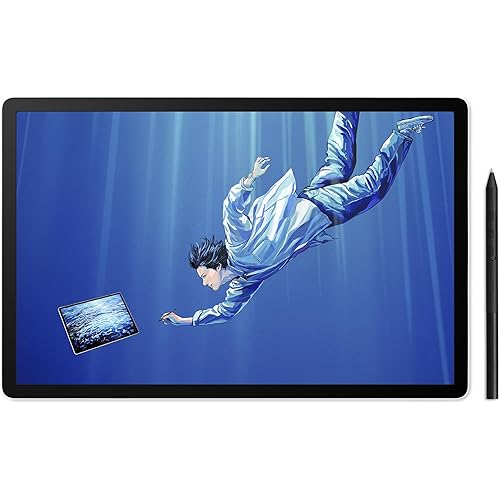
- HUION PenTech 4.0: 16384 pressure levels for smoother line transitions; 60 tilt for natural shading like a brush. 2g IAF captures light strokes. Enhances edge precision and minimizes cursor offset with tilt auto-alignment; 0.35mm retraction keeps the nib stable and solid.
- 2K+ Bigger Canvas for Sharp Details: 12.2-inch 3:2 screen gives you more vertical space for drawing and reading than standard 16:9; 2K+ resolution with 236 PPI and 350 nits of brightness delivers sharp, clear visuals on your drawing tablet with screen.
- Smooth 90Hz Refresh Rate: 90Hz refresh rate keeps your digital drawing tablet fluid with no lag. Strokes appear instantly as you draw, and video playback stays smooth for multimedia use on this digital drawing pad.
- Accurate Color Presentation: The digital sketch pad covers 99% sRGB with E<1.8 factory calibration, delivering accurate colors right out of the box. Preset to sRGB mode for stable, consistent colors ideal for your graphic design tablet, so you can start creating without additional calibration.
- AllNew Canvas Glass 3.0: The drawing pad adopts 3.0 nano-etched technology that reduces glare and eye strain. The fully laminated panel ensures balanced brightness and color accuracy. Textured surface delivers a paperlike feel and precise pen control, while AF coating resists fingerprints and keeps touch responsive.
- Latest Android 16 & Healthy Screen Time for Kids: Runs the latest Android 16 for full access to drawing and note-taking apps from the App Store. Comes preloaded with HiPaint, Clip Studio Paint, ibisPaint X, MediBang Paint, and Huion Note draw anytime, anywhere on this Android tablet. Parental controls help manage screen time and encourage healthy digital habits for kids.
- Powerful 8-Core Performance & Large Memory: This animation tablet features an 8-core processor and 8GB RAM, keeping multiple apps running smoothly with no lag. 256GB storage (expandable to 1TB) holds thousands of large illustrations, projects, and media files. 8MP front and 13MP rear cameras capture clear photos and videos.
- Long Battery Life & Ultra-Portable Design: 8000mAh battery with low-power processor delivers up to a full day of use on a single charge. Weighs just 1.47 lbs and measures 0.31 inches thin, making this portable drawing tablet easy to slip into any backpack.
- More Ways to Create & Enjoy: Split-screen mode lets you multitask between office apps and video calls. Students can take online courses, digital note taking, and organize study materials. For entertainment, enjoy e-books, videos, games, music, and photos with an HD display and built-in speakers on your digital notebook with pen.
Description
Founded in 2011, Huion has always been dedicated to providing high-quality pen tablets, pen displays, and pen computers to creative users. And our products not only help artists, designers, and animators to create fantastic digital masterpieces, but also bring digital ink solutions to many people around the world, changing the way they create, learn and work. We believe the world is in your hands.
Brand: HUION
Connectivity Technology: Bluetooth 5.4, USB, Wi-Fi 5GHz, Wi-Fi 2.4GHz
Pressure Sensitivity: 16384 levels
Operating System: Android 16
Special Feature: 2400 x 1600 Resolution, 90Hz Refresh Rate, 99% sRGB, ΔE<1.8 Factory Calibration, Android 16 OS, 8-Core Processor, 8GB+256GB, Canvas Glass 3.0 - Nano-etched Technology, AF Coating, Textured Furface, PenTech 4.0 - 16384 Pressure Levels, 2g IAF See more
Brand: HUION
Model Name: Kamvas Pad 12
Built-In Media: Felt Pen Nib x 10, Pen Nib Clip,, Protective Case, Anti-Palm Gloves, Micro SIM ejector pin, Quick Guide, Standalone Drawing Tablet, Stylus, USB Cable
Target Audience: Animators, Artists, Designers, Illustrators, Student
Model Number: KP1202
Number of Items: 1
Manufacturer: Shenzhen Huion Animation Technology LTD.
Item Highlight: 12.2Inch 90Hz Android 16 Tablet with PenTech 4.0 Battery-free Stylus Anti-Glare Canvas Glass 3.0 Digital Art Tablet 8GB+256GB
Warranty Description: 1 Year
Connectivity Technology: Bluetooth 5.4, USB, Wi-Fi 5GHz, Wi-Fi 2.4GHz
Pressure Sensitivity: 16384 levels
Operating System: Android 16
Additional Features: 2400 x 1600 Resolution, 90Hz Refresh Rate, 99% sRGB, ΔE<1.8 Factory Calibration, Android 16 OS, 8-Core Processor, 8GB+256GB, Canvas Glass 3.0 - Nano-etched Technology, AF Coating, Textured Furface, PenTech 4.0 - 16384 Pressure Levels, 2g IAF
Specific Uses For Product: 3D Modelling, Illustration, Animation,, Graphic Design, Photo Editing, Drawing, Sketching, Note Taking, Professional Digital Art, Character Design, Concept Art
Compatible Devices: Standalone Drawing Tablet No Computer Needed
Screen Size: 12.2 inches
Item Weight: 1.5 pounds
Item Dimensions L x W: 11.08"L x 7.7"W
Color: Grey
Software Update Supported to Date: unknown
Frequently asked questions
To initiate a return, please visit our Returns Center.
View our full returns policy here.
- Klarna Financing
- Affirm Pay in 4
- Affirm Financing
- Afterpay Financing
- Zip Pay in 4
- Financing through Apple Pay
- Financing through Google Pay
Learn more about financing & leasing here.
Similar Products




Top Amazon Reviews


