




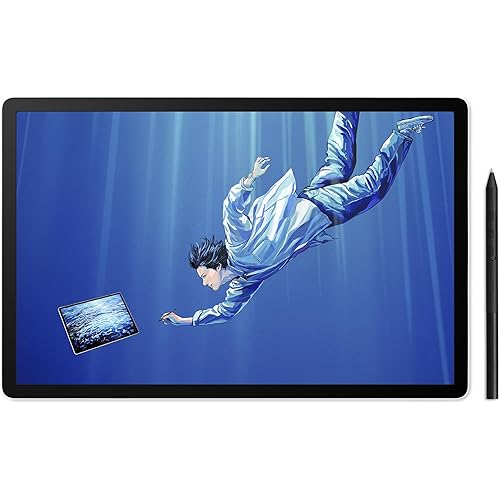
Graphics Drawing Tablet, 8.26 * 5.5 Inches Digital Tablet with 8192 Levels Baterry-Free Stylus & Customize 5 Hotkeys, Compatible with Windows/Mac OS/Android Teachers Students



Buy Now, Pay Later
- – 4-month term
- – No impact on credit to apply
- – Instant approval decision
- – Secure and straightforward checkout
Ready to go? Add this product to your cart and select a plan during checkout.
Payment plans are offered through our trusted finance partners Klarna, Affirm, Afterpay, Zip, Apple Pay, and Google Pay. No-credit-needed leasing options through Acima may also be available at checkout.
Learn more about financing & leasing here.
Selected Option
30-day refund/replacement
To qualify for a full refund, items must be returned in their original, unused condition. If an item is returned in a used, damaged, or materially different state, you may be granted a partial refund.
To initiate a return, please visit our Returns Center.
View our full returns policy here.
Recently Viewed


At a glance
- Condition
- New
- Color
- Black (Red Back)
- Model
- WP9625N
- Dimensions
- 12.8 x 8.5 x 0.1 in
- Weight
- 14.7 oz
- Pressure Sensitivity
- 8192 Levels
- Special Feature
- plug - and - play with Windows
Features 5
- Compatibility The drawing tablets connect to computer via USB. Compatible Windows 7 or above and Mac OS 10.0 or above. It works with Android devices with 6.0 or above system which support OTG function - included Android phones and Android tablets (USB to Type-C adapter included in the package). Not available for Chromebook. This easy-to-use pen tablet is perfect for kids and beginners for drawing, animation, photo-editing or design work in most programs.
- Smart Pen The pen adopted passive electromagnetic induction technology, no need to charge, equipped with intelligent chip, 8192 levels of pressure sensitivity, 5080 LPI pen resolution and virtually no lag, 10mm pen reading height, providing you ultimate precision and control. There are two custom buttons on the side of the pen to set more functions as needed. There are 3 additional replacement refills at the end of the pen. Efficient drawing, smooth strokes, restore real hand-painting feeling.
- 5 Custom Shortcut Keys The 5 shortcut keys on the graphics tablets are customizable to any shortcut combination you prefer, so you can program your favorite keyboard shortcuts and unlock your process and creativity, optimize your work flow.
- Large Work Area The graphics tablets size is 12.8 x 8.5 inch, the wrok area is 8.26 * 5.51 inch, thickness 2.4 inch. Large screen make you feel comfortable and convient while paiting. The front of the product is black and the back is red, there are four rubber feet on the back of the product to ensure that the product will not move during use on the desktop.
- Humanized Design This graphics tablets can be set to left-handed or right-handed mode, with the default setting being right-handed mode. The work area on the panel can be resized if you prefer to use a smaller work area. The pressure sensitivity of the pen can be adjusted, you can choose the strength you like to use this product. For more surprise operations, please carefully check the instruction manual provided with the product.
Description
LetSketch drawing board uses passive electromagnetic induction technology. When the angle of the stylus changes, different shading marks will appear in the handwriting. It allows you to regain the feeling of drawing on paper with a pen. It is very suitable as a gift for children's drawing tablets and people who start learning digital drawing. This digital sketch board is also often used by teachers for multimedia teaching because it is very friendly to connect with computers. No driver is needed, plug and play. With 5 shortcut keys that can be customized. Whether for drawing or office work, its performance is very reliable. Project details: Size: 12.8×8.5×2.4 inches Working area: 8.26×5.51 inches Touch technology: Passive electromagnetic induction technology Product weight: 417 grams Data interface: Micro USB Reading resolution: 5080 LPI Stylus size: 5.4×0.5 inches Stylus weight: 13 grams Pressure sensitivity level: 8192 levels. Features of LetSketch drawing board: This is an entry-level electronic drawing board without complicated operation processes. It can match common computer operating systems, as well as tablets and mobile phones. It is a very easy-to-operate drawing tablet. It is often used as a carrier for artists' drawing applications and an auxiliary tool for teachers in class. The polycarbonate shell has the characteristics of high strength, drop resistance, wear resistance, and easy cleaning. It is a good choice for making children's drawing boards. What you will get: 1 drawing board 1 passive electromagnetic induction pen 1 Micro USB connection cable 3 replacement nibs 1 USB to Type-C adapter. Special note: For LetSketch electronic drawing board, for Windows 10 and some Windows 7 systems, no driver needs to be installed, plug and play. For Windows 7 and above versions/Mac OS 10 and above versions, install the driver according to the user manual and then it can be used. For mobile phones/tablets, only when the system is Android 6.0 or above can it be used. No driver needs to be installed. Just follow the instructions in the user manual for operation.
Specs 10
| Brand | LetSketch |
|---|---|
| Connectivity Technology | USB |
| Pressure Sensitivity | 8192 Levels |
| Operating System | Windows 10 Professional, Windows 8.1, Windows 7 Starter |
| Special Feature | plug - and - play with Windows |
| Product Dimensions | 12.8 x 8.5 x 0.1 inches |
| Item Weight | 14.7 ounces |
| Item model number | WP9625N |
| Manufacturer | LetSketch |
| Country of Origin | China |
No specs match.
Frequently asked questions
To initiate a return, please visit our Returns Center.
View our full returns policy here.
- Klarna Financing
- Affirm Pay in 4
- Affirm Financing
- Afterpay Financing
- Zip Pay in 4
- Financing through Apple Pay
- Financing through Google Pay
Learn more about financing & leasing here.
Similar Products




Top Amazon Reviews
