Search  for anything...

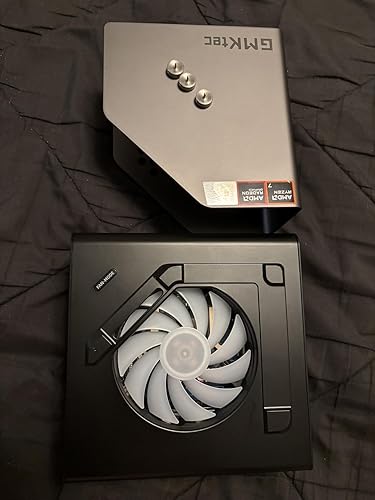
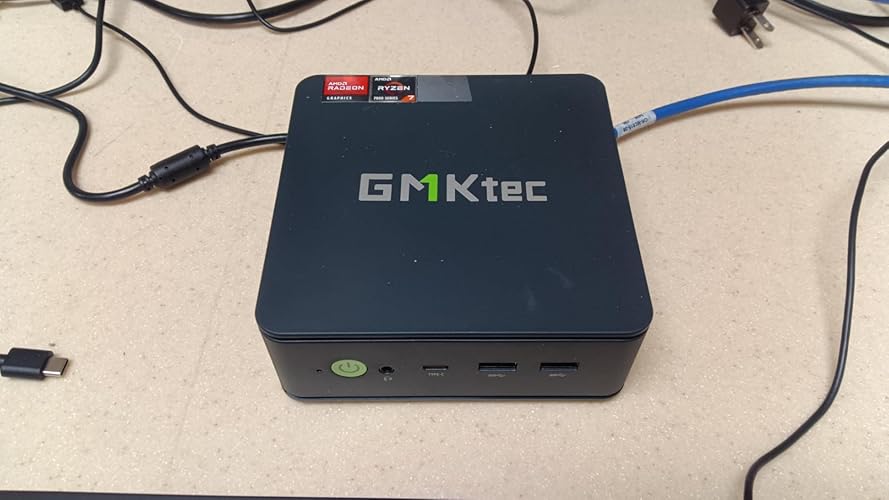
GMKtec Gaming Mini PC AMD Ryzen 7 7730U (Upgraded 7430U/ 5825U) 16GB DDR4 512GB NVME SSD WiFi 6E Dual NIC LAN 2.5GbE Desktop Computers USB-C, DP, HDMI Triple 4K Display M5 Ultra

  • Based on 0 reviews
Condition: New
Checking for the best price...
$399.79 Why this price?
Save $60.20 was $459.99

Buy Now, Pay Later


As low as / mo
  • – Up to 36-month term if approved
  • – No impact on credit to apply
  • – Instant approval decision
  • – Secure and straightforward checkout

Ready to go? Add this product to your cart and select a plan during checkout.

Payment plans are offered through our trusted finance partners Klarna, Affirm, Afterpay, Zip, Apple Pay, and Google Pay. No-credit-needed leasing options through Acima may also be available at checkout.

Learn more about financing & leasing here.

Selected Option

Free shipping on this product

FREE 30-day refund/replacement

To qualify for a full refund, items must be returned in their original, unused condition. If an item is returned in a used, damaged, or materially different state, you may be granted a partial refund.

To initiate a return, please visit our Returns Center.

View our full returns policy here.


Availability: In Stock.
Fulfilled by Amazon

Arrives Thursday, Jul 23
Order within 15 hours and 54 minutes
Available payment plans shown during checkout

Protection Plan Protect Your Purchase
Checking for protection plans...

Size: 16GB+512GB I 7730U


Features

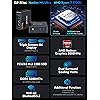
  • Office Gaming Mini PC - UPGRADED GMKtec Nucbox M5 Ultra Series is equipped with the powerful AMD Ryzen 7 7730U processor, 8 Cores/16 Threads, Base 2.00GHz (Power Saving Quiet Mode) with Turbo Boost up to 4.50GHz (Performance Mode) in BIOS settings, Based on the ZEN 3+ architecture, this small but powerful mini pc delivers satisfying results in productivity, office work, and gaming. 35% Performance increase over AMD Ryzen 5 7430U/ Ryzen 7 5700U, 5600U, 5560U, 5500U.
  • 16GB DDR4 RAM & 512GB PCIe SSD - Installed with DDR4 16GB RAM Dual Channel (2x8GB), the Nucbox M5 Ultra mini pc support expansion to 64GB RAM. Featured with 512GB M.2 2280 PCIe 3.0 SSD, support dual slot expansion each can be up to 8TB SSD. (Upgrades not included)
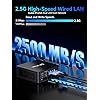
  • DUAL NIC LAN 2.5G RJ45 - Fast Network Speeds: Enjoy up to 2500Mbps data transmission speed without worrying about lagging. Ideal for working, gaming, and surfing the internet. Great for Untangle, Pfsense or as a server office PC.
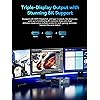
  • Mini Desktop Computer with 4K Triple Screen Display - Nucbox M5 Ultra integrates AMD Radeon Graphics 8 Cores 2000 MHz GPU to deliver powerful graphics processing power to easily handle the demands of complex design software, 4K@60Hz UHD video editing, and playback. It can connect to 3 display screens simultaneously.
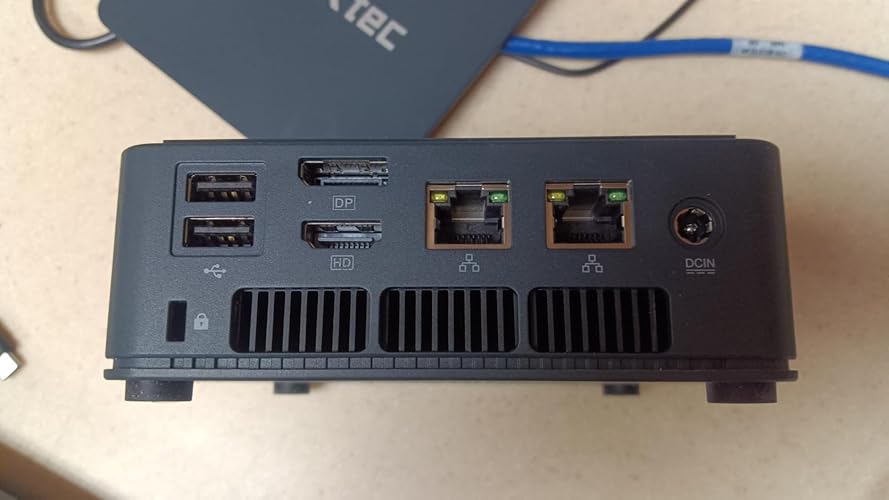
  • Fast Internet WiFi 6E + BT5.2 Connection - GMKtec Mini PC with WiFi-6E Wireless, have 2.5G/5G/6G triple band, more faster and lower latency. Bluetooth 5.2 allowing you more quickly to connect other wireless devices (headset, mouse, keyboard, etc.) Interface features 2*USB3.2 ports, 2*USB2.0 ports, 1*HDMI 2.0 port(4K@60Hz), 1*USB-C port(PD/DP/DATA), 1*DP Port, 1*Audio 3.5mm (HP&MIC), 1*DC Power Port.
  • GMKtec Warranty - GMKtec offers a 1-year limited warranty for each mini PC, starting from the date of the purchase. All defects due to design and workmanship are covered. With a professional after sales team always ready to attend to your needs, you can simply relax and enjoy your mini PC.

Brand: GMKtec


Operating System: OS


CPU Model: AMD Ryzen 7


CPU Speed: 4.5 GHz


Cache Size: 16 GB


Graphics Card Description: Integrated


Graphics Coprocessor: AMD Radeon Graphics 8CUs 2000 MHz


Memory Storage Capacity: 16 GB


Specific Uses For Product: Video or Photo Editing, Casual Gaming, Business, Education, Home, Office, School, Digital Billboard, HTPC, Server See more


Personal computer design type: Mini PC


Operating System: OS


Specific Uses For Product: Video or Photo Editing, Casual Gaming, Business, Education, Home, Office, School, Digital Billboard, HTPC, Server


Personal Computer Design Type: Mini PC


Color: Blakc


Additional Features: Auto Power ON, Dual DDR4 3200MHz Channel, Dual M.2 2280 PCle 4.0 SSD Slots, Performance Settings, Wake ON LAN


Hard Disk Description: M.2 2280 NVME SSD Dual Slot Max. 4TB


Hardware Interface: 3.5mm Audio, 802.11 ac/b/g/n, Bluetooth 5, HDMI, PCIE x 4, USB 3.2 Gen 2


Power Consumption: 35 Watts


Item Dimensions: 4.4 x 1.7 x 4.84 inches


Item Weight: 1.25 Kilograms


Specification Met: CE, FCC, UL


Video Output Interface: DisplayPort, HDMI, USB-C


Hard Disk Interface: PCIE x 4


Style Name: M5 Ultra


Cooling Method: Dual Cooling Fan


Compatible Devices: Headphone, Keyboard, Monitor, Mouse, Speaker


Power Plug Type: Type A - 2 pin (North American)


Video Output: HDMI, DisplayPort


Graphics Description: Integrated


Graphics Coprocessor: AMD Radeon Graphics 8CUs 2000 MHz


Graphics Card Ram: 16 GB


Graphics Ram Type: Shared


Graphics Card Interface: Integrated


Screen Size: 75 Inches


Display Resolution Maximum: 4096x2160 Pixels


Display Type: LED


Aspect Ratio: 169


Resolution: 4K


Native Resolution: 3840 x 2160


Connectivity Technology: Bluetooth, Ethernet, HDMI, LAN, USB


Wireless Compability: 2.4 GHz Radio Frequency, 5 GHz Radio Frequency, 802.11ac, Bluetooth


Wireless Technology: Bluetooth, Wi-Fi


Brand: GMKtec


Model Number: M5 Ultra


Model Name: M5 Ultra


Built-In Media: GMKtec Nucbox M5 Ultra AMD Ryzen 7 7730U Mini PC Computer, HDMI Cable, Power Adapter, User Manual, VESA Mount


Processor Brand: AMD


Model Year: 2025


CPU Model Number: AMD Ryzen 7 7730U (8C/16T 4.50GHz)


Warranty Description: 3 year manufacturer


Video Processor: AMD


Manufacturer: Shenzhenshi Jimokekejiyouxiangongsi


Cache Memory Installed Size: 16 GB


Memory Storage Capacity: 16 GB


RAM Memory Installed: 16 GB


RAM Memory Technology: DDR4


Ram Memory Maximum Size: 96 GB


Memory Speed: 3200 MHz


RAM Type: DDR4 SDRAM


Memory Clock Speed: 3200 MHz


Processor Series: AMD Ryzen 7


Processor Speed: 4.5 GHz


Processor Socket: FP6


Processor Count: 8


CPU Model Speed Maximum: 4.5 GHz


Total Usb Ports: 5


Total Number of HDMI Ports: 1


Number of Component Outputs: 3


Human-Interface Input: Buttons


Keyboard Description: Not included


Keyboard Layout: QWERTY


Frequently asked questions

If you place your order now, the estimated arrival date for this product is: Thursday, Jul 23

Yes, absolutely! You may return this product for a full refund within 30 days of receiving it.

To initiate a return, please visit our Returns Center.

View our full returns policy here.

  • Klarna Financing
  • Affirm Pay in 4
  • Affirm Financing
  • Afterpay Financing
  • Zip Pay in 4
  • Financing through Apple Pay
  • Financing through Google Pay
Leasing options through Acima may also be available during checkout.

Learn more about financing & leasing here.

Top Amazon Reviews


  • GMKtec K12 MiniPC:Ryzen 7H255+780M GPU (Fast, Expandable, Colorful, and saves Electricity Cost!) GMKtec K12 MiniPC:Ryzen 7H255+780M GPU (Fast, Expandable, Colorful, and saves Electricity Cost!)
Size: 32GB+1TB I H 255
I spent a lot of time checking this K12 out, and now have a good understanding of it. One big point is that this K12 MiniPC is "Rock-Solid". It never crashes, and I 'push' the limits as best I can when I test. And I tested a lot. No matter how hard I pushed it, it just kept going, seemingly effortlessly. I like it when I can't find a way to make a new PC crash. Reliability is important to me, and it delivered on that. Another nice feature is that the included Windows 11, 24H2 does not require a Microsoft account to use. I never use that, so I liked not having to figure out how to 'get around that'. GMKtec just took care of that where no Microsoft account is needed to get going. That is one less hassle, and I appreciate not having to deal with figuring out a workaround. So getting into Windows was super easy and smooth. See below for more details of my experiences. CPU I was not initially sure what a Ryzen 7H255 was. When I looked into it I found it is very similar to a Ryzen 7, 8845HS. Ok, that sounds good since the Ryzen 7, 8845HS is one of the faster processors I had so far tested (prior to this K12 MiniPC). However, the K12 is faster then my 8845HS computer. On the site CPUBENCHMARK.net, the Ryzen 7H255 has a CPU mark of 30410, whereas the older Ryzen 7 8845HS is rated 7 percent slower at 28447. My testing actually yielded even higher benchmarks. I got 31766 using their “Performance” setting which puts this about 12 percent faster. Or put another way, it runs at 112 percent of the 8845HS. They both have the same Cache sizes including 16MB of L3 Cache. They both include Radeon 780M Graphics, however Notebookcheck.net has the Ryzen 7H255 as being 5 percent faster in 3DMark graphics performance then the Ryzen 7 8845HS, and also even beats the Ryzen 9 8945HS by 2 percent. The Ryzen 7H255 runs at up to 4.9 GHz. POWER USAGE GMKtec has three settings (in BIOS) for power usage, ‘PERFORMANCE’ runs at up to 70 Watts. ‘BALANCED’ runs at up to 54 Watts, and ‘QUIET’ runs at up to 45 Watts. Keep in mind, that overall, this K12 just ‘sips’ power. Most of the time my Watt usage (not doing a benchmark) was roughly just 3 to 6 Watts. That means the K12 can run 16 processes, all at the same time, on only about 5 watts if not being stressed. I still have computers with 750 Watt power supplies. This K12 has markedly higher performance on about one-tenth, to one-twentieth the power usage of those older desktops I have worked with. That turns into significant money savings. Some (like me) keep their computer on all the time. If we assume a typical saving of 100 watts less power use for the K12 compared to some big desktop computer you are using, then that becomes 876 Kilowatt Hours per year, and where I live that costs me an extra $385, that I can save by switching to the K12 MiniPC, and the kicker is that it has better performance, is much smaller, is quieter, and is faster. Essentially, if you use an older Desktop computer, there is a good chance that switching to a MiniPC such as the K12 will have it pay for itself after a year or so. GPU This Ryzen 7H255 includes an integrated very powerful GPU called the 780M. This GPU has 12 RDNA 3 cores, running at up to 2.6 GHz. I tested this GPU that comes with the K12 MiniPC against other PC’s and Graphic cards where I have a good database on performance. This K12 GPU tests better in 2D and about the same in 3D as the following dedicated Graphics cards: AMD RX580 8GB NVIDIA GTX 1650 And the K12 test almost as fast in 3D as an AMD RX590 as well. Just as a rough cost evaluation. I just checked, and an NVIDIA GTX1650 with 4GB, or 6GB, costs between $200, and $400 dollars currently. ‘VRAM’ Now, what is interesting is that the K12’s integrated GPU, allows you to select the amount of Video dedicated RAM, from half a Gigabyte, all the way up to 16GB. (This comes from your RAM, however, since the K12 comes with 32GB of DDR5 RAM, it effectively means no decrease in performance to the K12’s Processing Power, since it would always have left between 16GB, and 31GB for its other tasks.) Whereas, if you spend $300 to get an NVIDIA GTX1650 with 4GB of VRAM, then that is it, you cannot increase it. BIOS With the K12, you go into BIOS (by hitting the ESC key when it boots, go to the ADVANCED tab at the top, go down to GFX Configuration, go to iGPU Configuration and change it from AUTO to UMA_SPECIFIED, then below that is UMA Frame buffer Size, select that and pick the size of the GPU VRAM between 512MB, to 16GB). I set mine at 4GB. That still leaves me 28GB Ram which is way more then needed, however, it feels good to have the luxury of extra Ram. What is literally Crazy is that I have 3D benchmarks on the RYZEN 9 7900X and the RYZEN 7, 7700, and it may be hard to believe, however, the K12 with its included GPU, tests at over Four times the speed in 3D then either of those cutting edge chips. (The reason why is that AMD apparently crippled the GPU in those expensive chips to presumably make you buy an expensive separate Graphics card for some $200-$500 dollars.) Here in the K12, you get a GPU included that tests at over 400 percent of the 3D Mark scores of the above Ryzen 7, 7700, and Ryzen 9, 7900X, without having to buy a separate Graphics card. OCULINK and External GPU Since we are on the subject of Graphics and GPU’s, I think I should add that there is an important feature that comes with the K12 MiniPC which is called “OCULINK”. This is a newer connection standard. By purchasing for example an External GPU, you simply connect it to the K12 via an OCULINK cable, and you have the Power of a very substantial Graphics card, such as if you want super hi-resolution gaming. So, if you wondered if the K12 MiniPC was limited compared to a ‘big’ PC, in fact it is quite expandable. That OCULINK port (and the USB-4 port as well) give the K12 a way to quickly transfer data at speeds we usually associate with full size expensive Desktop Computers. To be specific, the USB-4 port allow for transfer at 40gbps. And the OCULINK port is even faster at 64gbps. (Compare this to USB-3 which transfers at 5gbps). So OCULINK is 13 times the speed of USB-3. (However, the K12 has faster USB-3, it uses USB-3.2 ‘GEN2’ which runs at twice the speed of USB-3.1). External OCULINK GPU package For example, GMKtec has an External Graphics Card Package (called the GMKtec AD-GP1) which connects with the K12’s OCULINK Port. This self contained package includes an AMD Radeon 7600M-XT GPU with 8GB of its Vram, its own 240 Watt power supply, and Four high resolution Monitor connections via Two HDMI-2.1 ports, and Two DisplayPort-2.0 ports, as well as USB-4 which also does Power Delivery, and of course on OCULINK port for connecting to the K12. All of these four video outputs allow for 4K at 120Hz, or 8K at 60 Hz video resolutions. This allows the K12 to work even for those wanting cutting edge Graphics beyond the already integrated 780M GPU. (Currently, the AD-GP1 is priced at $460). The OCULINK port by the way is like an internal PCIe 4.0x4 connection, running at cutting edge 64Gbps which is the same as PCIe4.0x4 speed and is really fast. Its like you get to Plug a fast PCIe card into the K12 using OCULINK. (It just sits outside instead of inside the case.) I checked and by adding for example the AD-GP1 7600M-XT video card to the K12, the total graphics power would approach 400% of the included already powerful 780M GPU. A rough way to characterize this is that the included 780M GPU gives you good 1080p Gaming, whereas using OCULINK and for example, the GMKtec AD-GP1, you would be able to do 4K gaming. For my current uses, I am really pleased with the performance of the included 780M, it is very fast. APPEARANCE, IMPRESSION My initial impression upon seeing this K12 MiniPC is that it is substantial. It has a nice heft to it, and comes in a larger rectangular box as if to hint at something powerful inside compared to a smaller, ‘generic’ MiniPC. When opening this larger box, you are presented with an attractive silvery-grey metal cover over a black plastic case which is somewhat larger then other MiniPC’s I have worked with. The attached metal cover gives a more premium look to the K12 when compared to smaller MiniPC’s that do not have cases enhanced with metal. Under that Metal cover are two fans. A bottom CPU fan that is small, and also a top fan that is larger with white blades and beautiful LED colors. There is a button right on top of the K12 that says “FAN MODE”. By pressing this button, you can select from about 13 different color patterns that are animated, as well as colors that stay solid. I happen to like pretty LED colors that can be selected. I always have liked having bright colors that I can select from to match my moods, or state of mind. Call it small, but I like that. Some of the colors are a pretty blue, a pink, a green, and a yellow, as well as arrangements of moving colors that look nice. I like the mode where different colors cycle in what appears as a circular fashion around the fan. This is where I have mine set for now. If I want to ‘zone out’, I can just look at these colors, it is calming and relaxing. Kind of like meditation (without any ‘work’.) POWER ADAPTOR For the K12, the power adaptor is much smaller then prior GMKtec MiniPC’s. I included a photo comparing this new compact adaptor in comparison to the older larger ‘bulky’ adaptor. Both have the same output power specifications, (19Volts, and 6.32Amps). I did notice on the smaller adaptor some electrical noise at times that seemed to get into the audio output. The larger adaptor (from my other GMKtec MiniPC) did not transfer any electrical noise. I have let GMKtec know that this is something I noticed, and they can follow up and see if they find that to be of significance. RAM, NVMe details This K12 will accept up to 96GB of Ram, (it uses DDR5 Ram at 5600 MT per second.) Also, the K12 has three PCIe connectors on the inside, each can accept up to 8TB, allowing for up to 24TB (24000GB) of Internal NVMe storage. Using the Oculink Port gives you external access to the PCIe bus running at ‘4.0’ speed. (PCIe 4.0 speed means 8 Gigabytes per second, or 4 Gigabytes per second (using either x4, or x2 respectively). For comparison, USB2 is up to 0.05 Gigabytes per second, and USB3.1 is 0.5 Gigabytes per second. That means both the PCIe and Oculink run at 160 times the speed of USB2, and 16 times USB 3.1 Speed. PORTS The K12 has four USB3.2-Gen2 ports, (which run at 10Gbps.)(One is a Type-C). Also two USB2 ports, And importantly, a second Type-C port, that is USB4, which runs at 40gbps. For Video Output, there is an HDMI 2.1 Port, and a DisplayPort 1.4. Each of these video ports can deliver 8K video at 120HZ. The two Type-C ports can also deliver Video output, allowing for FOUR video displays to be connected to the K12. There are also two 3.5mm audio output ports, for audio which is a nice touch. Allowing you to connect to the front or the back of the case. For Networking, there are TWO LAN ports, each runs at 2.5G (whereas most Lan ports only run at 1G). That means you could setup the K12 to handle really fast Network processing, such as Router functions, if you wanted to. And of course the prior mentioned OCULINK connector, which is like an internal PCIe running at 4.0x4 which is 64gbps, except it allows you to get that with a thin cable so you can expand the K12 while still having state of the art transfer speeds. In summary, This K12 MiniPC is yielding extremely high scores in my Aquamark benchmark. It beats an Intel i5-13420H with a dedicated NVIDIA RTX4050. It is essentially the same in Aquamark as top notch DESKTOP processors such as the RYZEN 9 7700X, and the RYZEN 7 7700. I did not expect the K12 to deliver at such a high level before I tested it. Here are the Aquamark scores of the K12 and these top competitors: Computer/MiniPC Aquamark Score FPS GMKtec K12 (Ryzen 7H255) 251.74 Ryzen 7 7700 249.96 Ryzen 9 7700X 259.73 Intel i5-13420H + NVIDIA RTX4050 197.71 ... show more
Reviewed in the United States on September 29, 2025 Reviewed in the United States on September 29, 2025 by Zed

  • Excellent small capable device
Purchased as a Linux media PC and NAS. Running Debian. I have not been able to get WiFi 6E to work with 6ghz signal. On 5ghz, wifi works pretty well with good speed. However the WiFi card's temperature can quickly skyrocket to absurdly high destructive temperatures. If you max out the WiFi link such as during a local speed test, I've seen the temperature quickly climb above 105 C before I chickened out and stopped the speed test. Otherwise the system is most impressive in that it can run cool especially in its low power mode set via EUFI. There's a secondary fan on top. It's quite noisy. Runs all the time and does very little to cool the device. Monitoring temperatures, the fan does not significantly help cool the WiFi adapter. SSD doesn't seem to heat up much even without the fan. This MiniPC had been sold earlier without the top fan. Not sure why they felt the need to add one. I had earlier tried the GMKTec G3 minipc. Its SSD did get extremely hot and it doesn't have a fan, no heatsink, and the SSD is in a sealed top area without ventilation. Maybe they're overcompensating in this minipc or maybe it depends on the specific brand SSD included. As a media PC, the GPU is plenty fast to play 4k60 video stream even on low power mode. Meets my use case. It's also ideal for my use case as a NAS to have the two 2.5gbs ethernet ports. Pretty easy to set up bridging in Debian between the two ports. Can get amazing speeds to/from the NAS over 2.5gb ethernet. Overall, good system, good value when promotion or coupon is in place. ... show more
Reviewed in the United States on June 14, 2024 by Critic at large

  • The GMKtec Plus Gaming Mini PC...amazing PC
My name is Dr A and I am a real person. I recently purchased this product, the GMKtec Plus Gaming Mini PC Loaded with Win 11 and a 1T SSD. It can be used for Gaming but can also be used as a PC, which is what i bought it for. I love its compact size. It sits on my desk next to my monitor. It is extremely quiet. literally, I cannot hear its dual cooling fans working. As with most electronic devices things rarely go smoothly which is where technical support is extremely important, especially when this purchase involves software (Win 11) and hardware. I did have issuers getting some of my old peripheries to work correctly and I had some Win 11 glitches. I am happy to report that the technical support I received was outstanding, to say the least. After about 5-7 days of working kinks out, I discovered the errors were mostly on my part, such as the Microsoft One Drive, and Screen Saver, Screen sleep and Power plans such as PC going to Sleep functions were working. Once I resolved the One Drive issues (I completely by removing it from the OS register and deleted it from my computer. I do not use or need the Cloud. The only issue remaining were the screen saver and screen shut off and Mini PC not going to sleep functions not working. With the aid of technical support, we believed the issue may be with my older Hp monitor with it VGA port. In order to get the monitor to work and to plug into the Mini's HDMI port I need to use a VGA to HDMI adapter. I was thrilled this adapter worked well however, I later discovered this adapter was preventing the Screen Saver and Sleep (Power Setting Plans) from working correctly. I was advised by technical support to test the Mini PC with a different monitor. I tested with the HPE243 monitor with a dedicated HDMI port. I connected it to the Mini PC with the HDMI cable which shipped with the Mini PC. I tested it with WIFI connect and also unconnected. I also tested it at different launch times for the Screen saver and screen power off as well as mini PC Sleep functions. To my surprise the monitor and or adapter were the issues. Problem solved. All functions are now working perfectly. I created a Recover Disk and performed a full disk image backup onto an external drive. Now, I'm all set. Oh, I also order a new monitor. I cannot thank the technical support staff enough for not only helping me with the hardware side but also on the software issues. The GMKtec Plus Gaming Mini PC is an amazing Mini PC. I've already referred several of my friends. I highly recommend, if you are looking to conserve space and have a great Mimi PC/gaming box, this is the one for you. An addition: I discovered the new win 11 does not like wireless USB mouse. If you use one the power plan functions will not work, the screen saver, screen power off and PC sleep. I tried this on three separate machines with wireless usb mouse. Once disconnected and a conventional wired usb mouse connected, all worked well. This was not the case in win 10. ... show more
Reviewed in the United States on May 21, 2025 by Anthony Acierno

  • Windows did not function properly in my GMK mini PC
I have been a loyal Amazon customer for many years. In all that time, I believe this is only my second review. I was compelled to write this review to warn others about my extremely bad experience with this product. I purchased this GMK mini PC back in March 2025 and retired it today after enduring various problems for 6 months. Straight out of the box I discovered Windows had been setup to run under the Korean language. I should have immediately returned it, but I managed to overcome this hurdle after many hours of trial and error configuration tweaks. After a few weeks of usage, the PC began failing with RESET ERRORS. The resets were few at first, but gradually became a chronic condition. This forced me to reinstall Windows as a final solution. Reinstalling Windows solved the reset issues, but I lost WiFi capability and was never able to restore it. And yes, the reset problem eventually started reoccurring. As a desperate final measure, I successfully converted the PC to an Ubuntu Linux machine. This solved the reset problem and restored WiFi. However, I need a Windows machine and today I purchased an HP OmniDesk to fulfill my requirement. I will continue to use the GMK mini PC as a hobby toy to explore the capabilities of Linux OS. Thus far it has been running fine. It's great for internet access and runs effortlessly without all the bloatware Windows crams into their OS. I feel small degree of satisfaction with my experience. I feel it has not been a total loss. At least the GMK is good for something more than a paper weight. ... show more
Reviewed in the United States on August 26, 2025 by Lorenzo Lagos

  • Amazing power & capability for something so small!
Although I returned two, this is an amazing machine. The power and capability for something that can fit in the palm of your hand is amazing. The first one that I returned had an Intel i5 processor and graphics were basically acceptable on my 65” family room TV, but it started dropping the Wi-Fi connection, so I returned it. The 2nd one that I bought had an AMD processor, and having been a fan of AMD for many years, I thought that I would try it. It ran well but had poor graphics on the 65”TV, so I also returned that one. Having previously had a business building custom computers, I really appreciate this minicomputer when used in the right applications. Cooling also seemed good, but better with the AMD processor (heat is always the bad guy with electronics, and cooling something this small can be an issue). So, despite my issues, I rate both as a 4 ... show more
Reviewed in the United States on June 1, 2025 by Amazon Customer

  • I love it
Model Purchased: - AMD Ryzen 7 5825U (Turbo 4.5GHz),16GB DDR4, 512GB SSD - Paid $290 before tax - And connected it to a 4K monitor @ 60hz What did I do: - First thing was to install a super clear de-bloated Windows11 from USB. Worked great. - Obtained and installed latest drivers from GMKtec google drive. Worked great. - In BIOS made sure the CPU was in Balanced mode since performance mode caused too much fan noise. And set power mode to Balanced in Windows as well. - This new computer replaced a large desktop Intel i7 + Nvidia card. The Positives: - Very quiet, but I did place it under the desk as there was a very slight high-pitched coil hum and fan noise when it sat on my desk. - The performance in general rivals my old system with a few tweaks. Given my old system's dedicated NVidia card, I was gaming at 4k 60frames or higher. I had to step that down to 2K and less frames in general, but I didn't want this for gaming. If I wanted a better gaming experience I would have purchased a higher-end GMKTec gaming system. - The form-factor is tiny, I've had larger Intel i7 desktops that were so bulky, heavy, louder, and didn't perform this well. I don't even need a dedicated graphics card any longer. - My old computer used 250 watts, this new PC is using 8-12 watts as I write this review and up to 25 watts under heavy load. For comparison, my monitor steadily uses 50 watts. It just runs cooler. - I recommend this or the higher-end GMKTec PC's for anyone looking for a new PC. It just works, is affordable, and I enjoy using it. I just don't think about my PC as much any longer, since it is so quiet, has the performance I need, and it's out of sight and literally out of reach, which means I use the Windows Sleep feature to "turn it off/on" and it uses less than a watt in sleep mode. The Negatives: - The onboard fan is tiny and therefore loud if you intend to push this PC beyond the limits I described above. It will run at 65watts BIOS Performance mode, and you can get great performance but you'll hear the fan. - When I plug in a USB memory stick into the front USB-A 3.0 port to backup data I notice that the bluetooth mouse cursor/pointer will skip sometimes on screen as I'm using the PC, like a lag or delay. It's very annoying, so I just remove the USB stick and don't leave it plugged in. It's not a big-enough problem to try to find the root cause. I don't know if anyone else has seen this issue. Conclusion: Absolutely great all around inexpensive PC. I love it and this brand! ... show more
Reviewed in the United States on November 22, 2025 by SN

  • Exceeds Expectations Exceeds Expectations
Size: 32GB+1TB I H 255
The 780m iGPU in this system performs far better than I expected. iGPUs have come a very long way in the last five years, and this is a good example of how far they have come. I was able to play some fairly heavy games (Palworld, Claire Obscure: Expedition 33) at 1080p getting over 30 FPS in most instances at reasonable settings. I performed a little bit of benchmarking on Windows, but considering it is one of my least preferred OS to use, I didn’t do a lot. Performance was good, games ran well enough, etc. This is a pretty beefy systems with 8 cores and 32GB of DDR5 5600. One thing I really noticed about Windows is the power consumption was odd; the system would idle down to about 10-11 watts, but because Windows probably had random background processes going, it would frequently spike to around 40 watts and idle back down again. If you plan to have this PC as an always on system, maybe avoid using Windows. The real testing happened after I installed Bazzite (my favorite OS, right alongside Aurora Linux), which was a perfectly smooth install. As a side note to anyone who hasn’t used Bazzite lately, it feels great as a day to day main driver OS these days; it has come a long way. While in gamescope the system idles around 12-13 watts (not bad at all) without the pesky spikes Windows was experiencing. When at max load, I was hitting around 85 watts. For gaming itself, I initially tried out Palworld, Claire Obscure: Expedition 33, and ReCore. - Palword 1080p, medium settings, 35-50 FPS in the open world. 60 FPS in dungeons. - Expedition 33 1080p, medium settings, 28-40 FPS in Lumiere (one of the more difficult places for the game to run. So many particles and people it’s really taxing). - ReCore 1080p, 60 FPS, high settings. It’s an older game, so it locks 60 FPS pretty easy. I took some video of recordings of all three games (steam game recording doesn’t catch the FPS counter of MangoHud, so you’ll just have to trust your eyes and the stats I’ve given). I am more than impressed with the performance this Mini-PC has for gaming. I didn’t expect it to be able to run Expedition 33 at 1080, let alone at a playable FPS. Just about anything pre-2025 should run pretty darn well on this system. For day to day tasks this system should very easily handle just about anything you throw at it. I didn’t test video editing or any of the artistic pursuits, but those should be good enough on this system. Don’t expect much out of it for AI; this chip isn’t built for that. It could run a very small language model (7b?) and maybe do some slow image renders, but really look elsewhere if that is your goal. As a server, this system is very well suited as well. Memory is 2 SODIMM slots, so you could max out to 128GB RAM. 8 Cores/16 Threads would run quite a few services. There are 3 2280 NVMe slots in this system, so you have room to add plenty of storage. The idle wattage is quite low making it a good choice as well. Finally, this system has 2 2.5GB/s LAN ports. Overall, I am impressed. My bar was pretty high, but my expectations have been exceeded. ... show more
Reviewed in the United States on September 23, 2025 Reviewed in the United States on September 23, 2025 by Joshua Hinton

  • Excellent Value - Quality Parts Excellent Value - Quality Parts
Size: 16GB+512GB I 7730U
Price to value is incredible! This is the 3rd GMKtek PC I have purchased. Why? The incredible value they provide for mini PCs is unmatched. Here's why: Design: GMKtec has such a simple, basic design. That is a GOOD thing! All 3 PC's I have purchased are the same general design. A classic square, ports on the front and back where you need them. The cases are made of a durable, quality plastic that hold up nicely for my tech bench where I move equipment around a lot. No flashy RGB that just wastes power and distracts from work getting done. The plastic means these mini PCs are light as well. GMKtec also is the best I have found for easy access for upgrades. The top pry's open by hand for access to the upgradeable components inside. Very convenient! Parts: GMKtec does not cut corners on parts. Opening the top of the M5 Ultra reveals the quality parts they use inside. My M5 had a SK Hynix NVMe drive and Crucial memory! This is an area where other manufactures tend to use "no name" parts to cut costs. GMKtec stands out here. Value: I purchased this mini PC for under $400. For 512gb NVMe storage and 16gb of Crucial memory. Windows 11 Pro as well. A great bargain for a strong workstation PC. Performance: Windows 11 Pro ran fine considering its Windows.😆 I tested out Debian and Fedora on the M5 Ultra and performance was very good. I was able to run Ollama and an 8b parameter LLM model with an acceptable speed. The M5 Ultra did well and did not get too hot. Fan did ramp up a bit, causing noise, but well within limits needed for an office setting. Verdict: BUY IT! So many positives to talk about here. This is a must buy if your looking for a new mini PC. The value for the money is ridiculous. A Ryzen 7 7730U CPU is a strong performer for almost any task. Integrated Radeon RX Vega 8 GPU is more than fine for all but the most high end gaming. I was able to play every casual and mid range game I threw at it. It also did very well with Photoshop and Gimp while using it as a photo editing machine. I easily upgraded the RAM to 32gb. System saw the new RAM right away with no issues. If I had to name a negative it would be the small fan used in the top of the unit. While it moved plenty of air, and is in a good location for cleaning and service, its small size makes it nosier then it needs to be. Other manufacturers use a 120mm fan that runs much quieter while moving MORE air over the components. The M5 Ultra is large enough to accommodate such a large fan and I hope GMKtec considers it in any revisions moving forward. ... show more
Reviewed in the United States on February 6, 2026 Reviewed in the United States on February 6, 2026 by 004

Can't find a product?

Find it on Amazon first, then paste the link below.
Checking for best price...