Search  for anything...

GIGABYTE AORUS RTX 5060 Ti AI Box Graphics Card (16GB GDDR7, 128-bit, PCIe 5.0, HDMI/DP 2.1b, Hawk Fan, Server-Grade Thermal Gel, Thunderbolt 5™)

Based on 55 reviews
Condition: New
Checking for the best price...
$993.59

Buy Now, Pay Later


As low as / mo
  • – Up to 36-month term if approved
  • – No impact on credit to apply
  • – Instant approval decision
  • – Secure and straightforward checkout

Ready to go? Add this product to your cart and select a plan during checkout.

Payment plans are offered through our trusted finance partners Klarna, Affirm, Afterpay, Zip, Apple Pay, and Google Pay. No-credit-needed leasing options through Acima may also be available at checkout.

Learn more about financing & leasing here.

Free shipping on this product

This item is eligible for return within 30 days of receipt

To qualify for a full refund, items must be returned in their original, unused condition. If an item is returned in a used, damaged, or materially different state, you may be granted a partial refund.

To initiate a return, please visit our Returns Center.

View our full returns policy here.


Availability: In Stock.
Fulfilled by Nutrend Automotive Inc

Arrives Sunday, Nov 1
Order within 9 hours and 32 minutes

Available payment plans shown during checkout

Protect Your Purchase

Easy claims online, fast replacements, no fees

Checking for protection plans...

At a glance

Condition
New
Model
GV-N506TIXEB-16GD
Graphics Coprocessor
RTX 5060 Ti
Graphics Ram Size
16 GB
GPU Clock Speed
2572 megahertz
Video Output Interface
DisplayPort, HDMI, USB C
Graphics Ram Type
GDDR7
Warranty
3 Year Manufacturer
Works with
Desktop, Laptop

Features 5

  • Game Changing Performance Powered by the GeForce RTX 5060 Ti 16GB with NVIDIA Blackwell architecture. Enjoy high frame rates with DLSS 4, accelerated creativity with NVIDIA Studio, and AI-powered experiences.
  • WINDFORCE Cooling System Server-grade thermal gel, Hawk fans, and a direct-contact copper plate with heat pipes deliver exceptional thermal performance.
  • Thunderbolt 5 Plug and Play Unlock near-desktop level GPU performance with Thunderbolt 5, offering up to 80Gbps bidirectional bandwidth. Power Delivery 3.0 with up to 100W fast charging and daisy-chain supported.
  • High Speed Ethernet Integrated Ethernet port reduces latency and minimizes lag or disconnections during critical moments.

Description

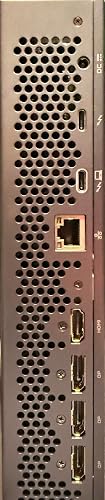
Ahead of its time, ahead of the game is the AORUS RTX 5060 Ti AI Box. Powered by NVIDIA’s Blackwell-based GeForce RTX 5060 Ti, this AI Box unleashes desktop-level gaming, creative, and AI performance with a blistering 16 GB of GDDR7 memory, a WINDFORCE cooling system, and Thunderbolt 5 plug-and-play. Packed with versatile I/O—including DisplayPort 2.1b, HDMI 2.1b, Thunderbolt 5 Type-C, and Ethernet port—it’s a portable powerhouse engineered for epic visuals and AI acceleration.

Specs 24

Graphics Coprocessor RTX 5060 Ti
Brand GIGABYTE
Graphics Ram Size 16 GB
GPU Clock Speed 2572 megahertz
Video Output Interface DisplayPort, HDMI, USB C
Graphics Card Ram 16 GB
Graphics Ram Type GDDR7
Graphics Card Interface PCI-Express x16

Frequently asked questions

If you place your order now, the estimated arrival date for this product is: Sunday, Nov 1

Yes, absolutely! You may return this product for a full refund within 30 days of receiving it.

To initiate a return, please visit our Returns Center.

View our full returns policy here.

  • Klarna Financing
  • Affirm Pay in 4
  • Affirm Financing
  • Afterpay Financing
  • Zip Pay in 4
  • Financing through Apple Pay
  • Financing through Google Pay
Leasing options through Acima may also be available during checkout.

Learn more about financing & leasing here.

Top Amazon Reviews


Initial Impressions - Awesome eGPU - Perfect for local AI (assuming your model fits in 16GB)
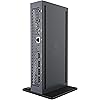
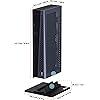
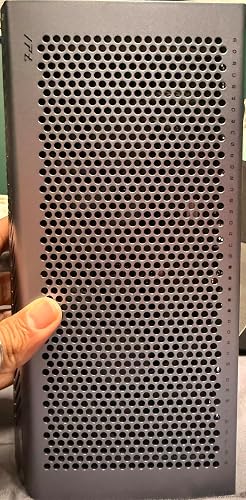
I purchased this card earlier this month, and it finally arrived yesterday afternoon after an almost 3 week wait. Well worth it. This "review" is just my initial impressions, and I will update later once I have this setup in its "final" configuration. I purchased this as a supplement for software development to my existing systems for various agentic flows. I also have an AMD Strix Halo (395) 128GB that I use for deeper reasoning with larger models (70B, 120B models) and other development tasks, and plan to use the 5060 for areas where I need more speed with smaller models. My primary use case for this is NOT gaming (and in fact that would be rare if I did), nor am I using the video outputs on this. I strictly intend to use this for AI / LLM / etc usage. I also don't plan on using any of the built in USB, USB C, or Thunderbolt 5 ports (and as mentioned not the DVI or HDMI), and definitely not the 1GB Ethernet (I am using 10GBE Thunderbolt 4 NICs for all my systems). So everything below does not review those. My initial test and review was plugging it into my laptop (ASUS PX13 with 4050/6GB, AMD 370, 32GB) under Windows 11, though eventually this will be plugged into either my Strix Halo box under CachyOS, or my AMD Ryzen 7 255 in ProxMox (haven't decided, still finalizing my setup). See below for some quirks with Windows. So a bit about my initial experience: **Quality** From the moment you get the box, it exemplifies quality, well protected and packed in thick foam, laid out well in the box. While I won't post a picture here at the moment (many others have done so), I will say that this is VERY solidly constructed, a very attractive piece of hardware, solid, and well designed. The metal construction dissipates heat well, and have very good air flow and ventilation. The plastic stand provided for vertical use is well made, very stable, and attaches firmly. **Heat/Noise** For horizontal usage, there are rubber feet that run the width of the unit on the front and back. No ventilation holes on the bottom so horizontal usage should not be an issue. The entire top, front, back and left side are perforated providing excellent airflow. When idle and powered on you cannot hear it. When under load (100% usage for LLMs) it still is not very loud (I have not measured), and heat is far less than expected (I'll get temp readings later). **Setup/Connection** Setup was very easy, slap the stand on (for vertical orientation, which is how I initially tested it, longer term it'll probably go in my rack horizontally), plug in the power cable, plug the unit in, turn it on, wait a few seconds, and plug in the Thunderbolt 5 cable into my PX13 (note PX13, and my other machines are only USB4 / Thunderbolt 4, so I'm currently leaving some transfer performance "on the table"). I will say that it would be nice if this unit also had an Oculink connector (my 255 has Oculink), but longer term Thunderbolt 5 (once more machines have it) will achieve roughly the same performance. But for LLM usage, Thunderbolt 4 or 5 does not make much of a difference, other than initial model load. **Windows 11 Issues** So my PX13, that already had NVidia drivers for the 4050, did immediately recognize it, and Windows switched the laptop to use the 5060 as the primary GPU (this was initially an issue, see below). After uninstalling the prior Nvidia drivers, and reinstalling both the 4050 and 5060 were recognized, and Windows again picked the 5060 as the primary GPU. The PX13 ASUS ProArtCreator hub then showed the 5060 (not the 4050) itself. Since I was using the built in display and HDMI port on the laptop, that meant the rendering was over Thunderbolt 4 and when I did some inference testing, the mouse jumped significantly (had I plugged my monitor into the 5060, this would not have been an issue). This was due to bottleneck over Thunderbolt 4 when loading models. The fix was simple - tell Windows 11 NOT to use the 5060 as the "Default high performance GPU", ie: Setup->System->Display->Graphics->Advanced graphics settings. I set "Default high performance GPU" to be the 4050, and left Hardware-accelerated GPU scheduling on (Gemini suggested turning it off, I'm still experimenting with this). This eliminated the mouse and keyboard studdering issues when loading a larger model (Qwen 2.5 Coder 14B for instance), as the internal 4050 was handling rendering (note: the 4050 (in most cases) would not have this issue as it is onboard and not subject to Thunderbolt 4 bottlenecks)). Longer term (at least until I move this to one of my Linux boxes), I'll probably just force Windows to use the AMD iGPU in most cases instead of the 4050, but I haven't yet messed with that (the ProArt Creator hub, since adding the 5060, doesn't seem to want to do that). I have yet to install the Gigabyte control software for this, as I didn't want to introduce any issues immediately, this might help with some of the issues (or possibly create new ones conflicting with the ASUS software potentially). ** LLM Performance ** Initially I tested with LM Studio - primarily because it's "easy" (this won't be my long term setup, most likely using vLLM, or at least native llama.cpp) and let's me change between GPUs with a click of a button, as well as support parallel use of multiple GPUs (ie: 4050 with 5060 - which probably I would not suggest, but it might help load models that slightly exceed the 16 GB in the 5060 by offloading some of it to the 4050 6GB). All of this worked very well, and inference on equivalent models that fit on both the 4050 and 5060 (ie: Gemma 4 E2B Q4_K_M) show a 2.5x or so boost over the 4050 with a prompt like "Write me a 5,000 word story about a turtle in outer space". (NOTE: this may not hold up, as I suspect the ASUS software may be throttling the 4050, so it might do slightly better). But overall, I'm VERY pleased. Larger models like Qwen 2.5 Coder 14B on the 5060 do very well under Claude Code (forcing Claude to use the local LLMs). I won't post numbers yet as I've only begun my testing, but it was a bit better initially than I expected (and should be better yet once I tune and move the 5060 to one of the Linux boxes). For LLMs, other than initial model load (which is still very speedy, with only 16GB VRAM it doesn't take long to load models even of T4), I see no degradation (yet) for having this connected over Thunderbolt 4 vs direct PCIe - exactly what I would expect. However, if you're using this for gaming or as your primary GPU, I would HIGHLY recommend plugging your monitors into the 5060 itself. Otherwise you will incur the T4 penalty due to passing everything back for the PC/laptop outputs to display. I haven't tested this though. But again, that is not my use case. Overall, initial impressions - BUY IT (at least at the price I got it at, its since skyrocketed). Don't expect to fit HUGE models on it, and don't expect it to compete with faster GPUs or those with more VRAM. But for what it is, it is an EXCELLENT eGPU. I'll update this review once I have done more testing (on Windows) and later after I move to my Linux system, and get my full AI workflow setup with the Strix Halo (again for coding I plan on using the Strix Halo (due to the huge 112 GB (of 128 GB) that I can use under Linux for VRAM) for deep reasoning/thinking/refactoring, etc, will use the 5060 for primary coding, auto complete, quick review/planning, etc). ... show more
Reviewed in the United States on August 28, 2026 by BriGuy

Great for adding GPU HP to a laptop!
I bought this for adding some AI oomph to my Lenovo Laptop (Slim 14 Aura Edition, Core Ultra 7 258v), and it was worth every penny! I'm not a gamer, but have been playing heavily with local AI lately and this was an absolute game changer! For the price (I paid, $700) it's hard to beat the specs, it's a nice compact unit vs a Franken eGPU with a dock/PSU/card. I love the fact that it functions as a "docking station" giving ethernet, USB ports and USB PD to my laptop over a single cable. The results... It's QUIET! My laptop fans are about the same noise level. I thought maybe I just didn't have it under much load considering, but when I checked task manager this thing was pegged for a minute and was only mildly audible. My son's 2060 is significantly louder at a fraction of the performance. Speed... I went from 7-8 tokens/second on a good day to 78-79 (Gemma 4 E4B). This was exactly the kind of boost I was looking for. "Thinking" was significantly faster, and once it started spitting out text it quickly reached a point where you can't keep up with it. By the time you finish reading a paragraph there's 10 more waiting for you already generated. I will say that it produces a bit of warmth even at idle. Holding my hand over the top vents I can feel a bit of heat being generated even though it's not doing anything ATM, but with winter coming up that may be a good thing! I think RAMpocalypse and the impending price hikes might make it a bit of a tougher sell, the price jumped from $700 to $900 the week after I purchased (glad I pulled the trigger when I did), but considering prices are rising across the board I think if anyone wants to give their setup for gamin or AI a decent kick this is still a top tier option. You might be able to save $50 by buying an eGPU rig, the card and a power supply, but it will easily consume 3-4x as much desk space, and you might not get the "just works" factor. I've always liked Gigabyte products and this one so far hasn't failed to disappoint! ... show more
Reviewed in the United States on August 27, 2026 by AC2MO

A Game Changer for Handhelds
I don't know where to start with this amazing product but I'll try my best to be as non-bias and detailed as I can so you don't waste your time being on the fence if you should get this product or not. This is a reviews from a person who works in a major International airline and flies for a living AND who has extensive knowledge in PC. As someone who flies all over I don't have the space or luxury to carry around my PS5 pro or my SFF PC I built for the sole purpose of playing games.The setup takes too long, too many wires and the weight of everything is not worth it.Thats where this product comes in I have never ever been so blown away by something so small and compact and something that makes me go WTH why hasn't anyone else done this.This eGPU is beyond perfect for your handhelds and older laptops with weaker gpu and cant play AAA or older games at high resolution with maxed out settings.This has completely changed my gaming experience in the Legion GO.I'm literally running every game maxed from 1920*1200 to 1080p, 1440p also works the same but listen just because you can do it doesn't mean you should.It's not a 1440p card and you have to remember its running through TB5 so be a little realistic.Single Player games don't need 100fps or 120fps, 60fps-75fps is more than perfect and I forgot to mention I don't use DLSS I use DLAA so all my games are running Native rendering resolution with Nvidia's amazing AA.On GTA V Enhanced I never dip below 60 EVER and everything is maxed out at 1920*1200.Using reasonable resolution and reasonable frames puts less strain on the eGPU which makes it run cooler and quieter and makes sure its always running games at optimal.There is no cheap plastic here everything is built sturdy and meant to last with metal all around the only plastic is the stand that the eGPU can be placed on which is the only very very minor negative thing I have to say.The stand should've had some sort of locking feature rather than the eGPU just being held with some support walls because you it can tip over if you put too much pressure on it which rarely happens but still thats one very very minor thing they should fix.This is literally the best money you can spend considering it upgrades your handhelds for the next few years until we start seeing more powerful eGPU's.The setup is also super super simple and easy just download the Nvidia app but download the driver from Gigabyte's provided driver site in the manual after downloading that update your eGPU with Nvidia app and thats it.Theres also every single port you can imagine on this eGPU that you need. Just buy the damn thing.Gigabyte has nailed out of the park with this and I'm sure others will follow aswell.The performance is mind blowing. ... show more
Reviewed in the United States on June 18, 2026 by Arjun Sohi

Great and travel freindly egpu for laptops and handhled pcs
First time egpu buyer. I purchased this as an upgrade for a 2 year old laptop. Upgrading the laptop itself would have been more expensive due to memory costs. The dock is compact and light. The power brick however is substantial, but everything can fit in my backpack with the laptop for travel. Its Easy to use and is plug and play once you download the drivers. Its fairly quiet and can get warm when used heavily, but it never gets too hot. Like most egpus its more effective if you connect an external monitor and use the monitor as the only screen. This is due to bandwidth limitations of usb4. I do not have a thunderbolt 5 device to try. There is a thunderbolt port on the dock for external ssd drives should you want to pair one with it. ... show more
Reviewed in the United States on June 10, 2026 by Mohamed

A good intro for private LLM and AI
Easy to setup. It is thunderbolt 5 but very few laptops/mini pcs have thunderbolt 5. It overheats and freezes with Ubuntu 26. Works fine with Ubuntu 24. Could not get it to work with Olares OS. Currently using it with LM studio & Foocus on Windows 11, and ollama on Ubuntu 24. I think it was worth it. ... show more
Reviewed in the United States on August 2, 2026 by Ryan Benjamin

Some troubleshoot
So, It's a good and way to increase handheld proformence (Xbox ally x), the egpu is extremely compact and streamlined, and easy to use once you get use to it, and solve the hurdle of installing the driver. My experience is download the driver file first, do not install it, most the handheld won't recognize the egpu, press the reset button on the egpu for 3 seconds and unplug the wall plug first and the power adapter, as well as the thunderbolt 5 cable, as well as shut down your device. After the reset pul the wall plug, and the power, as well as the thunderbolt cable as well as the HDMI cable or any sort of display port cable and open the handheld up, then run the driver installer again and it should be recognized, If it doesn't try it again. After downloading the driver because I am using the portable display, I had to use a wall plug - usbc changer to power the display. One bug I seen is one time when I was playing game, the game went white and there was a message saying the graphics can't render and there was a pop up saying the egpu is disconnected. When that happens I uninstalled the nividia control panel and app and did the reset step a few time and redownload the driver. ... show more
Reviewed in the United States on June 11, 2026 by Jason Lee

Works
Noice machine got lucky quiet and compact
Reviewed in the United States on October 3, 2026 by Joe

So sad :(
DOA. does not even power up, out the box :(
Reviewed in the United States on June 6, 2026 by Nemo
Checking for best price...