




Gamrombo LED Wireless Controller for PS5, Compatible with PS5 Pro/Slim/PC, Dual Vibration, Macro/Turbo Function, 3.5mm Audio Jack, 6-Axis Motion Control Gamepad with Speaker(Black)




Buy Now, Pay Later
- – 4-month term
- – No impact on credit to apply
- – Instant approval decision
- – Secure and straightforward checkout
Ready to go? Add this product to your cart and select a plan during checkout.
Payment plans are offered through our trusted finance partners Klarna, Affirm, Afterpay, Zip, Apple Pay, and Google Pay. No-credit-needed leasing options through Acima may also be available at checkout.
Learn more about financing & leasing here.
Selected Option
FREE 30-day refund/replacement
To qualify for a full refund, items must be returned in their original, unused condition. If an item is returned in a used, damaged, or materially different state, you may be granted a partial refund.
To initiate a return, please visit our Returns Center.
View our full returns policy here.
Recently Viewed



Color: Black
Features
- Usage NotesWhen using the gamepad for the first time, it needs to be connected to the PS5 console via a USB-C cable(It must be the data cable included in the package or the original data cable), and then press the Home button to activate it. The gamepad is only compatible with PS5 series consoles and Windows PCs, and it is not compatible with PS4.
- Quick Connection & One - click Wake - up You can connect to the PS5 console by pressing the HOME button on the controller. When connecting to the console for the first time, you need to use a data cable. It also supports use on computers with Windows operating systems.
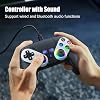
- Controller with Sound The controller is capable of producing sound, providing an immersive gaming experience. Please note that the controller is only equipped with a speaker and has no microphone. If you want to use the microphone fuacnction, please use an external headset. It is equipped with a 3.5mm TRRS headphone jack(not compatible with Apple headphones.)
- Customizable ColorsPress the Lighting button to switch colors and light effect modes with one click. It features a color memory function, ensuring that the next time you use it, it will still be the color you prefer.
- High - Precision JoysticksEquipped with upgraded joysticks, these effectively reduce the joystick dead zone and extend the controller's service life.
- Immersive Gaming ExperienceFeaturing dual - vibration function and paired with a high - precision 6 - axis gyroscope, this product elevates your gaming experience to a whole new level. It's an ideal choice, whether for personal use or as a gift.
Description
How should the controller be connected to the PS5 console for the first time? (Step 1) Step 1: Connect the PS5 console and the controller with a USB-C data cable that comes with the package(OR PS5 original data cable ). Please note that there must be a USB-A interface at the rear of the general PS5 console. How should the controller be connected to the PS5 console for the first time? (Step 2) Step 2: After the connection is completed, press the Home button on the gamepad. If you see the light flashing slowly, it means the pairing is successful, and you can use a wireless connection to the PS5 console subsequently. What Consoles can the controller be compatible with? It can compatible with PS5/PS5 Pro/PS5 Slim and Windows PC, NOT For Mac, PS4 and Phone. Cannot charge at charging stations The controller does not work with the charging station and only supports USB-C charging How to calibrate the triggers and joysticks -for joystick drift and trigger problems 1. Enter Calibration Mode: Power off the controller(after connecting to PS5), hold Share + Menu, press Home. Wait for rapid Home button flashing. 2. Calibrate: Press triggers 3-5 times, rotate joysticks 3-5 circles, confirm with X. Done. PS5 Controller - Black PS5 Controller - White PS5 Controller - Teal PS5 Controller - Red PS5 Controller - Blue PS5 Controller - Amethyst
Compatible Devices: Playstation 5
Controller Type: Gamepad
Connectivity Technology: Wireless
Additional Features: Ergonomic, Headphone Jack, Motion Sensing, Wireless
Button Quantity: 21
Hardware Platform: PlayStation 5
Compatible Video Game Console Models: Sony PlayStation 5, Sony PlayStation 5 Pro
Package Quantity: 1
Brand Name: Gamrombo
Model Name: PlayStation 5
Manufacturer: Gamrombo
Model Number: PlayStation 5
Color: Black
Frequently asked questions
To initiate a return, please visit our Returns Center.
View our full returns policy here.
- Klarna Financing
- Affirm Pay in 4
- Affirm Financing
- Afterpay Financing
- Zip Pay in 4
- Financing through Apple Pay
- Financing through Google Pay
Learn more about financing & leasing here.
Similar Products





PlayStation DualSense Wireless Controller – Galactic Purple


