Search  for anything...

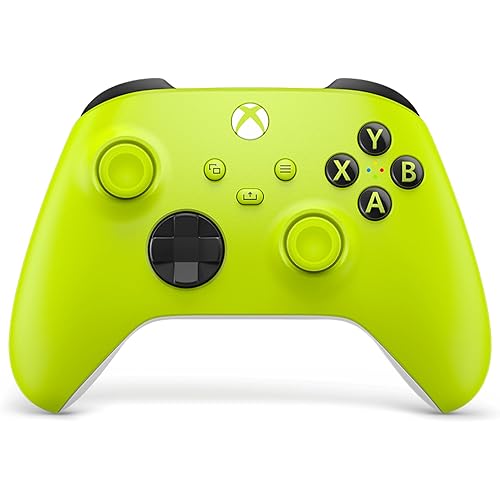
GameSir G7 SE Wired Controller for Xbox Series X|S, Xbox One & Windows 10/11, Plug and Play Gaming Gamepad with Hall Effect Joysticks/Hall Trigger, 3.5mm Audio Jack

  • Based on 11,781 reviews
Condition: New
Checking for the best price...
$44.99 Why this price?
Save $9.99 was $54.98

Buy Now, Pay Later


As low as $11 / mo
  • – 4-month term
  • – No impact on credit to apply
  • – Instant approval decision
  • – Secure and straightforward checkout

Ready to go? Add this product to your cart and select a plan during checkout.

Payment plans are offered through our trusted finance partners Klarna, Affirm, Afterpay, Apple Pay, and PayTomorrow. No-credit-needed leasing options through Acima may also be available at checkout.

Learn more about financing & leasing here.

Free shipping on this product

FREE 30-day refund/replacement

To qualify for a full refund, items must be returned in their original, unused condition. If an item is returned in a used, damaged, or materially different state, you may be granted a partial refund.

To initiate a return, please visit our Returns Center.

View our full returns policy here.


Availability: 20 left in stock
Fulfilled by Amazon

Arrives Monday, Jun 1
Order within 1 hour and 15 minutes
Available payment plans shown during checkout

Protection Plan Protect Your Purchase
Checking for protection plans...

Features

  • Versatile compatibility: supports Xbox Series X/S, Xbox One X/S consoles and PC Win10 and above (including the game platform Steam).
  • Precise control: features Hall joysticks and Hall triggers for a comfortable feeling, long service life and improved game accuracy.
  • Plug and Play ConvenienceWired USB connection (removable) for easy setup and instant play without the need for additional drivers.
  • Customizable experience: Includes 2 custom backbuttons that allow users to eliminate false triggers and improve their gaming experience.
  • Impressive gameplay: Provides a pulsating vibration trigger and an asymmetric vibration grip motor for intense tactile feedback.
  • Improved audio and comfort: equipped with a 3.5 mm audio interface for seamless connection with gaming headsets and an ergonomic handle with ultra-fine laser-engraved texture for comfortable and non-slip gaming sessions.

Compatible Devices: PC, Windows, Xbox One, Xbox Series X


Controller Type: controller


Connectivity Technology: Wired


Additional Features: Ergonomic


Button Quantity: 1


Hardware Platform: PC, Xbox, Xbox One, Xbox Series X


Power Source: Corded Electric


Compatible Video Game Console Models: Microsoft Xbox One, Microsoft Xbox SERIES X


Item Weight: 420 Grams


Package Quantity: 1


Item Dimensions: 8.27 x 4.53 x 2.56 inches


Item Dimensions D x W x H: 2.48"D x 4.53"W


Brand Name: GameSir


Model Name: G7 SE


Manufacturer: GameSir


Global Trade Identification Number: 76


Model Number: GameSir G7 SE


Manufacturer Part Number: G7 SE


External Testing Certification: Näo aplicável


Color: White


Frequently asked questions

If you place your order now, the estimated arrival date for this product is: Monday, Jun 1

Yes, absolutely! You may return this product for a full refund within 30 days of receiving it.

To initiate a return, please visit our Returns Center.

View our full returns policy here.

  • Klarna Financing
  • Affirm Pay in 4
  • Affirm Financing
  • Afterpay Financing
  • PayTomorrow Financing
  • Financing through Apple Pay
Leasing options through Acima may also be available during checkout.

Learn more about financing & leasing here.

Top Amazon Reviews


  • Great Controller with newer and better relatives.
I bought this controller after using the standard Xbox controllers for most of my life. It introduced me to a whole new category of inexpensive controllers that are surprisingly well designed and perform far better than expected. I started with the G7 SE, and it quickly became the best controller I had ever used. After several months, the bumpers began sticking, and it turned out that a small plastic piece inside had snapped from repeated use. This doesn’t seem to be a widespread issue with these controllers, so I’m assuming I just got unlucky. Because of that, I’m still giving the controller five stars. After that controller broke, I decided to try one of their newer models, the Cyclone 2. It was almost perfect, but the sticks didn’t feel quite as good to me as the ones on the G7 SE. That’s completely personal preference, and most people would probably say the Cyclone 2 is the better overall controller. After spending some time with it, I eventually decided to pick up the G7 Pro. All I can say is that the G7 Pro is one of the nicest controllers I’ve ever used. It doesn’t have any obvious downsides, and there’s even a PC-only version now with an 8k polling rate, macro functions, and other extra features. If I had never bought the G7 SE in the first place, I probably wouldn’t have gotten into the GameSir ecosystem or realized how good a “pro” controller can be without the insane price tag. That said, I probably wouldn’t recommend the G7 SE as much anymore since the G7 Pro and Cyclone 2 are both better controllers in my opinion, and in some ways objectively improved. It also depends on whether you’re playing on Xbox or PC. For PC, I would definitely recommend the Cyclone 2 or the G7 Pro. For Xbox, the options are really the G7 SE or the G7 Pro. If you’re willing to spend the extra $30–40 for the G7 Pro, it’s absolutely worth it. ... show more
Reviewed in the United States on March 12, 2026 by Peyton

  • Hall Effect means no drift. Ever.
I've spent hundreds, if not a thousand or so, of dollars on controllers over the years in my search for the perfect one. I thought I found it with the original Xbox Elite controller, which I sold off when the white version was released. For a year, that controller was my weapon of choice until the left joystick started to drift. I had it shipped off, hoping it could be fixed, but it was even worse when it was returned. Since then, I have had the worst luck with Elite controllers that either had drift right out of the box or buttons that needed to be pressed dead-center in order to work. Eventually, I gave up on the Elite controller and put gamepads from various other companies to the test. I bought a PowerA controller and several Razers. Buying extended warranties became a habit -- I normally don't purchase them, but controllers have limited 90-day to one-year warranties that don't cover enough of a controller's lifespan. Part of the problem is that modern-day controllers use potentiometers to determine how far or fast you move your joystick. Over time, the friction from components sliding over and under each other wears out until the tension holding your joystick at the zero-point becomes imbalanced. That causes stick drift -- your joystick is pushed or pulled away from the center. Hall effect sensors, which use magnets to detect the position of joysticks and triggers, will never drift -- in theory. Because the parts don't rub against each other, Hall effect sensors last a lot longer than your average gamepad that will eventually succumb to drift. I've used the GameSir G7 SE Wired Controller for a few weeks now, and it's been a great controller at a lower price-point than Microsoft's own standard controller. The controller has a build quality that feels similar to the standard controller with a sturdy plastic shell that doesn't feel cheap. The triggers were a little too sensitive out of the box, but after tuning them with the app and getting used to how much further they seem to stick out -- they're a little more pronounced, like upside down claws -- I haven't had any issues with them. The buttons feel fine without any mushiness or dead spots, and the sticks actually seem to be more accurate even with small nudges because you're not fighting the friction of the potentiometer. There are some features to the controller, like the buttons in the back, an app that lets you change a few settings, and some on-the-fly key presses you can do to change configurations that lift the value of the controller at its current price. I wish there were physical trigger locks, though the app allows for hair-trigger presses. I would advise that you immediately download and use the app before you game in order to calibrate the controller and set it up to your liking. ... show more
Reviewed in the United States on November 6, 2023 by ClumsyG

  • My new favorite controller! Get an unpowered USB hub to use longer USB exension cables.
Excellent controller! My new favorite controller with my Xbox Series X. Read on as I compare this controller to others I've had and also how to successfully extend the cord length. Playing FPS games, I've gone through 3 official Microsoft Xbox controllers. Each developing stick drift after less than 6 months. I didn't really like the official controllers and I started using PowerA Spectra Infinity wired controllers. I liked the PowerA controllers better as I could set a shorter distance on depressing the two rear trigger buttons and also the inclusion of the custom programmable buttons on the back of the controller. However, I went through a few of these controllers too as they also developed stick drift after a number of months. The PowerA controllers have an app so I could try and calibrate the worn out sticks. This was only a temporary fix as it would decrease responsiveness of the sticks and they would eventually drift further. I've now bought this GameSir G7 SE Wired Controller. It is GREAT! Right out of the box the sticks have no drift. Excellent responsiveness and control. It has the two programmable back buttons and through the GameSir Nexus app, on my Xbox, I was able to set the rear triggers to be hair triggers. Everything is good, EXCEPT I needed more cable length. With my old PowerA controllers I was using a 9.8 feet USB 3.0 extension cable with no problem. That same cable extension would NOT work with my new GameSir G7 SE plugged into it. This led to experimentation. I had a 3.3 feet USB 2.0 extension cable and it worked fine plugging it into the Series X and then plugging the GameSir G7 SE's cable into that USB extension. However connecting two 3.3 feet USB 2.0 extension cables together and then the GameSir G7 SE cable did NOT work. I had a single 6.5 feet USB 2.0 extension cable that I tried. Also did NOT work. Here comes the interesting part: ADDING A NON-POWERED USB HUB Adding a non-powered USB hub allowed me to use longer extension cables with this controller. So my current setup is: Xbox Series X > non-powered USB hub > 6.5 feet USB 2.0 extension cable > GameSir G7 SE Controller cable > Controller. I was also able to get the longer 9.8 feet USB 3.0 extension cable to work, but it needed to be in the following order: Xbox Series X > 9.8 feet USB 3.0 cable extension > non-powered USB hub > GameSir G7 SE Controller cable > Controller. All seems to work well with the extension cables, including with a wired headset being plugged into the GameSir G7 SE controller. USB extension cables I've tested: Amazon Basics USB-A 2.0 Extension Cable, 3.3 feet = Works without needing a USB hub. 2x Amazon Basics USB-A 2.0 Extension Cables connected together, (3.3 feet each, 6.6 feet connected together) = Works, but needs a USB hub before or after the extension cables. Amazon Basics USB-A 2.0 Extension Cable, 6.5 feet = Works, but needs a USB hub before or after the extension cable. Amazon Basics USB-A 3.0 Extension Cable, 9.8 feet = Works, but needs a USB hub AFTER the extension cable. (Xbox > Extension Cable > USB Hub > GameSir G7 SE cable > controller) USB Hubs tested and working: Anker 4-Port USB 3.0 Hub, Ultra-Slim Data USB Hub with 2 ft Extended Cable, Model: AK-A7516012 (A7516) Insignia USB 2.0 4-Port Hub, Model: NS-PCH5420 An old "Xtreme Tech" USB 2.0 Hub from Five Below My guess is other non-powered USB hubs may work too. If this controller keeps working as well as it does now, and lasts longer than 6 months, I'm going to be very pleased! ... show more
Reviewed in the United States on June 22, 2024 by Amzn Customer

  • Great controller Great value
I was so used to buying Xbox controllers every 3 months because I would get stick drift or my triggers would get stuck every 2 to 3 months before I found Gamesir . So I tried a Gamesir controller specifically gamesir G7 SE and bro ngl I will never buy any other type of controller. You will never get stick drift and never get triggers getting stuck. I love how you can pull the cover off and replace with other colors or even to clean the inside of the controller or if you want to change the sticks. You can do all that without a screw driver. I love this controller. Fyi Also it has perfect response time when pressing buttons AND they send you a 3 month of the ultimate game pass .. I definitely recommend this controller. ... show more
Reviewed in the United States on May 3, 2026 by Jai

  • Amazing, but fragile
I love this controller the amount of things you get with it for the price is amazing. The paddles work amazingly they are sensitive but once you get use to them, they can help you a lot in certain games plus you can turn them off for other games which is a great thing for me since I play a lot of other games that don't really need them. I love the hair triggers as well it's hard to believe how much of difference it can make in a lot of my games I never turn them off now lol, and the fact the gamesir app is on both Xbox and PC is a huge help since you need to turn features like the hair trigger on I almost avoided the controller since I thought the app was gonna pc only, but I was so happy that I was wrong. The deadzone is also amazing to play with, my movements have been a lot more precise when playing fps games, don't really notice much of a difference when playing on other genres of games though, again you will need the app to enable it. But here's where something went wrong, and this 100% my fault as I was being dumb. So I also have kontrol freeks which help with aiming on fps games they were a tight squeeze but I was able to put them on the controller, this is where I was being dumb. The controller also has a removable plate on it, so I decided to open it and see if there was any dust, but I forgot to take the kontrol freeks off and the joysticks came off with the plate, lucky enough I was able to put them back in but I noticed the right analog stick wasn't working well, it wouldn't input when pressing down on it and the stick was getting stuck on some parts, I was able to fix it but I noticed I started getting stick drift again which wasn't a good thing I checked the app and I had the feature turn on, that when I realized that it was probably because I accidentally pull of the analog stick when I opened it, I didn't make it out to be a big deal as the controller still worked fine just with a little bit of stick drift, so I was OK with it. But a month later the analog stick was doing the same thing where the button inside wouldn't work and the analog stick would get stuck. So sadly it seems I will have to buy another one unless a miracle happens and it works regularly again, I will say this again it was 100% my fault I should've been more careful with it. But anyway overall this is a great controller for the price, it was probably the best purchase I made for my Xbox. Just be careful when using it and be a lot more responsible than me lol. ... show more
Reviewed in the United States on March 3, 2024 by Preston

  • Amazing Stuff Amazing Stuff
I've been using a pretty beat up OEM controller for the past 2ish years. Finally decided to treat myself after working a 12 hour shift. Total upgrade. Sticks are smooth, triggers feel nice, the whole thing sits in your hand like a bouquet of roses. The back buttons are great too, responsive and nice and fat so you can't possibly miss them. The cable it comes with is really nice as well. Came with a month of Game Pass Ultimate, big bonus. Great stuff. ... show more
Reviewed in the United States on April 30, 2026 Reviewed in the United States on April 30, 2026 by Josh C.

  • Definitely not just hype
I can't say enough about how great this controller has been to me, even regardless of its price point. The analog sticks and triggers have very smooth linear activation, the hall effect components are worthy of the hype in my opinion. There is no friction in the movement of the analog controls, and the "spring" resistance feels just right for me. The ABXY and d-pad buttons are dome switches, which is just what the Microsoft Xbox controller feels like. The other buttons including the rear buttons are micro switches. If you're not sure what that is, they're somewhat like a mouse click but take a bit more force to activate than a mouse (too little resistance in the switch would be bad, and these feel good.) The tops of the sticks are not concave like the Xbox controller, which has a different feel, but not one that bothers me or impacts performance personally. The analog triggers have a more aggressive anti-slip texture to them than the Xbox controller. The size and overall feel of the controller otherwise feels just like the Xbox controller to me. The weight of the controller feels perfectly acceptable, its definitely lighter than the wireless Xbox controller with batteries in it, but also not as light as an empty one. I have no complaints, it doesn't feel cheap. The cable that comes with this is really high quality. It's covered in braided material but not overly rigid. The molded heads on both ends are very thick and strong, and the USB-C end that fits into the controller is very secure - I don't really have any concerns about it wiggling around or breaking the connector by dropping it on the cord or something. The controller has lots of features that standard Xbox controllers don't. I found that game support for the bottom buttons is not really as good as I thought it would be - some games just don't register the input. Everything else works as expected. There's an added "M" key that works like a function key, unlocking some on-the-fly adjustments. If you install the GameSir Nexus app in windows you can set up to three profiles that are saved directly to the controller (not the PC). You can use the M key and the ABXY's to switch between the controller's defaults, and your three stored profiles. If you're using the headset jack on the controller, there's a handy mic mute button next to the 3.5mm jack, and you can use the M-key in combination with the d-pad to control the overall volume of your headset, and the voice to game volume ratio (to an extent). The profiles let you change things like button mappings, deadzones, and vibration. So far, it would seem you can only re-map buttons that are internal to the controller - there's no way to assign keyboard shortcuts to the buttons for instance. The one thing I found this useful for is to re-map the stick button clicks to the rear buttons, which I find useful because trying to trigger the stick switch while aiming/steering/looking/whatever usually causes me a non-zero amount of grief. Using the Nexus app for windows you can also test your inputs, view the analog stick values and real-time movement, calibrate the analog controls, and update the firmware. They recently published a firmware update (v6.28) that allows you to increase the polling rate from the default 250 to 500 and 1000hz (effectively 4ms, 2ms, and 1ms control response), like you can with the Razer accessories I have. Unfortunately the 500 and 1000hz polling settings still come with a "work in progress" warning and cause some issues. You cannot, for instance, use the headset jack with the higher polling rates. Also when I turn the polling rate up, it starts to generate some odd input "spasms". My right stick randomly whips a 180, and sometimes my left and right triggers activate for no apparent reason. Everything goes back to normal with the default polling rate though. Eventually they'll fix this, I'm sure. It's not a deal breaker for me in any event, as I really can't tell the difference between 4ms and 1ms. The front top plate is magnetically affixed and stays securely in place. Other than the obvious cosmetic implications, cleaning is the only practical reason I can think to have a removable top plate. There seems to be anti-friction rings around the analog sticks, maybe if those wore out one day it could be a meaningful replacement, but I predict that replacement face plates would be long out of stock before I would need to replace those. ... show more
Reviewed in the United States on December 7, 2023 by Bartfast

  • Best "cheap" elite replacement, but horrendous cable
Been using for months now, every button works perfectly. It's so surreal to type that. Most controllers I've had have always had at least one small problem. A button doesn't register, a bad shoulder button, rubber texture peeling, star/menu button doesn't work. You name it. Luckily, my Xbox regular controllers never broke nor had a problem. But it did give out after 4 and a half years. Now the elite? 7 replacements. SEVEN. I take care of my controllers, and I was astonished by how bad the elites were. If you can find one that actually works and buy a warranty, yes, it is the best controller out there. If you can find one. Or you can just buy this controller. It's cheaper, full-on plastic, yet it does the job far better than any version of elite. The only drawback is that it's not wireless, nor does it have tension grips. But I couldn't care less about wireless. But here's why I didn't rate it five stars. The cable that comes with it is cheap. And I mean cheap. You will constantly disconnect by the slightest movement. To my horror, I was inserting it wrong, because the input was labeled the SAME on each side when you insert it on the controller. What the hell kind of design is that?? I was losing my mind trying to find why the cable was so bad, until I went online to reddit and saw the forums crapping on the cables too. The fix? A six-dollar 3-pack sold by Aliun here on Amazon. Did it fix my problem? Yes. Was it absolutely ridiculous that I had to buy another cable? Yep. Anyhoo, just buy this controller if you want a competitive FPS controller that actually works and holds its own against an elite, look no further. I use a regular xbox series s/x controller for every game, but for FPS, this is the controller you want. Say goodbye to stick drft and happy gaming. ... show more
Reviewed in the United States on August 25, 2025 by Mr. Ramon T. Delagarza

Can't find a product?

Find it on Amazon first, then paste the link below.
Checking for best price...