Search  for anything...

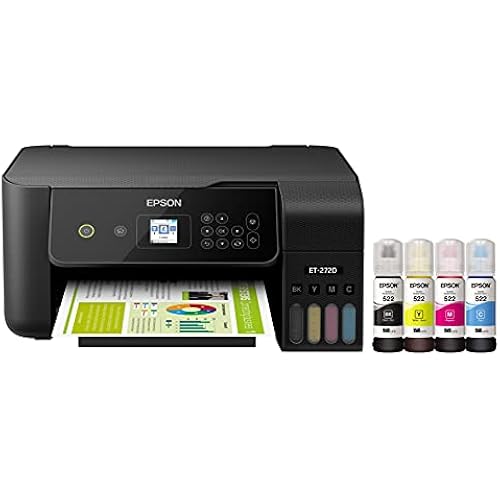
Epson EcoTank ET-3950 Wireless All-in-One Color Supertank Printer with up to 3 Years of Ink Refillable Tanks, Perfect for Home Office, 18 PPM, 2.4" Colorful Touchscreen, Auto Document Feeder - White

  • Based on 0 reviews
Condition: New
Checking for the best price...
$364.94 Why this price?
Save $55.05 was $419.99

Buy Now, Pay Later


As low as / mo
  • – Up to 36-month term if approved
  • – No impact on credit to apply
  • – Instant approval decision
  • – Secure and straightforward checkout

Ready to go? Add this product to your cart and select a plan during checkout.

Payment plans are offered through our trusted finance partners Klarna, Affirm, Afterpay, Apple Pay, and PayTomorrow. No-credit-needed leasing options through Acima may also be available at checkout.

Learn more about financing & leasing here.

Free shipping on this product

30-day refund/replacement

To qualify for a full refund, items must be returned in their original, unused condition. If an item is returned in a used, damaged, or materially different state, you may be granted a partial refund.

To initiate a return, please visit our Returns Center.

View our full returns policy here.


Availability: Only 9 left in stock, order soon!
Fulfilled by DealPointStore

Arrives Saturday, Mar 28
Order within 10 hours and 2 minutes
Available payment plans shown during checkout

Protection Plan Protect Your Purchase
Checking for protection plans...

Features

  • Introducing the EcoTank ET-3950 - The Perfect Printer for Busy Families. Say goodbye to expensive cartridges with the Epson EcoTank ET-3950, the newest innovation from a recognized leader in photographic printing. Combining simplicity with a modern design, the ET-3950 features advanced technology that enhances both performance and print quality, making it an ideal choice for home office printing-including content created by AI. Powered by PrecisionCore Heat-Free technology, the ET-39
  • INCREDIBLE VALUE - Each replacement ink bottle set is equivalent to about 90 individual cartridges
  • UP TO 3 YEARS OF INK INCLUDED IN THE BOX - Comes with enough ink to print up to 6,600 pages black/5,500 color for worry-free printing and fewer out-of-ink frustrations
  • SIMPLE INK REFILLING - Supersized ink tanks and uniquely keyed EcoFit bottles make refilling ink simple-no mess, no stress and no ink bottle mix-ups
  • THE #1 BEST-SELLING SUPERTANK PRINTER - Epson invented EcoTank to revolutionize the way people print; weve sold 100 million EcoTanks worldwide and this is our 7th generation of cartridge-free printers

Description

Introducing the EcoTank ET-3950—The Perfect Printer for Busy Families. Say goodbye to expensive cartridges with the Epson EcoTank ET-3950, the newest innovation from a recognized leader in photographic printing. Combining simplicity with a modern design, the ET-3950 features advanced technology that enhances both performance and print quality, making it an ideal choice for home office printing—including content created by AI. Powered by PrecisionCore Heat-Free technology, the ET-3950 offers a duty cycle that’s twice as robust as its predecessor³. And unlike conventional thermal inkjet printers, its unique permanent printhead is engineered to last the life of the printer. Designed to be simple and error-free, refilling ink is a breeze with large ink tanks and uniquely keyed EcoFit bottles—no mess, no stress and no ink bottle mix-ups. And with enough ink in the box to last up to three years⁴, you'll enjoy affordable, worry-free color printing without the hassle of frequently replacing cartridges. Featuring Ethernet and Wi-Fi for seamless connectivity, along with the user-friendly Epson Smart Panel app⁵, you can easily print, scan, and more directly from your computer or wireless mobile device⁶. Choose Epson EcoTank, the World’s 1 Selling Supertank Printer². With more than 100 million units sold globally⁷ across seven generations of innovation, EcoTank consistently delivers affordable, photo-quality prints, making it a reliable choice for all your printing needs.

Brand: Epson


Connectivity Technology: Ethernet, USB, Wi-Fi


Printing Technology: Inkjet


Special Feature: Auto Document Feeder, Auto-Duplex, Network-Ready, Refillable Ink Tank


Color: White


Model Name: EcoTank ET-3950


Printer Output: Color


Maximum Print Speed (Color): 9 ppm


Max Printspeed Monochrome: 18 ppm


Item Weight: 15.9 Pounds


Product Dimensions: 13.7"D x 14.8"W x 9.4"H


Maximum Media Size: 8.5 x 14 inch


Power Consumption: 15 Watts


Included Components: EcoTank ET-3950 all-in-one, manual, power cord, 1 bottle of 502 Black (127 mL) and 1 bottle each of 502 Cyan, Magenta, Yellow (70 mL)


Print media: Paper (plain)


Scanner Type: Flatbed, Sheetfed


Max Input Sheet Capacity: 250


Max Copy Speed (Black & White): 18 ppm


Maximum Color Print Resolution: 4800 x 1200 Dots Per Inch


Sheet Size: 3.5" x 5", 4" x 6", 5" x 7", 8" x 10", 8.5" x 11", 8.5" x 14"


Maximum Black and White Print Resolution: 4800 dpi


Warranty Type: Limited


Color Depth: Input 48-bit color/Output 24-bit color


Dual-sided printing: Yes


EU Spare Part Availability Duration: 3 Years


Maximum copies per run: 99


Wattage: 15 watts


Max copy resolution color: 4800 x 1200 dots_per_inch


Max copy resolution black-white: 4800 dpi


Duplex: Automatic


Hardware Interface: Ethernet, USB


Ink Color: black, cyan, magenta, yellow


Additional Printer functions: All In One


Compatible Cartridge: Epson 502 ink


Output sheet capacity: 250


Number of Trays: 1


Total Ethernet Ports: 1


Number of USB 2 Ports: 1


Total USB Ports: 1


Model Series: EcoTank


UPC: 198390000936


Printer Ink Type: Epson 502 ink


Smart Home Compatibility: Smart Home Compatible


Item Weight: 15.9 pounds


Item model number: C11CL43201


Date First Available: July 7, 2025


Manufacturer: Epson


Frequently asked questions

If you place your order now, the estimated arrival date for this product is: Saturday, Mar 28

Yes, absolutely! You may return this product for a full refund within 30 days of receiving it.

To initiate a return, please visit our Returns Center.

View our full returns policy here.

  • Klarna Financing
  • Affirm Pay in 4
  • Affirm Financing
  • Afterpay Financing
  • PayTomorrow Financing
  • Financing through Apple Pay
Leasing options through Acima may also be available during checkout.

Learn more about financing & leasing here.

Top Amazon Reviews


  • You DELIGHTED with the Quality, Cost, Reliability, and pure pleasure-in-use
Epson's EcoTank printers RULE! This is the SECOND ET-3950 I've bought for friends and family. Benefits: 1. Print cartridge worry obliterated 2. "Will it print?" worry obliterated (just leave printer on, it is ALWAYS READY TO GO) and ... no more test pages 3. Ink cost worry obliterated. The ink is essentially "free" because the ink lasts so long, and one print does not use a measurable amount. My personal printer is an Epson 8550 which prints large format, had a scanner but no pesky fax (who has a phone line in the house any longer?). The first batch of ink lasted me 2 years. 2 years even when I beg friends and family to let me print 13"x19" blow ups for them. I bought a case of 3" tubes to mail these prints: Pro Tip costs $.80 each. When you use photo paper on Epson's EcoTanks, you can buy a photo printed pic, and compare it to what you printed on your printer, and you won't be able to tell the difference. I did this test on 13"x19" print of a friend's son's soccer play. I was GRATIFIED that the EcoTank's quality was THE SAME. I bought my first Epson EcoTank by mistake. I intended to buy the 8550 but ended up with the 4950. I liked it so much that I could not return it. I was using it too much. When my Angel Wife wanted her own printer, then I ordered the 8550. These are GREAT printers. Doubt no more, this is the sign that you should take the plunge. I am DELIGHTED with the Quality, Cost, Reliability, and pure pleasure-in-use. ... show more
Reviewed in the United States on December 28, 2025 by DATAGEEK

  • easy to set up using app on the phone
Easy to install if you use the app on iphone. step by step instructions and trouble shooting provided. Good color. Easy to fill easy to use with my phone and computer. Print quality good. Needed business level productivity in a small footprint without all the hassle of cartridges that track my every move. Good value for the money ... show more
Reviewed in the United States on January 1, 2026 by Cindy Fisher

  • Defective upon receipt
The printer came with a completely faulty scanner camera - like clearly defective diagonal/unwired. I'm giving one star because the amount of time I've had to spend to get a replacement is insane. I spent several hours having to go through Epson support, sending pictures, talking to multiple representatives until finally they said they would send a new one. For which I had to put a $250 hold on my card to ensure I sent back the faulty one. Last time I buy something like this online. There's a delay in shipping from Epson so now I have no idea when I will have my new printer. The hoops I had to jump through to get them to understand what is clearly in pictures - the machine came defective - was crazy. Next time I'll go to costco or best buy so I can get real in person service. While I'm hoping I actually end up liking the printer, my review is based on the service and fact the machine was sent out clearly defective. ... show more
Reviewed in the United States on December 23, 2025 by AB10 AB10

  • Write down the serial number of the printer (On the underside of the printer).
This product was packed very, very well. I usually take pictures with my iPhone so that I know how to put products back together if I need to send them back but I was impressed with the way this printer was protected, really thoroughly! Step through the instructions very carefully. I wouldn't say that is the easiest setup but at least the instructions cover everything you need to know. Some of the features that are very useful - the size (fits on my small file cabinet with room to spare), has ethernet AND wireless and the printed pages tray pops out of the printer automatically when printing starts. Interesting observations - When loading the ink, do NOT pay attention to the logo onto top of the ink tank cover. It shows the inks from left to right - red, yellow, blue but it's actually (Black) blue, red yellow and there is label on the inside showing the correct sequence and the ink bottles will not fit if you try to put them in the wrong tank. It does save some degree of frustration if you don’t get misled by the logo. Some bright spark left out an important instruction in the user guide that you will run into when you are installing software. Bear in mind that you have carried the printer to its final location, hooked it up to power and connected cables and installed the ink and waited 11 minutes for the ink to finally finish its whirring and buzzing. You are installing software (maybe the Epson smart panel) and you are told to enter the serial number of the printer as the password. It then informs you that the serial number is on the bottom of the printer or underneath the side panel or on the back panel. I could not find the serial number in either the side or the back. As far as I could tell, the serial number is only on the underside of the printer so get ready to unplug your cables and don’t tip the printer now that you have loaded the ink! I lifted the printer up (not light) so that I could see the serial number and have my wife write it down. Why there was no instruction to write down the serial number after removing the printer from the box for whichever step it's needed BEFORE going through the entire setup and loaded up with ink seems ridiculous to me. It's certainly pretty annoying to find out you need the serial number from the underside of the printer after completing all the physical installation steps. The various panels are made of thin plastic and seem flimsy but I do like the way they fit together. When you run a test print you will be told to place the test print in the scanner so that it can be verified and you might get some errors if you don't place it exactly where it's supposed to be. I am used to positioning the paper with the small edge on the glass right where the lid is raised and the long edge against the edge of the glass near the front. That will get you an error message. There is an arrow (hard to spot) in the corner to tell you where it needs to be exactly, near the hinge of the cover. The instructions will have you go off in another direction if you don't realize that the problem is how you positioned the original on the glass. On the positive side, the printer worked right away using the ethernet connection to one of the switches in my home network. I have this printer installed on top of my small filing cabinet in the closet which is next to my desk. I had already installed an AC socket inside the closet for the printer so there was no extra work required. The Ethernet cable fits under the closet doors when they are closed. I moved the old Epson WorkForce 645 printer upstairs where I have three more Macs. These days it only works well for black ink only which cuts down on cartridge costs. That printer has been a workhorse for sure. It's a 3-in-one also. I expect it will keep on ticking for a while yet which is why I bought a new Epson. This printer has taken the longest to install of any of my previous printers but I have a photo journal to complete so I wanted to get a decent color printer. Lastly, I recommend that you buy good quality paper to get the best results (I ordered Epson Premium Presentation Paper MATTE (8.5x11inches, Double-Sided, 50 sheets - S041568), Bright White because of my use case). ... show more
Reviewed in the United States on November 2, 2025 by Pughimag Pughimag

  • Great alternative to HP
Took some effort to unpack, as Epson took precautions to make sure it didn't get damaged in shipping, but once all the tape and stuff was removed, it was easy to set up and it prints beautifully. This unit is slightly smaller than the HP all-in-one it replaced. It holds more paper, doesn't use exorbitantly expensive ink cartridges, has similar scan quality, and I'm really happy with it. ... show more
Reviewed in the United States on January 16, 2026 by Paul Cobbs

  • Great printer
Epson doesn’t disappoint! Easy to set up and delivers great prints. I like to edit photos, design landscaping and do scrapbooking, so it fits all my needs and then some.
Reviewed in the United States on February 8, 2026 by Julie

  • Great printer
Took awhile to deliver over Christmas but definitely worth the wait. Works great. Much cheaper to use than our old one with the expensive refills. Has great reviews is why I chose this one. Great buy!
Reviewed in the United States on January 20, 2026 by Quilter Deluxe

  • Excellent printer so far
I've only had it a week, so far it's been great. Print quality, scanning and speed are good. it's much less temperamental about switching between computers than my old Canon PIXMA. and OMG the size of the ink wells compared to the Canon cartridges, I'm the thinking it will be a long time before I need to refill. ... show more
Reviewed in the United States on January 26, 2026 by Cleo Parker

Can't find a product?

Find it on Amazon first, then paste the link below.
Checking for best price...