
Search  for anything...

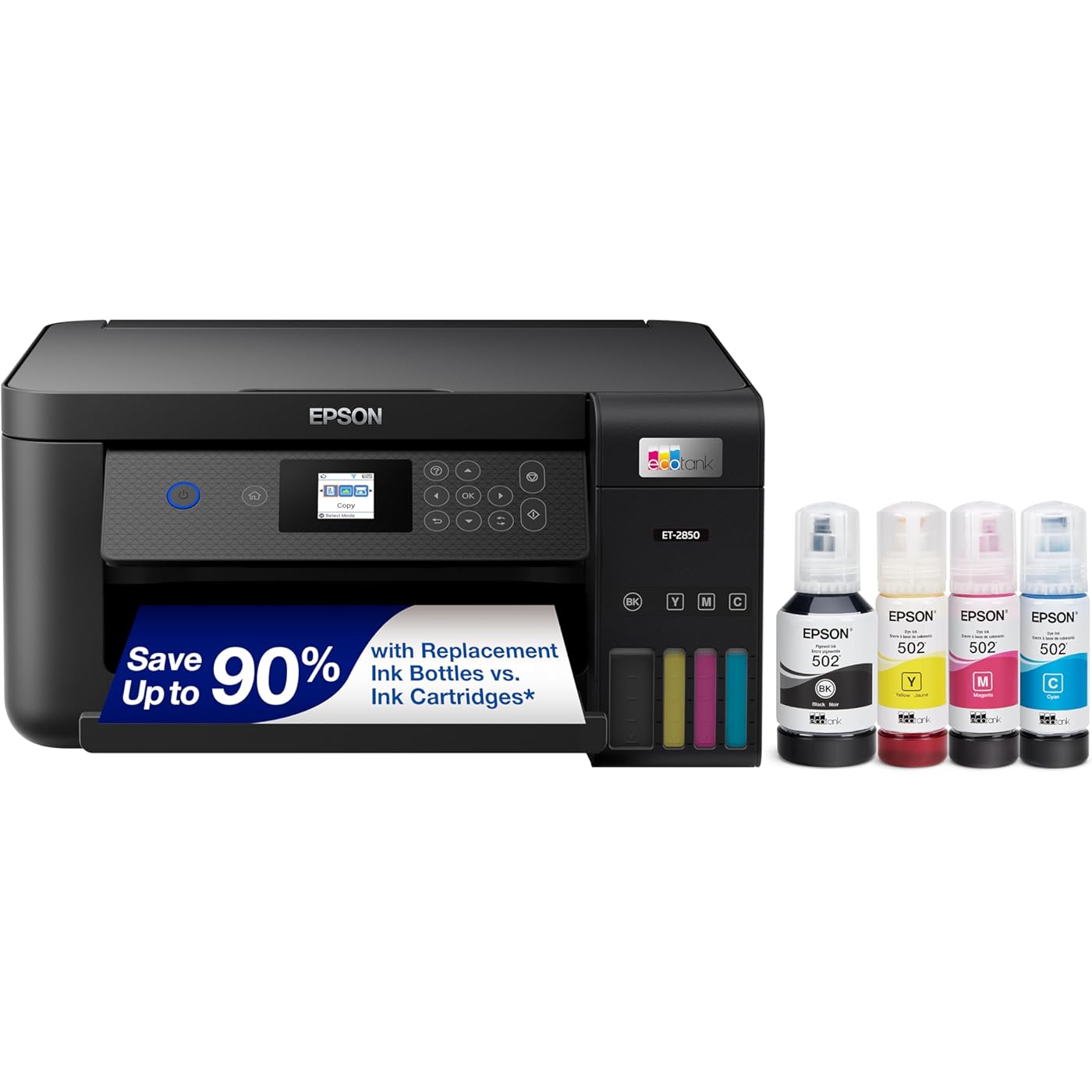
Epson EcoTank ET-2850 Wireless Color All-in-One Cartridge-Free Supertank Printer with Scan, Copy and Auto 2-Sided Printing - Black, Medium

  • Based on 7,630 reviews
Condition: New
Checking for the best price...
$349.99 Why this price?

Buy Now, Pay Later


As low as / mo
  • – Up to 36-month term if approved
  • – No impact on credit
  • – Instant approval decision
  • – Secure and straightforward checkout

Ready to go? Add this product to your cart and select a plan during checkout.

Payment plans are offered through our trusted finance partners Klarna, Affirm, Afterpay, Apple Pay, and PayTomorrow. No-credit-needed leasing options through Acima may also be available at checkout.

Learn more about financing & leasing here.
Selected Option

Free shipping on this product
This item's return window has been extended for the holiday season: FREE refund/replacement until Jan 31, 2026

To qualify for a full refund, items must be returned in their original, unused condition. If an item is returned in a used, damaged, or materially different state, you may be granted a partial refund.

To initiate a return, please visit our Returns Center.

View our full returns policy here.


Availability: In Stock.
Fulfilled by Amazon

Arrives Thursday, Dec 4
Order within 6 hours and 40 minutes
Available payment plans shown during checkout

Protection Plan Protect Your Purchase
Checking for protection plans...

Color: Black


Style: ET-2850 (Black)


Set: Print/Copy/Scan


Features

  • Innovative Cartridge-Free Printing No more tiny, expensive ink cartridges; each ink bottle set is equivalent to about 80 individual cartridges (2)
  • Dramatic Savings on Replacement Ink Save up to 90% with replacement ink bottles vs. ink cartridges (1) thats enough to print up to 7,500 pages black/6,000 color (3)
  • Stress-Free Printing Up to 2 years of ink in the box (4) and with every replacement ink set for fewer out of ink frustrations
  • High-Capacity Ink Tanks Epsons exclusive EcoFit ink bottles make filling easy and worry-free
  • Zero Cartridge Waste By using an EcoTank printer, you can help reduce the amount of cartridge waste ending up in landfills
  • Impressive Print Quality Unique Micro Piezo Heat Free technology and pigment black ink produce extremely sharp text plus impressive color photos and graphics on virtually any paper type
  • Built-In Scanner & Copier, Plus Auto 2-sided Printing High-resolution flatbed scanner and a color display for easy document copying and navigation; paper-saving auto 2-sided printing
  • Modern Connectivity Features wireless, plus hands-free voice-activated printing (5). Easily print from your smart device (6) with the intuitive Epson Smart Panel app (7)
  • Use Genuine Epson Ink For optimal print quality and performance. Non-genuine ink could cause damage not covered by the printers ltd. wnty.

Description

Your home needs a printer that’s fast, affordable, easy to use, and has great features. That’s why we developed the EcoTank ET-2850 – an innovative cartridge-free solution that uses high-capacity, easily refillable ink tanks. So you’ll worry less about running out of ink, and save a lot on replacement ink (1). The ET-2850 features outstanding print quality, auto-duplex printing, a high-resolution flatbed scanner, and convenient color display – making it the perfect family printer. Epson strongly recommends the use of genuine ink to ensure optimal print quality and performance. Use of non-genuine ink could cause damage not covered under the printer’s ltd. wnty. | 1. Actual savings and costs will vary considerably based on print tasks, print volumes and usage conditions. Savings and cost per ISO page are based on the cost of replacement ink bottles and the cost of enough standard cartridges to achieve the total page yields of the bottles using the MSRP (USD) and yields for Epson standard- capacity ink cartridges for similarly featured Epson consumer inkjet printers as of March 2024. | 2. Individual cartridges estimate based on print yields of an included or replacement set of black and color ink bottles as compared to Epson standard-capacity ink cartridges for similarly featured printers as of March 2024. | 3. Part of the ink from the included bottles is used for initial setup; yields are lower than those of replacement ink bottles. Replacement and included ink bottle yields based on the ISO/IEC 24712 pattern with Epson’s methodology. Actual ink yields will vary considerably for reasons including images printed, print settings, temperature and humidity. Yields may be lower when printing infrequently or predominantly with one ink color. All ink colors are used for printing and printer maintenance, and all colors must be available for printing. For more information, visit | 4. Based on average monthly document print volumes of about 150 pages. | 5. See for device compatibility. Epson Connect account and voice- activated account registration required. | 6. Most features require an Internet connection to the printer, as well as an Internet- and/or email- enabled device. For a list of Epson Connect enabled printers and compatible devices and apps, visit | 7. Requires Epson Smart Panel app download. Data usage fees may apply.

Brand: Epson


Connectivity Technology: USB, Wi-Fi


Printing Technology: Inkjet


Special Feature: Auto 2-sided Printing, Mobile Printing Capability, Refillable Ink Tank


Color: Black


Model Name: ET-2850 Black


Printer Output: Color


Maximum Print Speed (Color): 5 ppm


Max Printspeed Monochrome: 10.5


Item Weight: 16.15 Pounds


Product Dimensions: 22.3"D x 14.8"W x 10.2"H


Controller Type: Android


Maximum Media Size: 8.5 x 14 inch


Included Components: EcoTank ET-2850 all-in-one, manual, power cord, 1 bottle of 502 Black (127 mL) and 1 bottle each of 502 Cyan, Magenta, Yellow (70 mL) (2)


Print media: Envelopes, Glossy photo paper, Paper (plain)


Scanner Type: Flatbed


Max Input Sheet Capacity: 100


Max Copy Speed (Black & White): 10.5 ppm


Compatible Devices: Smartphones


Maximum Color Print Resolution: 5760 x 1440


Sheet Size: 3.5" x 5", 4" x 6", 5" x 7", 8" x 10", 8.5" x 11", 8.5" x 14", A4, A6, half letter, legal, executive)


Maximum Black and White Print Resolution: 5760 x 1440


Warranty Type: limited warranty


Color Depth: 24 bpp


Dual-sided printing: Yes


Maximum copies per run: 100


Max copy resolution color: 5760 x 1440 dpi


Max copy resolution black-white: 5760 x 1440 dpi


Duplex: auto


Hardware Interface: USB


Ink Color: Black


Additional Printer functions: All In One


Control Method: App


Output sheet capacity: 150


Number of Trays: 1


Processor Count: 1


Total USB Ports: 1


Model Series: ET


Specific Uses For Product: Office, home office


UPC: 679541101554 808222455079 010343957817


Printer Ink Type: tank-based


Memory Storage Capacity: 64 MB


Item Weight: 16.15 pounds


Item model number: ET-2850 Black


Date First Available: February 11, 2021


Manufacturer: Epson


Frequently asked questions

If you place your order now, the estimated arrival date for this product is: Thursday, Dec 4

Yes, absolutely! You may return this product for a full refund within 30 days of receiving it.

To initiate a return, please visit our Returns Center.

View our full returns policy here.

  • Klarna Financing
  • Affirm Pay in 4
  • Affirm Financing
  • Afterpay Financing
  • PayTomorrow Financing
  • Financing through Apple Pay
Leasing options through Acima may also be available during checkout.

Learn more about financing & leasing here.

Top Amazon Reviews


  • User friendly and well made
Color: ['White'] Style: ET-2850 (White - Renewed) Set: Print/Copy/Scan
It’s ridiculous how many printers I have purchased over the years and what I have spent on ink refills. This printer is the best one I’ve tried so far (will update if something changes my mind). I like it so much that I bought one for my son (and he loves it too). We both like that we can see the ink levels on the front of the machine. Other machines would give error messages that we needed to replace the ink cartridge even when it had a new cartridge. It doesn’t print super fast, but that’s not a problem for me. It does a beautiful job and it hasn’t had a paper jam…knock on wood. It was super easy to set up and use with my phone or iPad. I don’t use it every day, but I use it quite a bit and my ink levels are still full. It prints beautifully, makes perfect copies, it’s quiet, easy to fill with ink, and ink replacement is affordable. Also, both the printers I bought were refurbished and haven’t had any problems. If I didn’t know they were refurbished I wouldn’t believe it! ... show more
Reviewed in the United States on October 23, 2025 by BoCPhus

  • Great Printer!
Color: White Style: ET-2850 (White) Set: Print/Copy/Scan
I purchased this printer in December 2022, and it is without a doubt the best printer I have ever had! Two of my former students had this Epson and strongly encouraged me to consider it when I was shopping around. My HP Printer used too much ink, and the cartridges were expensive! I have purchased a black ink refill ONCE since I bought it almost 3 years ago! It has been a game changer! Print quality is good, it was a breeze to setup and connect with my home wifi. ... show more
Reviewed in the United States on September 29, 2025 by Carolyn A. Bailey

  • Love it so far
Color: White Style: ET-2850 (White) Set: Print/Copy/Scan
Love this printer. Couldn't be happier with it's easy of setup, ease of use and the ecotank system is amazing after using cartridges for years. So I'll start with setup, I wasn't happy to see that the basic setup uses Epson's fluky and antiquated feeling app, but at least with this setup, everything worked out alright. It takes about 15 minutes or so total to get all the tape off, plug it in, fill the inks and get the printer connected. All of which was nice. Speaking of filling the tanks, the ecotank system is amazing. This printer has an enlarged black tank and so comes with a much larger black fill cartridge. It says it's good for over a thousand pages, which is fine with me, but filling was so easy. Each of the refill tanks has a special nozzle so it will only work on the correct color and you can see what level the tank is at with just a quick glance. You can't overfill the tanks because they shut off when full, and ther's also no chance of leakage since the refill tanks won't dispense unless slotted all the way down onto the refill nozzle. Where has this system been my whole life? I looked up costs for refills and they seem reasonable, especially when compared to all the proprietary cartridges most manufacturers use. Five stars just for the ecotank system alone. Connecting to my home wifi was a bit wonky with the app but it worked on the second try, and thankfully this printer is AirPrint compatible so I was able to print straight from my iPhone and iPad without any issues. A quick check of my laptop and desktop and they both detected this printer without issue and soon I was printing off some needed tax documents. Print clarity was fine, the blacks in particular are nice and dark which is most of what I need anyway. After printing about 20 pages I checked the tank and couldn't see that the ink levels had dropped that much if at all, so I'm pretty excited about how useful this printer will be in the future. Overall, super happy with this printer. If you're tired of dealing with cartridges, give this a shot. ... show more
Reviewed in the United States on March 10, 2025 by Kordless

  • THE WORST PIECE OF JUNK. AVOID EPSON
Color: Black Style: ET-2850 (Black) Set: Print/Copy/Scan
I HATE THIS PRINTER. IT IS THE SINGLE WORST PRINTER YOU CAN BUY. IT NEVER WORKS. EVER. LIKE DONT BUY THIS. The first one I was sent didn't even turn on. It was supposedly brand new and it never turned on. So they sent me a refurb which basically voids the warranty you're supposed to have since it's a refurb and then the warranty is only 30 days. So it worked for a week or two, and then the Wi-Fi just stopped working. No matter what I did, the Wi-Fi will not work. You can reinstall an uninstall drivers, you can do everything under the sun that Epson says, and it does not work. I purchased this expensive printer so that I could print from my phone and computer wirelessly, but I have never been able to do that. I have to have it wired to my computer. When you actually have it wired to your computer and try to print, it will generally not print. The paper settings will never match no matter what you do. It prints, blank sheets, and gives you consistent errors. I think I have been able to print three or four documents and two photos. That's a lot of money. I have spent just to print three documents and two photos. This is a worthless piece of crap. Find a different brand. This printer is not worth it. This is NOT WORTH IT. DO NOT WASTE YOUR MONEY. If you wanna printer that actually connect to Wi-Fi, or even just print. This is not the printer. This is garbage. ... show more
Reviewed in the United States on November 12, 2025 by Mslkhernandez Mslkhernandez

Can't find a product?

Find it on Amazon first, then paste the link below.
Checking for best price...