Search  for anything...

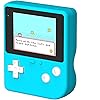
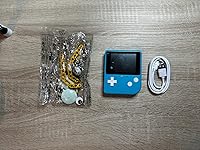
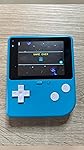
ELECFREAKS Retro Coding Arcade for Microsoft Makecode DIY Programmable Handheld Game Console Suitable for STEM Education, Kid Game Programming Learning Machine Supports Block Programming and Python

  • Based on 48 reviews
Condition: New
Checking for the best price...

Buy Now, Pay Later


As low as $9.97 / mo
  • – 6-month term
  • – No impact on credit
  • – Instant approval decision
  • – Secure and straightforward checkout

Ready to go? Add this product to your cart and select a plan during checkout.

Payment plans are offered through our trusted finance partners Klarna, Affirm, Afterpay, Apple Pay, and PayTomorrow. No-credit-needed leasing options through Acima may also be available at checkout.

Learn more about financing & leasing here.

Free shipping on this product

Returnable until Jan 31, 2025

To qualify for a full refund, items must be returned in their original, unused condition. If an item is returned in a used, damaged, or materially different state, you may be granted a partial refund.

To initiate a return, please visit our Returns Center.

View our full returns policy here.


Availability: In Stock.
Fulfilled by Amazon

Arrives Saturday, Feb 14
Order within 3 hours and 42 minutes
Available payment plans shown during checkout

Protection Plan Protect Your Purchase
Checking for protection plans...

Features

  • A Different Retro Coding Arcade This Game Programming Learning Machine is the first arcade device in a big screen with a high resolution. Kids are able to use them to create their games in a fun and easy way through the blocks program, and the Retro allows for a self-defined game role, multiple game sceneries and plots design. It surprises you more with the bountiful built-in sensors and gives kids more chances for creation.
  • Create Rather than Play GamesCompared with traditional handheld game consoles, Retro Arcade's games are completely user-made, such as self-defined game roles, multiple game sceneries and plots design.
  • STEM Education Gift for KidIn the process of programming learning, kids can use Makecode graphical programming language or Python language to program Retro Arcade, which can quickly develop their computational thinking ability.
  • Great Operating Feeling(1)High resolution of 320*240, which is four times than that of the same industry. (2)Silicon buttons: The buttons are made of silicon in cross design,and has 8 command directional buttons and provides the best handing experience. (3)Environment shells: Made from ABS & PC environment-friendly materials, the shells have fine outlook with high durability and safety. (4)Built-in Sensors:Buzzer,photocell,gyroscope,vibration motor.Pls enter "wiki.elecfreaks.com/en/" to learn.

Screen Size: 2.4 Inches


Power Source: Battery Powered


Hardware Interface: USB


Number of Batteries: 1 Lithium Ion batteries required. (included)


Age Range (Description): Kid


Battery Description: Lithium-Ion


Display Type: LCD


Material: ABS, Polycarbonate


Form Factor: Handheld


UPC: 779288988446


Package Dimensions: 8.62 x 6.1 x 1.69 inches


Item Weight: 7.4 ounces


Item model number: Retro Coding Arcade


Manufacturer recommended age: 8 years and up


Batteries: 1 Lithium Ion batteries required. (included)


Manufacturer: EF ELECFREAKS


Frequently asked questions

If you place your order now, the estimated arrival date for this product is: Saturday, Feb 14

Yes, absolutely! You may return this product for a full refund within 30 days of receiving it.

To initiate a return, please visit our Returns Center.

View our full returns policy here.

  • Klarna Financing
  • Affirm Pay in 4
  • Affirm Financing
  • Afterpay Financing
  • PayTomorrow Financing
  • Financing through Apple Pay
Leasing options through Acima may also be available during checkout.

Learn more about financing & leasing here.

Top Amazon Reviews


  • Perfect!
This game is awesome! It was easy for my 10yr old to do it. He loves being able to basically pick how the game goes.
Reviewed in the United States on January 1, 2024 by Kelly Lincoln

  • See Your Code in Action!!!
I teach young people to explore coding and tinkering with electronics. This past summer I began looking for a way to get projects into their hands to actually play and share with friends. The Elecfreaks Retro Arcade for Education (or at home) is perfect. The device feels solid and it also feels like the vintage GameBoy. You start off by building or remixing game code (low cade, Python, or Javascript) on Microsoft MakeCode. Then follow the easy to follow instructions to connect your computing device to the Retro. It will then download your chosen game and you can play it on the device. Battery life is good for playing these small 2-D low res (read RETRO old school) games. It really is alot of fun. ... show more
Reviewed in the United States on August 31, 2023 by Mr. Fred Mr. Fred

  • Neat Gadget, one issue for me
This is a nifty gadget, my only issue is it only lets you put one game on it at a time. It's not hard to figure out how to put games on it or use, so that is a plus.
Reviewed in the United States on November 3, 2023 by Elana Overcash

  • Does t work reliably
Won’t hold charge.
Reviewed in the United States on September 2, 2024 by Pokerbob

  • Quite Useful
The media could not be loaded. Pretty interesting device with relatively long battery life, though there are many limitations on coding because of the MakeCode platform. Spend an hour to make a simple timer program, it’s pretty straightforward.
Reviewed in the United States on March 6, 2024 by Sunbownia Dai

  • Bigger screen is good, but ours arrived scratched. Operation is a bit strange and some other caveats
We purchased this device after the X-Tron Pro, which was a really great toy for tinkering, but has a very small screen which can be hard on the eyes. This handheld has a nice big screen that is much easier to look at. Although ours arrived with some noticeable, long vertical and horizontal scratches. The scratches, while unpleasant, are more cosmetic in effect and do not detract much from the overall value. However, it is important to note, when using the handheld with Microsoft Makecode, as advised, the resolution is not 320x240, as the advertiser is listing. It registers as 160x120, like the X-Tron pro. It may be that the device actually is 320x240, and they are doubling the pixels to fill the screen? Whatever the case, I have yet to see the resolution boasted in the product details above. Finally, the operation of the device is a little strange. Unlike the X-Tron Pro, it hosts one game at a time, which is simple enough. The game can be loaded from the PC via USB-C cable after hitting the small round button under the screen. To power the device off, it seems one must hold the faintly indented button at the top edge of the handheld for 20 seconds or so. The instruction manual it came with had no English translation, so I may be wrong about this! Overall, I think it is a worthwhile alternative to the X-Tron if you need a bigger screen, but otherwise you should get that instead. ... show more
Reviewed in the United States on October 24, 2022 by James Gilbert

  • Cute!
Bought these for my classroom. My middle school students enjoyed coding video games and playing then with this device.
Reviewed in the United States on July 6, 2023 by Veronica

  • Very disappointed in Retro Coding Arcade
Very disappointed. Wrote half of a multiplication game for my coding students. It ran flawlessly on the MakeCode Arcade online simulator, but would not run on the Retro Coding Arcade device. The program I wrote was not that long or complicated. Very simple programs I tried did run OK. Fortunately, my program ran fine on an Android phone. Save your money. Use your phone. (Probably OK for young children with very limited coding experience.) ... show more
Reviewed in the United States on September 29, 2024 by Frank

Can't find a product?

Find it on Amazon first, then paste the link below.
Checking for best price...