Search  for anything...

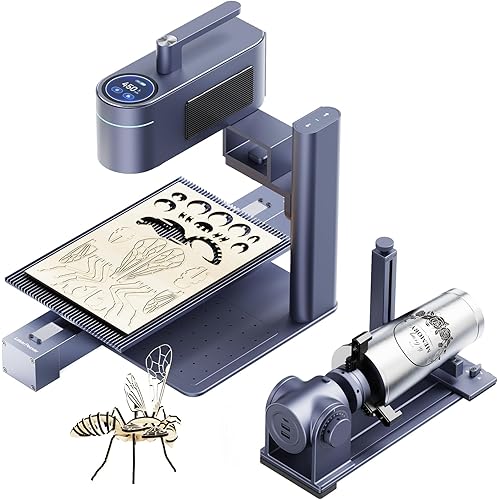
Creality Falcon A1C 10W AI Laser Engraver with AI Camera, Class 1 Desktop Engraving Machine with Interchangeable Laser Platform, Auto Focus, 0.1mm Positioning, 15,000mm/min for Wood, Leather & Acrylic

Based on 40 reviews
Condition: New
Checking for the best price...
$359.00
Save $40.00 was $399.00

Buy Now, Pay Later


As low as / mo
  • – Up to 36-month term if approved
  • – No impact on credit to apply
  • – Instant approval decision
  • – Secure and straightforward checkout

Ready to go? Add this product to your cart and select a plan during checkout.

Payment plans are offered through our trusted finance partners Klarna, Affirm, Afterpay, Zip, Apple Pay, and Google Pay. No-credit-needed leasing options through Acima may also be available at checkout.

Learn more about financing & leasing here.

Free shipping on this product

FREE 30-day refund/replacement

To qualify for a full refund, items must be returned in their original, unused condition. If an item is returned in a used, damaged, or materially different state, you may be granted a partial refund.

To initiate a return, please visit our Returns Center.

View our full returns policy here.


Availability: Only 5 left in stock, order soon!
Fulfilled by Amazon

Arrives Friday, Oct 30
Order within 12 hours and 23 minutes

Available payment plans shown during checkout

Protect Your Purchase

Easy claims online, fast replacements, no fees

Checking for protection plans...

At a glance

Condition
New
Model
Falcon A1C
Dimensions
18.5 x 16.54 x 15.75 in
Weight
31.1 lb

Features 8

  • AI SMART CREATION: Create stunning engravings in just a few clicks with Falcon A1C's intelligent AI workflow. AI One-Tap Engraving instantly converts photos into engraving-ready artwork, while AI Background Removal, Smart Fill & Layout, and AI Assistant simplify design, optimize layouts, and recommend the best settingsmaking professional-quality engraving faster and easier for beginners and experienced creators alike.
  • INTERCHANGEABLE LASER PLATFORM: Designed for long-term creativity, Falcon A1C features an interchangeable laser platform compatible with 5W, 10W, and 1.2W Falcon laser modules. Easily switch laser heads to match different engraving tasks, from fine-detail artwork to higher-power applications. NOTE: Each package includes one laser module based on the selected model.
  • AI CAMERA & AUTO FOCUS: The built-in AI HD camera quickly captures your material and automatically positions designs with up to 0.1 mm positioning accuracy, helping reduce setup time and improve engraving precision. Combined with Auto Focus, Falcon A1C delivers a smoother, faster, and more reliable engraving experience.
  • FAST & PRECISE PERFORMANCE: Complete more projects in less time with engraving speeds up to 15,000 mm/min. The high-performance motion system delivers smooth movement, sharp details, and consistent accuracy for everything from photos and logos to personalized gifts and production-ready designs.

Description

Easily swap between laser modules (5W / 10W / 1.2W IR) to unlock more engraving possibilities with A1C. Simply place your material and click to operate. A1C automatically determines the optimal focus height for your engraving. Experience 15,000 mm/min high-speed engraving that gets more projects done in less time. Preview your material through the software AI camera and position your design with confidence. Switch between 5/10W diode and 1.2W infrared lasers to explore more engraving applications. * NOTE: The package contains only the selected module; The 1.2W IR laser module needs to be purchased separately (B0H45PB4PG). Creality Falcon A1C 10W Creality Falcon A1C 5W Creality Falcon A1 10W 1.2W IR Laser Module 10W Diode Laser Module RC2 Rotary Kit for A1C AP1 Mini Smoke Purifier

Specs 4

Product Dimensions 18.5 x 16.54 x 15.75 inches
Item Weight 31.1 pounds
Item model number Falcon A1C
Manufacturer CREALITY FALCON

Frequently asked questions

If you place your order now, the estimated arrival date for this product is: Friday, Oct 30

Yes, absolutely! You may return this product for a full refund within 30 days of receiving it.

To initiate a return, please visit our Returns Center.

View our full returns policy here.

  • Klarna Financing
  • Affirm Pay in 4
  • Affirm Financing
  • Afterpay Financing
  • Zip Pay in 4
  • Financing through Apple Pay
  • Financing through Google Pay
Leasing options through Acima may also be available during checkout.

Learn more about financing & leasing here.

Top Amazon Reviews


A Very Capable Enclosed Laser, but Plan for Fume Control
At this price point, I expect considerably more than something that simply works, and so far I've been very pleased with the Creality Falcon A1C. This is a substantial piece of equipment, and my experience from delivery through setup and initial use has been positive. First, Creality did a very good job with the packaging. The machine arrived in perfect condition, everything that was supposed to be included was there, and the individual components were well protected during shipping. That's particularly important with equipment like this, where shipping damage to the enclosure or laser mechanism could turn setup into an immediate headache. Assembly and setup were easier than I anticipated. There are several steps involved, but nothing was particularly difficult. My advice is simply to follow the directions rather than trying to figure it out as you go. The instructions walk you through the process logically, and everything went together without any significant problems. One of the reasons I chose the A1C is the enclosed design. I've used enough workshop equipment to appreciate having the working area contained rather than operating an open-frame laser on a table. The enclosure, integrated features, and automation make this feel much more like a finished appliance than a collection of laser components. The 10W laser gives it a useful combination of engraving and cutting capability for the types of projects most people are likely to tackle with a desktop machine. Wood, appropriate acrylics, leather, and similar materials give you a tremendous number of possibilities. The automated features also reduce some of the trial and error involved in getting a project positioned and started. One thing I absolutely would plan for before buying this is fume management. Enclosed does not mean that the smoke, odors, particulates, and potentially harmful fumes created by laser cutting simply disappear. What is produced depends heavily on the material being processed, and some materials should never be put in a laser at all. We use a filter cartridge specifically for fume removal with ours. Suitable filtration equipment is available here on Amazon, and I consider some form of appropriate exhaust or filtration part of the cost of setting up a laser like this. Don't buy the engraver, put it in an unventilated room, and assume that because the machine is enclosed you don't have to think about what is coming off the material you're cutting. As far as actually living with the machine goes, my biggest consideration is software ecosystem. This is Creality equipment, so it adds Creality's software to my workflow. That isn't inherently bad software, but most of my existing 3D printing equipment is on another manufacturer's platform. Since I currently use the manufacturers' software, switching between ecosystems is tedious. That's also very specific to my workflow. If you already use non-proprietary software and have equipment from several manufacturers, the ability to choose the best machine from each company can actually be an advantage. I just find that when you're relying on manufacturer-specific software, there is considerable convenience in keeping as much equipment as possible under one roof. None of that changes my opinion of the Falcon A1C itself. It arrived perfectly, assembly was straightforward, everything worked as expected, and the enclosed desktop format makes it much more convenient than the open-frame laser systems I've considered. This isn't an inexpensive impulse purchase, and anyone buying one should factor materials, ventilation or filtration, and their preferred software workflow into the decision. Once properly set up, however, the Falcon A1C is an impressive and very capable machine that opens up an entirely different category of projects beyond what I can do with my 3D printers. ... show more
Reviewed in the United States on September 29, 2026 by LF

Works Well Until it Gets Tired
Color: Purple Gray
It appears like my review is the first from someone who actually paid for this product. I decided to buy the Creality Falcon A1C on a whim. I have a cricut already, but I had never heard of laser engraving until recently, and I wanted to give it a try as it could be a tool to create some more original products. I did a lot of research before making the purchase, and I ultimately picked this one for several reasons. 1. It's a class 1 machine. I have small children in my home, and their safety is my number one priority. When I first started looking, I saw the open frame models were much more affordable. However, after researching it thoroughly, I decided that the risk of dangerous fumes, risk of fire, and the safety mask/goggles needed to protect anyone in the workspace was not worth the risk. This machine is fully enclosed, and the enclosure also works to protect your eyes from the laser. As such, I don't worry too much if my three year old is around while I am working. The enclosure and ventilation system is also a comfort. I don't plan to engrave any material that'll give off toxic fumes, but the ventilation system helps to reduce the smoke. However, I have smelt the burn of my wooden projects a little. Finally, the system has an emergency stop button and warns you if the laser is getting too hot. 2. There were some other cheaper machines available, but this one is from a more well-known company. This is important to me because I knew I'd be able to get better support if I needed it, and I am more likely to get the replacement parts I need over time. 3. It claims to be beginner friendly. I mostly agree with this. I wish there were more directions on how to calibrate the camera. I made a mistake the first time I tried to calibrate it, and now I have my children's outline already burned into the plate. However, the camera is very helpful once it's calibrated. The steps are easy: Autofocus, camera, check settings, and then start. It took me a little while to know which settings to use. For example, some of my wood projects were either too light or scorched a little. I wasted some material through the trial and error process, but I feel like that's expected when working with a completely new machine. Nonetheless, I've only had the machine for a couple of weeks, and I'm already making ornaments for my brother to use as favors at his wedding. It was fairly easy to learn, especially with wood projects. On the contrary, I also wanted to start making keychains with family pictures on them, and I'm struggling to figure out how to get the details in the faces better. Other Comments: Setup was fairly easy. It arrives mostly assembled. Out of an abundance of caution, I have used the machine outside rather than in my home. I'm a 130 lb female, and I'm able to carry it, but it is slightly heavy and bulky. It's definitely better as a stationary machine if you have the workspace available. Being that I need to make about 100 ornaments, I make one project after another fairly quickly. I've noticed that after 10ish ornaments, I always have one that gets messed up by the laser accidentally hitting it and the material shifting. I'm not sure if it's a coincidence, or if it's something that happens when the laser is running for a long time. I usually give it a break, and when I return, it's working well again. However, out of the 50 ornaments I made, about 5 got ruined this way. It is frustrating that I lost about 10% of my material due to this. This machine might not be suited for batch work. The Creality software itself (or at least the app) doesn't have many options to design projects. I usually design in a different app and then upload. The 10w laser is powerful and worth the extra cost to have. ... show more
Reviewed in the United States on September 1, 2026 by Sara

Testing Whether "Beginner Friendly" Actually Means It
This is my first laser engraver, and the listing kept saying "beginner friendly," so I figured I would see how true that is., Getting started was a little more confusing than I expected. One of the tutorials on Creality's site warns that if you haven't bought a slat bed or honeycomb bed, you need a metal sheet or wooden board to cover the base plate, and that had me worried I was missing a part. After some research and a few rounds of quizzing AI, we confirmed the metal cutting plate that comes with the 10W package covers it, nothing extra to buy. The included user manual looks overwhelming until you realize it covers every language, so the actual English section is about 12 pages. That's thin on its own, but Creality's website fills in the gaps if you go looking. I almost skipped watching the unboxing video but I'm glad I didn't: it mentions removing the foam under the base plate that I would have missed otherwise. The software itself seems fairly easy to use for the basic stuff but there isn't a lot in the way of explanation. I like the material presets and the handful of starter projects built in for beginners, that part really does deliver on "beginner friendly." I ran the bookmark project first. Couldn't get the name to switch to the pictured font, it kept defaulting to something plain, so adding more fonts is still on my list to figure out. It's going to take some time to get it to do what I want, though. Running the machine itself is pretty simple: load your design, set it for the material, let it autofocus and frame so you can see where the laser will go, vent the hose out a window, and press the button. That part just works. I would have really liked some more beginner material though. There's no single quick-start sheet with pictures, no explanation of when or how to calibrate the camera, and nothing on what settings produce what results on which materials. If you've used one of these before, none of this will faze you. If you're a complete beginner like me, expect to lean on outside videos and forums to fill in what the box doesn't cover. I expected a learning curve but having more structured material for complete beginners would go a long way. I took my time, worked through it, and it going at least. Looking forward to learning more. It's an accessible starting point, just go in knowing you'll be doing some of your own homework. ... show more
Reviewed in the United States on August 28, 2026 by Dixie

A Capable Enclosed Laser That Complements Our 3D Printers and Craft Tools
Our family already uses a Cricut and several 3D printers for a wide range of craft and fabrication projects, so a laser engraver fills a very practical space between those tools. We also own a Creality 3D printer that has worked extremely well, which gave me some confidence in the brand before trying this machine. The Falcon A1C strengthened that confidence. It feels thoughtfully designed, performs reliably, and makes laser engraving far more approachable than I expected. The enclosed desktop format is one of its greatest strengths. An open-frame laser can feel like a piece of shop equipment that requires a dedicated workspace, while this design contains the working area and fits much more naturally into a home craft setup. I still treat it as a real laser rather than a toy: I pay attention to ventilation, verify that a material is safe to engrave, and supervise it while it operates. The enclosure does not replace those precautions, but it makes the overall process feel considerably more controlled. Setup and operation proved straightforward, and the machine produced clean, precise results without forcing me through an unnecessarily complicated learning process. We have used it for personalized projects and experimented with different materials. One of our more unusual tests involved engraving a leaf, an example shown in the product material, and it worked exactly as demonstrated. That small experiment showed how much creative range the machine offers beyond ordinary signs and labels. It is equally useful for blank wood pieces, personalized gifts, decorative projects, and other items that would otherwise require paying an engraving service. The 10-watt laser offers a useful balance for this type of desktop machine. It has enough capability for the materials and projects we want to make, while the controls make it accessible to someone who already understands digital design or other computer-controlled craft tools. Experience with 3D-printer slicers and Cricut-style design workflows helped me get comfortable quickly, but I do not think a new user needs extensive technical experience to begin producing worthwhile results. Value depends on whether someone will actually use the machine, but for a household that regularly makes gifts, decorations, labels, prototypes, or customized items, I think it is priced competitively within the enclosed-laser category. Outsourced engraving becomes expensive quickly, and owning the machine also provides far more freedom to experiment and revise a design. Creality has earned some brand loyalty in our home through its 3D-printing equipment, and this engraver shows the same combination of capable hardware, practical features, and good overall value. It has worked extremely well for us and easily earns five stars. ... show more
Reviewed in the United States on August 11, 2026 by Amazon Customer

Perfect for beginners! Simple and easy to use for anyone!
I am super impressed with how simple it is to operate this laser engraver. I have owned a Creality Falcon Pro 10w laser engraver for over a year and while I have had success With it, it did have a bit of a learning curve since I have not been keeping current on computer drafting software. I had to use the open source software to run it and while I'm glad I learned all about designing and creating the appropriate files to run laser engravers, I do wish it has come with the same software as this new Falcon A1C system does, it would have saved me a lot of time and effort spent learning how to create the proper files to make it work. This new laser engraver is entirely self-contained and required zero assembly. The laser modules already in place, it has a motorized lift tray and auto focuses itself. There's no more need to get out the bubble spirit level, check the gap between the laser and the material and all the other fiddly things with my other laser engraver. You simply choose the product you want in the Falcon design space software and follow the instructions. It has tutorials that take you straight through autofocusing, sizing and everything else as soon as you turn it on and install the software. It's really simple, intuitive and makes using a laser engraver accessible for anyone, even with minimal experience with computers or no computer at all, you can run this using the app on a smartphone. It does have a small working surface area of 150 mm by 150 mm. My larger Falcon Pro has a 400 MM x 400 MM work area, but this newer model will probably see more use due to the simplicity of using it. I can literally cut and engrave the project simply by taking a photo of something, letting the AI in the app converted to a proper SVG file and then running it through the software. It does really work, and I'm fairly impressed with it even though I do not careful most AI programs. This is one case where is really helpful and very useful. I'm also grateful that they added support for my older Creality laser engraver and I was very easily able to run projects through this new software using it. I no longer have to rely on the open source software, they're really expensive software or anything else. I can simply run these using the included Falcon design space app using either my laptop or my smartphone. That's really amazing to me! As for the machine itself, it's well made and function perfectly. I've had no issues with it after running several projects through it. It cuts accurately, quickly and is extremely quiet while doing so. I already have a ventilation system for my other laser engraver and this one hooked into it simply and easily. I honestly do prefer this enclosed style rather than the large tent-like cover I have over my other laser engraver. This thing works, it's perfect for people interested in learning how to use an engraving tool like this or home Crafters who don't want to spend a lot of time learning how to operate sophisticated machinery running on CAD type software. If you have ever used a Cricut cutting machine, this machining works exactly like that and the software is nearly identical. This is highly recommended for beginners and people with very little technical skill with computer drawing and drafting. The simplicity of this machine and it's operation really make it a great place for someone to learn and become comfortable using a laser engraver. This would be a terrific addition to a homecraft studio and it's easy and functionality really make it a terrific value for the price. Really highly impressed with the simplicity of this system and the ease of creating a project using the new Falcon design space software. ... show more
Reviewed in the United States on August 14, 2026 by Amazon Customer

Good entry level engraver that is expandable
I have been wanting to play around with a laser engraver, granted I am not big into the arts world with lasers. But this unit came along and I wanted to try an entry level unit. This one fits the bill for anyone who wants to learn engraving, but still have the capabilities to engrave a lot of items. It comes with a 10W diode laser that will burn a lot of porous material (wood, paper) and can even do some glass if you use a spray. But for doing crystals and a lot of non-porous materials (metal, brass and shiny surfaces) you can also get a 1.6W inferred laser which changes out in seconds, you can also change out for a 1.2W diode laser to engrave more detail into projects and there is also a 5W. So the possibilities on creating is massive with additional features. I even bought the tumble 4th axis which makes engraving on round objects a lot easier and the tumbler looks better. If you plan to use this indoors keep in mind engraving can leave a burnt wood smell, because well that is what you are doing no different than the old wood burning kits I grew up with. Just be sure to get a way to exhaust the fumes out a window or go the route I did and buy their smoke purifier which eliminated virtually all smells for my engraving I do. I included a 3D engraving I did with default settings as an example of what can be completed with the first time use. Playing around with the settings and software will provide a lot better results, but first impressions are this is a good unit for beginners. My only complaint is the AI camera stopped working on mine. You should be able to autofocus the print, then adjust it in the provided Falcon Design software for the machine using the camera to make sure the print fits on your coaster or even place text on the fly. EDIT: I had to remove 1 star for upgradeability. From what I found out if you have the "white" cased A1C then you do not have the AI Camera, only the "grey" cased unit which mine is clearly the white version so not sure how I was able to use it to focus. Waiting for the mfg to clarify this issue. Also, the White version can not be upgraded to use the AI camera at a later date. So while you can use most attachments, the unit is designed not to be upgradeable. One other complaint, which is minor is the unit is very, very light. With mine when I lift the lid it gets stuck at the top and I end up lifting the whole printer trying to raise the top. I end up having to hold the printer down and lift the lift. I will check later if there is a binding issue and see if I can resolve that. All in all the unit is great for beginners and for the money you can't beat it for doing a little playing around. With the additional features and the fact you can remove the cover (be sure to use the included glasses) to engrave larger pieces. ... show more
Reviewed in the United States on August 30, 2026 by Ranbo

Excellent mid-size ENCLOSED Desktop Laser Engraver
I've heard about Creality Falcon A1C for a while for excellent laser engraving as a decent sized desktop ENCLOSED. Everything you need to start engraving right away is included even samples to test it out and make sure it's calibrated before you use your own product. The SOFTWARE is excellent, realky intuitive and easy to use. I was able to take a photo omage, remove the background and turn it into a black and white sketch for engraving all with their AI soft ware program in the mobile app. It can literally engrave on anything. I tried the balsa wood sample provided. HOWEVER, ensure you have a filter attachment or a way to vent out the window because MAN IT STINKS AND THE WOOD BURNING. IT IS NOT SAFENTONUSE INDOORS WITHOUT VENTING. I'm excited to engrave more with it once I get an attached filter or a windows screen to vent properly. I do have an air cleaner but it took a while to remove the smell and I had it on as a test for only a couple minutes to ensure everytjing worked well SAFETY FIRST ALWAYS! ... show more
Reviewed in the United States on October 8, 2026 by Olly2014

Look elsewhere for accuracy
Color: Purple Gray
Do not expect to use the camera with any amount of accuracy. From factory it was off over 5mm in the y axis and distorts the image so badly you are unable to accurately place the image you want to engrave over your object. Wasted several hours trying to make it usable for my needs but unfortunately it's not there with it's accuracy. ... show more
Reviewed in the United States on September 30, 2026 by KB
Checking for best price...