Search  for anything...

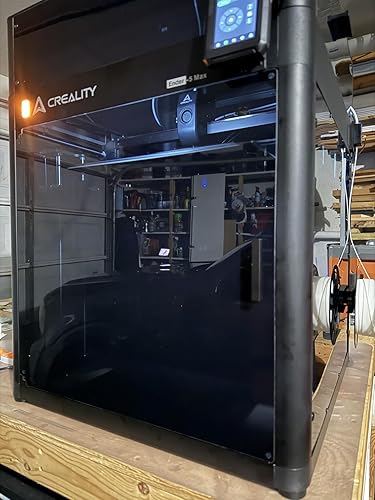
Creality Ender-5 Max 3D Printer, 400mm Build, 700mm/s Printing | 400x400x400mm build volume, 36-point auto leveling and LAN multi-device control for professional FDM printing.

  • Based on 2,138 reviews
Condition: New
Checking for the best price...
$699.00 Why this price?
Save $21.84 was $720.84

Buy Now, Pay Later


As low as / mo
  • – Up to 36-month term if approved
  • – No impact on credit to apply
  • – Instant approval decision
  • – Secure and straightforward checkout

Ready to go? Add this product to your cart and select a plan during checkout.

Payment plans are offered through our trusted finance partners Klarna, Affirm, Afterpay, Zip, Apple Pay, and Google Pay. No-credit-needed leasing options through Acima may also be available at checkout.

Learn more about financing & leasing here.

Selected Option

Free shipping on this product

30-day refund / replacement

To qualify for a full refund, items must be returned in their original, unused condition. If an item is returned in a used, damaged, or materially different state, you may be granted a partial refund.

To initiate a return, please visit our Returns Center.

View our full returns policy here.


Availability: Only 2 left in stock, order soon!
Fulfilled by Amazon

Arrives Thursday, Aug 20
Order within 16 hours and 50 minutes
Available payment plans shown during checkout

Protection Plan Protect Your Purchase
Checking for protection plans...

Model: Ender 5 Max


Features

  • Massive Build Volume of 400x400x400mm Designed for professionals, the Ender-5 Max offers a spacious build area to handle large projects and batch printing efficiently, freeing you from size limitations.
  • Ultra-Fast Printing Speed of 700mm/s Equipped with high-performance XY-axis motors, this printer delivers a peak speed of 700mm/s with an acceleration of 20000mm/s^2, ensuring faster prints without compromising quality.
  • Precision with 36-Point Auto LevelingThe intelligent auto-leveling system features 36 reference points for accurate and efficient leveling, enabling optimal adhesion and consistent results every time.
  • Durable All-Metal ExtruderThe near-end dual-gear extruder ensures stable performance with high wear resistance, supporting continuous printing for extended hours without clogging issues.
  • Enhanced Productivity with LAN Multi-Device Control Featuring LAN-based multi-printer management and an upgraded Creality Print slicing software, the Ender-5 Max simplifies operation for professionals managing multiple devices.

Brand: Creality


Material: Metal


Color: Black


Product Dimensions: 25.5"D x 33.5"W x 28.4"H


Compatible Devices: Personal Computer


Product Dimensions: 25.5 x 33.5 x 28.4 inches


Item Weight: 68.9 pounds


Item model number: Ender 5 Max


Date First Available: March 5, 2025


Manufacturer: Creality 3D


Frequently asked questions

If you place your order now, the estimated arrival date for this product is: Thursday, Aug 20

Yes, absolutely! You may return this product for a full refund within 30 days of receiving it.

To initiate a return, please visit our Returns Center.

View our full returns policy here.

  • Klarna Financing
  • Affirm Pay in 4
  • Affirm Financing
  • Afterpay Financing
  • Zip Pay in 4
  • Financing through Apple Pay
  • Financing through Google Pay
Leasing options through Acima may also be available during checkout.

Learn more about financing & leasing here.

Top Amazon Reviews


  • Worth the money and time spent building but be careful to check everything before it's to late
At first, I DID NOT want a Creality anything, nor an open style, some assembly required kit. I wanted the $799 QIDI tech enclosed and all Turnkey. Plug and play. But for about 325-350$ you can get the printer including miro sd card. Filament-https://amzn.to/3vMMnYb (The pack of white that came with was junk) Micro SD to Full SD card adapter-https://amzn.to/3eWMt96 Upgraded springs and Knobes-https://amzn.to/2SzT4P9 Better tubing with nozzles -https://amzn.to/33q0Qxf I also bought a cordless rotary tool-https://amzn.to/3trpdVU and some purple glue sticks that really do work for better grip when you need it I changed my mind because there are tons of videos, blogs, posts, forums, and groups out there ALL using an ENDER something! When you have an issue, there answers everywhere online! I have not hit much that slowed me down. It will take longer to assemble than they say if you count cleanup and fine turning. No big deal. Take the time and get it set up right the first time. Plus I had to install upgrades during my build time...About 1-1.5 hours to unbox and set up, another 2 or 3 if you are like me, and do everything twice to be sure. I love this thing. I can't stop watching it! So if you looking for your first one, save the money and learn more than where the power switch is...It will be worth it. Update: 5/22- A few days ago, my printer started acting strange, not leveling right and prints were coming out worse and worse. It came with two nozzles, so I watched a few videos on care and Maintainance and did a nozzle change. Found that the first nozzle was 2.5mm! Not worn down from printing but from the factory, my glass bed is in good shape. No idea how it got in the package, but I thought it looked big when I installed it. I change to the other and OMG the prints were amazing. I'll say I still like the printer, but they owe me a nozzle, and 3 weeks of ripping my hair out trying to get the test prints right, and a full spool of Hatchbox PLA, and an all-metal hot end, and a PONY! for the time I wasted in test prints and failed prints. I guess I should have known better but I BOUGHT THIS BECAUSE I KNOW NOTHING ABOUT 3D PRINTING AND THE ENDER SERIES HAS THE BEST NON-FACTORY SUPPORT ONLINE! I ADDED SOME PICTURES OF THE TO NOZZLES FOR YOU. hOPE THEY SEE THIS AND TAKE STEPS. Sorry for shouting. I'm a bit angry at this. I checked the packaging and there was no label on the nozzles. will update as needed. S. ... show more
Reviewed in the United States on May 7, 2021 by S.

  • Massive upgrade from my Ender-3 S1. Works 2x better at 3x the size.
Set name: Ender 5 Max
I've had an Ender-3 S1 for about four years and it is awesome and works really well for the work stuff I use it for. As I became more proficient with drawing and printing objects, however, I ran into size limitations more and more often and complaining to AI about it pointed me to this printer, among others, as a solution. I read all kinds of horrific reviews about this one but then looked up reviews of my trusty Ender-3 and they were also horrific so I went for it; Crealty performed really well over a long period of time in my ownership and I surmised that it will again. I got it. I've used it. Holy cow. The Ender-5 Max prints 3x the size of my Ender-3 S1. My options just blew up for the things I could print. I could be wrong, but you might be able to print a common 5-gallon bucket with this thing. It is HUGE. I used half of a roll of filament on a recent print. That's an unexpected resource consideration! It worked without a single problem. This print was 14" tall and terrifying to think about printing while drawing it and it came out perfect. I can't believe it. It has a Very Large Footprint and needs more space than you might think. I have to remake a cabinet to house this monster. I think it is 24" deep, needs 32" tall without cramping wires and the filament feed on top, and is 24" wide but the onboard roll-holder adds around 4"-5" to the 24" width. I used Cura with my Ender-3 and it worked great and this isn't a default profile and AI was giving me settings I couldn't verify so I am using Crealty's slicer with this and it fits my needs really well. I can tune in remotely at home at night, right out of the box without add-ons, and see what my printer at work is up to in the dark. I bought the camera and it looks pretty awesome but I haven't hooked it up yet. The shop can be dark and allegedly I can remotely turn on the printer's LED light and see what the printer is up to while laying in bed. The camera was $30 so that's cool if it works well. I am delighted with this purchase and it has my mind thinking of all kinds of new projects that make my tasks at work easier. Highly recommend. ... show more
Reviewed in the United States on August 13, 2025 by Chris Hansen

  • I'm new and so far so good!
This is a really nice printer for a beginner in the 3D printing world. The key factor of operating this printer is really the firmware. I have had to swap 5 or 6 times before I found one that worked for me. It was a bit frustrating at first but once you understand how everything works and is supposed to be, it really isn't too difficult. Just be warned, there is a LOT of hands on maintenance involved in owning one of these. I recommend reading more on how they work before you decide to buy one. But if you do decide to get one, go with this one before you get a bigger one! The bigger ones I am told are harder to maintain if you are just starting off. Stuff to know What I recommend is using the professional firmware from mriscoc on github. It has a lot of options, tweaks, settings, and other stuff! However, you do need the upgraded LCD screen for it, so keep that in mind. (It should come with the one I reviewed.) You can get 3d prints from all different sources on Yeggi, it searches multiple different sites like Thingiverse. You can use Ultimaker Cura to slice the files to read on the printer, just make sure you set it to the Ender 3 V2 profile. Don't leave it unattended! If you have to leave it for whatever reason for an extended period of time, I would invest in octopi with an octoeverywhere link so you can watch it wherever you are. You can also use this to stream it to anyone else. Still, if you are going to print please please please be close by because these things could burn down your house if you aren't careful. I do not advise leaving the printer alone for long! ALSO, MAKE SURE YOUR POWER SUPPLY IS SET TO 115V AS OPPOSED TO 230V IF YOU ARE IN THE US. I forgot to flip the switch and it was giving me thermal runaway and nozzle too low temp errors, and it would mess up my print. Overall its a solid printer, nothing feels cheap and its very upgradable. Follow assembly carefully and watch a video guide if need be! Thumbs up, good luck if you get one! ... show more
Reviewed in the United States on October 23, 2023 by Nolan Morris

  • Solid, Probably One Of The Best In Budget
LT;DR if this is your budget and you want a printer, go with this one or the 3 Pro. I've had my printer for a couple weeks at this point and have probably 100+ print hours on it, and have put almost 2kg of filament through it. First thing I noticed is the hot end fan - thing is loud. For those familiar it's roughly as loud as a dell tower server's power supply (making me actually think it was the PSU fan... but thats almost silent). Not really too bad, printer is setup by me and cleints can't hear it over the phone but you may want to swap it out. Cheap to do so, so not a big deal on what I consider a budget printer. Actually compared to other options - its fairly good. For the first week or probably 50 hours of printing the servos were quiet. Then I started ramping up speeds (my fast setting is running at 12kmm/s accel and 120mm/s speeds across the board) and I can definitely hear them. The included rubber feet dampen it a bit but at high speeds solid infill is *loud*. Sounds like a car driving by with a big sub. Would definitely recommend some kind of material to decouple the printer, CNC Kitchen has a video on youtube. Over-all - printer noise is good. I can and do sleep by it while it's running at full speed. The bed has been... an adventure. I know how to tram things so tramming / leveling the bed was easy. But the nobs dont lock so it's easy to change a corner of the bed level without noticing. Auto bed leveling isn't included (IMO that is the biggest thing they need to put on the V3 or V2 Pro or whatever the next printer is called) but a BLTouch is like 40 bucks and you can print a bracket easily. Basically all that to say I had bad issues with the beggining of a track not sticking at first but then adhering, so I'd get partial first prints. Solution was to remove the bed AND CLEAN IT THOUROUGHLY. This meant washing it in the sink with water (obviously just the glass top) and then pouring on IPA for ~60 seconds, wiping with a paper towel, and testing a print. I wipe with IPA every 5 or 10 prints now. The glass can be flipped for a non-coated surface - Amazon Basics PLA loves plain glass. Hatchbox works great on the coated side, with or without gluestick. I'm able to get reliable first layers with a 60 to 80mm/s first layer speed. Frame is kind of dumb... there are no included brackrts or tools to square it. I ended up using the edge of my table and a straight edge. Print dimensions are acceptable. Without any tuning I'm printing within .1 mm in x/y and even closer in z (this is printing a test cube I spun up in CAD at 20mmx20mmx20mm). Im sure it can get better with calibration, I will do that and may update here but probably not... lol. Print quality is really good - after a couple hours of dialing in my filaments (totally normal process, I'm new so it took longer than normal. My next roll took me literally 10 minutes) I had nearly perfect prints with Prusa Slicer. Seriously - these prints are pretty dang good. Overhangs up to 65 or 70 degrees without supports work well, only one part cooling fan so thats another upgrade path to think about. Honestly my biggest complaint is that their github doesnt have CAD files for the V2. There are some on Grabcad, but official ones would be great. Having cad files for the pro are close enough mostly and I've been able to design attachments brtween those two sources. ... show more
Reviewed in the United States on March 19, 2021 by Amazon Customer

  • Rest printer esp for the price!
Set name: Ender 5 Max
My husband loves this printer! It’s our first 3 d printer and we did a lot of research before deciding on this one! We have had it for about two months and we have over 160 hours of print time on it. It prints well! Setting up took awhile and it’s very heavy! We like the print sizes we can print! We have had a few hiccups but nothing we have not Bern able to fix ourselves. We had a few prints that didn’t turn out but found the issue to be the file as most every thing turns out. The photo is a mask we blow up to a massive size, far too big for anyone to use but great as a wall hanging! Highly recommend getting the inclosure! The enclosure has helped protect the moving components! Great printer and does quality prints! ... show more
Reviewed in the United States on November 14, 2025 by Julie N

  • If I could do this all over again, I would avoid Creality all together
I bought this printer based on the community around it and the 3D printing community as a whole considering it to be the "best printer I could buy for the money". An extra $100+ later and it still isn't. I was brand new to 3D printing when I bought this. I spent an entire month trying to get prints to stick to this glass bed that is supposedly "better than PEI" until I finally gave in and started using glue sticks. Finally, I got prints that came out decent, time to tune... Tuning this thing is a royal pain in the ***. Firstly, the instructions for building the printer are absolute crap. Lots of things either overlooked or entirely left out of the "instructions" by Creality. These things you'd only know if you did a TON of research or were already into 3D printing. Not for the beginner who has no idea. So I went through 3 different builds. The first one when I got the machine, second when I learned all of the mini things to check and the third was an ENTIRE teardown to bare nuts and bolts then rebuilts paying extra careful attention to every detail. Next thing I did was buy a CR Touch, at this point I'm not yet convinced Creality is the problem and I think to myself "well, having a metal probe has to be more reliable, and this thing was built FOR creality printers and has metal mounting brackets just for them, it has to be good, right? WRONG! I got a faulty unit and had to have it replaced. This was relatively easy but I think ONLY because the return was processed by Amazon and not Creality, who is a royal PITA to get ahold of, basically impossible. After that was the extruder replacement... This thing is absolute junk. It's plastic, it's hollow and it's brittle. Mine broke and I fought with messed up prints for a week before I noticed, because the initial break was a small, nearly invisible crack that led to flexing and allowing filament to slip. But yet Creality sells an all aluminum extruder for $20. Imagine that, they KNOW this is an issue and they want you to pay extra to fix it, it's literally a trap for your wallet. Finally, we get to where I am today. I bought my printer in mid Dec. 2021, it is now Feb. 2022. I've had completely random luck with all of my prints up to this point and I'm convinced the printer is junk. I've already decided I will never buy another Creality product again. Shoot me, right? I've wasted $300+ on this printer to this company and I've had nothing but trouble with it. I came across a Reddit post complaining about layer shifting problems on Ender printers. I thought my layer shifts were due to me being new, fresh and putting something together wrong, having wrong belt tension or who knows what. I was convinced this was my fault at this point, I mean what else could it be? Well, this post talks about an issue with the v4.2.2 boards shipped on these printers, and with the stepper drivers and cooling specifically. What happens, is that the board gets hot during longer prints and when the steppers get too hot, they lose steps, causing, you guessed it, layer shifts. So I do what any sane, sensible person would do and I take the mainboard cover completely off the machine, no fan, nothing, just wide open air, and I print a test print. BINGO! Prints are coming out "relatively" beautifully. I mean I noticed a tad bit of layer shifting but passive cooling isn't perfect. The important thing is for every 30 layers I had shifted I'm now down to 1. Man what a difference. I've sent Creality an email explaining my issue. The post I found was from 2020, so it's been a while. I have my doubts that they will ever reply to me at this point and I have even more doubt that they're going to send me a replacement 4.2.7 board. Either way, I'm not sure I want it. I'm sold on the idea of putting in an SKR Mini E3 v3.0, especially considering the Creality 4.2.7 board costs $50 if I were to buy it myself, and the SKR is $40, has better reviews, upgraded drivers and appears to be a more thought out board that the company cares about rather than what Creality seem to be doing with their products. I'm still waiting on my reply, it's only been 2 days, and I'm holding off on the SKR until they tell me whether or not I'll get my replacement. But if I can say anything to you, fellow 3D printer beginner, look elsewhere. There are many printers that are cheaper, built EXACTLY the same way, and typically perform better out of the box. For example, the Voxlab Aquila, Aquila C2 and Aquila X2 are all cheaper than this, have had great reviews and appear to be the EXACT same printer. The S2 is slightly more expensive but has a PEI sheet from the factory (worth every penny of the $30 I spent, though I shouldn't have had to....), a more refined build and what appears to be a more refined hotend. Go there and look, stay away from here! ... show more
Reviewed in the United States on February 21, 2022 by Kenzii Jo

  • Great for Starters
I am new to filament printers. I started in the resin printing world, and WOW these things are way better. I am a mechanic and this printer STILL took me so long to assemble. It is NOT intuitive. The instructions are bad. Save yourself some time and watch a Youtube video on it. The filament that came with this printer was surprisingly very good! This printer does not start printing successfully out of the box, it takes a lot of learning and tweaking and bed leveling before you get good prints. But it's very satisfying when you finally get it. My printer came with a bad nozzle front fan, but Creality is shipping me a replacement. I use Hatchbox filament and have mostly been successful. This printer is NOT fast, but it's great for beginners. ... show more
Reviewed in the United States on May 10, 2023 by Amazon Customer

  • Improvement over the E5Plus
Set name: Ender 5 Max
6-month update: I have been both impressed and frustrated with this printer. My previous (and first) machine was an Ender 5 Plus, and was such a headache that I almost swore off Creality altogether. But nearly everything that was a problem with the Plus, design wise, has been improved with the Max. •Core-XY Motion •Direct Drive Extruder •Linear Rails •Quiet(er) •Klipper (-ish) When it works the speed and quality of the prints has been amazing, and it’s easy to use. Unfortunately after the first month it has been in various stages of repair, broken more often than not. •The hotend leaks, pressing molten filament out into the shroud and under the silicone sock. I have replaced the parts, and the replacement eventually failed in the same way. Other users in the community have reported the same problem. •The toolhead board connectors are brittle and heavily glued together. Disassembly destroyed the connecting clips and/or pulled the sockets off of the pins on the board. Again, other users have reported this. •There is a lack of native slicer support (third-party Orca profiles exist, but you have to search for them) •The enclosure kit should be included but isn’t. Overall while the print volume and speed is great, the reliability and downtime for repair (exacerbated by Creality’s meager customer service) makes this impossible to recommend. ... show more
Reviewed in the United States on September 29, 2025 by RyO

Can't find a product?

Find it on Amazon first, then paste the link below.
Checking for best price...