Search  for anything...

Cozyla Mate Calendar+ 2: 32" 4K Digital Calendar Wall Touch Screen Chore Chart Customizable Dashboard Smart Electronic Display for Family Schedule Meal Plan All App Support Wall Mount Planner for 2026

  • Based on 349 reviews
Condition: New
Checking for the best price...
$1,099.99 Why this price?

Buy Now, Pay Later


As low as / mo
  • – Up to 36-month term if approved
  • – No impact on credit to apply
  • – Instant approval decision
  • – Secure and straightforward checkout

Ready to go? Add this product to your cart and select a plan during checkout.

Payment plans are offered through our trusted finance partners Klarna, Affirm, Afterpay, Zip, Apple Pay, and Google Pay. No-credit-needed leasing options through Acima may also be available at checkout.

Learn more about financing & leasing here.

Selected Option

Free shipping on this product

FREE 30-day refund/replacement

To qualify for a full refund, items must be returned in their original, unused condition. If an item is returned in a used, damaged, or materially different state, you may be granted a partial refund.

To initiate a return, please visit our Returns Center.

View our full returns policy here.


Availability: In Stock.
Fulfilled by Amazon

Arrives Friday, Aug 7
Order within 43 minutes
Available payment plans shown during checkout

Protection Plan Protect Your Purchase
Checking for protection plans...

Color: White 4K


Features

  • Family Shared Calendar: Our digital-calendar auto-syncs with Google, Apple, Outlook, Yahoo, etc. Create individual family profiles and use color-coded events to clearly organize everyones schedules in one shared view.
  • 4K UHD Display: Enjoy ultra-sharp visuals for your electronic wall calendar. Every detail is clear and vibrant, making family planning and media viewing more enjoyable.
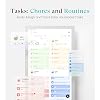
  • Tasks with Rewards: Manage routines and chore chart with reminders. The built-in reward system in this electric calendar motivates kids to complete tasks proactively and build healthy responsibilities.
  • Family Meal Planner: Plan meals easily with built-in recipes, pantry tracking, and auto-generated grocery lists. Our smart digital calendar supports YouTube cooking videos for step-by-step meal guidance.
  • Customizable Dashboard: Personalize your digital calendar wall screen with widgets for calendar, tasks, meals, weather, and media. Arrange and resize widgets to fit your familys daily routine.
  • Wall Mount Support: Mount your digital wall calendar touch screen on the wall for easy visibility. Supports portrait and landscape modes to fit any room.
  • App Control & Customer Support: Our calendar digital works seamlessly with the Cozyla+ app for anytime updates. Includes 24/7 customer service to help resolve any issues quickly.

Description

Cozyla Calendar+ 2 32" 4K Cozyla Calendar+2 15.6" Cozyla Calendar+2 24" Cozyla Calendar+ 2 32"

Brand: Cozyla Mate


Product Dimensions: 17.28"W x 29.29"H


Manufacturer: Cozyla


Brand Name: Cozyla Mate


Manufacturer: Cozyla


Part Number: CLD-32-WH-4K-UK


Item Dimensions W x H: 17.28"W x 29.29"H


Frequently asked questions

If you place your order now, the estimated arrival date for this product is: Friday, Aug 7

Yes, absolutely! You may return this product for a full refund within 30 days of receiving it.

To initiate a return, please visit our Returns Center.

View our full returns policy here.

  • Klarna Financing
  • Affirm Pay in 4
  • Affirm Financing
  • Afterpay Financing
  • Zip Pay in 4
  • Financing through Apple Pay
  • Financing through Google Pay
Leasing options through Acima may also be available during checkout.

Learn more about financing & leasing here.

Top Amazon Reviews


  • Great product and great customer service!
Color: White
I recently purchased the Cozyla Mate Calendar+ 2, and I couldn't be happier! This 32" digital calendar has truly transformed the way I organize my schedule and keep track of important dates. First off, the ease of use is remarkable. Setting it up was a breeze; I had it up and running in no time. The intuitive interface makes navigating through the features simple, even for those who might not be tech-savvy. I appreciate how user-friendly it is—everything from adding events to customizing reminders is straightforward and quick. Visually, this calendar is stunning. Its sleek design and vibrant display make it a lovely addition to my home. It fits perfectly in my living space, blending functionality with aesthetic appeal. I’ve received numerous compliments from friends and family who are impressed by its modern look. One standout aspect of my experience has been the exceptional customer service I received from Nora. She was incredibly helpful, answering all my questions with patience and providing guidance on maximizing the calendar's features. It’s refreshing to encounter such supportive customer service! Additionally, the ability to add ancillary applications is seamless. Whether it’s integrating with my Google Calendar or syncing with reminders, the process is smooth and efficient. This flexibility enhances the calendar's usefulness, making it adaptable to my busy lifestyle. Overall, I highly recommend the Cozyla Mate Calendar+ 2 to anyone looking for an effective, stylish, and user-friendly digital calendar. It’s more than just a calendar; it’s a vibrant hub for organizing my life! ... show more
Reviewed in the United States on January 2, 2026 by Brocklyn Stone

  • A Mom Review
Color: White
I don’t usually write long reviews, but this family wall calendar genuinely changed the way our home runs, so I want to share my honest experience in normal, everyday language. If you’re a parent who constantly feels like you’re forgetting something, or you’re tired of shouting reminders across the house, this thing might save your sanity the way it saved mine. Before we got this digital calendar, our family schedules were all over the place. My husband had his work meetings in Google Calendar, I used Apple Calendar, the kids’ school sent updates by email, and we had random notes stuck on the fridge. We were always missing something—spirit days, early dismissals, doctor appointments, you name it. It felt like we were running a small business with zero organization. But once we set up this Cozyla family calendar, everything changed. The best part is that it syncs with all the calendars we already use. I didn’t have to switch apps or learn something new—which I love. Everything just appears on one big screen in the kitchen, and everybody can see it. No more “Mom, when is picture day again?” or “Did you forget my practice?” The schedule is right there. Honestly, it has cut down on so many unnecessary conversations and last-minute stress. The second thing I didn’t expect to love so much is the chore chart with the reward system. I’m not exaggerating—this has reduced at least 50% of the nagging I normally do. I assign the kids’ chores on the screen, it reminds them automatically, and they actually like checking things off to earn their points. It made chores feel like a little game for them, and I don’t have to repeat myself ten times like a broken record. I also like how customizable everything is. You can choose what shows on the main screen—calendar, chores, weather, meal planner, photos—all the things a family actually uses every day. The layout is clean, simple, and doesn’t look messy on the wall. I switched between portrait and landscape to see which I liked better, and both looked great. Now let me talk about the meal planner, because this one surprised me. I cook almost every day, and one of the most annoying parts is thinking about what to make. This device lets me plan our meals for the whole week, and it even generates recipes and grocery lists. When I go shopping, the Cozyla+ app has everything ready. I didn’t think I needed this feature, but now I use it all the time. Another thing I appreciate is how everything stays synced even when we’re not home. If my husband gets a meeting change at work, he updates it on his phone and it shows up on the screen instantly. If school suddenly sends an email about a schedule change, I add it right away. It really makes life easier when everyone is running in different directions. And in case you’re wondering about setup or customer service: Their support team is actually helpful. I had one small question when I first installed it, messaged them, and they replied really quickly. It wasn’t one of those companies that disappear after you buy something. Overall, this digital family calendar has made a real difference in our daily routine. It doesn’t magically make life perfect, but it helps everything stay organized in a way that feels natural and not stressful. My kitchen feels calmer. I forget fewer things. The kids help more. And I don’t feel like the only person holding the entire household schedule in my head. If you’re a parent who wants less chaos and more teamwork at home, I honestly recommend giving this a try. I am truly happy with this purchase and would buy it again without hesitation. ... show more
Reviewed in the United States on November 13, 2025 by C. W

  • A smart hub that opens up a world of possibilities!
Color: White
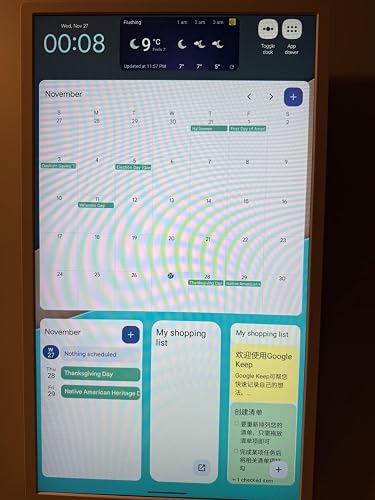
I installed the Cozyla Calendar+ in my kitchen/dining area. The large 32" display enables a wide variety of applications that covers the whole room: -A calendar that displays upcoming events so family members can stay in sync. -A Google Tasks widget to capture to-do items which apply to the whole family. -A Google Keep widget with the current shopping list. -A stock ticker for a market watchlist. -Weather and time. The wall-mount installation was easy using the included mounting template, a 1/4" drill bit, and the supplied wall anchors. A Phillips-head screwdriver was included in the package which worked perfectly for the drywall screws and I/O panel cover. The digital calendar on the home page has upgraded my family's organization and made it so we should never miss an upcoming event. In addition, I created a second home page to display a full-month calendar and meal planner app, as well as a split-screen display of the Calendar and Chrome browser. The split-screen allows me to monitor the home's live camera feeds in the browser while keeping track of the shared calendar, which can be updated at this device or remotely from a tablet, phone, or computer. I paired a RF keyboard/trackpad with the hub to make it easy to enter calendar details and navigate the display from a distance. I also connected a USB webcam to enable video calls in Google Meet -- for this to work properly it was necessary to Disable USB Audio Routing in the Android developer options. The screen saver is currently set to kick on after 30 minutes of inactivity and display pics from our Google Photos collection. The pics look great and attract a lot of attention given the big, bright screen. The Google Assistant can be summoned anytime with a "Hey, Google" and is super handy for playing music and videos, adjusting the volume, and navigating back to the home screen. This digital calendar has totally transformed our kitchen/dining area and enabled more organization & fun for the whole family! ... show more
Reviewed in the United States on November 2, 2024 by Tim V

  • Tried a lot of organizing tools and this one is awesome.
Color: White
The Cozyla Calendar+ 32-Inch Digital Wall Calendar has been a great addition to our home and family! I’ve tried a lot of organization tools, but this one stands out for its size and functionality. Here’s what I think: Pros • Big Screen, Big Help: The 32-inch touchscreen is amazing. It’s so much easier to manage schedules when everything is clearly displayed and touch-friendly. It’s like having a family command center. • Chore Chart Made Easy: The chore chart feature is one of my favorites. Each family member has their own section, and I can quickly assign tasks. My kids have actually been checking it without me having to remind them (that’s a win!). • Syncs with Everything: I use Google Calendar for work, personal activities and the kids school schedules, and it syncs flawlessly. It’s nice to SEE everything consolidated in one place. How We Use It: Our family uses the Cozyla for more than just keeping track of events. It’s become our go-to for meal planning, organizing to-do lists, and even jotting down reminders. My husband loves that it’s easy to see the week’s overview at a glance, and I like that I can update it from my phone when I’m out. My Overall Thoughts The Cozyla Calendar+ is a practical and stylish tool for any household. It’s helped us stay on top of things without the clutter of paper calendars or sticky notes everywhere ( as seen in my pic) Would I recommend it? Definitely, especially for families with hectic schedules! ... show more
Reviewed in the United States on November 29, 2024 by Christie

  • Pretty cool item
Color: White
Cozyla Calendar has helped our busy household! Living with roommates, pets, and frequent guests, we needed to keep everyone’s schedules in sync without constant check-ins. Cozyla makes it easy to see who's coming, going, or having plans at a glance. It’s helped us avoid scheduling conflicts and even plan for our pets' care while away. The interface is user-friendly, and we love how it keeps our chaotic lives a bit more organized. I could do this with a whiteboard, but just to be honest, I probably would not write it on a whiteboard. I just mark it on my calendar through my devices, and it syncs up. Here is how our household uses it: - Shared Family Calendar (schedules, appointments, pet care, maintenance (plumber, electrician, etc..) - Media Hub (Spotify - connected to wireless speakers (Patio), YouTube, and Apps for the Kitchen) - Security Cameras (Ring) - Project Planning - we are doing lots of projects, installations - this helps in executing our responsibilities As we learn more, we will collaborate more as needed. ... show more
Reviewed in the United States on October 25, 2024 by Patrick

  • The Best Digital Calendar On The Market
Color: White
I have been looking to buy a digital family calendar for months. I'm already a fan of Cozyla products, so when I saw they had a family calendar of their own, I was excited to get mine, and it doesn't disappoint. At 32-inches, it is the biggest calendar screen I've seen on the market. The competitors are good too, but I really love the size of this one. There is plenty of room to see everything on the screen, especially the calendar which can have a lot of things on it. The screen is bright, responsive, and easy to use. In some ways, it acts just like a tablet, and that is where the biggest divide will be for customers. Those wanting are more seamless, all in one experience, may not appreciate that fact. Since it acts like a tablet, it is incredibly customizable, if you don't like the chores app, you can download others until you find what works for you, same with the calendar, the shopping lists, etc. Some people may not want to put in that effort or work, but if you don't mind a little trial and error, you can make your calendar experience exactly what you want it to be. I personally found some of the apps on the calendar a little lacking, so I went and found what I wanted. It took a little while, but again, I didn't mind, I was making it to be exactly what I wanted. You get out, exactly what you put into it. The Cozyla Calendar+ boasts no subscription fee, which is great! With the competitors, you have to pay anywhere from $40 a year up to $240 a year to use the calendar's features, depending on the model and subscription you buy. The Cozyla Calendar+ uses Google products, Gmail, Google Tasks, Google Calendar, etc to keep the service free. I found the Tasks app to be a little lacking for chores and shopping, so I had to search to find what I wanted. There are free apps you can replace them with, but others you may have to pay for IF you want to. Again, you don't have to pay a dime on any subscription fees with the Cozyla Calendar+, but you may find yourself looking for an app or two that can do more, and you may have to pay for it. A bonus feature is the Cozyla Calendar+ comes on a swivel mount. You can turn it from portrait mode to landscape mode. In landscape mode, you can treat it like a TV. It can play Disney+, Netflix, and other streaming services. Not necessary for a family calendar, but it is a nice little perk! It is the most expensive calendar on the market, and that price point may turn some people away. However, it is also the largest digital family screen out there. It is also highly customizable, so in a sense, you are getting what you pay for. If you want an Out-of-the-box experience, you may find the Cozyla Calendar+ lacking. If you don't mind the price point, like the bigger screen (I absolutely do!!!!), and you are ok putting in a bit of trial and error to find the right apps that work for you and your family to keep you organized, then I cannot recommend this calendar enough. It can do everything its competitors can do, and a so much more! Try it for yourself! ... show more
Reviewed in the United States on November 7, 2024 by Philip L. Rabon

  • Finally, a digital calendar that I can stand by! Amazed at how well it performs.
Color: White
Let's get started that this digital calendar by Cozyla was impressive right at the start. Packaging: The box was so well thought out, it had a strong feeling of classy/luxury, and it was well packaged so nothing would get damaged during shipping. Everything was separated strategically from the charging cable to the two different wall mounts, etc. Device Setup/Initialization: The digital calendar was as simple as setting up an Android tablet if you've owned one in the past. Once you add your Gmail account to the device and syncing starts it pulls all of your contacts, Calendar events, Gmail configuration, and other settings with ease! After powering the device and testing the boot-up time after the device was setup this took under 30 seconds, solid design! Mounting: The mounting was well thought out as they provide not only a fixed wall setup but also a rotational mount allowing you to change from landscape to portrait given how you wish to use it at that present moment. Allowing for this adjustment provides flexibility as well as adaptability in the environment/room that it's placed. Screen customization: One of the features that really stands out is the widget/screen adjustments. By just holding the app you want for 1-2 seconds you are allowed to resize and/or move the widget to a different screen. This digital calendar truly allows complete uniqueness in terms of the layout that best fits your use case whether it be as a digital calendar, media center, home security control pad, or similar application. Security/Safety: Since it is an android based device it has the same level of security whether you want to add a swipe/pin lock. It also has eco-centric features allowing the device to have a standby mode helping with energy usage. Based on everything that was stated above, this touch screen device stands out among all of the others in it's class. If you are looking for a digital calendar that's going to organize your life with the highest value for money the Cozyla 32 inch Digital Calendar is the proper choice ... show more
Reviewed in the United States on April 11, 2025 by Justin S.

  • Smart calendar for family
Color: White 4K
The Cozyla Mate Calendar+ 2 is amazing. The 32” 4K screen is big, clear, and looks great on the wall. The touch screen is smooth and responsive. We use it for family schedules, chores, and meal planning. It supports all the apps we need and syncs easily with our phones. Now everyone can see the daily plans at a glance. Easy to install, very modern looking, and super useful. Highly recommended! ... show more
Reviewed in the United States on January 26, 2026 by Steven

Can't find a product?

Find it on Amazon first, then paste the link below.
Checking for best price...