










$629.99
Save $20.00
was $649.99
Buy Now, Pay Later
As low as
/ mo
Learn more
- – Up to 36-month term if approved
- – No impact on credit to apply
- – Instant approval decision
- – Secure and straightforward checkout
Ready to go? Add this product to your cart and select a plan during checkout.
Payment plans are offered through our trusted finance partners Klarna, Affirm, Afterpay, Zip, Apple Pay, and Google Pay. No-credit-needed leasing options through Acima may also be available at checkout.
Learn more about financing & leasing here.
Selected Option
Free shipping on this product
30-day returns
Learn more
FREE 30-day refund/replacement
To qualify for a full refund, items must be returned in their original, unused condition. If an item is returned in a used, damaged, or materially different state, you may be granted a partial refund.
To initiate a return, please visit our Returns Center.
View our full returns policy here.
Availability:
Only 5 left in stock, order soon!
Arrives
Thursday, Oct 29


At a glance
- Condition
- New
- Color
- Silver
- Model
- 272BGBA
- Weight
- 22.7 lb
- Size
- 27 in
- Format
- Widescreen
- Theme
- custom
Features 6
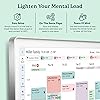
- 27" TOUCHSCREEN FAMILY CALENDAR: Meet the Skylight Calendar Maxour largest and most vibrant smart calendar yet. This stunning 27-inch digital calendar wall touch screen display auto-adjusts in portrait or landscape, keeping your familys schedule front and center in any space.
- EFFORTLESS SYNCING WITH ALL CALENDARS: Experience the power of an all-in-one electric calendar. Connect to Wi-Fi and sync instantly with Google, Apple, Outlook, Yahoo, and Cozi. This digital wall calendar auto-syncs events from all your devicesno manual updates needed.
- CHORE CHART & DAILY PLANNER IN ONE: Assign chores, track tasks, and organize routines with this electronic calendar's built-in digital planner, designed to support independence and shared responsibility. Great for kids and parents alike.
- UPDATE ANYTIME, FROM ANYWHERE: Use the free Skylight mobile app to update your digital chore chart and edit your calendar on the go. With the optional Plus Plan, unlock premium features like Magic Import, photo screensaver, meal planning, and stars & rewards.
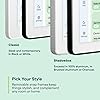
- MODERN DESIGN, EASY TO INSTALL: This premium electronic wall calendar mounts in portrait or landscape with an included guide. Swappable frame styles let you match your homes decorperfect for kitchens, entryways, or command centers.
- DISNEY MODE: Featuring 16 iconic characters. Encourage your family to work together via animations, avatars & screensavers! Only on Skylight Calendar. Available with the Calendar Plus subscription.
Specs 11
| Size | 27 inch |
|---|---|
| Format | Widescreen |
| Brand | Skylight |
| Theme | custom |
| Manufacturer | Skylight |
| Item Highlight | Family Organizer, HD Touchscreen Display, Wall Mountable, Portrait or Landscape, WiFi, Auto-Brightness |
| Brand Name | Skylight |
| UPC | 860011834342 |
| Item Weight | 22.7 pounds |
| Model Number | 272BGBA |
| Part Number | 272BGBA |
No specs match.
Frequently asked questions
If you place your order now, the estimated arrival date for this product is:
Thursday, Oct 29
Yes, absolutely! You may return this product for a full refund within 30 days of receiving it.
To initiate a return, please visit our Returns Center.
View our full returns policy here.
To initiate a return, please visit our Returns Center.
View our full returns policy here.
- Klarna Financing
- Affirm Pay in 4
- Affirm Financing
- Afterpay Financing
- Zip Pay in 4
- Financing through Apple Pay
- Financing through Google Pay
Learn more about financing & leasing here.
Similar Products



Top Amazon Reviews
A Game-Changer for Our Family’s Chaos
Color: Charcoal


Since we set up the Skylight Max, life at home just flows better. My wife and I both work full-time, and, with a pre-teen in the house, we all used to trip over each other with missed plans and last-minute surprises. Now we can all see the whole week laid out at a glance — appointments, date nights, school projects, even what’s for dinner — and it makes everything just SO much less stressful. Oh yeah, and the meal planning? SO much easier with Skylight’s built-in meal planning tools! N more “what are we having for dinner and what do we need to get from the store?” It’s all there in the app now! 🤌 It’s super easy to use, even if you’re not big on tech. The app lets us see everything and add stuff on the fly, so no more scribbled notes or random texts to try to remember things. And the fact that the screen rotates and adjusts to wherever you mount it? That was amazing since the space I wanted to put it is tall and narrow! I had it up and running in about 15 minutes and the supplied hardware worked great. Shipping was quick, the packaging was solid, and the calendar itself feels super premium. If you’re on the fence, I’d just go for it — it’s one of the best things we’ve bought in ages. It really helps keep the chaos of family life in check.
...
show more
Reviewed in the United States on July 2, 2025 by chris d.
10/10 recommend - read full review for details
Color: Silver


Went back and forth on this calendar for months trying to see if it was worth the price tag. I am someone who plans everything to the T and sticks to routines and schedules like it's my job. I have had this for a week now. 1st, let me say I was under the impression that I would receive the one month free trial to the plus subscription. Upon opening, I couldn't find anything anywhere implying that was true. I messaged skylight support to see what could be done as I wanted to try out the features before committing to $79 per year for the subscription. Was in a chat with a real human within 2 minutes. Gave me a one month free trial, activated it instantly on their side and had me up and running within 5 minutes of chatting. Their customer service alone is worth it. 2nd, The Packaging is very straight forward. You get a big box, you open to your 27 inch calendar. under that, you have two square boxes with the power supply in one and the mounting hardware in the other. there and two skinny boxes on the upper and lower side of the square boxes with your snap on frames in them. everything was very easy to figure out. 3rd, the mounting box included high quality, lipped drywall anchors, (if you know, you know), a drywall drill bit to predrill your holes, an extra screw and anchor as well. Very straight forward mounting bracket with a paper template. a level built into the mount and only 4 holes to hang. The calendar slides effortlessly into the mount and stays put with no wiggling. Frames snap right on. lastly, it may be a high price tag but for those who live for a central hub and something to take off some mental load, this is it. Family hub, meal calendar (I plan a month at a time), different profiles for the family, very customizable. Plus includes rewards for your tasks. 27 inch picture frame when not in use. Husband has app on his phone so doesn't ask what plans or dinner are as often. Plus gives you the AI sidekick that I have tested and helps input events and appointments easily. can control every from your phone. 10/10 would recommend.
...
show more
Reviewed in the United States on March 13, 2026 by Holly
Life changing for real!
Color: Charcoal
I love this thing so much! I hate it took me so long to buy one. It keeps everyones schedule so organized. I am able to color coordinate our whole family (we have 7 of us under one roof) and there are so many amazing features. To name a few of my favorite: I love that the screen saver is photos. Its so much better looking than a regular calendar. I love that I can share it with so many people and they can add events or photos or whatever. I love that I can easily make events reoccurring: think anniversaries and birthdays I love that I can upload recipes from online, or even my own. When I travel, I always have my recipes on the app and if my kids are home cooking they have all my recipes too. I use this feature every single day! There are seriously so many features. And I love them all. The only negative I have it that my husband had to cut a hole in the wall to mount it. But since I use it so much, it isn't going anywhere so that a small negative. That also brings up one more thing that I think is so amazing: the technology won't ever be outdated. It's not like a cell phone that a new one comes out every year with amazing new features. Skylight will download any updates so you won't ever have to purchase a new device to access new features. I think that is amazing for the customer because it is an investment!
...
show more
Reviewed in the United States on March 29, 2026 by Loading…
Best Planner for Type A
Color: White

I love this product! I am a type-a, mom of four and rely on lists and calendars. This does it all. It takes pictures and creates recipes or imports into lists. It is amazing. My kids love the chore chart and reward system. They also have stopped asking me what’s for dinner every night. The Skylight came with a diagram and level for easy install. Love it!
...
show more
Reviewed in the United States on August 27, 2026 by Josh B
Keeping track of appointments is super easy with a Skylight
Color: Black
Just absolutely wonderful !!! I missed the fine print about the subscription for the adding of photos, meals and such but I love the easy to use calendar on the Skylight and from my phone. Mounting the Skylight was a breeze !!!!
Reviewed in the United States on October 18, 2026 by Myra Acevedo
Serious game-changer!!! This will organize you!
Color: Charcoal
Ok got the 15inch and it was too small, so I got the 27inch max and I totally love it!! My husband and me stare at it when we add a new event to the calendar.. it populates real time from your phone!! You can put it on sleep mode so it’s not advertising your calendar to guests in your home or just to turn it off so it doesn’t light the room up at night. The light is dimmable, however still bright. So many features!! You can make the font larger to read the calendar from a further distance.. I love it!!!!! It is with the price! No more white boards, sloppy handwriting or accidental erasures!
...
show more
Reviewed in the United States on August 2, 2026 by Amazon Customer
Yes, buy this, dont wait
Color: White
This calander, though expensive. Is 100% worth every dollar. With children it helps with planning, rewards, and even tasks for cooking. I waited months before I bought it. I wish I bought it sooner. Day 1 and it was already making things easier. Really was amazing lol
Reviewed in the United States on August 25, 2026 by Amazon Customer
Skylight Yes Buy Go Big-Top 1000 best dad!
Color: White

Was on the fence on whether too buy or not. Well worth the money, it’s expensive but the large model is a must buy. Upgraded to this model! Easy to install, hang and use. Kids and adults can use very easy. Fit great mounted to the wall: looks amazing, great gift idea to someone why wants the organization and versatility. You’ll have to have subscription but worth it to unlock full potential of unit. It’s a practical upgrade for busy family. Buy a cord hider to go with it!
...
show more
Reviewed in the United States on September 8, 2026 by Top 1000 Rank Dad