




Cozyla Mate Calendar+ 2: 32" Digital Calendar Wall Touch Screen Chore Chart Customizable Dashboard Smart Electronic Display for Family Schedules Meal Plan All App Support Wall Mount Planner for 2026
Condition: New






$899.99
Buy Now, Pay Later
As low as
/ mo
Learn more
- – Up to 36-month term if approved
- – No impact on credit to apply
- – Instant approval decision
- – Secure and straightforward checkout
Ready to go? Add this product to your cart and select a plan during checkout.
Payment plans are offered through our trusted finance partners Klarna, Affirm, Afterpay, Zip, Apple Pay, and Google Pay. No-credit-needed leasing options through Acima may also be available at checkout.
Learn more about financing & leasing here.
Selected Option
Free shipping on this product
30-day returns
Learn more
FREE 30-day refund/replacement
To qualify for a full refund, items must be returned in their original, unused condition. If an item is returned in a used, damaged, or materially different state, you may be granted a partial refund.
To initiate a return, please visit our Returns Center.
View our full returns policy here.
Availability:
In Stock.
Arrives
Wednesday, Oct 28
Recently Viewed


At a glance
- Condition
- New
- Color
- White
- Model
- CD-7V541F
- Dimensions
- 29.29"W x 17.28"H
- Size
- 32 in
- Part Number
- CLD-32-White-UK
Features 6
- Family Shared Calendar: Our digital-calendar auto-syncs with Google, Apple, Outlook, Yahoo, etc. Create individual family profiles and use color-coded events to clearly organize everyones schedules in one shared view.
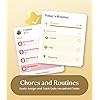
- Tasks with Rewards: Manage routines and chore chart with reminders. The built-in reward system in this electric calendar motivates kids to complete tasks proactively and build healthy responsibilities.
- Customizable Dashboard: Personalize your digital calendar wall screen with widgets for calendar, tasks, meals, weather, and media. Arrange and resize widgets to fit your familys daily routine.
- Family Meal Planner: Plan meals easily with built-in recipes, pantry tracking, and auto-generated grocery lists. Our smart digital calendar supports YouTube cooking videos for step-by-step meal guidance.
- Wall Mount Support: Mount your digital wall calendar touch screen on the wall for easy visibility. Supports portrait and landscape modes to fit any room.
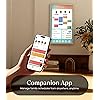
- App Control & Customer Support: Our calendar digital works seamlessly with the Cozyla+ mobile app for anytime updates. Includes 24/7 customer service to help resolve any issues quickly.
Specs 11
| Size | 32 inch |
|---|---|
| Year | 2026 |
| Brand | Cozyla Mate |
| Product Dimensions | 29.29"W x 17.28"H |
| Manufacturer | Cozyla Mate |
| Model Year | 2026 |
| Brand Name | Cozyla Mate |
| UPC | 792105798042 |
| Model Number | CD-7V541F |
| Part Number | CLD-32-White-UK |
| Item Dimensions W x H | 29.29"W x 17.28"H |
No specs match.
Frequently asked questions
If you place your order now, the estimated arrival date for this product is:
Wednesday, Oct 28
Yes, absolutely! You may return this product for a full refund within 30 days of receiving it.
To initiate a return, please visit our Returns Center.
View our full returns policy here.
To initiate a return, please visit our Returns Center.
View our full returns policy here.
- Klarna Financing
- Affirm Pay in 4
- Affirm Financing
- Afterpay Financing
- Zip Pay in 4
- Financing through Apple Pay
- Financing through Google Pay
Learn more about financing & leasing here.
Similar Products



Top Amazon Reviews
The Best Digital Calendar On The Market
Color: White
I have been looking to buy a digital family calendar for months. I'm already a fan of Cozyla products, so when I saw they had a family calendar of their own, I was excited to get mine, and it doesn't disappoint. At 32-inches, it is the biggest calendar screen I've seen on the market. The competitors are good too, but I really love the size of this one. There is plenty of room to see everything on the screen, especially the calendar which can have a lot of things on it. The screen is bright, responsive, and easy to use. In some ways, it acts just like a tablet, and that is where the biggest divide will be for customers. Those wanting are more seamless, all in one experience, may not appreciate that fact. Since it acts like a tablet, it is incredibly customizable, if you don't like the chores app, you can download others until you find what works for you, same with the calendar, the shopping lists, etc. Some people may not want to put in that effort or work, but if you don't mind a little trial and error, you can make your calendar experience exactly what you want it to be. I personally found some of the apps on the calendar a little lacking, so I went and found what I wanted. It took a little while, but again, I didn't mind, I was making it to be exactly what I wanted. You get out, exactly what you put into it. The Cozyla Calendar+ boasts no subscription fee, which is great! With the competitors, you have to pay anywhere from $40 a year up to $240 a year to use the calendar's features, depending on the model and subscription you buy. The Cozyla Calendar+ uses Google products, Gmail, Google Tasks, Google Calendar, etc to keep the service free. I found the Tasks app to be a little lacking for chores and shopping, so I had to search to find what I wanted. There are free apps you can replace them with, but others you may have to pay for IF you want to. Again, you don't have to pay a dime on any subscription fees with the Cozyla Calendar+, but you may find yourself looking for an app or two that can do more, and you may have to pay for it. A bonus feature is the Cozyla Calendar+ comes on a swivel mount. You can turn it from portrait mode to landscape mode. In landscape mode, you can treat it like a TV. It can play Disney+, Netflix, and other streaming services. Not necessary for a family calendar, but it is a nice little perk! It is the most expensive calendar on the market, and that price point may turn some people away. However, it is also the largest digital family screen out there. It is also highly customizable, so in a sense, you are getting what you pay for. If you want an Out-of-the-box experience, you may find the Cozyla Calendar+ lacking. If you don't mind the price point, like the bigger screen (I absolutely do!!!!), and you are ok putting in a bit of trial and error to find the right apps that work for you and your family to keep you organized, then I cannot recommend this calendar enough. It can do everything its competitors can do, and a so much more! Try it for yourself!
...
show more
Reviewed in the United States on November 7, 2024 by Philip L. Rabon
Great smart home hub for a busy family!
Color: White
This cozyla calendar has been a great smart home hub for my family! The packaging was really great, containing a ton of styrofoam, cardboard corner covers, boxes within boxes, and protective films for many layers protection. I knew the screen was going to be large, so I was a little concerned the delivery would cause some damage, but it arrived in great shape. The wall mounting hardware, instructions, tools and paper wall guide included were easy to use and made installation very easy. The power cord is extra long, which is great! I'll eventually hide the cord in the wall, so the the long cord will be ideal when I do that. Overall, the setup was simple but I did have to do some extra research and contact customer service about a couple of software questions I had. My google calendar synced perfectly and quickly. I use the large month view as well as the smaller "next event" view on my screen at all times, and that works well. I thought there was going to be a chore chart capability built in, but I needed to find an app to perform that function instead. I decided on Chores & Allowance Bot because it seems the most kid friendly. Unfortunately, the calendar does not support a widget for that app, so the kids do need to open the app separately from the home screen in order to check their chores and mark them complete every day. I REALLY enjoy my cozyla digital frame, so I was also surprised to find out that the cozyla calendar does NOT sync with the cozyla photo albums I set up for my frame. I was hoping to set the screen saver option to shuffle my cozyla pictures since they are already organized, but you are only allowed to select google photos for that purpose. Customer service was quick and helpful when I reached out with questions. I like that there is a screen lock button for quickly turning the screen black, when needed. We also like the spotify widget for playing music from the calendar since it is central in our living space. There is a snooze/wake up button on the side/back of the calendar as well as volume buttons, but they are a bit difficult to find at first. One of the best features is the Google Keep Notes widgets for shopping and to-do lists since you can say "Hey google - Add milk to my shopping list" and it shows up right away! The quality of the screen is easy to read, responds well to touches and swipes, and rotates easily on the mount for using both seamless landscape and portrait modes. My family has learned how to work the calendar quickly and have used it every day since installation. I would highly recommend this product to anyone!
...
show more
Reviewed in the United States on November 25, 2024 by Jolene Savkic
An All-in-One 32-Inch Android Touchscreen Hub That Transformed Our Home!
Color: White

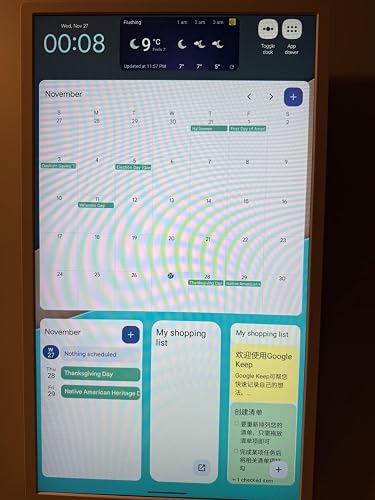

I am absolutely thrilled with the Cozyla Calendar+! This 32-inch digital wall calendar has become a central hub for our household. The multitasking capability is a standout feature—I can run multiple windows simultaneously, whether it’s streaming Netflix, catching up on YouTube, or monitoring our home security cameras in real-time. The split-screen functionality is smooth and efficient, making it incredibly versatile for both productivity and entertainment. The integration with the Google Play Store is a game-changer, allowing us to download a variety of apps tailored to our needs. Plus, the ability to summon Google Assistant adds an extra layer of convenience—it’s like having a personal assistant ready to help with anything from playing music to answering questions or managing smart home devices. The setup process was straightforward, thanks to the incredibly well-thought-out mounting tools included in the package. Cozyla even went the extra mile by providing a Phillips-head screwdriver! The free mounting bracket allows you to easily switch between horizontal and vertical display orientations, making it adaptable to different spaces and preferences. One of the most practical uses for us has been its role as a home security monitor. By connecting our cameras, we can view live feeds directly on the large, bright screen. It’s also perfect for family organization, with features like to-do lists, shared calendars, and shopping lists, all easily accessible and synced across devices. The drag-and-drop widgets and customizable dashboards make planning meals and events a breeze. This device has transformed how we manage our home, blending entertainment, security, and productivity into one sleek, stylish unit. It’s a must-have for any household looking to simplify and upgrade their daily routines. Highly recommend it to anyone seeking a functional and beautiful addition to their smart home setup!
...
show more
Reviewed in the United States on November 27, 2024 by Wenzy
Tried a lot of organizing tools and this one is awesome.
Color: White


The Cozyla Calendar+ 32-Inch Digital Wall Calendar has been a great addition to our home and family! I’ve tried a lot of organization tools, but this one stands out for its size and functionality. Here’s what I think: Pros • Big Screen, Big Help: The 32-inch touchscreen is amazing. It’s so much easier to manage schedules when everything is clearly displayed and touch-friendly. It’s like having a family command center. • Chore Chart Made Easy: The chore chart feature is one of my favorites. Each family member has their own section, and I can quickly assign tasks. My kids have actually been checking it without me having to remind them (that’s a win!). • Syncs with Everything: I use Google Calendar for work, personal activities and the kids school schedules, and it syncs flawlessly. It’s nice to SEE everything consolidated in one place. How We Use It: Our family uses the Cozyla for more than just keeping track of events. It’s become our go-to for meal planning, organizing to-do lists, and even jotting down reminders. My husband loves that it’s easy to see the week’s overview at a glance, and I like that I can update it from my phone when I’m out. My Overall Thoughts The Cozyla Calendar+ is a practical and stylish tool for any household. It’s helped us stay on top of things without the clutter of paper calendars or sticky notes everywhere ( as seen in my pic) Would I recommend it? Definitely, especially for families with hectic schedules!
...
show more
Reviewed in the United States on November 29, 2024 by Christie
Nice for family organization
Great unit, the size and the ease of mounting. Could have added more calendar integration options(ie:url for google) and maybe some cable track to maintain/hide the lower cord. The packaging is A+, nearly 1/2 the weight was the packaging. The robust packaging made sure that everything arrived working and undamaged. 2 mounting options were included as well as templates for mounting. VERY complete kit. 4 stars because as nice as it is the price is unreal for what it is.
...
show more
Reviewed in the United States on November 5, 2025 by 21B
Honest review from a busy mom of three!
Color: White
The Cozyla Calendar+ 32-Inch Digital Wall Calendar is a game-changer for busy families! As a mom juggling multiple schedules, I’ve been looking for a digital solution to keep my household on track, and this smart calendar does not disappoint. Design & Features The 32-inch touchscreen display is sleek, modern, and easy to navigate. Mounted on the wall, it doubles as both a stylish piece of home tech and an efficient family organizer. The resolution is crisp, and the touch functionality is responsive. It connects seamlessly to all major apps via the Google Play Store, making integration with Google Calendar, meal planners, or chore apps a breeze. The built-in chore chart and to-do list functions are lifesavers. You can assign tasks to individual family members, and everyone can check off their responsibilities in real time. This has worked wonders for encouraging accountability in my kids—no more excuses like “I didn’t know!” Usability Setting it up was straightforward. The app integration is excellent, and syncing multiple devices ensures everyone stays updated, whether they’re at home or on the go. I especially love using it as a meal planner—it’s so satisfying to plan the week’s meals visually and adjust things with a simple drag-and-drop. What I Love Most • Family Coordination: The calendar updates instantly, so there’s no confusion about plans or tasks. • Size: The large screen is perfect for busy families—everything is easy to read at a glance. • Multi-Functionality: It’s not just a calendar; it’s a full household hub! From chores to meal planning and more, it has streamlined so many aspects of our daily lives. Overall Impression The Cozyla Calendar+ is an excellent tool for families looking to stay organized in a digital age. It’s intuitive, attractive, and packed with features that make daily life more manageable. While it’s an investment, the amount of time and stress it saves is priceless. Highly recommend for busy households!
...
show more
Reviewed in the United States on November 16, 2024 by Shayla Tiare
⭐⭐⭐⭐⭐ Cozyla 32" Wall Calendar – Clear, Versatile, and Surprisingly Easy
Color: White

I’ve used a Cozyla wall calendar for over a year, and recently upgraded to the newer model. The setup was refreshingly simple—there was no need for me to transfer anything, which is why I didn’t need to use the flash drive or phone they recommend. It powered up quickly and was ready to go. The display is noticeably improved: crisp, easy to read in any lighting, and perfect for both planning and streaming. I love that it supports any app you’d use on an Android phone, which makes it incredibly versatile. The analog clock screensaver is a favorite—it adds a calm, classic touch to the room. The new placement of the power and volume buttons (now on the bottom instead of the back) makes it much easier to adjust. It’s wall-mounted in our space, and while they provide new brackets, I was able to reuse the ones from the previous version. It rotates smoothly on the wall, which is great for adjusting the viewing angle when streaming. I was without it for about a month before reaching out to support, and I didn’t realize how much I relied on it until it was gone. The replacement process was smooth and surprisingly quick—about a week to 10 days once I contacted them. The representative who helped me did a great job—professional, clear, and easy to work with. I had expected a software update, not a full replacement, so that was a pleasant surprise. There are a lot of features I’ve read about but haven’t explored yet, and I’m excited to dig into them. Based on my experience, I’d definitely recommend this product to others. It’s a great blend of functionality, design, and ease of use.
...
show more
Reviewed in the United States on November 5, 2025 by Renee
A smart hub that opens up a world of possibilities!
Color: White


I installed the Cozyla Calendar+ in my kitchen/dining area. The large 32" display enables a wide variety of applications that covers the whole room: -A calendar that displays upcoming events so family members can stay in sync. -A Google Tasks widget to capture to-do items which apply to the whole family. -A Google Keep widget with the current shopping list. -A stock ticker for a market watchlist. -Weather and time. The wall-mount installation was easy using the included mounting template, a 1/4" drill bit, and the supplied wall anchors. A Phillips-head screwdriver was included in the package which worked perfectly for the drywall screws and I/O panel cover. The digital calendar on the home page has upgraded my family's organization and made it so we should never miss an upcoming event. In addition, I created a second home page to display a full-month calendar and meal planner app, as well as a split-screen display of the Calendar and Chrome browser. The split-screen allows me to monitor the home's live camera feeds in the browser while keeping track of the shared calendar, which can be updated at this device or remotely from a tablet, phone, or computer. I paired a RF keyboard/trackpad with the hub to make it easy to enter calendar details and navigate the display from a distance. I also connected a USB webcam to enable video calls in Google Meet -- for this to work properly it was necessary to Disable USB Audio Routing in the Android developer options. The screen saver is currently set to kick on after 30 minutes of inactivity and display pics from our Google Photos collection. The pics look great and attract a lot of attention given the big, bright screen. The Google Assistant can be summoned anytime with a "Hey, Google" and is super handy for playing music and videos, adjusting the volume, and navigating back to the home screen. This digital calendar has totally transformed our kitchen/dining area and enabled more organization & fun for the whole family!
...
show more
Reviewed in the United States on November 2, 2024 by Tim V