




Like-New Amazon Kindle Scribe (32 GB) - 10.2” 300 ppi Paperwhite display, a Kindle and a notebook all in one, convert notes to text and share, includes Premium Pen
Condition: New


Buy Now, Pay Later
As low as
/ mo
Learn more
- – Up to 36-month term if approved
- – No impact on credit to apply
- – Instant approval decision
- – Secure and straightforward checkout
Ready to go? Add this product to your cart and select a plan during checkout.
Payment plans are offered through our trusted finance partners Klarna, Affirm, Afterpay, Zip, Apple Pay, and Google Pay. No-credit-needed leasing options through Acima may also be available at checkout.
Learn more about financing & leasing here.
Selected Option
Free shipping on this product
30-day returns
Learn more
FREE 30-day refund/replacement
To qualify for a full refund, items must be returned in their original, unused condition. If an item is returned in a used, damaged, or materially different state, you may be granted a partial refund.
To initiate a return, please visit our Returns Center.
View our full returns policy here.
Availability:
Only 2 left in stock, order soon!
Arrives
Oct 2 – Oct 7
Recently Viewed


Digital Storage Capacity: 32.0 GB
Offer Type: Without Kindle Unlimited
Features
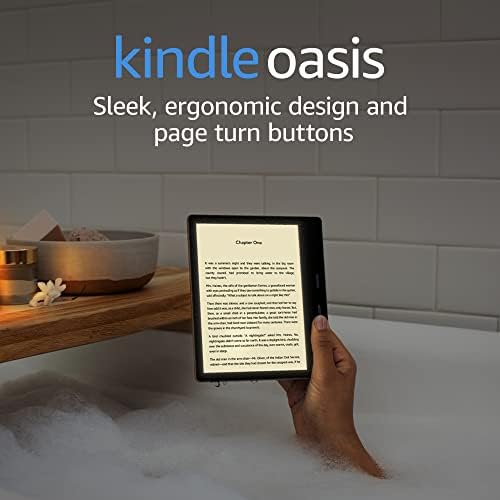
- A Kindle and a notebook, all in one - Read and write down thoughts in books and documents, now with Active Canvas. Take notes in the built-in notebook, now with AI notebook tools.
- Write in books Start writing on the page and Active Canvas will create space for your notes. Expand the margins to add more notes, or collapse them to see the original page.
- Create notebooks - Journal, sketch, take meeting notes, and more. Summarize and refine your notes with new built-in AI notebook tools.
- Import and mark up documents - Review and take notes directly on documents and PDFs.
- Read and write as naturally as you do on paper - With a 10.2" 300 ppi glare-free, front-lit display.
- Long battery life - Unlike tablets, Kindle Scribe offers months of reading and weeks of writing on a single charge.
Frequently asked questions
If you place your order now, the estimated arrival date for this product is:
Oct 2 – Oct 7
Yes, absolutely! You may return this product for a full refund within 30 days of receiving it.
To initiate a return, please visit our Returns Center.
View our full returns policy here.
To initiate a return, please visit our Returns Center.
View our full returns policy here.
- Klarna Financing
- Affirm Pay in 4
- Affirm Financing
- Afterpay Financing
- Zip Pay in 4
- Financing through Apple Pay
- Financing through Google Pay
Learn more about financing & leasing here.


Top Amazon Reviews
Digital Storage Capacity: 32.0 GB
Offer Type: Without Kindle Unlimited
I was looking for a device that would allow me to read and take notes without the distractions of a typical tablet, and the Kindle Scribe seemed like a good fit. After using it for a while, here are my thoughts: Use Cases: The Focused Reader: If you're someone who loves to read without distractions, this is a great device. The large, paperwhite display is easy on the eyes, and the lack of notifications helps you stay immersed in your books. I especially appreciate it for reading in bed, as the warm light setting is very comfortable. The Note-Taker: The Scribe is excellent for taking notes, whether it's for work, school, or personal use. The pen feels natural to write with, and the ability to organize notes into notebooks is a plus. I've found it particularly useful for brainstorming ideas and taking meeting notes. The Document Annotator: Being able to write directly on PDFs is a game-changer. I can easily mark up documents, highlight important sections, and add my own comments. This has been incredibly helpful for reviewing contracts and research papers. The Journaler: The Kindle Scribe is great for journaling. The writing experience is very smooth, and the device is less distracting than using a computer or tablet. My Personal Take: The large screen is fantastic for reading and writing. It feels much more like reading a physical book than smaller e-readers. The pen is comfortable to hold and write with, and I appreciate that it doesn't need to be charged. The note-taking features are basic but functional. The handwriting-to-text conversion works surprisingly well. The battery life is excellent. I can go weeks without needing to charge it. While you can't directly mark up the pages of books purchased from the Kindle store, the sticky note feature is a decent workaround. The device is a bit pricey, but if you value focused reading and note-taking, it's worth the investment. Overall: The Amazon Kindle Scribe is a great device for anyone who wants a distraction-free reading and writing experience. It's not a replacement for a full-fledged tablet, but it excels at what it's designed to do: provide a focused and comfortable way to read, annotate, and take notes.
...
show more
Reviewed in the United States on March 11, 2025 by Robert Standen
Digital Storage Capacity: 64.0 GB
Offer Type: Without Kindle Unlimited
Okay, this thing definitely exceeded my expectations, and I'm honestly kind of shocked by how much I actually love this thing. And one of the things I love about the kindle line as a whole is the battery life, and the scribe is no exception. I was messing around with sketching in the notebook for about an hour and a half only lost about 6 percent. Very nice! I know writing is more taxing on the battery, so I know that reading will last even longer. For me, the screen size is perfect (for both books and comics) in my opinion. While I love and still use my Paperwhite, there were some instances where I really wished I could have just a little bit more real estate. I know it's a small thing, but it's nice having an entire page fit on the page! It's also a lot snappier than my aging Paperwhite - turning pages is a remarkably quick by comparison! Speaking of stupid conveniences, the feel of the pens/pencil/marker is so satisfying. I don't know how else to say it, but it makes writing more enjoyable somehow. Maybe it's because I've spent so much time typing lately, but going back to handwriting is very nostalgic and (for me, at least) gets my creativity flowing in a way that typing just can't. And as an artist, it feels good to just sketch a little doodle in the corner, or add a starburst around your text to make it stand out more. I can put fancy little outlines on there as well, and add a bit of shading with the highlighter. I only wish it had the ability to set up layers (even one of them would help a ton!) or have different styles for each page in your notebook. (It'd be nice to alternate between a blank page and a sheet of looseleaf!) Either way, this thing works like a dream and I'm enjoying it far more than I was expecting to, which is why I felt compelled to write this review and recommend it to anyone wanting to spice up their notes. It also works fantastic as a journal too, which has provided plenty of unexpected therapeutic benefits as well. 10/10 product, easy. Best of all, I got a refurbished model along with a used leather case - both showed up looking like they were brand new. Today was a good day!
...
show more
Reviewed in the United States on January 26, 2024 by Wilfredo Martinez
Digital Storage Capacity: 32.0 GB
Offer Type: Without Kindle Unlimited


I bought this tablet for the purpose of taking notes. Here are my observations: • I bought the “Like new” model. It came in a generic amazon box and packaging. As advertised, it looks and behaves like new. It includes the same warranty as the new models. • The construction feels durable and pleasingly tactile. The writing surface resembles frosted glass. There are small rubber “feet” on the bottom side that keeps it planted while on a tabletop. • There’s only one button located on the side of the tablet. • Battery life is super compared to conventional tablets. It can last days under “normal” use. • With its 300 DPI resolution, the text looks crisp, just like print. • It is super responsive when taking notes with the stylus. It truly feels like you are writing on paper including the sound that it makes. • The tablet supports light and dark mode. It also has a backlit screen feature. This allows for use in varying lighting conditions. • Uploading files the tablet can be done by side loading, plugging in the tablet with a USB cable, or you may upload the document via “Send to Kindle”. If you upload the file via a USB cable, you will have limited functionality when viewing the document. You can use the “send to kindle” online uploader. I would recommend this method as it provides the best functionality for the documents. There is a Send to Kindle app, although I couldn’t get it to work with my PC. • You can export documents within the tablet to your email address. • Mine came with the premium pen. It allows for writing, highlighting, and erasing. The side button can be programmed to perform different shortcuts like highlighting, erasing, switching writing modes, etc. There are two premium pens available. One with a plastic end and the other with a rubberized end. I like the one with a plastic end as it provides sufficient resistance. It compresses slightly giving you positive feedback. • It can be used as an E-reader, including books from Amazon and other sources, Audible books and music (using a wireless Bluetooth speaker or earphones). Supported File Types are PDF, DOC, DOCX, TXT, RTF, HTM, HTML, PNG, GIF, JPG, JPEG, BMP, EPUB. • It can perform text to speech. (You need to pair it with a Bluetooth speaker or headphones for this feature to work.) • You can take notes on documents while viewing them. Although, this option varies depending on what type of document you are viewing and how it was uploaded to the tablet. • I was able to use it to sign PDF documents and export them to my email account. I found this to be very helpful! • In terms of how many notes you can take, it depends on which one you buy. I bought the 32 GB model. Based on my limited experience, you can take as many notes as your heart desires. My advice is to keep things organized using folders to minimize clutter. • I found that I have to replace the pen tip more often than I would like, and they are not cheap. This would be one of my top negatives. • It is a bit laggy going through the menu options compared to conventional tablets but isn’t a deal breaker for me. • All things said, I love this tablet. It suits my purpose perfectly as a note taker. I will be able to take notes galore without worrying about running out of storage space, and it is an enjoyable experience. Being able to read eBooks and write notations on them is a bonus. There is room for improvement such as improved response time, a better method to copy documents to it, and the cost of pen tips. Otherwise, I would recommend it.
...
show more
Reviewed in the United States on February 25, 2025 by gr2
Digital Storage Capacity: 32.0 GB
Offer Type: Without Kindle Unlimited
The Kindle Scribe is an innovative addition to the Kindle family, bringing e-ink reading and note-taking together in one device. As someone who enjoys both reading and jotting down thoughts or annotations, I was excited to try out this new model. It does a lot of things well, but there are a few areas where it could use some improvement. What I Liked: Beautiful Display: The 10.2-inch E Ink display is perfect for reading. It's large, clear, and easy on the eyes, even for long reading sessions. The text is crisp, and the screen feels almost like reading paper, which is what I love most about Kindle devices. Writing and Note-Taking: The writing functionality is surprisingly smooth, and the included stylus has a nice feel in your hand. Whether you're underlining text or making full-page notes, it feels natural. It’s a great tool for people who like to highlight and make annotations directly on their books. Storage: With up to 64 GB of storage, you can keep a huge library of eBooks, PDFs, and notes all in one device, which is excellent for students, professionals, or heavy readers. Battery Life: As expected from a Kindle, the battery life is outstanding. Even with regular use, it lasts for weeks without needing to be charged, which makes it ideal for long trips or vacations. What Could Be Better: Limited Note-Exporting Options: While the note-taking feature is fantastic, exporting your notes isn’t as seamless as I’d hoped. I’d like to be able to more easily sync or export my notes to other platforms like Evernote or OneNote. The current export options feel a bit clunky. Price: The Kindle Scribe is quite a bit more expensive than other Kindle devices, so you’re paying a premium for the larger screen and note-taking features. If you’re primarily a reader, it might feel a bit overkill compared to the more affordable Kindle Paperwhite. Writing Precision: While the stylus works well for general note-taking, I found that precision could be a little tricky for more detailed sketches or fine writing. It’s great for basic annotations, but not necessarily for high-level sketching or drawing. Overall Thoughts: The Kindle Scribe is a wonderful tool for readers who also like to take notes and highlight within their books. It's great for students, researchers, and anyone who likes to engage with their content more deeply. The display quality is fantastic, and it’s a pleasure to read and write on. However, the high price point and some minor limitations with note exporting and precision writing make it feel like a niche product. If you’re looking for an all-in-one e-reader and notebook, it’s definitely worth considering, but if you’re just looking for a Kindle for reading, the Paperwhite might be more than enough.
...
show more
Reviewed in the United States on February 14, 2025 by Pink022
Digital Storage Capacity: 32.0 GB
Offer Type: Without Kindle Unlimited
I love it, I carry it everywhere with me and it's just there for me to take notes or read. I wish it was a bit lighter, however I am impressed with the build quality. Why did I chose this out of all the ink pads out there? 300dpi having clear reading and good writing is important to me. The software development team is going a great job and updating the features. I love the fountain pen. The note taking abilities of the scribe I believe will only get better over time. I am impressed with what it can do now. Way more than a not pad could ever do for me. It's quick, I like the start up speed. Some reviews mentioned a lot of the others are slow. I love the speed it makes it a lot easier to use no frustration for waiting to be able to take a note. I have kindle unlimited and read a lot, and in the Amazon ecosystem for my books. Get the pro pencil love the eraser and the button to highlight. Battery is great I use about 10% a day although I do use it lots. Try to keep battery below 80% to look after the longevity of the batter. I have one notebook that's called: Random and I have a place to write down anything I want thoughts ideas and it's a great brain dump. Which I then review. I also have an On going to do list which again is a brain dump so I don't forget things I have to do. It took me a while to get the resources to buy this but I am really glad I did. I was very ready to return this as it's reviews are mixed and I was undecided. Don't get me wrong have wanted a digital writing note book for ages. Ever since the remarkable tablet came out. I was also disappointed in the kindle scribe when it was released, now I have been converted. I don't regret this purchase at all, in fact it's one of my most useful bits of technology. A never ending note book and eReader in one. If you are in the market for one of these try it out, get a refurbished one, if you don't like it return it.
...
show more
Reviewed in the United States on February 14, 2024 by Andrew Bamford
Digital Storage Capacity: 16.0 GB
Offer Type: Without Kindle Unlimited
It’s exceptional for reading. The light softens at night. It’s the closest experience to reading from a book. The look and size of the page is great. Also, if you’re going to splurge on the Scribe, I’d strongly recommend a very nice cover. I started with a cheap cover and decided to splurge for the leather cover that can be sat up easily and spins in any direction. This makes it so easy to read in bed at night. The Scribe looks like a book page but with the cover it can be sat up to read and even turned a bit to balance on the bed. The writing is fine. I’m not as into it but it helps. It’s also heavy and the leather cover adds weight but I still take it everywhere. It has a huge library inside it. So the weight doesn’t matter to me I’ve had many kindles but could never read on them easily. The pages were small enough for me to get distracted. They just weren’t as easy as a book with the full page. This Kindle is so worth it. I love mine. I’m updating. I’ve had it for awhile now. The writing feature is GREAT. I easily open notebook in seconds to write down appointments and information. The pen turns into a marker and I’m a nervous doodler. It’s just the best for doing this if you have the habit of drawing everyone waiting in a room or a plant in the corner. And no internet connection to distract from your books.
...
show more
Reviewed in the United States on November 20, 2024 by Karen Barker
Digital Storage Capacity: 32.0 GB
Offer Type: Without Kindle Unlimited
I really enjoy the scribe. It's useful, easy to use and surprisingly accurate in it's tracking. Reading is a real pleasure with your entire library at your fingertips. The problem that I have found is the auto shut off "feature". The device will shut down with no warning, and go to sleep. The only way to keep it awake is to interact with the screen frequently. This is fine when reading, but when using the notebook feature, it incredibly annoying and no way to turn it off. Take some notes, do a little reading / research and you have to turn it back on to see what you've done, over and over again. Even just a warning would help, but no... it just shuts down. Oh.. if you're having trouble with the pen writing at a distance, reset the tip of the pen. If it's in too much, or too little it will act strangely --- update. The latest software update corrected this issue. There is now a timer to control when it sleeps I'm completely satisfied, and am using this daily!!!!!
...
show more
Reviewed in the United States on April 21, 2024 by Kawboy
Digital Storage Capacity: 32.0 GB
Offer Type: Without Kindle Unlimited
I have been waiting SO long for a paperwhite device I could write in. When I saw this I knew I had to have it, though it’s probably worth about $50 tops. Y’all. Idk where all these 5-star reviews are coming from. I assume people with perfect vision who are never going to use the “scribe” feature (I saw a few say they had no intention of doing so). But there are some HUGE issues still! - the price. I mean obviously. Why is it so expensive? It makes no sense! There are tablets cheaper! I assume it’s all about the paperwhite. Which was the main deal for me - I just think it’s really cool. Whatever. - This thing is NOT user-friendly. It’s gotta be primarily the Kindle cult followers who are using this thing with any regularity. The most user-friendly things are flipping the pages and erasing. The web browser is clunky and doggedly stuck on Amazon uk, which I clicked by accident. I figured out how to delete Amazon.uk from the list and it STILL defaults to there every single time. I tried the Facebook link but it doesn’t load. I’ve given up. Web browser unusable. - the biggest problem of all: the font is TINY. My vision is fading but it’s not THAT bad. There is NO way to adjust the font past “regular” and “large” - and “large” is mayyyyybe 1pt larger than regular. So if you need large font, this is not the device for you. - the “brightness”. In setup mode it was ridiculously dim. I mean so stupidly dim I almost gave up and repackaged it for immediate return because if I can barely see it in “large” with the brightness up… I had to take a pic of the screen with my phone and enlarge it a few times, but I got through it. But the brightness is either “blinding” or “too dark”. I couldn’t find a sweet spot. I thought I’d love the “warmth” - I romantically thought “oh, it’ll be like sepia!” But it’s not like sepia; it’s like some weird alternative-tangent yellowish color that hurts my eyes and reducing the dimness (dimth?) doesn’t help because everything just fades away. - everything seems really fuzzy. I know it’s not just me because I’m sitting here typing this out on my much-smaller phone and it’s fine. - they REALLY want you to spend money on this goodreads thing, whatever that is, and the kindle store. It found two of the few dozen books I’ve downloaded in the past decade or so - don’t judge me; I haven’t been able to see well enough to read a book, and I’m more of a writer anyway, which is why I wanted the SCRIBE. But I thought maybe we could use apps like the Gutenberg thing or that app that brags about having 500,000 free books or something. No apps. It appears to be Kindle or nothing. There are some books available with Prime, apparently, but I couldn’t tell you the names of them because there was no way to enlarge anything there. So obviously because I couldn’t even see the covers/titles nothing jumped out at me as something I might want to check out. - ok, so I wanted a device that might help me read books again (this ain’t it, so I can’t imagine what a regular size kindle must be like!), but I really wanted it for my own books I write. I keep thinking if only I had a really cool device maybe I could get back into it. This device is cool, but that’s all it is. It just isn’t functional! There’s no way to put my own books on this thing. Supposedly we can use email, but this device isn’t very forthcoming in telling people how to do things they’d like to do. Oh yeah, the “Notebooks”. Very no-frills - you can get free apps on your phone that are roughly a billion times better. You can start a “notebook” and write or doodle to your heart’s content… and that’s pretty much it. I haven’t tried but apparently you can’t save your writing to text (so yeah, useless for longhand book writing). It’s a fun little thing to scribble on and mess around for a few minutes, but I’m just not sure $300 is a reasonable price for that. Ugh. Well, bottom line is I think I just talked myself out of keeping this thing. If I were rich I might keep it around as a scribble toy, but I’ve already ordered an LCD tablet on Temu for $4 so… I’m so disappointed I think I might cry. Ugh.
...
show more
Reviewed in the United States on December 16, 2023 by Gracie V