




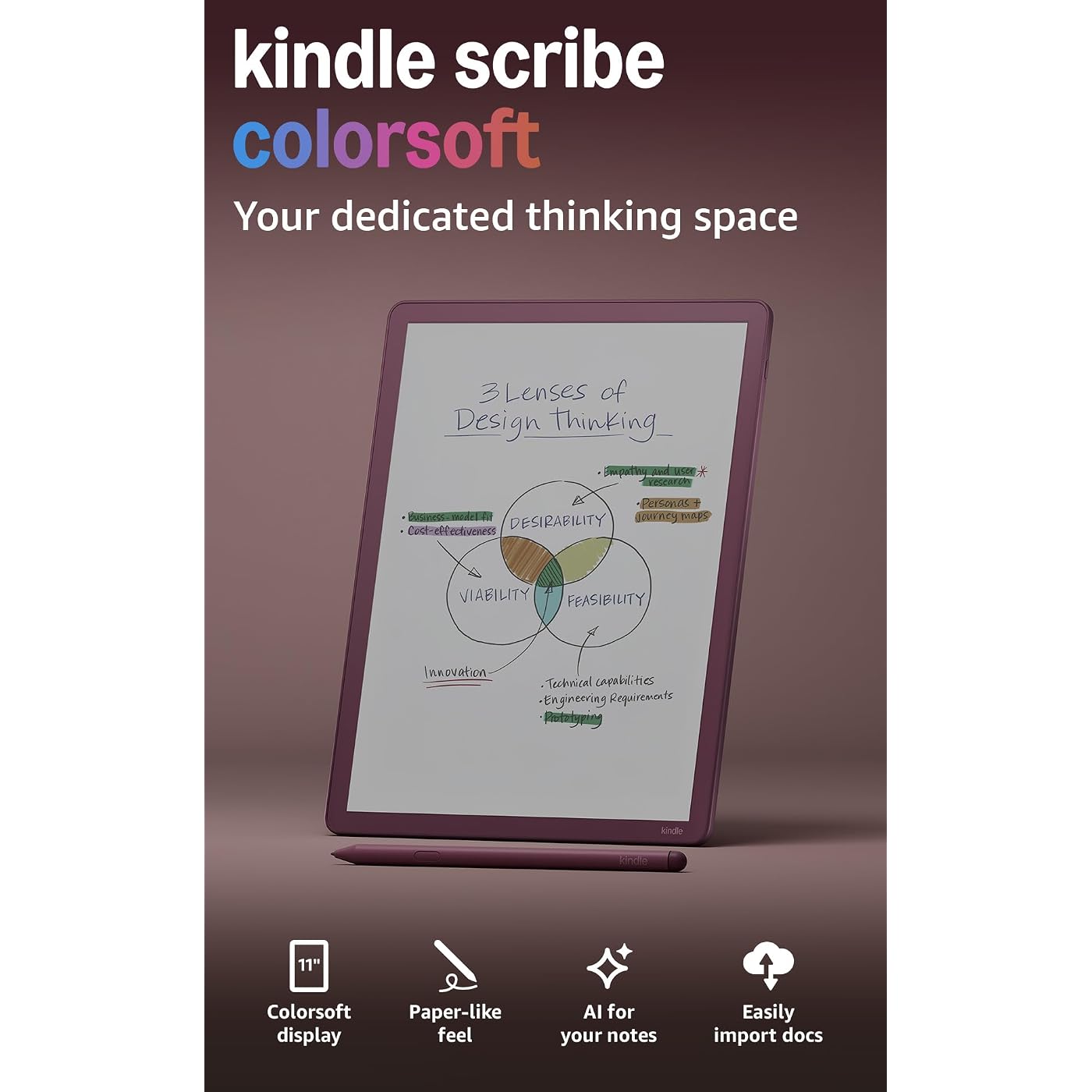
Amazon Kindle Scribe Colorsoft 64GB (newest model) — 11” paper-like color display — Write in notebooks, docs, and books. Read in any light. Pen included - Fig
Condition: New




Buy Now, Pay Later
As low as
/ mo
Learn more
- – Up to 36-month term if approved
- – No impact on credit to apply
- – Instant approval decision
- – Secure and straightforward checkout
Ready to go? Add this product to your cart and select a plan during checkout.
Payment plans are offered through our trusted finance partners Klarna, Affirm, Afterpay, Zip, Apple Pay, and Google Pay. No-credit-needed leasing options through Acima may also be available at checkout.
Learn more about financing & leasing here.
Selected Option
Free shipping on this product
30-day returns
Learn more
FREE 30-day refund/replacement
To qualify for a full refund, items must be returned in their original, unused condition. If an item is returned in a used, damaged, or materially different state, you may be granted a partial refund.
To initiate a return, please visit our Returns Center.
View our full returns policy here.
Availability:
Only 2 left in stock, order soon!
Arrives
Thursday, Oct 8


Digital Storage Capacity: 64 GB
Color: Fig
Offer Type: Without Kindle Unlimited
Features
- Our most advanced Kindle Scribe Features an 11 Colorsoft display with front light, built-in notebook, AI tools, and support for popular cloud services.
- Bring ideas to life in color The custom-built Colorsoft display delivers high-contrast, paper-like color thats easy on the eyes without distracting flashes when writing.
- Get a pen-on-paper feel: The textured surface and responsive display create a smooth, paper-like writing experience. Plus, the included pen never needs charging and has a built-in eraser and shortcut button for tools like the highlighter.
- More room to read, write, and think Just 5.4mm thin and 400g light, with fluid performance and a large 11" display that gives you space to work comfortably.
- Get more out of your notes Take notes in the built-in notebook, then use AI to find information, ask questions about what youve written, and generate summaries. You can also clean up handwriting or convert it to text.
- Review documents without printing Import files from Google Drive or Microsoft OneDrive, add handwritten notes and markups, and export them as PDFs. You can also send notebooks to Microsoft OneNote to edit anywhere.
- Capture thoughts as you read Choose from millions of title in the Kindle Store, then jot notes right on the page. Write between the lines as text shifts to make room, or expand and collapse margins as needed.
- Leave the charger behind Long battery life gives you weeks of reading and writing on a single charge.
- Stay focused on what matters: Unlike a tablet, Kindle Scribe is purpose-built for reading and writing. Its glare-free, paper-like display is easy on the eyes, even in bright sunlight, without distracting apps and notifications pulling you away.
Frequently asked questions
If you place your order now, the estimated arrival date for this product is:
Thursday, Oct 8
Yes, absolutely! You may return this product for a full refund within 30 days of receiving it.
To initiate a return, please visit our Returns Center.
View our full returns policy here.
To initiate a return, please visit our Returns Center.
View our full returns policy here.
- Klarna Financing
- Affirm Pay in 4
- Affirm Financing
- Afterpay Financing
- Zip Pay in 4
- Financing through Apple Pay
- Financing through Google Pay
Learn more about financing & leasing here.



Top Amazon Reviews
Digital Storage Capacity: 64 GB
Color: Fig
Offer Type: With 3 months of Kindle Unlimited
If you are looking at Kindles, THIS Scribe Colorsoft 64GB is the best pick. Well, if you plan to use its features, that is. I have owned Kindles from the original, the Paperwhite, and the black and white Scribe. This Colorsoft is by far Amazon’s best model. I have an Audible account and Kindle Unlimited which makes the most out of all of my Amazon platforms (Fire TV, Echo/Alexa). Being able to organize books by collection makes enjoying the Scribe easy. The battery life of this version and pencil lasts pretty much all day long. Charging takes less than an hour to fully fluff it up. The screen is easy to see at 11”. You can use the pencil or your finger or both, the Scribe has excellent touch sensitivity. Now with color, the new functionality has made using the Scribe incredibly fun. I love to do puzzle books like Codeword Books, Sudoku, and Anagrams. I can change the color at any time. Make a mistake? No worries: I can use the eraser end of the pencil and touch the screen. Or I can tap two things and erase the whole page. You can do the same puzzle books again and again. I am able to do coloring books, ink tracing books, and zen tangle. In the interest of saving paper, I downloaded a five-subject notebook for $2.99 in which I do my nightly journal, etc. I change the color on the page as many times as I want for the manifesting section, Bible verses, whatever. The Colorsoft is a fabulous gift for the reader in your life who has too many books. I’ve downloaded many of my books (many for free with Unlimited), and decluttered my house! The ability to read and write is wonderful. No extra payment for cloud storage. When I eventually replace this Kindle, no worries, Amazon will have everything popped back onto the new one without batting an eye. No antivirus software. No cloud storage fees. Just the kindle and you. Lovely.
...
show more
Reviewed in the United States on September 19, 2026 by Nursebeanpole
Digital Storage Capacity: 64 GB
Color: Graphite
Offer Type: Without Kindle Unlimited
My 15-year-old Kindle Fire died. At first, I was bummed. Now I am so happy because I love this Scribe. It weighs virtually nothing and the screen is so easy on the eyes. The long battery life is a real plus and makes this e-reader truly portable. Set up was a breeze. But the feature that sealed the deal was the ability to take notes within the book. It made me experience the same joy as when I bought my first book and realized it was mine and I could write in it if I wanted. It is pricey, worth it for an avid reader.
...
show more
Reviewed in the United States on July 28, 2026 by Susan E. Chariker
Digital Storage Capacity: 32 GB
Color: Graphite
Offer Type: Without Kindle Unlimited
I absolutely love it! I originally bought it just to try it out, thinking I might return it if I didn't like it, but I’ve been inseparable from it since the moment it arrived. While you can’t fully compare a Kindle to physical paper, this is an excellent color e-reader. Here are some of the highlights for me: 1. Seamless Integration: I really love the Google Drive connectivity. It makes it incredibly easy to upload documents or e-books to Drive and then just import them directly onto the Kindle. 2. Increased Reading Time: My overall reading time has definitely gone up, so I highly recommend this device. If you have Kindle Unlimited, it's particularly great for children's picture books; the experience is wonderful and it keeps me engaged. 3. Lightweight and Great Writing Feel: The device itself is very light. The writing experience feels surprisingly close to paper, and I especially enjoy the pencil-writing sensation. It’s also great that you can flip the pen over to use it as an eraser (it reminds me of practicing calligraphy when I was a kid). That said, there are a few areas that could be improved: (a) Consistency: The experience with highlighting seems to vary depending on the file format (like EPUB, PDF, or Markdown). (b) Palm Rejection: Sometimes my right hand triggers the screen while resting on it, causing accidental page turns. (c) Writing Refinement: I think the writing experience could still be tweaked and improved a bit more. Overall, picking up the Kindle Scribe during Prime Day was a fantastic deal!
...
show more
Reviewed in the United States on July 28, 2026 by Chloe G.
Digital Storage Capacity: 32 GB
Color: Graphite
Offer Type: Without Kindle Unlimited
Full disclosure: I returned it. But I think most people would love it. I’ve had this on my “want” list for YEARS. I bullet journal and read kindle books and thought this was going to be amazing!!! I was waiting for it to have color option and Prime Day sale. It was delivered last week and I really really wanted to love it. And honestly, if it had been $250, I probably would have kept it and tried to use it. But I just couldn’t justify the $500+ price tag for what I would use it for. It DOES feel enough like paper and the pen was excellent but the size was weird. It’s not a notebook size or a book size—so it felt awkward using it for either. I need reading glasses now but my paperwhite or my phone with larger font works fine to read ebooks. The screen was colorful enough and no glare but I didn’t look forward to writing in it like I do with my paper notebook. And I tried making a couple different notebooks to see how easy it would be to go back and search for something or reread a page…it wasn’t that easy and I didn’t remember locations like I do in my paper journals. And I love being able to see all my journals on the shelf and pull one down and find my goals that year or my gratitude page for May 2021. And I just couldn’t see myself doing that with this. I truly think some things just cannot be replaced by electronics. And maybe if you grew up with this instead of notebooks and journals, you’d love it. But it’s just too large and too expensive and too much of a screen for me to embrace it.
...
show more
Reviewed in the United States on July 2, 2026 by Alyssa80
Digital Storage Capacity: 64 GB
Color: Fig
Offer Type: Without Kindle Unlimited
I am an avid reader and gave up paper books years ago in favor of e-readers. Every couple of years, I upgrade to the newer model for a year or two. Last Prime Day, I decided to pick up a Kindle Color Scribe to replace my older B&W Scribe. I cannot tell you how happy I am with the unit. It is lightweight and fairly easy to read in bed. The Scribes are big, so you usually need two hands. Great clarity. The new Color Scribe is thinner than the original, and the display uses most of the space, unlike the original Scribe, which had a wide band on the left side. A bit pricey, but I use it daily, and it was easy to justify the cost. Very highly recommended.
...
show more
Reviewed in the United States on September 9, 2026 by LarryB
Digital Storage Capacity: 64 GB
Color: Graphite
Offer Type: Without Kindle Unlimited
Everything about this experience was bad for me. My nearly $700 64GB Scribe Colorsoft arrived poorly padded in a beat up outer box and the inside box was scuffed as well. I thought, "ok, it's just the outer packaging". I open it up and go to power it on. I'd selected the box for them to set it up so I could skip the initial setup but there I was, staring at the Language select screen followed by Region and finally...... Setup for my account. At this point we're already down to 4 stars max for the bad "out the box" experience by it not being configured as requested. I mean they do offer the option so... I do what it recommends and use the Kindle app on my iPhone (15 Pro) to do the setup. It sees the new Kindle and goes to connect it to WiFi.... It shows every network except my two networks. Even though I'm in the room with the router, the phone is connected to the same network, and I have both 2.4 & 5G bands for it to use. I hit rescan.. 5 times... Nothing. I close the app, re-open it and try again... Nothing. You get no option to continue if your network doesn't show up. I try 4 more times and then my network shows up and I finish setup. Were down to 3.5 stars max because at this point I'm irritated. It was almost $700 after all and I just spend 10 minutes trying to do what they said would be done for me. Finally I go through the settings and set it up like normal and then go to download my books, manga and graphic novels. It seems fast. Until you download something big. I downloaded Vineland Saga Vol.1. It took over 5 minutes on 5G WiFi and I have 900+ Mbps over WiFi in my house. Ok, I think, "Only gotta do that once". Then I go to open it..... Wait for it... Wait for it... It took so long I started counting. After 3 minutes I scrolled the page thinking it had frozen. It hadn't but it was just back to showing me the book. I tapped to open it again and it said "opening" again. Another 3 minutes. Repeat. This time it opened in 1 minute 37 seconds. I try to scroll back to the start of the graphic novel by tapping the top of the screen and then dragging the progress bar to the beginning. It won't let me. At this point were down to 2 stars max. After a dragging forward to the middle of the graphic novel and letting it get me to the page, it then let me drag to the beginning. I download a few manga and Solo Leveling. I open Solo Leveling which worked fine but then when trying to read I could barely make out the images. It's a resolution thing, color and contrast thing. I thought this would be a great device for it but it was very, very bad. There are images with multiple people early on and you honest to goodness can only make out 2 people. I pop open the same page on my iPad Mini 6 and go, "wow. There's like 4 other people in this panel". I go back into Library and look at my Collections. I keep everything in a collection from samples and even split fiction and non-fiction. When you buy a lot of series with 20+ books in them it feels essential for finding what you're looking for. No matter what I did, it would not sort by recent. It kept putting collection that hadn't been read, added to or downloaded from for years at the top. Meanwhile a entire series I just bought and downloaded two days ago was buried in the middle. Yes, I did use sort. I toggled it off and on trying to fix it and it wouldn't. I was determined to keep the first 4 or so collections in alphabetical order. Yeah... Were definitely at no more than 2 stars now. I try to read a black and white manga because that's where it should be 300 PPI right? Contrast kills it. You stare at the page trying to make out what the background art is supposed to be. I was so disappointed at that point. I tried several manga, and these are all manga I bought through Amazon (that's the only way I buy or read manga) 1 star, definitely going to return. I had this out the box and lost all faith in it in less than 3 hours. TLDR; Software isn't ready and features don't work like they should. Bad for color graphic novels with fuzzy images, washed out color and most importantly you really can make out what your looking at well. It's not about if it's pretty, it lacks sufficient contrast for intelligibility. It's an 11 inch screen and I was reading with a squint and it 8 inches from my face trying to make things out. Vineland Saga looked great but basic manga looked bad. There wasn't enough contrast and the more you crank the backlight the worse the contrast gets. I'm returning it, disappointed beyond words. I was so looking forward to this. I will say it was perfectly fine for book that are just text. But at this price point that doesn't make sense for me when I still have (and love) my Oasis.
...
show more
Reviewed in the United States on May 30, 2026 by D. Robinson
Digital Storage Capacity: 64 GB
Color: Graphite
Offer Type: Without Kindle Unlimited
BLUF: Awesome Kindle upgrade but a terrible Remarkle2 replacement. I give it a 3* due to lack of functionality to compete with the Remarkable, cost at being a Kindle Reader. But even knowing that I would still have gotten it for the backlighting, color, larger screen, and faster responsiveness. The Good: As a Kindle reader I would give it a solid 4*. This is for the responsiveness (my 6 yr old Kindle takes a sec or two to flip pages or respond to menu selections. The backlighting is nice. I also like the larger size than the small Kindle readers. I would have been happy with the larger screen without any writing capability. The pages are a light pale blue at best (not white as some have expected). I am okay with that. The Bad: Too expensive to be just a Kindle reader. But if you want a 11" screen it is your only option. The Kindle GUI is clunky and non-intuitive unless you have had a lot of experience with them. Their iPad app has more features than the Kindle GUI. Seems odd, you would have expected the opposite. It is like there are two separate teams and they do not talk to each other. The Ugly: As a productivity device I give the Scribe a 2*. Kindle/Amazon has a lot to work to do if they want to compete with Remarkable. They are not even in the same league. Simply being able to write on Epaper is not enough. The Kindle Scribe documents cannot be accessed/edited directly by the PC/Mac/Tablet (iPad, etc). I can create PDFs to use as a template and duplicate the pages on the Remarkable with ease and edit on both the device or my PC or iPad easily.
...
show more
Reviewed in the United States on February 25, 2026 by Tadashi
Digital Storage Capacity: 64 GB
Color: Graphite
Offer Type: Without Kindle Unlimited
BUILD The device is sturdy and solid. The rubber nubs on the bottom of the device are held in place providing excellent protection. They feel like they will never come out and are definitely not glued in. But, I always have a quiver of extra protective items in place for my devices. SPEED This is a super device, just incredible. The graphic novels and the colors are fantastic. The layout and software are just a bit different than the regular Kindle scribe. The pens are very responsive and there is no hesitation or slowness in any of the operations or test that it is given. PLAN TO USE BUSINESS CLOUD OPTIONS I have noticed some options for import and export but I cannot comment on them yet as I'm enjoying this device so much at this time. SET UP Set up was absolutely simple and even quicker than any of my other Kindle devices that I favor (all of them). Even download times that you would expect to be longer because of bigger pages being downloaded are not noticeable. FIRST SECOND AND THIRD PARTY ACCESSORIES For me, there are just enough first party and second party items to make the most of this device available at this time. I did also grab some paper like feel covers and a Mars Lumograph (PC EMR) digital pencil, (the blue one) and a Lamy AL-Star (PC) EMR digital pen with some extra nibs. As you may find out by doing some research, the Amazon pro pen is definitely the best pen that there is (I almost went ahead and bought another Amazon pro pen) but I love the extra options by picking up the extra pencil and pen by STAEDTLER. I was also able to grab one of the Amazon"s professional portfolio covers. The leather on the new covers is beautiful. The Colorsoft professional portfolio cover leather has a slight crinkled pattern while my black and white Kindle scribe stand up cover is smooth. The Colorsoft scribe cover seems to take the scratches a little better. The Colorsoft cover folds to the left and opens up to the left with a magnetic fold over tab to hold the device and pen all together. COLOR AND PLEASING APPEARANCE TO THE EYE - ENJOYMENT TO GET SUCKED IN TO A LARGE PAGE The pages are huge and again that the color, especially a graphic novels or any colors graphics that are in any of the books also look wonderful great for the eyes soft on the eyes. SPECIAL DEVICE This is a special device as a Kindle. I feel Amazon developed the ultimate Kindle. What we have here is a color kindle mixed with color scribe that is blazing fast. But each kindle has its place. The Colorsoft Scribe is an incredible value for the price. Expect a kindle that pulls at your heart strings that is nothing less than a Colorsoft and a Scibe all mixed together like a perfect speedy batter for the perfect cake. Gosh just enjoy it as it makes your synapses fire.
...
show more
Reviewed in the United States on February 21, 2026 by Rich Z.