Buy Now, Pay Later
- – 6-month term
- – No impact on credit to apply
- – Instant approval decision
- – Secure and straightforward checkout
Ready to go? Add this product to your cart and select a plan during checkout.
Payment plans are offered through our trusted finance partners Klarna, Affirm, Afterpay, Zip, Apple Pay, and Google Pay. No-credit-needed leasing options through Acima may also be available at checkout.
Learn more about financing & leasing here.
Selected Option
FREE 30-day refund/replacement
To qualify for a full refund, items must be returned in their original, unused condition. If an item is returned in a used, damaged, or materially different state, you may be granted a partial refund.
To initiate a return, please visit our Returns Center.
View our full returns policy here.


At a glance
- Condition
- New
- Size
- 7inch for Ram 1500 09-12
- Model
- Dodge RAM 1500/2500/3500 Radio
- Storage
- 32 GB
- Screen size
- 7 in
- Vehicle Service Type
- Car
- Map Type
- North America
- In the box
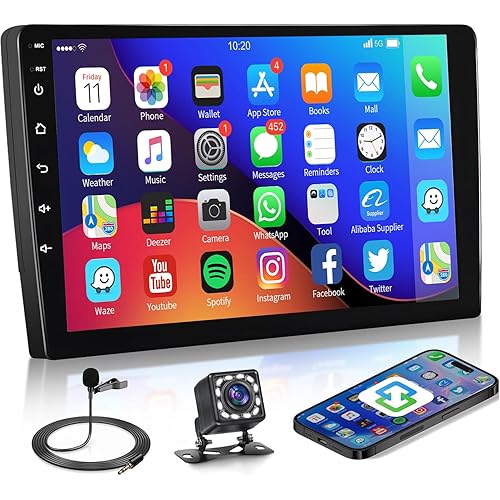
- Dodge RAM 1500/2500/3500 RadioGPS AntennaBack CameraHarness CableCanbus BoxInstructions and Installation Guide
- Warranty
- 12 month
- Works with
- Amplifier, Smartphone, Speaker
Features 7
- Applicable Car Models Car radio built for Dodge radio:Ram 1500/2500/3500 2009-2012;Challenger 2008-2014;Avenger 2008-2014;Grand Caravan 2008-2020;Nitro 2007-2011;Journey 2009-2010;Caliber 2009-2012Charger 2008-2010;Dakota 2008-2011;Magnum 2008;for Jeep radio:Wrangler/Unlimited 2007-2017;Grand Cherokee 2008-2010;Liberty 2008-2012;Compass 2009-2016;Patriot 2009-2016;for Chrysler radio:200 2011-2-2010;300C 2008-2010;Sebring 2007-2010
- Wireless CarPlay & Android Auto Refresh your commute, Daily Commuters, tired of reaching for your phone in traffic for maps and calls? With dodge Ram radio 1500 2500 3500 2009-2012, wireless CarPlay & Android Auto sync navigation, music, and calls instantly cable-free. Engineered to reduce distractions and save time, it keeps your drive fluid. dodge ram 1500 accessories makes daily travel easier.
- Upgrade Android 15 & Quad-Core CPU 32GB ROM SystemUpgrade with confidence, Budget Upgrade Drivers, tired of slow performance systems that fail to match their price? With dodge ram 2500 radio, Android 15 and a quad-core CPU plus 32GB ROM deliver smooth multitasking, and reliable storage without overspending. Designed for efficiency and value, dodge ram 3500 radio elevates your driving experience.
- Faster 5GWiFi & Bluetooth Connectivity Drive with confidence, New Drivers, uneasy about managing calls and navigation while learning to drive? With Jeep Wrangler radio upgrade, faster 5GWiFi and Bluetooth keep your maps, music, and calls connected instantly and smoothly. Designed to minimize distractions and simplify control, jeep jk radio helps you stay focused on the road.
- Online/Offline GPS Navigation & HD Rearview Camera Upgrade your view, Small Screen Owners, tired of tiny screens making driving and reversing hard? With jeep Grand Cherokee radio, online/offline GPS gives clear directions anywhere, while the HD rearview camera ensures a wide, sharp view when parking. Built for safety and ease, jeep Grand Cherokee accessories improves every drive.
- FM Radio & Steering Wheel Control & DSP Multi-EQ SoundModernize your car, Used Car Owners! Missing premium sound and easy command? Through dodge challenger radio 2008-2014, FM radio preserves favorite channels, steering wheel control ensures safety, and DSP technology enhances every song. For used vehicle upgrades, dodge challenger accessories is the ultimate choice for better sound and convenience.
- Plug & Play Installation & Technical Support Budget-friendly upgrade, Value Seekers! dodge avenger radio 2008-2014 offers simple plug & play setup and expert tech support to avoid hidden service costs. Your dodge avenger accessories makes modernizing affordable and stress-free.
Description
For Dodge radio: Ram 1500/2500/3500 radio 2009-2012; Challenger radio 2008-2014; Avenger radio 2008-2014; Grand Caravan radio 2008-2020; Nitro radio 2007-2011; Journey radio 2009-2010; Caliber radio 2009-2012; Charger radio 2008-2010; Dakota radio 2008-2011; Magnum radio 2008; For JEEP radio: Wrangler/Unlimited radio 2007-2017; Grand Cherokee radio 2008-2010; Liberty radio 2008-2012; Compass radio 2009-2016; Patriot radio 2009-2016; For Chrysler radio: 200 radio 2011-2014; 300 radio 2008-2010; 300C radio 2008-2010; Connect your device to your dodge ram radio using CarPlay or Android Auto for seamless navigation and audio control. Its vivid screen helps you keep your eyes on the road, ensuring a safer and smoother travel experience. Built-in Bluetooth in your dodge ram 1500 stereo makes it easy to stream music and answer calls hands-free, ensuring your phone stays put. You can maintain your road focus while experiencing superior call clarity and simplified everyday travel. Explore new destinations using the built-in GPS on your dodge ram 2500 stereo, featuring clear on-screen routes to replace your small phone display. Offline map functionality is perfect for remote drives with weak signal, ensuring you arrive safely and calmly. Navigate busy city streets while staying entertained; your dodge ram 3500 accessories supports split screen for FM radio and maps at once. You can follow your route and enjoy local broadcasts without ever needing to swap displays. Immerse yourself in superior sound with the EQ and DSP features of your jeep wrangler JK radio, designed for precise audio shaping. Everything stays highly visible on the HD screen, allowing you to manage your custom soundstage with total precision and ease. Avoid the lag of older networks by utilizing 5GWiFi on your jeep Wrangler/Unlimited stereo to keep your maps sharp and your apps ready to go. It offers the stability and speed required to make city driving and highway cruising feel completely effortless and connected. Enhance your daily routine with the HD rearview camera on your jeep Grand Cherokee stereo, which offers a crystal-clear visual guide whenever you are in reverse. It significantly reduces the stress of backing up in tight quarters by making every obstacle stand out on your main display. Experience a smarter way to drive by linking your steering wheel buttons to your dodge challenger stereo for instant control over volume and tracks. By putting audio management right in your hands, it helps you avoid the risk of distracted driving during your daily travels. Maintain your vehicle's electrical integrity with a dodge avenger stereo that features a direct plug-and-play interface. It plugs straight into the factory wiring harness, providing a secure and simple connection without the extra steps of cutting into your car's power lines. Q: Bluetooth won't connect or signal is unstable? A: 1.Verify the signal booster on the reversing line is connected; 2.Use the stereo’s Bluetooth settings to pair with your phone; 3.Enter “0000” for “Car-BT” and delete old connections if pairing fails. Q: How do I manage CarPlay connectivity? A: 1.Pair with Bluetooth and Zlink will open CarPlay; 2.Disable Background Connection to avoid automatic linking; 3.Control via iPhone Settings > General > CarPlay > Zlink. Q: Wireless Mirroring setup instructions? A: iOS: Open Zlink5, activate iPhone hotspot, connect Wi-Fi, and select zj-airplay; Android: Open Zlink5, install Zlink, pair Bluetooth, and enable hotspot. Q: Why is my Wi-Fi connection dropping? A: CarPlay requires the Wi-Fi signal, causing regular Wi-Fi to drop; disable Background Connection to manage this. Q: Rear camera display is showing a blank image? A: 1.Verify the trigger wire and camera plugs are tight; 2.In Factory Settings (8888), go to Protocol Parameters and pick the right camera format. Q: How to disable the backup lines? A: Access Factory Settings (8888) > Protocol Parameter Settings and turn off Reverse Track and Auxiliary Line. Q: What to do if the radio has a black screen? A: 1.Check the CANBUS box interface; 2.Press the RST reset hole and check the fuse. Q: The screen is unresponsive to touch? A: Recalibrate the touch sensitivity with the five-finger method from the video. Q: Why is there no sound? A: 1.Ensure the speaker wires are not crossed or loose; 2.Confirm the CANBUS box is fully connected. Q: Steering wheel controls aren't responding? A: 1.Make sure the SWC/protocol cables are connected correctly; 2.Set the vehicle protocol to the correct model. Founded by a team of automotive technology enthusiasts. At Clavhop, we believe every drive should be smarter, safer, and more enjoyable. We design, develop, and continuously improve Android car radios that help drivers enjoy navigation, communication, and entertainment on every journey.
Specs 25
| Brand | Clavhop |
|---|---|
| Model Name | Dodge RAM 1500/2500/3500 Radio |
| Vehicle Service Type | Car |
| Screen Size | 7 inches |
| Special Feature | 7 Inch Touchscreen radio & Split-Screen, Bluetooth & Faster 5GWiFI & GPS Navigation, FM Radio & DSP & EQ Setting, Steering Wheel Controls & Back-up Camera, Wireless CarPlay & Android Auto |
| Connectivity Technology | Bluetooth, USB, Wi-Fi |
| Map Type | North America |
| Audio Output Mode | Stereo |
| Mounting Type | Dashboard Mount |
| Compatible with Vehicle Type | Car |
| Additional Features | 7 Inch Touchscreen radio & Split-Screen, Bluetooth & Faster 5GWiFI & GPS Navigation, FM Radio & DSP & EQ Setting, Steering Wheel Controls & Back-up Camera, Wireless CarPlay & Android Auto |
| Map Types | North America |
| Operating System | Android |
| Memory Storage Capacity | 32 GB |
| Display Type | Touch Screen |
| Human-Interface Input | Touchscreen |
| Control Method | Touch |
| Supported Satellite Navigation System | GPS |
| Software Update Supported to Date | unknown |
| Built-In Media | Dodge RAM 1500/2500/3500 Radio, GPS Antenna, Back Camera, Harness Cable, Canbus Box, Instructions and Installation Guide |
| Item Highlight | 5GWiFi Upgrade Grand Cherokee 2008-2010,Challenger Avenger 08-14 7inch Touch Screen Stereo GPS FM Apple Carplay Android Auto |
| UPC | 607615218068 |
| Manufacturer | Clavhop |
| Number of Items | 1 |
| Unit Count | 1 Count |
No specs match.
Frequently asked questions
To initiate a return, please visit our Returns Center.
View our full returns policy here.
- Klarna Financing
- Affirm Pay in 4
- Affirm Financing
- Afterpay Financing
- Zip Pay in 4
- Financing through Apple Pay
- Financing through Google Pay
Learn more about financing & leasing here.