Search  for anything...

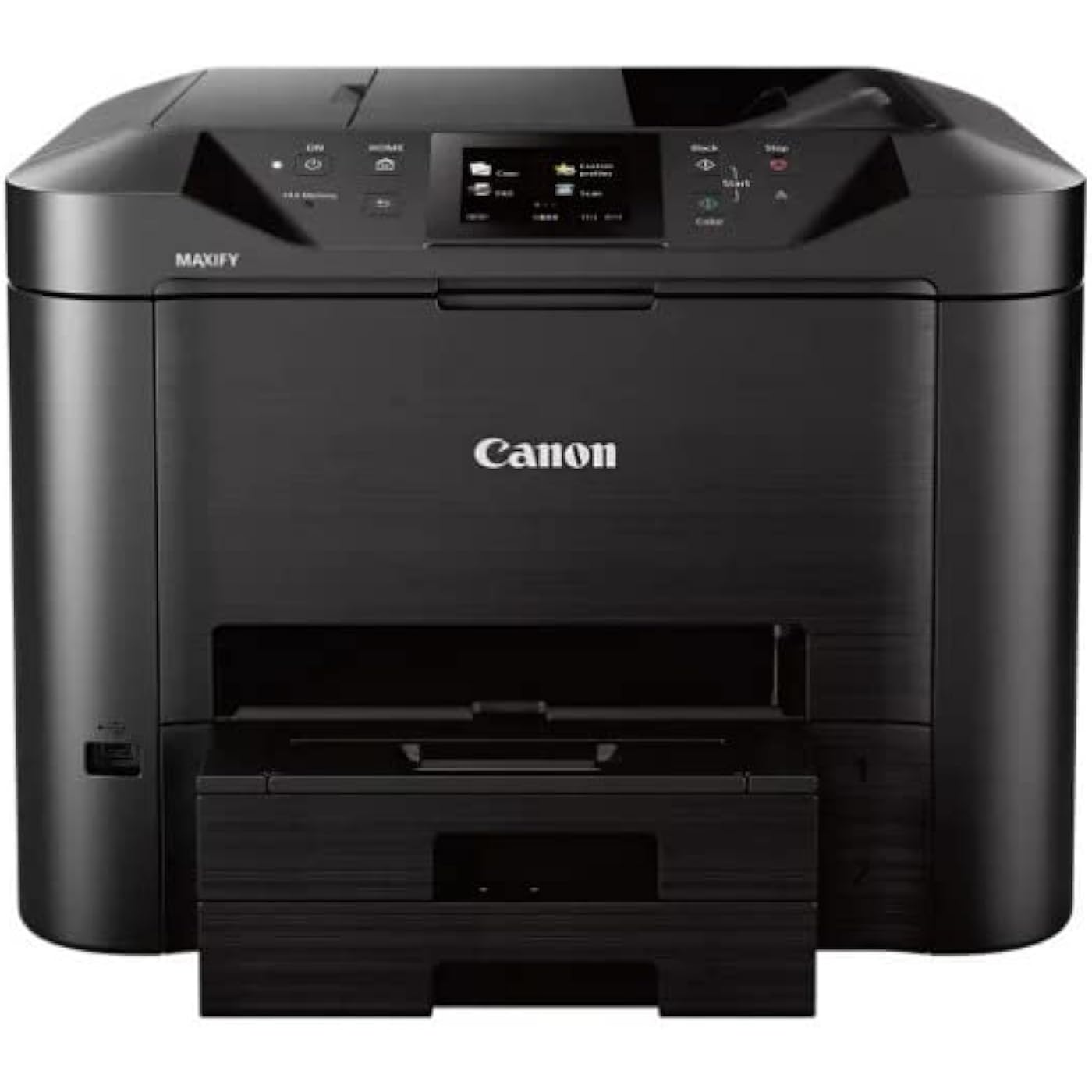
Canon Office and Business MB5420 Wireless All-in-One Printer,Scanner, Copier and Fax, with Mobile and Duplex Printing, Black, Desktop
  • Based on 423 reviews
Condition: New
Checking for the best price...
$319.98 Why this price?
New Year Deal · 22% off was $410.99

Buy Now, Pay Later


As low as / mo
  • – Up to 36-month term if approved
  • – No impact on credit
  • – Instant approval decision
  • – Secure and straightforward checkout

Ready to go? Add this product to your cart and select a plan during checkout.

Payment plans are offered through our trusted finance partners Klarna, Affirm, Afterpay, Apple Pay, and PayTomorrow. No-credit-needed leasing options through Acima may also be available at checkout.

Learn more about financing & leasing here.

Free shipping on this product

30-day refund/replacement

To qualify for a full refund, items must be returned in their original, unused condition. If an item is returned in a used, damaged, or materially different state, you may be granted a partial refund.

To initiate a return, please visit our Returns Center.

View our full returns policy here.


Availability: 19 left in stock
Fulfilled by Fast and Precise by Staples

Arrives Jan 9 – Jan 12
Order within 12 hours and 15 minutes
Available payment plans shown during checkout

Protection Plan Protect Your Purchase
Checking for protection plans...

Features

  • Save time with single pass duplex scanning and copying, by scanning both sides of 2-Sided documents simultaneously
  • Be ready to print in as little as 6 seconds from power on with Quick First Print
  • By using XL ink tanks MAXIFY printers feature a Low Cost per Print with a High Page Yield that can save you money by delivering a high volume of prints from one set of ink tanks
  • With a 30, 000 page peak Monthly Duty Cycle, the MAXIFY MB5420 is built to last for all your business needs.
  • Built to handle big jobs, this MAXIFY Printer features a 500 Sheet Paper Capacity with two 250 Sheet paper trays

Description

The Canon MAXIFY MB5420 Wireless Small Office All-In-One Printer is designed to meet the needs of smaller businesses with up to nine users, by delivering high-quality, low-cost prints. It boasts a quick first printout time as fast as 6 seconds with fast print speeds up to 24 ipm (B&W)/15. 5 ipm (Color) getting your prints you need when you need them. Power through paperwork with single-pass duplex scanning which simultaneously scans both sides of two-sided documents, enabling fast multi-page copying and scanning. The MB5420 is built for big jobs with a 500 sheet paper tray capacity, and a high page yield of 2500 B&W/1500 color prints when using XL ink tanks. Always stay connected and informed with built-in standard Management Information Base (MIB) support, which allows you to easily manage the MAXIFY printers on your network. Built- in Wi-Fi networking makes it easy to connect and print from your computer and favorite mobile devices, and with the Canon PRINT app, you have the added features of being able to print from the cloud and scan directly to your mobile device. Best of all, the MB5420 printer is backed by 100% U. S. -based customer service & support.

Brand: Canon


Connectivity Technology: Ethernet, Wi-Fi


Printing Technology: Inkjet


Special Feature: Auto-Duplex, Double Sided Scanning, Energy Star, Touch Screen


Color: black


Model Name: MAIN-31864


Printer Output: Color


Maximum Print Speed (Color): 15.5 ppm


Max Printspeed Monochrome: 24 ppm


Item Weight: 28.4 Pounds


Is Discontinued By Manufacturer ‏ : ‎ No


Product Dimensions ‏ : ‎ 18.3 x 18.1 x 13.9 inches; 28.4 Pounds


Item model number ‏ : ‎ MB5420


Date First Available ‏ : ‎ July 20, 2016


Manufacturer ‏ : ‎ Canon USA Inc.


Best Sellers Rank: #86,624 in Office Products (See Top 100 in Office Products) #76 in Ink Tank Printers


#76 in Ink Tank Printers:


Customer Reviews: 3.8 3.8 out of 5 stars 423 ratings


Product Dimensions: 18.1"D x 18.3"W x 13.9"H


Controller Type: Android


Maximum Media Size: 8.5 x 14 inch


Included Components: Full Set of Ink Tanks, MAXIFY MB5420 Wireless Small Office All-In-One Printer, Power Cord, Setup CD-ROM, Telephone Line Cable


Print media: Paper (plain)


Scanner Type: Printer


Max Input Sheet Capacity: 500


Max Copy Speed (Black & White): 24 ppm


Compatible Devices: Laptops, PC, Smartphones


Maximum Color Print Resolution: 600 x 600 dpi


Sheet Size: All MAXIFY Printers support multiple paper types including Business Card paper, Label paper and even ID Cards.


Maximum Black and White Print Resolution: 600 x 600 dpi


Warranty Type: 1 Year Warranty


Color Depth: 36 bpp


Dual-sided printing: Yes


Maximum copies per run: 500


Max copy resolution color: 300 dpi


Max copy resolution black-white: 600 dpi


Duplex: Automatic


Hardware Interface: USB 2.0


Ink Color: Black


Additional Printer functions: Copy, Fax, Scan


Control Method: App


Number of Trays: 2


Processor Count: 1


Series Number: 5420


Total Ethernet Ports: 1


Number of USB 2 Ports: 1


Total USB Ports: 1


Model Series: 5420


Specific Uses For Product: Office, business


UPC: 013803266719


Printer Ink Type: Inkjet


Global Trade Identification Number: 19


Memory Storage Capacity: 64 MB


Item Weight: 28.4 pounds


Manufacturer: Canon USA Inc.


Item model number: MB5420


Is Discontinued By Manufacturer: No


Date First Available: July 20, 2016


Frequently asked questions

If you place your order now, the estimated arrival date for this product is: Jan 9 – Jan 12

Yes, absolutely! You may return this product for a full refund within 30 days of receiving it.

To initiate a return, please visit our Returns Center.

View our full returns policy here.

  • Klarna Financing
  • Affirm Pay in 4
  • Affirm Financing
  • Afterpay Financing
  • PayTomorrow Financing
  • Financing through Apple Pay
Leasing options through Acima may also be available during checkout.

Learn more about financing & leasing here.

Top Amazon Reviews


  • Best of the multi-function printers I have owned
Style: Printer Only
Enjoying this model more than others I have had Moved from an Epson 3640 series, which, when I purchased, was very favorably rated. As time went on, the ratings for that machine dwindled in parallel to my own experience. Ultimately, the Epson was very bad at paper handling with duplex printing jams becoming the norm after about 900 pages printed. Similarly, the ADF on the scanner jammed a lot and overall I realized it was not worth pouring more cash into ink cartridges when duplex printing was in demand at our home. Ink jet printers are cheap to acquire but expensive to run longer term with the extreme cost of ink. I had huge struggles years earlier with HP and a horrible set of driver bloat including never getting a scanner to work over the network. I saw the newer HP models had a few reviewing complaining similarly and knew I could not go down that road again. Brother branded models were historically very good to me so I really thought about buying theirs but desired to try the Canon this time around seeing the reference to 100% U.S. based customer support, which I really like as a feature. I purchased the Canon 5420 for the reputation that brand had at my office. Operating the machine for a few days at home now, we are delighted with it as the print is high quality, speed is unbelievably fast, ink cartridges are high capacity, scanner works very well, and duplex printing without a hitch, and the overall construction quality seems high. There are a few minor things Canon could improve including: • The installer is not very intuitive as it asks questions about which network interface one desires to use. Given you are installing a printer; you might guess the question pertains to the printer-side setup but it really is a question about how your computer is going to connect. Since I was on a wireless router, I needed to select wireless, which did not make a lot of sense to me the way the question was framed. Once I passed that, the install went well. When I answered incorrectly the first time, the network drivers I needed for the scanner and printer were not installed. • Why on earth they would default this printer to not resuming from sleep with the first arrival of a print job is beyond me. Fortunately, one can go into the menu under the eco mode settings and change this. That allowed me to reduce the sleep standby time from four or so hours down to 1 hour and set the printer to awake on arrival of a print job. • Paper trays do not slide all the way in when loaded with standard letter-size paper, which is kind of silly though admittedly not a big problem—they stick out about an inch. I think this printer is going to serve me well and I will report on any adversity that may arise. ... show more
Reviewed in the United States on April 14, 2017 by Michael Hudson

  • Update to review: 3 years later. Downgrading to 1 star
Style: Printer Only
The media could not be loaded. --- UPDATED 3/11/2023 I thought I needed to share this. This printer has worked pretty well right up until the printing started to fade. I began to see color fade, color missing, text being skewed when printed, eventually whole blocks of text started to fail to get printed. I went through some instructions to clean the print head, which I thought I did successfully, but it didn't rectify the fact that both yellow and magenta was not printing properly. I then went looking for a print head replacement and it was at this point that I was just super disappointed. A new printer head is $400, more than the list. In addition, there are a lot of scammers out there trying to sell renewed heads that are just trash. Basically, to fix this printer, you might as well buy a new one and in a world where we are trying to be ecologically conscious, this seems like a total waste. The printer still looks good, scans good, and does other things it is supposed to do well. However, the issue is that the print head is ridiculously expensive. Compare this to our older Epson Workforce 840, I replaced that head for just $28. So how and why this is so expensive, I just do not know. Stay away from this Brand. I ended up ordering a HP now. Not sure if that is going to be any better. A quick look at printer heads and they are about $80. At least that is reasonable. Shame on Canon. ---- PREVIOUS REVIEW FROM JAN - 2020 Pros: - Well worth every penny - Excellent build quality - Elegant finish - The touch screen is large, interface easy to use and fairly responsive - Super-fast prints that are high-quality - Excellent software that is configurable - Cloud print support - Accessible UI from a web browser - One-touch scanning places result exactly where you expect it to end up Cons: - It's big - No print to edge bleed support (this made me knock off 2 stars) - Ink is a bit more pricey than the competition - Black shows dust more quickly - Printing can be noisy at high speeds, but it has a mode to be "quieter", though will print slower - The scanner can take up to 10 seconds to be ready from cold My last printer was an Epson Workforce 840 that I purchased in 2011. It has been reliable but I find the print quality not so great compared to the newer ones. I also needed something that would scan faster. After shopping around, pressing buttons, reading specs through a range of multi-function printers, I was disappointed to find that the overall feeder scanning speeds had not improved all that much since my Epson purchase. What had improved was duplex scanning and quality. In one trip through the feeder, both sides are scanned and this removed a lot of paper jam problems that tend to occur with older duplex feeders. Of all of the other printers I tested at the time of shopping (Dec 2019) which were HP, EPSON, and Brother all supported duplex scanning, but I found the Canon had the fastest and the best print quality. The Canon MB5420 also looks the part. It has the largest touch screen in its class, but I the responsiveness to be a bit laggy, though 100% better than the Epson I already own. It also prints extremely fast and with amazingly high quality. But the most impressive piece is the software. The setup allows me to press one button and scan directly to a custom folder on my PC or network storage device. This way I do not need to keep going back to my desk to request the next scan. They are also kind enough to keep bloatware off the installation media. These are the tools you will need and only the tools you need. I've included some photos and a video to showing the fastest scan speed. ... show more
Reviewed in the United States on December 24, 2019 by AlanO AlanO

  • My favorite inkjet printer of all time
Style: Printer Only
I’ve owned lots of printers through the years. This is my favorite. It prints well, installs easily, scans nicely, has a good document feeder, and all that. I’ve never had a problem with it.
Reviewed in the United States on August 11, 2025 by Brian Reid

Can't find a product?

Find it on Amazon first, then paste the link below.
Checking for best price...