Search  for anything...

Brother Work Smart 1360 Wireless Color Inkjet All-in-One (Renewed Premium)

Based on 2,929 reviews
Condition: New
Checking for the best price...
$89.99

Buy Now, Pay Later


As low as $15.00 / mo
  • – 6-month term
  • – No impact on credit to apply
  • – Instant approval decision
  • – Secure and straightforward checkout

Ready to go? Add this product to your cart and select a plan during checkout.

Payment plans are offered through our trusted finance partners Klarna, Affirm, Afterpay, Zip, Apple Pay, and Google Pay. No-credit-needed leasing options through Acima may also be available at checkout.

Learn more about financing & leasing here.

Selected Option

Free shipping on this product

FREE 30-day refund/replacement

To qualify for a full refund, items must be returned in their original, unused condition. If an item is returned in a used, damaged, or materially different state, you may be granted a partial refund.

To initiate a return, please visit our Returns Center.

View our full returns policy here.


Availability: In Stock.
Fulfilled by Amazon

Arrives Sunday, Nov 22
Order within 5 hours and 25 minutes

Available payment plans shown during checkout

Protect Your Purchase

Easy claims online, fast replacements, no fees

Checking for protection plans...

At a glance

Condition
New
Style
Current Model: MFCJ1360DW
Pattern
Renewed (Refurbished)
Size
Printer
Model
MFCJ1360DW
Dimensions
13.5"D x 15.4"W x 7.2"H
Weight
16.8 lb
Warranty
1-Year Limited
Works with
Laptops, PC, Smartphones, Tablets

Features 5

  • AFFORDABLE ALL-IN-ONE FOR HOME AND HOME OFFICE: Print, copy, and scan on one compact wireless printer designed for everyday home office printing, schoolwork, documents, and reports. Produce beautiful prints for results that stand out.
  • EASY TO USE WITH CLOUD APP CONNECTIONS: Print from and scan to popular Cloud apps(2), including Google Drive, Dropbox, Box, OneDrive, and more from the simple-to-use 1.8 color display on your printer.
  • FULL-SIZE FEATURES IN A COMPACT DESIGN: This printer includes automatic duplex (2-sided) printing, a 20-sheet single-sided Automatic Document Feeder (ADF)(3), and a 150-sheet paper tray(3). Engineered to print at fast speeds of up to 16 pages per minute (ppm) in black and up to 9 ppm in color(4).
  • MULTIPLE CONNECTION OPTIONS: Connect your way. Interface with your printer on your wireless network or via USB.

Description

Looking for reliable printing with robust efficiency-boosting features? The Brother Work Smart 1360 Wireless Color Inkjet All-in-One Printer delivers. With versatile tools like automatic duplex (2-sided) printing, a 20-page single-sided automatic document feeder(3) and flatbed scanner capabilities, wireless(7), Wi-Fi Direct, AirPrint®, and Mopria® compatibility, plus Cloud connectivity(2) options available on the 1.8” color display, this multifunction printer makes getting your work done simple. Perfect for printing anything you need, from to-do lists to business reports, this color inkjet printer outputs vibrant colors and bold, rich blacks at fast print speeds, and Page Gauge(6) monitors your ink usage so you know when you’re running low. When paired with the Brother Mobile Connect app, setup is quick and easy – plus, you can print from virtually anywhere on your mobile device(5). Print Confidently with Brother Genuine LC501 Ink in your Work Smart 1360 for reliable, consistent prints – with convenient multipack and high yield cartridge options for added convenience. Try one of our smart delivery systems with Refresh and have your ink delivered automatically, before you run out. Includes a 2-month FREE Refresh EZ Print Subscription Trial(1) and built- in savings of up to 50%(8).

Specs 45

Brand Brother
Connectivity Technology USB, Wi-Fi
Printing Technology Inkjet
Special Feature Auto Document Feeder, Auto-Duplex, Energy Star
Color Black
Model Name MFCJ1360DW
Printer Output Color
Maximum Print Speed (Color) 9 ppm

Frequently asked questions

If you place your order now, the estimated arrival date for this product is: Sunday, Nov 22

Yes, absolutely! You may return this product for a full refund within 30 days of receiving it.

To initiate a return, please visit our Returns Center.

View our full returns policy here.

  • Klarna Financing
  • Affirm Pay in 4
  • Affirm Financing
  • Afterpay Financing
  • Zip Pay in 4
  • Financing through Apple Pay
  • Financing through Google Pay
Leasing options through Acima may also be available during checkout.

Learn more about financing & leasing here.

Top Amazon Reviews


Great Printer, Nightmare Setup
Style: Current Model: MFCJ1360DW Pattern Name: New Size: Printer
The print quality and features are great. Now beware, if you don't have a background in IT you better not buy this one. This has been the most difficult printer for setup that I have ever encountered. Shame on Brother for not fixing this issue and trying to suck you into every kind of subscription they have for supplies. This will be the last Brother printer I will buy until they address these issues and fix them. ... show more
Reviewed in the United States on October 15, 2026 by Denise

What a great Brother!
Style: Current Model: MFCJ1360DW Pattern Name: New Size: Printer
I searched extensively for months to find the right printer for my needs. I scan maybe 20 pages a month and print only a handful of items. For the last few years I've had an HP that would only print if it was plugged into my laptop and then it barely did that. I disliked it so much. This Brother Work Smart 1360 is a dream. It prints and scans perfectly every time. The automatic document feeder handles several papers at once and works seamlessly. The step by step set up was easy and the instructions were clear. Very happy with this purchase! ... show more
Reviewed in the United States on August 21, 2026 by Jamie A

Horrible set-up. Not user friendly. Keeps having errors.
Style: Current Model: MFCJ1360DW Pattern Name: New Size: Printer
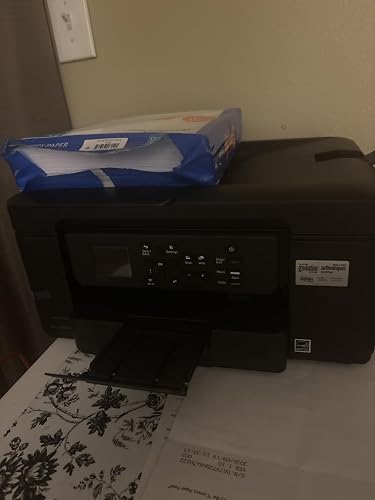
I would give it zero stars if I could. This machine has a horrible set-up. I read the reviews that it was difficult, but I didn't know it was going to be this difficult. Nothing works. It says it's connected to the Internet, and as soon as it says that, it goes back to having to connect to the WiFi again. App didn't work, and when I entered the website it said it's under maintenance. I received this on June 22 and it's June 30 and I still haven't gotten to have it working. Tried installing the PC drivers and that didn't work as well. I'm returning this. I'm buying a Canon. Edit: Changing my review to 4 stars. Yes the set up was horrible, I have no idea what happened, it just started working magically. I have had no problems since and I had to use it for scanning huge amounts of documents. The only annoyance right now is that the dispenser tray is too short so all the papers are flying all over the place. But all in all, works and prints just fine. You just have to have so much patience with it at first. ... show more
Reviewed in the United States on June 30, 2026 by Amazon Customer

Awesome product
Style: Current Model: MFCJ1360DW Pattern Name: New Size: Printer
Brothers is the best printer I have ever used at home. It works much better than previous brands and this is my third brothers not because they fall apart because I print a lot and after these things get used a lot they do have a shelf Life so you do need to get another one maybe I should buy a professional one, but the price is pretty steep. I would buy this product again. ... show more
Reviewed in the United States on September 13, 2026 by Robert Brown

Best Printer
Style: Current Model: MFCJ1360DW Pattern Name: New Size: Printer
I love this printer. It did give me a bit of a trouble to connect with my WiFi but I hit it. The trick is to make sure your internet provider has the 2.4 ghz network to do the initial setup up. If you have the 2g and 5g disable the 5g then once the printer is up and running you can enable the 5g. It prints fast on both sides and it comes with smart cartridges that will detect ontime when you gonna run out of ink and with the ink subscription you will have your cartridges delivered ontime. Space saver not too big. Perfect for what I need it to do ... show more
Reviewed in the United States on September 22, 2026 by Maria Casanova Seda

Good printer
Style: Current Model: MFCJ1360DW Pattern Name: New Size: Printer
So people on here keep complaining about set up, for me it’s was very easy to set up the WiFi. You just follow the instructions on the brother app and press some buttons on the machine and everything is set up. Took me about 30 minutes to set up. Print quality is good so far ! I printed this cover for my trig binder and I think the colors are pretty good! Overall I think this is a good home printer for people who work from home or students who have to print things often! ... show more
Reviewed in the United States on October 10, 2026 by Phoenix

Good quality print, but cannot recommend. Ink purchase nags and poor management software.
Style: Current Model: MFCJ1360DW Pattern Name: New Size: Printer
While the printer produces good quality prints and scans, using the thing is a pain. I scan/print maybe six pages per month. I just want to do my scan or print and move on. Oh, no, no, no. We must first respond to pop-ups requesting us to join their little ink club, wouldn't we like to use the mobile connect app, etc. When I tried to use the web interface to change IP settings, this is impossible. The method they give for bypassing HTTPS no longer is valid with Chrome, Edge, nor Brave. When I use the Mobile connect app, I can see the same ink levels on the web page, but to make advanced settings changes, you click, "All Machine Settings" and...nothing...happens. This mobile app which should be called Brother Mobile Connect instead of Mobile Connect so you can actually locate it on your phone, does nothing with regard to actually managing the printer. Scanning to a Windows 11 PC is similarly painful. It's like you have to use three pieces of software that were written for other devices/purposes, cobbled together to do anything with this printer. ... show more
Reviewed in the United States on February 7, 2026 by Daniel A. Aunspach

A great printer-if you don't chuck it out of the window before set up!!!
Style: Current Model: MFCJ1360DW Pattern Name: New Size: Printer
Ok....an HONEST review from someone who IS NOT a technological genius. After my 12 year old printer kicked the bucket, I finally bit the bullet and my husband decided that this was the printer that he wanted. He looked at probably 2 dozen before he chose this one. Because I'm writing a story and now printing, we wanted a good quality without going commercial use. Firstly. This printer took WAY longer to ship and get to us than we wanted. Then the UPS driver who brought it up to us (as we were at the door coming home when he arrived) DROPPED it on the porch and left. (Wish id had it on my camera but where I was standing blocked it, totally ticked my husband off). Anyways, there didn't appear to be damage so we figured lets try to set it up because we didn't wanna wait 2 weeks sending it back if it wasn't broken. Set up WAS THE MOST ANNOYING THING IN THE WORLD. Seriously, the way to set up this printer is the most unfriendly, ridiculously complicated process ever! We have to use a USB cable with it because my laptop isn't able to connect wirelessly and even with a USB cable it took us almost an HOUR just to get the dang thing so it was connected and downloaded to the laptop. And the brothers website to download everything was absolutely a pain to navigate! Once we got it done, then you have to go thru this overly complicated and stupid process of aligning the printing paper. Finally, I was able to print. Now this, the printer is AMAZING at. It prints BEAUTIFULLY. I printed off an 1,888 page story (yes, you read that right one thousand, eight hundred and eighty eight pages) and this thing did not jam up once! Now aside from being a pain to connect, you will want LOTS of extra ink, and I highly advice you buy the XL cartridges, especially if you have a lot of printing to do, because I'll tell you I went through 3 ink cartridges in just the first 900 pages. But the quality of the print is beautiful, and looks very nice and professional. I love that it stops when its too low to print out anymore instead of trailing off and blurring out and running out of ink like my old one did, that way its not wasting paper that I have to reprint. ... show more
Reviewed in the United States on October 27, 2025 by Wendy Cook
Checking for best price...