Search  for anything...

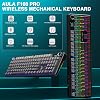
AULA F108 PRO - Wireless Mechanical Keyboard with Screen & Knob,Full Size Keyboard with 8000mAh Battery,Pre-lubed Switches,Side Printed PBT Keycaps,RGB Backlit Hot Swappable Custom Gaming Keyboards

Based on 1,049 reviews
Condition: New
Checking for the best price...
$89.99
Save $10.00 was $99.99

Buy Now, Pay Later


As low as $15.00 / mo
  • – 6-month term
  • – No impact on credit to apply
  • – Instant approval decision
  • – Secure and straightforward checkout

Ready to go? Add this product to your cart and select a plan during checkout.

Payment plans are offered through our trusted finance partners Klarna, Affirm, Afterpay, Zip, Apple Pay, and Google Pay. No-credit-needed leasing options through Acima may also be available at checkout.

Learn more about financing & leasing here.

Selected Option

Free shipping on this product

FREE 30-day refund/replacement

To qualify for a full refund, items must be returned in their original, unused condition. If an item is returned in a used, damaged, or materially different state, you may be granted a partial refund.

To initiate a return, please visit our Returns Center.

View our full returns policy here.


Availability: Only 10 left in stock, order soon!
Fulfilled by Amazon

Arrives Wednesday, Oct 28
Order within 3 hours and 56 minutes

Available payment plans shown during checkout

Protect Your Purchase

Easy claims online, fast replacements, no fees

Checking for protection plans...

At a glance

Condition
New
Color
Gradient Black
Model
AULA F108
Weight
2.7 lb
Material
Plastic
Keyboard Description
Mechanical
Style
Contemporary
Warranty
6 Months
Works with
Gaming Console, Laptop, PC, Smartphone, Tablet

Features 6

  • Smart Display Screen & Multi-function Knob: AULA F108 Pro wireless mechanical keyboard has built-in intelligent TFT color display screen, which can be used as an interactive interface for real-time updating and customization. The high-definition display and multi-function knobs are designed to make it easy to switch and update custom Gif images, volume, date and time, battery status, backlight and connection modes for greater ease of use(Note: You need to download the software under windows system and keep in wired mode to set the screen image/GIF, calibrate the date and time. The screen has a transparent protective film that can be torn off for use)
  • Tri-mode Connection Mechanical Keyboard: The AULA F108 Pro gaming keyboard supports BT5.0, 2.4GHz wireless and USB-C wired connectivity which can save up to five devices. The BT5.0 mode allows for quick switching between pc,mac,laptop and tablets while the 2.4GHz wireless and USB-C wired mode with a polling rate of 1000Hz ensures highly competitive stability and responsiveness.The F108PRO pc gaming keyboard is compatible with Windows, Mac, IOS and Android operating systems, and you can easily switch systems with multifunctional knob(Note: In Linux systems, incompatible driver versions may cause abnormal F-zone functionality, which is a normal phenomenon. Please rest assured to use it)
  • Hot-swappable Custom Keyboard: The F108 Pro wireless gaming keyboard comes with a hot-swappable base that is compatible with 3-pin or 5-pin switches. Without the soldering process, users can easily replace switches and keycaps to customize their keying experience (keycap/switch puller is included in the package). Equipped with pre-lubricated stabilizers and switches, the creamy keyboard bring smooth typing feeling and pleasant creamy mechanical sound, providing fast response for exciting games
  • Advanced Five Layers Filling Structure: The mechanical gaming keyboard features an advanced structure, extended integrated silicone pad, and PCB single key slotting, better optimizes resilience and stability, making the hand feel softer and more elastic. Five layers of filling silencer fills the gap between the PCB, the positioning plate and the shaft, effectively counteracting the cavity noise sound of the shaft hitting the positioning plate, ensuring the purest sound and soft and smooth typing experience every time you press the key

Description

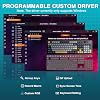
How to download the software? Is it compatible with Mac? 1.Download the software via bit.ly/m/AULA 2.This F108Pro mechanical keyboard is compatible with Windows, Mac, IOS and Android systems, but the software only supports Windows system and wired mode. How to quickly solve keyboard unresponsive or other unknown issues? Reset the keyboard by holding down FN+ESC for a few seconds until the keyboard light flashes AULA F108 Pro backlight/side light shortcut key? Backlight Adjustment: FN+\|=switch 19 lighting effects;FN+Tab=switch lighting colors;FN+↑/↓=lighting brightness+/-;FN+→/←=lighting speed+/- Side Light Adjustment: FN+Right Shift=Switch effect;FN+/?=Switch color;FN+Right Alt=Switch brightness How to calibrate the date/time and custom GIF images on the screen? 1.Download and install the F108pro driver in wired mode with windows system. 2.Find the "TFT screen" and click to "Time Syns" button. 3.Upload an image or gif Note: The LCD screen has a transparent protective film that can be peeled off before use. How to view the instruction manual? And receiving incorrect product colors Scan the QR on the card inside the packaging to view the instruction manual The keyboard packaging is uniformly gray yellow, please refer to the actual color inside the packaging for accuracy AULA F108 PRO AULA F108 PRO AULA F108 PRO AULA F108 PRO AULA F108 AULA F108 AULA F108 ABOUT AULA Founded in 2002, AULA is an enterprise integrating production, sales, distribution and after-sales service. The brand is inspired by one of the largest spiders in the world, the tarantula, which is characterized by its speed and strength, like the response of AULA keyboard and mouse. Our products are sold all over the world and are loved by gaming enthusiasts.

Specs 31

Brand AULA
Connectivity Technology 2.4GHz Wireless, BT5.0, USB-C
Keyboard Description Mechanical
Recommended Uses For Product Business, Education, Everyday Use, Gaming, Multimedia, Personal, Photo Editing, Programming, Student, Video Editing See more
Special Feature Backlit, Hot-Swappable, Programmable Keys, Rechargeable
Color Gradient Black
Keyboard backlighting color support RGB
Style Contemporary

Frequently asked questions

If you place your order now, the estimated arrival date for this product is: Wednesday, Oct 28

Yes, absolutely! You may return this product for a full refund within 30 days of receiving it.

To initiate a return, please visit our Returns Center.

View our full returns policy here.

  • Klarna Financing
  • Affirm Pay in 4
  • Affirm Financing
  • Afterpay Financing
  • Zip Pay in 4
  • Financing through Apple Pay
  • Financing through Google Pay
Leasing options through Acima may also be available during checkout.

Learn more about financing & leasing here.

Top Amazon Reviews


The Perfect Pink Mechanical Keyboard for Work and Gaming
Color: Gradient Pink
I am absolutely in love with this keyboard, especially in the pink colorway. It is the perfect combination of functionality, aesthetics, and that satisfying creamy typing sound that mechanical keyboard lovers are always looking for. The first thing that stood out to me was how gorgeous it looks on my desk. The gradient pink design is stunning and adds the perfect feminine touch to my workspace. It feels very high-end and makes my entire setup look more polished and put together. What I love most is how premium this keyboard feels. The keys are incredibly smooth, quiet, and satisfying to type on. AULA’s F108 Pro is a full-size 104-key mechanical keyboard with tri-mode connectivity (Bluetooth, 2.4 GHz wireless, and USB-C wired), hot-swappable switches, a multifunction knob, an LCD screen, and a large 8,000 mAh battery, which makes it equally great for work and gaming. The LCD screen and control knob are such fun and practical features. I can quickly adjust settings, and the customizable display gives the keyboard a unique touch. The RGB lighting is bright and beautiful, and there are plenty of effects to choose from. Battery life has been excellent, and switching between devices is seamless. I use it for both productivity and casual gaming, and it performs flawlessly. The included number pad is a huge plus for work tasks, spreadsheets, and data entry. If you’re looking for a high-quality wireless mechanical keyboard that sounds amazing, performs beautifully, and looks absolutely adorable in pink, I cannot recommend this one enough. It exceeded all of my expectations and has quickly become one of my favorite desk accessories. 💗⌨️ ... show more
Reviewed in the United States on May 14, 2026 by Janeen

Solid Keyboard at a great price
Color: Gradient Black
Feels really good, I owned a Logitech G513 before purchasing this. I’ve ran the 513 since 2021 with zero issues and the only thing I miss about it compared to this is the USB Passthrough. Outside of that this keyboard IN MY OPINION is perfect. It’s easy to set up, has a lot of features and options, and it sounds amazing to use. So Long as it lasts I don’t see a reason to upgrade from this. It’s a full 100% keyboard which I love, and it has a nice weight to it. I’d like to say it weighs more than the G513! ... show more
Reviewed in the United States on October 8, 2026 by Sir Nick

Just bought it! Expensive but worth it!
Color: Gradient Pink
I just bought the keyboard and honeslty love it! I was sad I couldn’t get the color I wanted but the pink asthetic is super beautiful. I can’t say much on connecivity as I have only had it 2 days but I do work at an office so it is being used all day, love the easy connection though! So far it’s easily compatible with my work desk. Can switch quickly between corded and wireless, plus the color options and effects are super cutesy! It’s a heavy weight keyboard so it’s nice it doesn’t shift and feels like a heavy cloud. The keys are sooo soft and velvety feeling and the main reason I got it was for the SOUND. I needed a creamy sounding keyboard for work and was disappointed by Amazon’s choices but after some thought I caved and bought this one, all my co workers love it! The size is perfect for a full keyboard.( I don’t know how good my video of the sound but I guarantee it sounds amazing!) ... show more
Reviewed in the United States on August 26, 2026 by Kay

CUTE thocky sounding keyboard, LOVE the muted colors
Color: Mocha Mousse
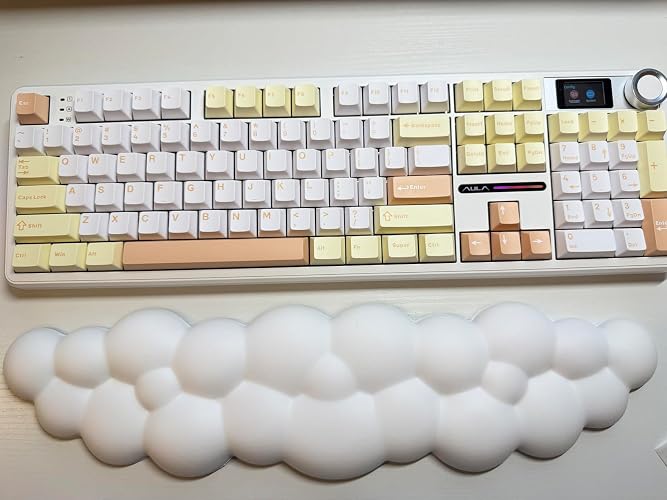
⇄ Connectivity: USB, Wired, or Bluetooth 📢 Noise level: Sound is very "thocky" that sounds like a deep but muted click when you are typing. If you are looking for a completely silent keyboard, this is not it. This is loud enough to make me feel focused when I'm working but not so loud that it becomes obnoxious. MAC/PC I use this on both on my MacBook & a Windows PC. It's set for Windows so every time I connect it my MacBook, I have to change the keyboard shortcut so it's the "Apple" button instead of the "Alt" button. Easy swap. 🔋 Battery Life: Lasts for AGES. It is rechargeable with a USB-C cord that is included which I liked compared to other keyboards where you need to use a AA battery. ⌨️ The actual keyboard: -It does have flip out feet at the bottom if you prefer typing at an angle -There are 4 non slip pads on the bottom -Feel SOLID, a bit heavy & high quality. I like keyboards like that that have some weight to it so it's less likely to move around the desk. TIPS: -GET A WRIST REST!! ... But seriously, if you are not used to a mechanical keyboard, I'd pair it with a wrist rest. I'd seen a few videos where people paired theirs with the cloud wrist rest and it matches so nicely, especially since this keyboard has a lot of white keys mixed in with the muted yellow and muted orange. -Previously, I typed mostly on low-profile keyboards (think Apple magic keyboard) so I had never needed and wrist rest. I tried this one without one and it wasn't super comfortable for me due to the angle of this keyboard. For the occasional user, I don't think a wrist rest is necessary. I work on my computer about 8-10 hours a day so a wrist rest was necessary for me. When I use it, I only use it with the wrist rest AND the feet are completely flat (no angle). -I bought a cloud wrist rest (in photo) which pairs perfectly to the white, yellow and muted orange colors of the keyboard. Value for money: -Pretty good. I think this will last awhile. Compared to other keyboards: -I also have a YUNZI B98 PRO. Compared to that one, this AULA F108 PRO requires more pressure to type on the keys. Whereas the YUNZI keyboard, I can barely press and it almost feels a bit too sensitive to the touch. I definitely feel like I have to press harder (compared to my YUNZI keyboard or Apply magic keybaord) so if I'm typing for awhile, I feel like my hands get a bit tired. I have noticed I have less typos because with this one you have to almost press a bit longer than a super-sensitve Apple magic keyboard. LANGUAGE -When you turn on the LCD screen, the language is set to its native language. It was easy to scroll to the very last one to click English. OVERALL I really like it. If I could change one thing, I would want the keys to be a bit more sensitive so typing does not feel like a workout. Again, for the occasional user, I don't think this is an issue. However, because I do work on my computer 8-10 hours a day and I am typing a lot, this is something I notice more. ... show more
Reviewed in the United States on May 2, 2026 by Mariam

Creamy Mac-Friendly Mechanical Keyboard with Style and Substance
Color: Mocha Mousse
As a Mac user, I wasn’t sure this CIDOO V Series keyboard in Mocha Mousse would work for me since the software is Windows-only. But I took a chance because I really wanted a creamy-sounding keyboard, and I’m happy to say it works great on macOS. When I plugged it into my Mac, the Mac Keyboard Setup Assistant launched right away, which made it easy to detect the type of keyboard. I then went into the settings and keyboard shortcuts and remapped a few keys without using the CIDOO driver. The keyboard is fully functional without the software. However, if you want to customize the LCD screen, like uploading a GIF or syncing the clock, you’ll need to do that on a Windows computer. However, I took a chance because I had a theory that if I set it up on a Windows it may hold my settings on a Mac. I was able to set everything up on a Windows laptop (my husbands), and the settings stayed in place when I reconnected it to my Mac, which was a huge plus. If you don’t have a Windows device, that might be a hassle, but borrowing one from a friend just once could be enough to get things how you want them. Again it is fully functional, this would just impact your ability to change the gif animation and sync the time. One thing to note for Mac users, the keycaps are labeled for Windows (with Ctrl, Win, and Alt instead of Control, Option, and Command), but that’s pretty standard with most mechanical keyboards. It’s an easy fix if it bothers you, you can remap the functions in macOS and swap in Mac-specific keycaps if you want a more native look. I’m giving this keyboard four stars instead of five for two reasons. First, I really wish there were a native Mac driver, it would make customization much easier and more accessible. Second, I’d love to be able to switch the LCD clock from 24-hour to 12-hour format, which currently isn’t possible even through the driver. These are minor in the grand scheme, but worth mentioning if those features are important to you. The unboxing experience was pleasant and simple. The outer packaging included English and what I believe is Chinese, and the manual inside was mostly (if not entirely) in Chinese. I was still able to figure things out using the Apple Translate app. One small detail that didn’t quite match the overall design: the included USB-C cable is gray, which feels out of place next to the white keyboard. A color-matching cable would’ve made the whole setup feel more polished and aesthetic. PRO TIP: The sturdy plastic cover that comes in the box isn’t just for shipping protection, it fits the keyboard perfectly and works great as a dust cover when your setup is idle. I’ve been using it on my desk to keep the board clean between sessions. Build quality is where this keyboard really shines. It’s heavier than most, with an aluminum top and a polycarbonate bottom that gives it a solid, premium feel. The typing feel and sound? Chef’s kiss. Smooth, soft, and super satisfying. The sound is exactly what I was looking for: creamy and refined without being overly loud or hollow. I am literally more productive and look forward to being at my computer working. The LCD screen works as expected once set up, and while I don’t use the clock much (thanks to my Mac’s display), I really enjoy having a custom animated GIF on it. It’s a fun little feature that adds personality to my workspace. Overall, this is a high-quality mechanical keyboard that’s absolutely usable for Mac users, even without native software support. It looks great, feels great, and types even better. With a Mac driver and a few small tweaks, it would be an easy five stars. ... show more
Reviewed in the United States on July 18, 2025 by Helen Louise

AMAZING KEYBOARD, MINOR QUIRKS
Color: Gradient Black
After putting together my first Desktop PC I found myself having switch my wired keyboard back and forth between my work laptop and the new Desktop. I needed a keyboard that had multiple connection options so I wouldn't have to physically change what my keyboard was plugged into. I also have never spent more than $30.00 for a keyboard but looking at my options it was evident I needed to spend a little more. I wanted a full size keyboard with the ability to connect wirelessly to both of my systems. After a ton of research I decided on the Aula F108 Pro, this would be my first premium keyboard. Once received and unboxed, right off the bat I knew this was a quality keyboard. It was very well packaged, was SUPER heavy, and came with some extra keycaps and a tool to remove and install the keys. I decided to use the included wifi dongle to connect to my desktop as that is my gaming rig, and connected to my work laptop via bluetooth. Switching connections is super easy, you just use the circular dial on the keyboard to switch back and forth between bluetooth, wifi or wired connection. This is also my first keyboard where the letters and symbols are on the front of the keys and not on the top. Honestly it works out just fine, you can see all of the keys just fine thanks to the way the keys get higher from the bottom row to the top. I also feel as though it will increase the durability of the key symbols so they won't wear out and fade after a while. The RGB color and light pattern options are out of this world. You have so many options that for the first day or so you're just going to be going through them all to find your favorite. The sound and feel when typing is amazing. Each key stroke has a deep thud, the keys are responsive, and using it just makes you want to type. The sides of the keyboard have an RGB strip which can also be customized with both color and strobe effect. There is also a small screen next to the dial that shows you a ton of information and where you can change color, brightness, strobe effect's, etc. You can also customize the screen to show a small gif of your choosing. Doing so was pretty straight forward after watching a quick YouTube video. I mention YouTube because you will definitely want to watch a quick video on how to get the keyboard set up, why you ask? What about the instruction manual? Well, it's all in Chinese, the manual, the writing on the box even the keyboard screen itself comes preset to Chinese. It's honestly not that big of a deal because you can just change it through a couple of spins of the radial dial. There is also a program you can download to even further customize the keyboard and is needed to use your own gif. It is a bit buggy and windows will think it is a malicious program but it is just fine to quickly download, set up your keyboard and then uninstall or just leave it be. The time on the screen is also in military time with no option to change it. The advertised battery charge is also a bit exaggerated. While wireless with all of the RGB's on, I was getting roughly 4-5 hours of charge time before needing to plug the keyboard in. I also did notice that the battery indicator was a bit wonky, I would start a full 100% charge and then notice it drop to 70 after 30 minutes or so. I just don't think the indicator is accurate. These are things I just don't mind and would not take points off because the keyboard as a whole is amazing. The convenience of multiple connections, the radial controls and just the overall feel of the keyboard far outweigh the tiny inconveniences. ... show more
Reviewed in the United States on September 14, 2025 by Joe Daoud

Best value I've found in a keyboard
Color: Gradient Black
In a word, this keyboard is awesome. I'm old and retired. Not a gamer, but a graphic content designer. At first, looking at the different keyboards, I was conflicted. The South facing keys on the Aula 108 seemed awkward and strange to me. I spent hours watching utube videos on different keyboards. Slowly it started becoming obvious to me Aula offered more value for the money. I ordered the 108 Pro. but still concerned about the South facing keys. Before it arrived, I watched another video on the Aula 106 Pro. This model had the letters on top where I had always been used to seeing them. I ordered it with the idea of sending the 108 Pro back when it arrived. The 106 arrived first. It was beautiful and worked well, (Except for the wanky way over sensitive knob), It was impressive. , , BUT , , , although the letters were on top of the keys where I wanted them, the keys were opaque with the backlighting not illuminating the tops of the keys. That was a bummer. I watched other utube videos with folks talking about the South facing keys on the 108. Every single one of them said they caught on quick, and it wasn't a problem. So, when my 108 Pro arrived, I was/am amazed at how easy I adapted to the strange South facing keys. The backlighting is beautiful and shines through the keys. No problems at all. The software you can download to set it up is perfect. No problems at all with it. Being a graphic designer, I was anxious to make a GIF for the little keyboard screen. Although my effort had over the required frames, the software readjusted what it needed to and uploaded it to my keyboard. Considering how small the screen is, I was blown away at the quality detail my GIF has, I haven't tried the BT yet, but the wired, and wireless, work flawlessly. Very responsive, with no lag whatsoever. The sound and feel of the keys is something you just have to try yourself to fully appreciate it. Different, and way better, from anything I've had in the past. In their comments and reviews, folks have mentioned how heavy the keyboard is. It's true. It is heavy, but it's not a problem for me. So do I think it's a good value for the money, and would I recommend it? You betcha I would. ... show more
Reviewed in the United States on April 10, 2026 by Jane Smith

Solid, better than expected!
Color: Gradient Black
Better than expected. This keyboard is solid, heavier than my several other failed attempts at finding a keyboard I liked. It feels very well constructed. Once I figured out the set up—the videos from other reviewers was extremely helpful so the configuration was a breeze. Love that you can change so may aspects of the functionality! The buttery sound the keystrokes make is super nice. So far the battery has held a charge for over a week but I turn it off when not in use. Going to order a second one for my home office. ... show more
Reviewed in the United States on October 21, 2026 by CMS
Checking for best price...