Search  for anything...

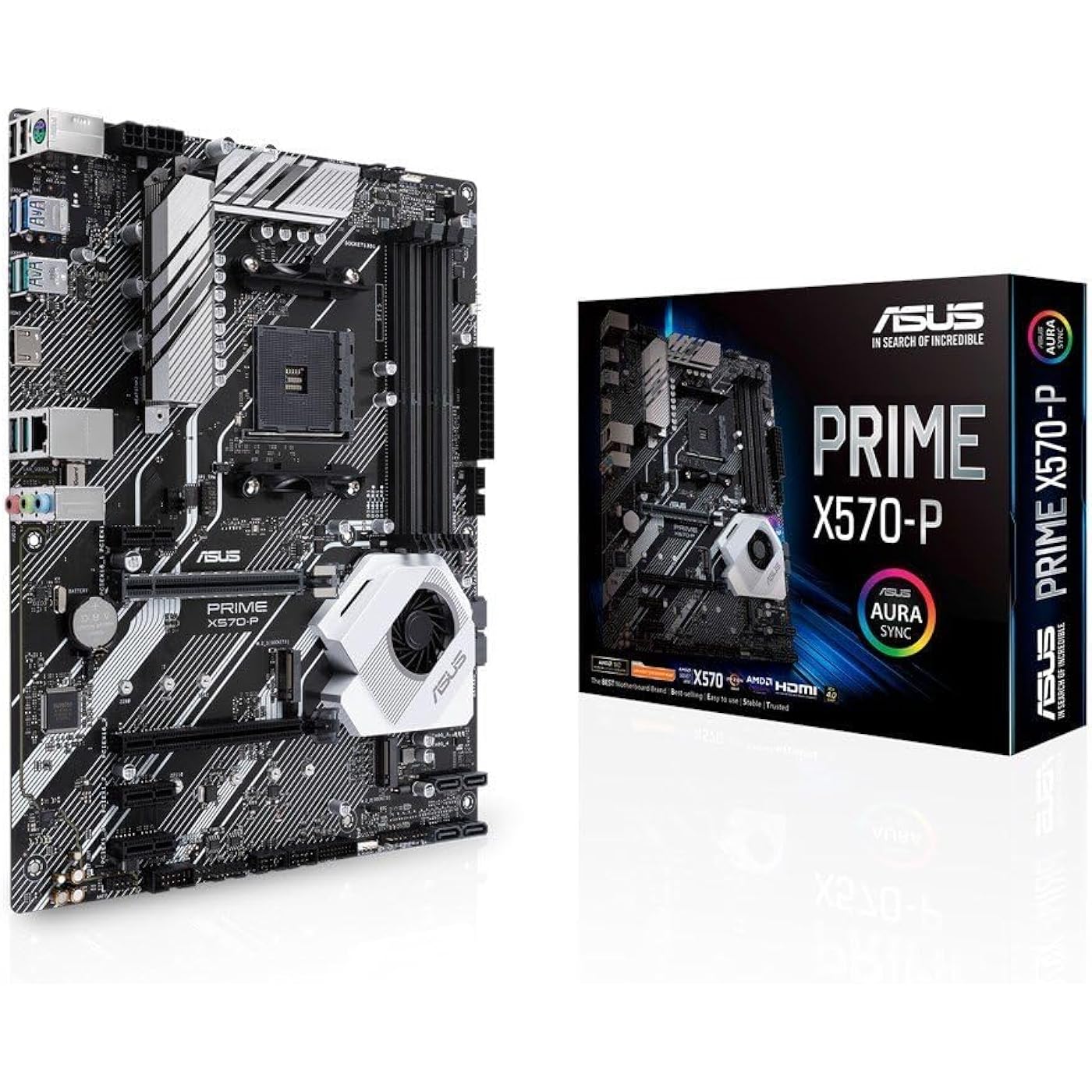
ASUS Prime X570-P Ryzen 3 AM4 with PCIe Gen4, Dual M.2 HDMI, SATA 6GB/s USB 3.2 Gen 2 ATX Motherboard
  • Based on 1,740 reviews
Condition: Used - Like New
Checking for the best price...
$143.90 Why this price?
Save $204.03 was $347.93

Buy Now, Pay Later


As low as $23.98 / mo
  • – 6-month term
  • – No impact on credit
  • – Instant approval decision
  • – Secure and straightforward checkout

Ready to go? Add this product to your cart and select a plan during checkout.

Payment plans are offered through our trusted finance partners Klarna, Affirm, Afterpay, Apple Pay, and PayTomorrow. No-credit-needed leasing options through Acima may also be available at checkout.

Learn more about financing & leasing here.

Free shipping on this product

This item is eligible for return within 30 days of receipt

To qualify for a full refund, items must be returned in their original, unused condition. If an item is returned in a used, damaged, or materially different state, you may be granted a partial refund.

To initiate a return, please visit our Returns Center.

View our full returns policy here.


Availability: Only 1 left in stock, order soon!
Fulfilled by Amazon

Arrives Friday, Mar 20
Order within 20 hours and 24 minutes
Available payment plans shown during checkout

Protection Plan Protect Your Purchase
Checking for protection plans...

Features

  • AMD AM4 Socket and PCIe 4. 0: The perfect pairing for Zen 3 Ryzen 5000 & 3rd Gen AMD Ryzen CPUs.Manageability: WOL by PME, PXE
  • Industry-leading cooling options: comprehensive controls for fans and AIO pump, via fan Xpert 4 or the acclaimed UEFI
  • Asus Optic-MEM: careful routing of traces and vias to preserve signal integrity for improved Memory overclocking
  • Next-gen connectivity: supreme flexibility With PCIe Gen 4 support, Dual M. 2 support, USB 3. 2 Gen 2 ports
  • Aura Sync RGB header: synchronize RGB header with a vast portfolio of compatible PC gear, including next-gen addressable RGB strips
  • Please ensure your BIOS is up to date if installing a compatible Ryzen 5000 series CPU. Visit ASUS site search by motherboard model name, click on Support tab, Drivers and Tools, then BIOS & Firmware to download the latest BIOS.

Description

Powered by AMD Ryzen 2 and 3 AM4 processors, the Asus Prime x570-p delivers customizable performance. Tune your build your way, on-board dual M. 2 support and USB 3. 2 Gen 2 deliver maximum transfer speeds. Outshine the competition and personalize your build with AURA Sync RGB. Free 3-months Adobe Creative Cloud Subscription: Receive complimentary access with the purchase of this product (offer valid from 9/15/2021 to 9/15/2022) visit to claim.

Brand: ASUS


CPU Socket: Socket AM4


Compatible Devices: Personal Computer


RAM Memory Technology: DIMM


Compatible Processors: amd 3rd generation ryzen


Chipset Type: AMD 570X


Memory Clock Speed: 2133 MHz


Platform: Windows 10


Model Name: PRIME X570-P


Memory Storage Capacity: 128 GB


Processor: ‎2133 MHz


RAM: ‎DIMM


Memory Speed: ‎2133 MHz


Wireless Type: ‎Bluetooth


Number of USB 2.0 Ports: ‎2


Brand: ‎ASUS


Series: ‎PRIME X570-P


Item model number: ‎PRIME X570-P


Item Weight: ‎2.64 pounds


Product Dimensions: ‎10.35 x 12.92 x 2.09 inches


Item Dimensions LxWxH: ‎10.35 x 12.92 x 2.09 inches


Voltage: ‎12 Volts


Batteries: ‎1 A batteries required. (included)


Manufacturer: ‎Asus


Language: ‎English


Is Discontinued By Manufacturer: ‎No


Date First Available: ‎July 1, 2019


Frequently asked questions

If you place your order now, the estimated arrival date for this product is: Friday, Mar 20

Yes, absolutely! You may return this product for a full refund within 30 days of receiving it.

To initiate a return, please visit our Returns Center.

View our full returns policy here.

  • Klarna Financing
  • Affirm Pay in 4
  • Affirm Financing
  • Afterpay Financing
  • PayTomorrow Financing
  • Financing through Apple Pay
Leasing options through Acima may also be available during checkout.

Learn more about financing & leasing here.

Top Amazon Reviews


  • Great board, wish it had wifi
Great board, but wish I read further and knew it didn't have wifi or Bluetooth. Cannot get my TridentZ NEO memory to DOCP to its rated speed with a Ryzen 9 3900X, can only get it to 80% of the memory's rated speed. Overclocked the Ryzen 9 to 4GHz and runs stable. RGB control is cool, works great. Industrial quality power to the CPU, better than most other boards. Wish it had a TPM chip, had to get that separately for BitLocker. Works great with NVMe drive for system boot drive, and regular SATA drive for data. Blazing fast boot-up and app launch. Great price point for what you're getting as of early 2020. RealTek audio is flaky when stressing the CPU and GPU simultaneously, so I'll probably get an external sound device. Otherwise no complaints. BTW, there's what appears to be RGB lighting on the board fan cover, but that is constant and does not change colors with any settings. ... show more
Reviewed in the United States on April 20, 2020 by Slartibart Jones

  • Not a dud. :p
My 13 year old computer finally bellied up over a month ago, so I needed a new computer. After spending hours using a really old laptop (1.2ghz slow little thing) I finally decided on this board. After waiting a week for it, I finally got it today. I added a Ryzen 5 3600X, SSD, etc...plugged in the power. I love the soft blue glow...but that is all. The chipset fan spun for a second and then nothing. I have spent the last few hours trying to troubleshoot the thing, had "computer gurus" giving me advice and we have all come to the conclusion the board is bad. Now Amazon doesn't have any boards to replace this one with or will take another two to three weeks to ship. No thanks. I need a computer NOW. This laptop just isn't cutting it. :p Edit: It's not a dud. Apparently, I'm the dud. I finally figured out what I was doing wrong and got it to work. This is an amazing motherboard...just check the specs at the Asus site and make sure you get the proper, Asus approved memory. Works fantastically with Ryzen 5 3200X CPU. ... show more
Reviewed in the United States on May 6, 2020 by J. Oge

  • Installing Linux is NOT EASY to install but dooable; otherwise a great motherboard
This motherboard is an awesome budget choice, with the VRMs capable of supporting high-wattage CPUs like the R9 3950x. There are a ton of USB ports on the back, and not anything else you don't need. There's an addressable Gen 2 RGB header next to the RAM slots that you can use to directly hook up any WS2812B LEDs to the motherboard (I've done it and its awesome!). Installing Linux isn't easy though, as you have to tweak ALOT of BIOS settings to get it to work. Here's how I did it: 1.) BIOS SETTINGS: -disable secure boot and wipe ALL KEYS -set OS type to “Other OS” in that secure boot window. -enable Compatibility Support Module (with boot device control set to Legacy & UEFI) -disable the IOMMU controller -enable SVM mode (virtualization) Linux Mint & Ubuntu users are good to go; Arch Linux users need to follow step 2 below 2.) pre-installation -Use a Linux Mint LiveCD to pre-format your drive into 3 partitions: a. 600mb vFAT drive b. 200-1TB ext4 drive c. 2-16GB SWAP partition 3.) Actual Install (tutorial here works for Archlabs Linux) -boot into the USB in LEGACY mode using the F8 boot menu -before running archlabs-installer, run these two commands: mkfs.vfat -F32 /dev/nvme0n1p1 mkfs.ext4 -q /dev/nvme0n1p2 remember to replace the above labeled partitions with your actual partitions Now run archlabs-installer -once you reach the main menu, skip down to option 4.1 “mount partitions” and follow the instructions to reformat your GRUB and ROOT partitions. Do NOT reformat your partitions using option 2 in the main menu. -continue as normal ... show more
Reviewed in the United States on April 19, 2020 by Random Reviewer

  • Quality product
This motherboard has been holding strong on my PC for almost 6 years now and I love every time I can boot up my computer. I have no issues it is dated now but is still very good and quality and I can run a ton of performance demanding games with it.
Reviewed in the United States on August 17, 2024 by Josiah caldwell

  • Unremarkable but adequate for basic builds
This is a very spartan AMD AM4 X570 motherboard, the kind you expect to see in a budget PC bought from a retailer. Out of the box it comes with two 6Gbps SATA cables and an RGB adapter cable. That's the entire extent of the 'extras'. However my primary complaint is the rubbish back panel. The back panel is cheap - shiny metal, no decals / legible printing to indicate the function of the sockets (example, it would be helpful to differentiate the USB 2.0 from the USB 3.2 Gen1 and USB 3.2 Gen 2 sockets). On the motherboard itself, placement of the M.2 sockets left a lot to be desired. My 1660 Super graphic card collided with the Sabrent M.2 heatsink when I tried populating the first NVMe socket. On a similar vein, the cooling fan for the chipset is obstructed by just about any modern graphic card. At best the chipset fan is unimpressive and the location, beneath the graphic card, disappointing. I've seen more expensive motherboards with vented cooling from the chipset fan, but none of that here! Fortunately the second M.2 socket works fine and supports the full PCIe 4.0 x4 mode. It does mean that if I want to add a second NVMe card, it will require a slimline heatsink! I'm not a huge fan of the (2) edge mounted SATA connectors. This could be inconvenient if the motherboard is a tight fit into your case. Finally, the CPU power supply (heatsinks) look weedy. They are rated to support high end Ryzen processors and I have to trust they wont overheat in gaming. Time will tell. What I can say for sure is the heatsinks are smallest I've seen on an X570 motherboard. I bought this motherboard and CPU because my old computer, powered by an Intel 2600K CPU, would not support an upgrade to Windows 11. While I'm not mad keen on Windows 11, I don't want to get stuck with an operating system that is no longer supported. So it was time... I installed 32GB of RAM, an AMD 5900X processor and a 1TB Sabrent Rocket Plus NVMe drive along with the SATA SSD drive from my old computer. Boot up into the BIOS/UEFI went smoothly however the machine did not recognize the SATA boot drive I was carrying over. By default the motherboard is looking for a secure boot configuration (which obviously mine wasn't). However I poked around and it turns out you can easily configure the machine to run legacy boot configurations. Once I did that the computer booted into my SATA drive without further issues. I can now proceed to migrate the system across to NVMe. Overall the boot up process (re-using the SATA SSD drive from an 11 year old Intel based computer) was surprisingly drama free. I'm using 4 sticks of cheap-and-cheerful G.SKILL FlareX RAM (F4-3200C14D-16GFX). The computer had no problem recognizing the full 32GB and appears to work just fine. I should add, the manual which accompanies this motherboard is unusually well written. No complaints about the manual! It is concise, helpful and appears accurate. I would feel a lot happier about this motherboard if it weren't so expensive and had a more confidence-inspiring heatsink for the power supply. That aside, it was a trouble-free build and my computer is running well. I plan to use the computer for Data Science so if I experience any heat-related issues I'll update this review accordingly. ... show more
Reviewed in the United States on September 10, 2022 by Alastair G. Stell

Can't find a product?

Find it on Amazon first, then paste the link below.
Checking for best price...