Search  for anything...

ASUS ROG Rapture WiFi Gaming Router (GT-AC5300) - Tri Band Gigabit Wireless Router, Quad-Core CPU, WTFast Game Accelerator, 8 GB Ports, AiMesh Compatible, Included Lifetime Internet Security

  • Based on 2,015 reviews
Condition: Used - Very Good
Checking for the best price...
$142.00 Why this price?
Save $557.99 was $699.99

Buy Now, Pay Later


As low as $23.67 / mo
  • – 6-month term
  • – No impact on credit to apply
  • – Instant approval decision
  • – Secure and straightforward checkout

Ready to go? Add this product to your cart and select a plan during checkout.

Payment plans are offered through our trusted finance partners Klarna, Affirm, Afterpay, Zip, Apple Pay, and Google Pay. No-credit-needed leasing options through Acima may also be available at checkout.

Learn more about financing & leasing here.

Free shipping on this product

This item is eligible for return within 30 days of receipt

To qualify for a full refund, items must be returned in their original, unused condition. If an item is returned in a used, damaged, or materially different state, you may be granted a partial refund.

To initiate a return, please visit our Returns Center.

View our full returns policy here.


Availability: Only 2 left in stock, order soon!
Fulfilled by Elpis Tech - SN info recorded

Arrives Sunday, Oct 25
Order within 5 hours and 47 minutes
Available payment plans shown during checkout

Protection Plan Protect Your Purchase
Checking for protection plans...

Features

  • Tri band (dual 5 GHz, single 2.4 GHz) AC5300 wireless router with the latest 802.11ac 4x4 MU MIMO technology for maximum throughput (5334 Mbps) and coverage (up to 5,000 sq. ft.)
  • VPN Fusion enables you to run a VPN and ordinary internet connection simultaneously, effectively maximizing your connection speed to gaming servers (available via firmware update). WAN Connection Type Internet connection type Automatic IP, Static IP, PPPoE(MPPE supported), PPTP, L2TP
  • Game IPS Powered by Trend Micro provides multi stage protection for your gaming network from external attacks and threats, neutralizing them before they reach your network or devices.Power supply:AC Input : 110V~240V(50~60Hz),DC Output : 19 V with max. 3.42 A current
  • ROG Game Dashboard gives you access to exclusive features like Game Boost, Game IPS, VPN Fusion, and route optimized low ping time gaming servers using WTFast Gamers Private Network (GPN) all to help you optimize your gaming network
  • AirMesh Supported Upgrade your firmware to easily connect to other compatible ASUS routers to create a powerful and flexible whole home Wi Fi network; 1024 QAM high data rate, 20/40/80 MHz bandwidth
  • 1.8GHz 64bit Quad Core processor maximizes data throughput from 8 ports and dual USB 3.0 for optimizing network traffic and connectivity speeds 3. VPN Fusion enables you to run a VPN and ordinary internet connection simultaneously, effectively maximizing your connection speed to gaming servers (available via firmware update)

Description

The ASUS ROG Rapture is the world's first gaming tri-band router featuring a 1. 8GHz quad-core processor and the latest 4x4 802. 11AC MU-MIMO technology. Game dashboard with game IPS controls and protects your network in real-time while delivering data rates up-to 5334 Mbps across prioritized ports and gaming-dedicated 5GHz Wi-Fi band.

Brand: ASUS


Model Name: GT-AC5300


Special Feature: Internet Security


Frequency Band Class: Tri-Band


Wireless Communication Standard: 802.11ac


Compatible Devices: Gaming Console, Personal Computer, Smartphone


Recommended Uses For Product: Gaming, Security


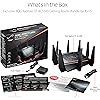
Included Components: GT-AC5300 Extreme Gaming Router, Power Adapter, Quick Start Guide, RJ-45 Cable, Warranty Card


Connectivity Technology: USB, Wi-Fi, Wireless


Color: Black


Other Special Features of the Product: Internet Security


Frequency Band Class: Tri-Band


Wireless Compability: 802.11ac


Compatible Devices: Gaming Console, Personal Computer, Smartphone


Antenna Location: Gaming, Security


Connectivity Technology: USB, Wi-Fi, Wireless


Antenna Type: Retractable


Operating System: ASUSWRT


Security Protocol: WEP, WPA-PSK, WPA2-PSK


Number of Ports: 8


Control Method: Voice


Data Transfer Rate: 5334 megabits_per_second


LAN Port Bandwidth: 1000 Mbps


Voltage: 240 volts


Maximum Upstream Data Transfer Rate: 5334 megabits_per_second


Number of Antennas: 2


Wi-Fi Generation: Wi-Fi 5


Router Network Type: Tri-band


Connectivity Range: 5000 square_feet


Connectivity Protocol: wi-fi


Coverage: 5,000 sq. ft.


Frequency: 5 GHz


Brand: ASUS


Model Name: GT-AC5300


Built-In Media: GT-AC5300 Extreme Gaming Router, Power Adapter, Quick Start Guide, RJ-45 Cable, Warranty Card


Model Number: GT-AC5300


Unit Count: 1 Count


UPC: 889349607701


Number of Items: 1


Global Trade Identification Number: 01


Manufacturer: ASUS Computer International Direct


Item Type Name: ASUS ROG Rapture GT-AC5300 Tri-band 4x4 AC5300 Gaming WIFI Router with 8-port Gigabit Router


Mfr Part Number: GT-AC5300


Warranty Description: 2 Years Warranty


Item Weight: 1 kg


Item Dimensions L x W x H: 11.46"L x 4.72"W x 14.88"H


Color: Black


Frequently asked questions

If you place your order now, the estimated arrival date for this product is: Sunday, Oct 25

Yes, absolutely! You may return this product for a full refund within 30 days of receiving it.

To initiate a return, please visit our Returns Center.

View our full returns policy here.

  • Klarna Financing
  • Affirm Pay in 4
  • Affirm Financing
  • Afterpay Financing
  • Zip Pay in 4
  • Financing through Apple Pay
  • Financing through Google Pay
Leasing options through Acima may also be available during checkout.

Learn more about financing & leasing here.

Top Amazon Reviews


  • A beast of a router! Love it!
Before I start let me just say that wifi performance can vary depending on your home/apartment walls material and interference. I've read some great and some good reviews about the GT-AC5300. Some reviews say it's way too much money to spend and some say it's great in every way. At the end of the day, the only way to know what you will like is BUYING IT and TESTING IT for days. I ended up testing both the RT-AC5300 and the GT-AC5300 to see which one I liked more. I ended up sticking to the GT-AC5300 for some good reasons; hardware specs, tools and the awesome webui that I liked the most. I will go over the things I liked first and then what things I didn't find too great which was totally not a deal breaker at all. If 8 ports and gaming boosts with the different webui is not a thing for you then the RT-AC5300 is more than enough to support your network. Plus with the RT version you can get merlin firmware (asus alternative firmware that is a more minimalist approach which I really like. I spend a good time also on small netbuilder website and its forums to watch how the GT-AC5300 firmware improved over the past year. Hardware - This router has pretty insane specs. A 1.8Ghz CPU with 1GB of ram. This thing is like a gaming computer, pretty nuts. The bootup is a bit faster than the RT-AC5300. The 8 ports are one of the reasons I liked this one including the link aggregation. By the way, if you will not use this feature you need to turn it off so that you can use port 5+6 with different devices or they won't connect! I tested the network under heavy load with my smart TV doing netflix 4k along with my laptop transferring files to my NAS in the same time over wifi at over 75 MB/sec and the wife watching her youtube videos on her cellphone with zero issues. I do know that the GT-AC5300 and the RT-86U both have the newer wifi chips so that's nice. Connectivity - A neat feature are the first two gaming ports that I use for my two gaming stations. I noticed they get a little nice performance boost. Things just respond faster on the network, the web and gaming wise. Lovely feature. I also really like the dashboard webui that shows network ping and ping deviation. Another feature that I have yet to test but is really awesome is the VPN fusion where you are able to assign specific clients on your network to be on VPN. I attached speed tests I did on speedtest by ookla and dslreports.com. DSLreports one can vary as their servers aren't really the best but it shows that the QOS I setup works well so I have zero complaints there. Keep in mind that these tests can vary time to time depending on the server load. There are times you can have bit slower speeds which doesn't mean you have any issues on your end. Before I got these two routers to setup I actually had spectrum come out to improve my cable signal since the signal was too strong (I only have the cable modem I use in my apartment complex so usually they send stronger signals since most homes have more than one device). I was also getting more error logs in on my Netgear CM600 cable modem before the fix and after the fix I only would get maybe one T3 error in 3 weeks now instead of a few daily. Wifi range and speed are absolutely incredible just amazing. Gaming/Performance - I really love the gaming features of this router. When you combine the WTfast gaming network with the game boost for specific game like how I tested for Destiny 2 for PS4, you can get some pretty damn low pings in the low 10's. I really like also the game radar that shows you the servers that are close to you in your region. For the WTfast network, it only boosts one device for free which is perfectly fine as I mainly do online gaming more on the PS4. I used to play world of warcraft a lot on my PC but I quit that game a while back. Overall compared to the RT-AC5300 I like these small features that the GT version comes with that helps in small ways. Anything that helps to me is good in my book! Here are some other things I noted that weren't maybe the best about the GT-AC5300 which I can improve over time. Wifi radar. When I initially tried this the feature just did not work. I found out that you actually have to click the "start data collection" button to be able to scan the wifi in your area to get information.The information you can gather is quiet nice and can be useful. 5GHz-1 and 5GHz-2 Wifi performance. The two wifi bands actually have different performance. The 2nd 5GHz has better signal and performance than the 1st one. I verified this using the wifi analyzer app on my phone and the wifi radar app on the router. I disabled the 2.4GHz and will leave the 1st 5GHz for visitors/friends to use while I use the 2nd faster wifi band. I am using the latest firmware that is dated 9/19/2018 which has noted "fixed wifi stability issue." Not that I have any wifi problems or stability issues but that's kind of interesting. I sort of was hoping that maybe in future Merlin would support this router and make firmware for it but that is definitely not going to happen as the hardware is quiet different. That's all. Overall I highly recommend the GT-AC5300 if you really are going to use the awesome features it comes with, want the 8 LAN ports and better hardware specs. I am just in love with this router and it's awesome features. ... show more
Reviewed in the United States on September 24, 2018 by Sev

  • Fastest & Most Powerful Router there is. ASUS have a winner here
First off let me start off by saying that I've tried the Linksys EA9500, Netgear Nighthawk x10. Both of which are the top dogs within the realm of Wireless networking. I have since returned both because I was not satisfied with the way they performed. The linksys only had a 1.4 GHZ dual core while the Netgear had a 1.7 GHZ. The linksys choked at times running 15-17 devices in my household, The Netgear held up with the power demand. The Linksys also had issues with my 3TB backup drive connected via USB 3.0, Data transfers were very slow as because the memory was only that of 256mb While the netgear had 1 GB and was able to load up and transfer files between my backup storage without any issues. Now the reasons I returned the linksys was obviously Not enough Power, Ram. The Netgear was returned due to not being able to justify using the 60 GHZ AD technology, Nas, & 10 G Fiber, Which at that point only left me with me a basic router with only dual bands of 2.4 GHZ & 5 GHZ. Wireless range of the two were decent but would start degrading outside of the house from the door step.. Now that I got those out the way, I read plenty of reviews on the ASUS GT-AC5300 and was skeptical at first because of the Bugginess of the firmware. That didn't keep me away from looking deeper into the router because the specs were insane. 1.8 GHZ Quad core, 1 GB of ram, two USB 3.0 Ports, and with some high performing antennas (8). The fact it also had a dedicated Gaming 5GHZ band and ethernet ports also was a big plus. I decided to buy the router and try it myself and see if it was Good & Bad like the reviews said. I was blown away once hooking up the router and having it fully set up with my Verizon FIOS Gigabit connection. I've done my firmware update out of the box and setup was a breeze. Not a hiccup in install, upgrades and setups. I have the antennas at all angles wide so it can penetrate every aspect of the area it can and I must say, WOW. While sitting in my car in the drive way I had all bars of wifi signal strength on 5GHZ band. I started degrading by the mailbox which I then connected to the 2.4 GHZ and was ROCK SOLID in signal again. I am very pleased with signal strength and the performance this thing has. Even with my 3TB backup drive, I am able to transfer files with ease. In my eyes this router flies like no other, I love the GUI in the router settings that allows me to have full control over the way I want it to perform. I give this 5 STARS.. It is a must have for anyone that have multiple devices, That games, That run multiple devices (MU-MIMO), This will not let you down by far. 15-17 devices connected and its still wanting more !!!!!!!! ... show more
Reviewed in the United States on August 13, 2017 by Ezcustomz

  • Great Product, but no real warranty.
I purchased the Asus Rapture GT-AC5300 Router to replace the similar Asus RT-AC5300. I believe the main difference is my GT has 8 ether net ports and the RT has 4. I used the RT for 2 yrs & 8 months until a power surge, cause unknown, burned out both the GT Router as well as the Century Link Modem sitting behind it connecting it to the telephone line. I must have been a power surge because the modem and router failed at the same time. We had a power surge less than a yr. ago that fried the Century link modem but spared the router. Therefore, I invested in a DSL phone line power surge suppressor with a Green Ground Wire, very expensive, as well as a similar ether net power line surge suppressor with a Green Ground Wire, both connected to an Earth Ground. Perhaps it will prevent the agony and shipment delays of equipment replacement in the future. I am happy with the RT as a replacement for the fried GT. I was pleasantly surprised when I found it was possible to upload the backups of the GT, stored on on my computer, into the RT replacement. That made life so much easier. The older router had a huge Network map with security cams, door bell cams, static IPs for my printers and Sky Bell and direcTV links, etc. etc. It would have been a real headache to go thru all that programming again. All I had to do was change the user name and password for the RT after I had finished uploading old data from the GT backups into the new RT router. 2 things I noticed during my unique experience with these high end Asus home routers. #1 The Warranty for these routers does not specify a TIME PERIOD!!!! , unless you live on the Continent of Australia. I thought that was bizarre. I checked it because the first router failed after 2 years and 8 months. I looked into it and saw no time period given for the Warranty's expiration period. I noticed several other reviews where others had noticed the same thing. #2 The damaged RT router worked when I set it up as a WiFi extender Node for the active GT-AC5300. It seems that the power surge damaged all the ethernet ports, but the RT's wifi radio went unscathed. It is easy to set up, and I am still using it to make my signal stronger in one end of my house. That was another pleasant surprise, that saved me from having to throw away the damaged RT router. I recommend checking to see if any old router can be used as a WiFi extender before you decide to throw it out. Note: I felt good about giving everything 5 stars, except tech support. I never used them so I gave them the benefit of the doubt. These ASUS Routers are great and the definitely exceeded the power of the routers I first purchased off the shelf in Stores. ... show more
Reviewed in the United States on October 18, 2020 by home cable man

  • The best. You get what you pay for.
Update: after a few months of use this has been the most reliable piece of networking gear I've ever had. Think I've maybe rebooted it once. And that was after I had my isp load a new config file and change from docsis 3.0 to 3.1. This thing is screaming fast with very very consistent high speed throughput. Will definitely be worth the price tag if I get a few years of this experience. Tried to cheap out and buy an x4s. It sucked on throughput and reliability. Multiple hardware lockups needing a reboot in the first week of ownership. 125/10 on a 250/10 package. Tried both stock firmware and ddwrt. Wan throughput is maxed out on this GT-AC5300. 255/12 on a 250/10 package. Much happier. Qos and trendnet ai both functional. Firmware must have been bad previously. But no issues for me yet. I'll update if any arise. Got a square trade warranty in case one of the radios burn up. The major downfall of this router is trendnet's privacy policy. But that's what a cloud VPN service is for. I have not tried to set up my VPN through fusion yet. ... show more
Reviewed in the United States on August 24, 2018 by TheCableGuy

  • OK, but maybe not worth the extra money.
It set up pretty easy, but with all the technical language, I have no idea if the settings are correct. I waited a few months to review to see how it works. I’ve had to reset it about 4 times now because it just stops working. This is what I hate more than anything. If I’m not home, my wife will just be without internet until I come home to reset it. It occasionally lags for my son’s Xbox one. But it works much better than the one I had that was about 10 years old. While working from home Microsoft TEAMS has worked well with it. No lag time or other issues. The app seems to have the right features, but doesn’t always work. Again this is frustrating when you are paying this much. ... show more
Reviewed in the United States on July 1, 2020 by Jen Hubbard

  • No compromise Mesh network router.
Hey! This wireless router is pretty great!!! It upgraded my speeds compared to the Apple Airport Extreme (narrow tall one). I upgraded my cable internet service and cable modem which did get me much better speeds on the Airport, but I was not satisfied with my signal range and strength. I also bought a WiFi mesh router Asus RP-AC1900 and it is also working great. It's so nice to be able to extend the range without the need to setup a different WiFi network that makes you switch from one to the other as you move around your property. I signed up for the 1 Gbps service which hardwired gets me 800 Mbps. I can get over 500 Mbps on my cellphone while on the WiFi 5ghz network. Apple Airport maxed out at about 300 Mbps. I have not tried any of the special gaming features because it seemed odd that you have to agree to a bunch of stuff that probably allows some company to monitor your data. I'll read through it sometime maybe. Initial setup was smooth, but setting up mesh didn't work until I did it a 2nd time. I also had to factory reset the main router after a reboot that caused it to lose the networks that I just set up. Now I'm afraid to reboot it again. Note that I rebooted it through the web GUI and that's when the device failed. It's working good now though. As large as this router is, it is not too obtrusive sitting behind my TV. The white lights in the front are not super bright to distract you. I may still use some dimming stickers to dim them like I had to do on a bunch of home theater electronics. I wanted to place it up high on my mantle, but the device would hang over the edge an inch or so. I'm sure the TV interferes with my WiFi signal a little bit, but nobody can have a perfect setup. Highly recommend this router! ... show more
Reviewed in the United States on December 7, 2019 by B. Good

  • Very well built, easy setup, works SOMETIMES but only as a non-gaming router.
So far, not so good. I am an IT Consultant and have been for 20 years and I am an avid ASUS fan, but wow, the ROG Rapture GT-AC5300 is aggravating to say the least at this point. I couldn't possibly count the number of wireless access points, routers, extenders and other devices i've configured over the years, certainly more than 500, probably more than 1000. Some are awesome, others are a little tricky but work fine once you find their sweet spot, others just don't seem to want to show up for work at random moments. My experience so far is that the latter is the case with the GT-AC5300. Unboxing: It is a formidable looking and feeling wireless router, big, heavy and it makes me want to run from its spidery legs =] but i kind of liked that. Very solid, feels like it is made well with solid materials and would be able to disperse heat with no problem at all. Initial Setup: Pretty painless, attach the antennae, plug it in to our comcast business connection, get power to it, let it boot up and break out my laptop to connect to the standard default wireless networks that magically appear. No problem Connected to the admin UI, most folks complain about the ugly ROG interface, meh, i don't care much either way, a UI is a UI at this point to me, its all a matter of finding what needs to be done and doing it. So i won't go into all that too much, only to say that i like the initial screen of network stats screen., not necessarily the look (who cares), but the data.. me likey data.. Anyway, i'm in the admin UI, I go thru the initial standard setup that anyone who should be considering this router would be very familiar with (translation: if you are looking at a router like this, you should be very familiar with the ins and outs of how to setup wifi by now, not like its hard) and within 10 minutes or less i'm up and running with my 2g, 5gx2 internal and guest wifi networks. There is a firmware update, so i go ahead and do that as well. All is well, Cool, just as it should be. I leave it at that for the night because i have other things to do and it seems to be working ok. IPS, Game Boost, QOS and GPN (WTFast) are all in their default disabled state. If i didn't want to use the router for anything more than a standard $125 router could handle i suppose i would be writing a 4 star review.. umm.. but i spent a LOT more than that and for a reason.. Later the next day, i go in and enable Game IPS (the GT-AC5300's implementation of Trend Micros security), Adaptive QOS, Game Boost and WTFast.. woot! game on baby! well.. sorta.. i mean its JUST diablo 3 for crying out loud.. which i've been playing for years off various other wireless routers just fine... but as i'm sure you can tell.. Hell hath no fury as a necromancer routed thru a GT-AC5300! i noticed a little bit of load time issues right away, but thought nothing of it, maybe my computer was just slow today (please.. please God.. let it just be my computer slow today.. ok???) once i get in game and start up a grift, i get about 3 minutes in and i lag out, ping goes from 65ms (already very slow for me) to well over 1000ms.. then 2000ms.. 3000ms.. you know where this is going.. connection dropped.. I am in the middle of "trying everything" on this router, but i'm frustrated as you can imagine. even disabling everything and making the router the equivalent of a $400 version of a $125 router, d3 gets massive lag spikes and disconnects.. this is hardlined into the 5300 or via wireless. if i wifi directly into my old wireless router d3 plays fine. I am sad to say, that at this point my professional opinion as an IT professional with 20+ year experience specifically with network hardware and infrastructure. This router isn't ready. Either there is a manufacturing issue, where some routers have a problem and i got one of those, or there is a firmware issue or its just plain bad. i'll continue my experiments today and post anything useful i might learn. **Updated 7/2/17 1pm PST** I've downloaded the latest firmware, which as mentioned above i already installed via the admin UI, and installed it again directly from file. then did a factory reset to clear all the settings. Resetup with the same exactly settings, enabling Game IPS but leaving QOS, WTFast and Game Boost disabled, and so far so good. i've run about a dozen grifts fine, although my in game latency is averaging about 70ms which is a bit slow for me. it isn't lagging out at least and all webpages are loading so far. **Updated 7/2/17 4:45pm PST ** Sadly one problem fixed and another pops up.. I run a plex media server at home and while my wireless devices previously streamed at full file size original no problem before with many simultaneous streams. Now i can't even get a single stream to play without constant buffering. Even with a very small originating filesize of barely 1mbps. i've turned Game IPS (trend micro) off, hoping that would help but no. I also went into the advanced troubleshooting page to see if the showed anything of value and noticed that it doesn't reflect the proper wireless network names, it retained the default network names and shows no data whats so ever. /facepalm **Updated 7/2/17 5pm PST** ANOTHER manual power cycle of the router and it updated the advanced troubleshooting page to show the right SSID's. it is at least temporarily streaming video as well too. Let's see if it maintains. **Updated 7/3/17 10:20am PST** I am noticing that the router will work great for a short time after a restart, which makes it very difficult and much more time consuming to troubleshoot if a change actually has a positive effect or if its just a reboot "honeymoon phase" for the router. Lots of issues last night for my wireless devices, the kids had trouble streaming youtube and pandora and even just getting page loads on snapchat and instagram. Restart the router and it works for 30 minutes or an hour or 3. Same thing going on this morning. Definitely not good. **Updated 7/20/17 1:30pm PST** After an extreme amount of testing, tweaking and retesting.. i've found a configuration that at least for my particular router works great. Albeit, with less than fully advertised functionality. First thing i did was download the current firmware(3.0.0.4.382_12184, signature v2.022) directly from asus and manually patch the router (again, this version was already applied to the router, but i did it again, this time manually (choose file), NOT via the automatic "check" button. per a forum recommendation). After trial and error here is my basic configuration that has worked GREAT for the last 2 weeks: Game IPS - ON (all 3) Game Boost - OFF (on caused issues) Game Private Network - OFF (on caused issues) Wifi Radar - remember to STOP data collection when you are done in here or it will cause issues VPN - OFF (haven't tried it yet) Traffic Analyzer - On or Off is fine, i have mine on Tri-band Smart Connect - On (i LOVE this feature, the router smooth and seamlessly connects devices to 2.4ghz or 5ghz depending on quality and congestion of signal and capability of device) Guest network - i have one enabled fine i have all of the AICloud 2.0 menu options disabled because i don't need any of them. I'm happy to share any other settings if it might help someone else get a temporarily stable router until Asus figures out the issue. ... show more
Reviewed in the United States on July 2, 2017 by Shutter

  • Works as intended with a skeptical start.
Sometimes i feel after reading people's reviews about how it didn't do this or its DOA 4 times or it just sucks, i tend to think they are just the unlucky ones or just haters spamming nonsense. i took mine out of the box, hooked it up, it came on (after i figured out it had a power push button) my 2 computers, 2 tablets and phone immediately found it both wirelessly and wired in. i went in to do the basic setup and firmware updates (no problems there) then to setup the 3 different wireless bands (2.4Ghz and 2 5Ghz lines.) and come to find after jumping on an mmo to find things wouldnt load very fast like a ingame store page or event page. after a long timeline of a few days of buying a new modem from my ISP because i upgraded my internet previously and my old modem didnt support the new speeds, and got a new modem i still problems with super erratic download speeds. like really fast to almost nothing. long story short the QOS (quality of service) thing in the router settings was freezing up my true internet speeds to do the complete opposite of what it claims. i dont bother using really any of the other features in it like the vpn and the gpn thing. basically its just my high dollar, high speed router that does what a router should basically do and that's that. my computers, tablets, laptops, phones, and even my IRobot Roomba's connect and stay connected like they are supposed to. As far as performance is concerned i usually have both of my computers turned on and doing something. i play an MMO that has alot of AFK-able tasks so 1 computer is usually always running that game about 16hours a day, and i'm usually playing something else online while sitting in a discord room with buddies chatting and neither computer has any lag or degradation of performance related to the router (lag from the game's connection different story). past that i've also ran a small minecraft server for myself, friends, and family without a hitch. forwarding ports on it is a snap, alot easier than previous routers i've had. i've also had friends over while also doing the mentioned above, with them doing their own downloading and playing, and still no realistic drop in connection quality to speak of. i really have no complaints to speak of. i've had it a little over a year and its been serving me well for what i use it for. i would add pictures but the store page ones are accurate enough. i will most likely add some later. Edit: 11/10/2019: Passed it's 2 years alive in my house mark. No noticeable drop in performance to speak of. Currently the record holder for longest living router in my house. ... show more
Reviewed in the United States on September 6, 2018 by Chris

Can't find a product?

Find it on Amazon first, then paste the link below.
Checking for best price...