Search  for anything...

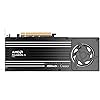
ASRock Radeon AI PRO R9700 Creator 32GB Professional Graphics Card, 2920 MHz Boost Clock, GDDR6, AMD RDNA 4, AI-Accelerators, DisplayPort 2.1a, PCIe 5.0, Blower Cooler

Based on 64 reviews
Condition: New
Checking for the best price...
$2,449.94

Buy Now, Pay Later


As low as / mo
  • – Up to 36-month term if approved
  • – No impact on credit to apply
  • – Instant approval decision
  • – Secure and straightforward checkout

Ready to go? Add this product to your cart and select a plan during checkout.

Payment plans are offered through our trusted finance partners Klarna, Affirm, Afterpay, Zip, Apple Pay, and Google Pay. No-credit-needed leasing options through Acima may also be available at checkout.

Learn more about financing & leasing here.

Free shipping on this product

This item is eligible for return within 30 days of receipt

To qualify for a full refund, items must be returned in their original, unused condition. If an item is returned in a used, damaged, or materially different state, you may be granted a partial refund.

To initiate a return, please visit our Returns Center.

View our full returns policy here.


Availability: Only 2 left in stock, order soon!
Fulfilled by Joes Tech Shop Inc

Arrives Nov 4 – Nov 10
Order within 17 hours and 24 minutes

Available payment plans shown during checkout

Protect Your Purchase

Easy claims online, fast replacements, no fees

Checking for protection plans...

At a glance

Condition
New
Model
90-GA5XZZ-00UANZ
Weight
1069 g
Graphics Coprocessor
AMD Radeon AI PRO R9700
Graphics Ram Size
32 GB
GPU Clock Speed
2920 megahertz
Video Output Interface
DisplayPort
Warranty
2 Years Manufacturer
Works with
Desktop

Features 9

  • Professional AI & Creator Workstation: AMD Radeon AI PRO R9700 GPU with 32GB GDDR6 is engineered for AI development, professional content creation, and compute-intensive workloads.
  • Massive 32GB Memory Capacity: 32GB of GDDR6 memory on a 256-bit bus provides ample bandwidth for large AI models, 8K video editing, and complex 3D rendering.
  • Advanced RDNA 4 with AI Accelerators: 64 Compute Units with 3rd Gen Ray Tracing and dedicated 2nd Gen AI Accelerators for groundbreaking AI performance and visual computing.
  • Professional Blower Cooling: Efficient single blower design exhausts heat directly out of the chassis, ideal for multi-GPU workstation and server configurations.

Description

Unlock AI potential with the AMD Radeon AI PRO R9700. Featuring RDNA 4 and 2nd-gen accelerators, it delivers 2x the performance of previous models. With 32GB VRAM, it effortlessly handles complex local workloads, turning your biggest ambitions into reality with elite speed. Boost speed with PCIe Gen 5, enabling fast transfers and easy multi-GPU scaling. Built for AI developers, the AMD Radeon AI PRO R9700 runs large models locally, cutting cloud reliance. It tackles memory-heavy tasks and scales with your needs, ensuring limitless local performance.

Specs 24

Graphics Coprocessor AMD Radeon AI PRO R9700
Brand ASRock
Graphics Ram Size 32 GB
GPU Clock Speed 2920 megahertz
Video Output Interface DisplayPort
Graphics Card Ram 32 GB
Graphics Ram Type GDDR6
Graphics Card Interface PCI-Express x16

Frequently asked questions

If you place your order now, the estimated arrival date for this product is: Nov 4 – Nov 10

Yes, absolutely! You may return this product for a full refund within 30 days of receiving it.

To initiate a return, please visit our Returns Center.

View our full returns policy here.

  • Klarna Financing
  • Affirm Pay in 4
  • Affirm Financing
  • Afterpay Financing
  • Zip Pay in 4
  • Financing through Apple Pay
  • Financing through Google Pay
Leasing options through Acima may also be available during checkout.

Learn more about financing & leasing here.

Top Amazon Reviews


Good Value, Great capability
This GPU is solid. The build quality is great. Compared to other cards I've had on this MOBO it seats firm and stays stable. Performance is great. My system is getting a bit old (Intel socket 1151, Z390 chipset) but this GPU gave it some serious new life. I can run Cyberpunk at 4K, 60Hz on default Ultra settings (without ray-tracing). True, that is not what this card is for. It also has tons of VRAM to load your AI models. Qwen3-VL-32B-Instruct loaded in LM Studio and was running at a quick conversational speed. I have seen people say the blower fan is loud, but that is not my experience. During normal desktop usage the card is barely audible, similar to a standard case fan. When it is counting tokens it does get louder, but it is not high pitched and franky is not any louder than my RTX 2060 Super was when it was doing a lot less useful work. Another benefit of this AMD over NVIDIA was the ZERO FRICTION installation for Linux. I'm running Fedora KDE. I shut my PC off. I pulled my NVIDIA card out. I put the AMD in. I MADE SURE the power cable was well connected...twice. I powered the PC back on. Everything worked. All my screens came back as they were set before. Resolutions were fine. Nothing needed to be tweaked. The PC was just better. Keep in mind this card is LONG. In my aging mid-tower I had to do some parallel parking maneuvers with the power cable attached to clear my hard drive bay/optical bays to make things clear. Once in place everything is happy though. Even though this card is way more expensive because Big Tech is stealing all the RAM, it is still much cheaper than other alternatives. For certain AI tasks this will be slightly slower than NVIDIA, but it's a third of the price and is way (well, slightly) less evil. Get one before we are no longer allowed to own such things. ... show more
Reviewed in the United States on July 30, 2026 by Jeff

Most affordable current generation 32 GB GPU if you want to do local AI
First, since I've seen complaints about other brands of this card, it *does* come with with a power supply adapter (3x8 pin to the 12 pin required by this card). It didn't matter to me since my power supply came with a 12 pin socket and cable, but if it matters to you, you're in good shape and don't need to order an adapter. Otherwise, it's as advertised. I'm running it on Linux. Installing ROCm and ComfyUI was a bit of an adventure, but that comes with AMD cards in general, and it's a lot cheaper than the alternatives if you want that much VRAM. It's pretty noisy when the fan cranks up, but I like that the blower fan evacuates the warm air from the case to keep everything else cooler. Downrate it to 210w with amdgpu_top and it's very quiet and only 5-10% slower. ... show more
Reviewed in the United States on July 29, 2026 by Robert K

A solid card for light "AI" work with the current insanity of prices (1300 bucks)
You need to go into a card like this with a bit of an understanding. It is a productivity card, and it is AMD. So there are certain expectations that need to be understood. This being said - it has met all of mine. I use this on a VM using a TB3 egpu pass through, so there is some loss of performance expected for llama.cpp and this card - LLM (llama.cpp vulkan) - Qwen 3.5 35b a3b Q6 - 75-90 TPS (Good model for many things. Generally the best in this range) Qwen 3 Coder a3b Q8 - ~100 TPS (Still a pretty good model at 30B) GPT-OSS 20B Q8 - ~120 TPS (Yeah, it works... Just stick to lmstudio) Gemma 4 26b A4b Q6 - 50-65 TPS (The best I have found for text adventures in the 20-35b range) Gemma 4 31B Q6 - 16-18 TPS (Kind of slow, but for things like chatting 16-18b will work. And will ramp the fan HARD) (The above are for fully loaded models with as little CPU as I can manage) Diffusion - SDXL (Comfy ROCm) 1920x1200 image - ~7-8 seconds (perfecting the prompt will take the rest of your life.) AceStep 1.5 (Comfy ROCm) - ~70-90 seconds for a 180 second track. (And about 30-60 runs before you get an acceptable track) Not the best, but for most things on smaller models it works really well as knee capped as I have made it. Fan Noise - It can be loud. If you push it up to 300w for more than 10 seconds or so, it will be loud. I would say about as loud as running most microwaves. But YMMV for that comparison. The software build is not that bad for this card. No where NEAR as bad as building out the base system with all of the pass through work that needed to be done. Most of the usual softwares, comfy, llama, ollama, kobold, lmstudio - they all pretty much 'just work' as long as you grab the right builds. ROCm is supported very well these days, even if it is not as fast as cuda yet. All in all, it is (A FOUL TEMPTRESS! IT IS NEVER ENOUGH, 32GB OF VRAM WILL NEVER BE ENOUGH! YOU WILL ALWAYS NEED MORE, CRAVE MORE! LLMS WILL CONSUME IT ALL! RUN! RUN IF YOU VALUE YOU SANITY!) Pretty good. ... show more
Reviewed in the United States on August 23, 2026 by Amazon User

Very loud. Good performance. Weak software support.
It’s extremely loud when running on full throttle. Very loud. Well built and well packed. It comes with a 3-8-pin to 12v power adapter in case your PSU doesn’t have a 600w 12v socket. Software support is abysmal on windows and barely working on Linux. When it works it works well. At the time of my purchase AMD hasn’t updated their guides and the official rocm is 7.2 which didn’t fully support this card. Maybe later versions would have better support. I returned mine as it can’t run my ComfyUI workflows (with PyTorch cuda/rocm). ... show more
Reviewed in the United States on July 7, 2026 by vincent lee

overpriced at its current level
amazing, incredible, economical I just wish they'd stop raising the price every five minutes. I'm not writing a technical review untill they stabilize the pricing.
Reviewed in the United States on October 2, 2026 by Jaz-Aero Designs

Great for local AI with some quirks
New system with 128GB DDR4, 5900x, and dual r9700 gpus for local AI coding agents and some diffusion workloads. I also have a 7900xtx and 5090 in other builds so I was excited to optimize and compare the 9700s. Overall these are great but some things to keep in mind. I do not recommend using only one r9700. They seem to work best in even numbered pairs, allowing for tensor splitting in LLM deployments and running multiple parallel batches in diffusion tools. I’ve seen several complaints regarding the noise. I wouldn’t say it’s terrible but they are not consumer gaming gpus. It’s about the same as an 8-10” fan on full blast or an above stove range exhaust hood. One gpu fan had some vibration at full speed but it was mostly fixed by pushing down on the aluminum backplate where the fan is mounted while it was spinning. It seems the fan can be off balance if the backplate isn’t just right. It still vibrates through to my desk a little at times so be sure case wires are not in a position they could rub and short. Temperatures are ok for a blower card. Neither of mine are thermal throttled but I have them in a free flowing Corsair 4000d case. The backplate gets hot so I may try to position an extra fan somewhere to push more air over it. The hotspot is about the same as my 7900xtx but memory runs 10c hotter. It’s one of the best space heaters I’ve owned. I plan to move the tower to another room and connect to it remote over lan to keep my office from being a sauna in the summer. I’m still optimizing LLm deployment settings but so far prompt processing is lightning fast and response token speed is ok. I gained huge uplifts to response speed by adjusting llama.cpp compile and deployment settings with the other gpus and hope to eventually get the same from these. At the moment response speed is not much greater than the optimized xtx. 5090 runs laps past it while responding but prompt processing is comparable. This pair shines with models in the 32-64GB range (or 128gb when scaled to 4x). It does not hold a candle to an RTX 6000 pro but I wouldn’t be here if I could afford that mess. Renting them works ok but can introduce new latency and workflow optimization issues. For diffusion workloads it’s just ok. The 32GB of vram opens a few doors to heavier workloads but it’s not much faster than the xtx. While upscaling a 30s clip to 1080p resolution with SeedVR, the xtx hits oom or slows down to unusable levels, the r9700 completes in 45 minutes, and 5090 in 18 minutes. With two r9700s running parallel jobs the effective speed could be seen as 22.5 minutes which isn’t too bad considering the 2026 price gap between two r9700 and one 5090… I am drawing more power though at 600W+ for the pair vs 480W for undervolted 5090. Overall I’m happy with the build. However if you can only get one then look for an xtx or 3090 unless you absolutely need 32GB. These need to come down a few hundred dollars to be worth running a single 9700 but they provide some value with multiples. ... show more
Reviewed in the United States on March 10, 2026 by DS

Awesome for AI models and ai generations
So far its working good , actually awesome , not for gaming at , i repeating not for gaming , but a 27b ai model fits perfectly , and i think i reached about 1100 to 1200 tokens a second , using lm studio , comfy ai genration is smooth wan 14b is taking the same time as 5090 would , kicker i cant prove it , but works best with amd ryzen 9 , I have tried it on tel i9 and coreultra 9 but amd processing was awesome in terms of ai ... show more
Reviewed in the United States on October 1, 2026 by Crazy shopper

AMD GPU for AI
AMD has hit a home run with this build. Using it for home AI workflow but has exceeded expectation and performance. Meeting benchmarks that are better than my 5080.
Reviewed in the United States on October 2, 2026 by JF
Checking for best price...