




Search  for anything...

Aqara Door and Window Sensor P2, Contact Sensor with Remote Alarm

  • Based on 1,114 reviews
Condition: New
Checking for the best price...
$27.99 Why this price?
Save $2.00 was $29.99

Buy Now, Pay Later


As low as $6 / mo
  • – 4-month term
  • – No impact on credit to apply
  • – Instant approval decision
  • – Secure and straightforward checkout

Ready to go? Add this product to your cart and select a plan during checkout.

Payment plans are offered through our trusted finance partners Klarna, Affirm, Afterpay, Zip, Apple Pay, and Google Pay. No-credit-needed leasing options through Acima may also be available at checkout.

Learn more about financing & leasing here.

Free shipping on this product

FREE 30-day refund/replacement

To qualify for a full refund, items must be returned in their original, unused condition. If an item is returned in a used, damaged, or materially different state, you may be granted a partial refund.

To initiate a return, please visit our Returns Center.

View our full returns policy here.


Availability: In Stock.
Fulfilled by Amazon

Arrives Friday, Oct 2
Order within 11 hours and 32 minutes
Available payment plans shown during checkout

Protection Plan Protect Your Purchase
Checking for protection plans...

Features

  • [Open/Closed Status Monitoring] With a built-in high-precision Hall sensor, the Aqara Door and Window Sensor P2 can detect the opening and closing status of doors, windows, and drawers precisely. Once the sensor is triggered, it will send real-time alert notifications to your smartphone whether you're at home or away, ensuring you're always aware of any potential security concerns. (*Note: To ensure a stable connection, place the Door and Window Sensor P2 main unit between the accessory unit is no more than 22 mm )
  • [Local Home Automations] You can integrate the Door and Window Sensor P2 with your smart home ecosystem to enable advanced automations like adjusting thermostat settings or activating security cameras when a door or window is opened. Moreover, the automations are executed without the cloud, which can protect the users privacy and will keep working even if there is no internet connection.
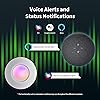
  • [Voice Alerts and Status Notifications] The Aqara Door and Window Sensor P2 supports Apple Siri, Alexa, and Google Assistant. With these voice assistants, you can receive alerts about events such as door entries, or ask whether a door is open, allowing you to effortlessly monitor your home.
  • [Easy Installation & Long Battery Life] With its compact design and adhesive back, the sensor is easily integrated into any interior. Additionally, equipped with a powerful CR123A battery, it provides uninterrupted protection with infrequent replacements.* The battery life may vary depending on the border router and Matter app the sensor is connected to. Please ensure to use a CR123A battery when replacing, as incompatible models may cause failure or malfunction.

Description

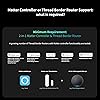
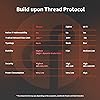
The P2 supports Matter natively, and connects directly to the most popular ecosystems and Aqara Home in the near future through the Matter-compatible Aqara Thread border router*. To add the P2 to a particular Matter-enabled app, your device or devices will need to have both functionalities, therefore a 2-in-1 Matter Controller & Thread Border Router is needed as a minimum requirement. Stay informed and secure with real-time notifications on your smartphone whenever the sensor detects activity. You'll never miss a potential security threat, whether you're at home or away. By installing the P2 on a first aid kit, medical professionals can monitor when it is opened, ensuring that it is used appropriately and restocked when necessary. The P2 can also be placed on a safe box in a home or office to alert owners if it is opened by unauthorized personnel, preventing the loss of important documents, cash, or valuables. You can receive alerts, or ask about whether a door is open, keeping you on top of things at home. The sensor is easy to install with its strong sticker and an alternative flat magnet. Equipped with a powerful CR123A battery, it provides uninterrupted protection. Settings through the Aqara Home app will be expanded with the future launch of the Hub M3. Does this product come with a 2-in-1 Matter Controller & Thread Border Router? No, 2-in-1 Matter Controller & Thread Border Router is required and sold separately How can I ensure a stable connection for the Door and Window Sensor P2? To ensure a stable connection, place the Door and Window Sensor P2 main unit between the accessory unit is no more than 22 mm .And make sure the Door and Window Sensor P2 and the router are connected to the same local area network (LAN). What type of battery should I choose for this sensor? To ensure optimal performance, please ensure to use a CR123A battery when replacing, as incompatible models may cause failure or malfunction. As a leading provider of smart home solutions, Aqara excels in delivering a wide array of award-winning, user-friendly smart home products and platform solutions tailored for your home. We proudly serve over 12 million customers in more than 170 countries and territories. Our products are designed to offer convenience, security, and energy efficiency, making your home smarter, more sustainable, and adaptive to your evolving needs.

Brand: Aqara


Item dimensions L x W x H: 3.03 x 1.32 x 0.87 inches


Item Weight: 0.04 kg


Style: Door and Window Sensor P2


Mounting Type: Door Mount


Mounting Type: Door Mount


Specific Uses For Product: home security, smart home integration, voice assistant integration


Style Name: Door and Window Sensor P2


Item Dimensions: 3.03 x 1.32 x 0.87 inches


Item Weight: 0.04 kg


Brand Name: Aqara


Model: DW-S02E


UPC: 192784000847


Number of Items: 1


Manufacturer: Lumi United Technology Co., Ltd


Item Highlight: Matter Over Thread, Requires 2-in-1 Matter Controller & Thread Border Router, Supports Apple Home, Alexa


Warranty Description: 1 Year Warranty


Unit Count: 1 Count


Included Components: Sensor Accessory Unit × 1


Item Type Name: Door and window sensor


Part Number: DW-S02E


Frequently asked questions

If you place your order now, the estimated arrival date for this product is: Friday, Oct 2

Yes, absolutely! You may return this product for a full refund within 30 days of receiving it.

To initiate a return, please visit our Returns Center.

View our full returns policy here.

  • Klarna Financing
  • Affirm Pay in 4
  • Affirm Financing
  • Afterpay Financing
  • Zip Pay in 4
  • Financing through Apple Pay
  • Financing through Google Pay
Leasing options through Acima may also be available during checkout.

Learn more about financing & leasing here.

Top Amazon Reviews


  • It works well with SmartThings, but not with Google Home.
05/10/24 Edit: I wasn't able to establish a proper connection between the sensor and Google Home at first using Google Nest Hub Maxes. After connecting the sensor to Google Home, the sensor would show that it was offline. My solution to this was to bring together and separate the sensor and the magnet several times after adding the sensor to Google Home. After doing this, the sensor finally appeared as online on Google Home. 5/17/24 Edit: Two sensors were unstable with my Google Nest Hub Maxes, despite the closest Hub Max being only about three feet away. It kept appearing as offline and online randomly. I also tried connecting them to an Aqara Hub M3 (about four feet away) and an Aeotec SmartThings Home Hub (about four feet away) with no success. I connected them to a Samsung SmartThings Station (about seven feet away). So far for the last three days, the connection between the Samsung SmartThings Station and the sensor has been stable with no issues. ... show more
Reviewed in the United States on April 30, 2024 by Andre Leon

  • Constantly Offline
I like Aqara products, have been using smart switches, wireless mini switches, motion sensors, wireless relays etc. Have around 50 devices installed at home. In the past i never had issues with its Zigbee devices. However its newer line of Matter devices (locks and Sensors) are not reliable. With time its U200 lock reliability has increased, no problems when used with the Aqara app or HomeKit. However not fully satisfied with Alexa integration, it is slow to react and disconnects continuously. The P2 window sensor does not work at all in any ecosystem, not even with Aqara. My experience is that it gets disconnected every other day. Every other day I had to reset it. I finally gave up and no longer use it. I realy do not know how this sensor could be used in an alarm system where reliability is paramount. ... show more
Reviewed in the United States on January 14, 2025 by KKNOWS

  • Excellent Door and Window Sensor that works well in Home Assistant and HomeKit
I needed to replace a door and window sensor and thought I'd give this one a try, since it's Matter over Thread. While the sensor is a little bigger than I'd like, it sits high up on a door and doesn't stick out much. I forget it's there now. I added the sensor directly to HomeAssistant (because I have HA set up in my Thread network already) and it added quickly without any hiccups, so it's definitely possible. I did have to replace the battery it came with, since I think the battery had drained while sitting in the box, but that wasn't a big deal. The sensor works great and I would definitely buy another one. Whenever possible I prefer Matter over Thread or Z-Wave devices for use in Homekit to keep 2.4GHz interference down and to keep IoT devices off my wi-fi network, taking up IP addresses. This one was a good buy and I recommend it IF you already have a thread border router. If you don't use Home Assistant and just use HomeKit, I still recommend it because I was able to pair it with HomeKit and it worked flawlessly. I have an AppleTV 4k and a few HomePod minis as border routers, so your mileage may vary. ... show more
Reviewed in the United States on February 3, 2026 by Sandro Munoz

  • The ones that work, work great
EDIT: although I did not request it, the seller did see this review and offer to refund the cost of the malfunctioning sensors, which I appreciate. I’m a little torn at this point - on the one hand, two of five are not working, which seems like a high failure rate, but one sample isn’t enough data to make that judgement. Could just be bad luck. Also, obviously they still don’t update via HomeKit, which I consider a flaw. However, the description does disclose that a hub is required, and the ones that do work are still working great. With that in mind, assuming someone has or is willing to buy a hub, and assuming the 66% failure rate is a fluke (or could be fixed with an update), these would be the best door and window sensors I’ve used so far. So I’m going to bump this to 4 stars, just make sure you understand the limitations and requirements to make them work at a 4 star level. First, the good - these are pretty nice, reasonably economical door and window sensors. Not the cheapest, not the most expensive. While a bit large and clunky, they're still attractive reasonably unobtrusive. Another nice feature is the distance from the sensor to the magnet that registers as "closed" is quite long compared to many sensors. That's a big deal because if you have trim around your doors, for example, you can mount the sensor on the trim and the magnet on the door and it will still work. With other brands, it simply won't work at all, or they include spacers you have to stack up until they are close enough in an ugly, kinda hack-ey way. Aqara's way is better. They also pair pretty easily, report excellent signal no matter how far from a Thread router they are in my (admittedly not very large) house, and the ones that work properly have worked every single time without a single failure or "no response" issue. I'm quite happy with their performance. Now, the not so good. I bought five of them. I am using Apple Home (HomeKit) via Matter over Thread. Three of them work great. Two of them drain the battery in under two weeks. Replacing the batteries, removing then re-adding to Home, factory resetting then re-adding to Home, and even moving them right next to the active hub/thread border router (an AppleTV 4K) doesn't fix them. Their signal strength reports excellent. They are connected to only one thread network, only one Thread router (just like the working ones, some of which are further from the router), it's winter here so they're not even being cycled. They just suck the battery dry. So there's one more thing I could try - a firmware update. And that's a problem. There is newer firmware available, but you cannot update the firmware via HomeKit. Since I have no Aqara hub I cannot update them. This is admittedly my fault. If you read the description carefully, it says an Aqara Matter Controller/Thread Border Router is required. However, since my other thread/matter devices all update fine through HomeKit, I just assumed these would too. I thought it was part of the Matter standard. No hub is one of the big selling points of Matter over Thread devices. I figured the hub requirement was just for additional features or something I didn't care about, like renaming the device or something. But apparently while it is possible to make updates available in Matter/HomeKit, it is not required to meet the standard. I need to be able to install updates. As these work on firmware 1.0.1.1, in my setup, I cannot. Since I can find no indication on the Aqara web site or any other source indicating that's a known fix for this battery drain issue, it's a roll of the dice to buy a device that serves no other purpose for me. I also started to sign up for an Aqara account to get support through that avenue, but when it asked for my birthday that was it for me. Maybe they would replace it under warranty, but then I'd have 5 devices I can't update without buying more hardware instead of three. Not sure that's even worth it. I gave up. I'm going to cut my losses. If you already have an Aqara hub (many of their cams are also hubs I think) or are willing to buy one, or if you don't mind the return hassle, or if my 66% failure rate isn't typical, or if you just don't care if you can update the firmware, these may be great for you. As I said, the ones that are working do work very well. Perhaps, if it is just firmware, by the time you read this they may be shipping with an update and work fine (or maybe even with updates enabled?) via HomeKit alone without the hub. If so, these are probably worth trying. For me, I think I'll just chalk it up to a learning experience and move on. I've already tossed the packaging (stupid of me), so I won't bother trying to return them to Amazon. Plus, they may not be defective. They may just need an update that I'm not willing to do. I'm just going to toss the bad ones, plan to phase out the others eventually. There are plenty of door and window sensors that work and can be update via HomeKit so this brand will probably be pretty low on my list for any home automation devices in the future. It's too bad, because the G100 camera is an absolute monster value that is just about impossible to beat, and requires no hub to work. If you need a cam (indoors or out!) you may still want to check it out. But the inconsistency between these two products, even though partially my fault for misinterpreting the hub requirement, gives me lingering doubts that will be difficult for me to overlook. So let's call it three stars - one added for every one that works and works well, and one subtracted for every one that doesn't. ... show more
Reviewed in the United States on January 15, 2026 by Darrick Smith

  • Mixed
As others have noted the door sensor is kind of large but it's not much bigger than the Nest detector sensors that were discontinued which is what I'm replacing. The first one I bought was DOA. I could not get it pair at all. Fortunately, I bought two. I was hesitant to open the second one, but it worked w/o much incident the first time and placed on my bedroom window and returned the first. For the most part it worked great but periodically it would seem to go offline and had to be reset but eventually seem to stabilize. It might go offline for 30 seconds to a minute or so but it would recover w/o intervention but about a month ago I've started to see a lot of connectivity drops for extended amounts of time. May just need to reset some something but the sensor will be offline for 20 minutes or more at time repeatably. The third one I bought I placed the main unit on the trim which sites about .25 in above the door in a similar manner to my nest detector. This was big mistake as that .25 in elevation prevented the door from being seen as closed. The website says that with the M3 hub I would be able to adjust the sensitivity, but that feature is currently MIA. I attempted to swap the main unit and the accessory (accessor on trim and main unit on door) which would have worked except that the adhesive is not reusable, and it took some paint with it. ... show more
Reviewed in the United States on May 9, 2024 by Jonathan Porter

  • Five stars...after some issue resolutions
These are wonderful, but you have to do a few things if you're having issues. I tried connecting one and it was not working at all. So I tried to set up another and the same thing happened. Since both were not working I figured it was something with my network. Turns out my mesh router (Google Nest Wifi Pro) was conflicting with my router (whatever ATT gave me). The ATT router had its WiFi signals enabled for 2.4Ghz and 5Ghz so when the set up was happening, it was picking up both WiFi connections from my phone. I disabled the signals from the ATT router, and they still weren't working, but I wanted to try a third just in case, and it magically connected easily. Since that started working, I wanted to troubleshoot the other two that were still having issues. I figured hat during the setup, the devices remembered the settings so I needed a way to reset them and start fresh. I saw a video from their YouTube account that you can factory reset if you press the button 10 times. Once I did that, both connected easily. I bought 13 of these and never had an issue setting up the other 11 after the network issue / factory reset took place. They are easy to set up and don't get in the way. Finally I used the extra magnets that came with each device on my fridge, lol. ... show more
Reviewed in the United States on July 15, 2024 by Mooey

  • I have several of these, and they have all worked flawlessly for me with Home Assistant
I have not had any of the connectivity issues or reliability issues that some reviewers have had with this product. To date I have purchased 7 of these contact sensors, and they have all been rock solid, in fact theyve been some of the most reliable products in my smart home. If that changes I'll edit this review with an update. They all paired to Home Assistant using Matter quickly and without issue...except for one. One was actually giving me a decent amount of trouble with pairing. I ended up temporarily turning off my Wifi's 5Ghz network, factory resetting multiple times, and retrying multiple times, but it did eventually work, and that sensor has not given me any trouble since. The sensors are also pretty fast to update, and while it's a tad bulky for a contact sensor, the trade-off is that i've gotten great battery life out of them so far. I have no complaints ... show more
Reviewed in the United States on October 22, 2025 by Jonathan Jules

  • Aqara P2 Contact Sensor – Disappointing Reliability for a “Next-Gen” Matter Device
I’ve been a long-time Aqara customer with over 35 Aqara products at home — including switches, cameras, and sensors. The original Aqara Zigbee contact sensors have worked flawlessly for years. That history of reliability is what led me to purchase four Aqara P2 Contact Sensors, which use Matter over Thread. Unfortunately, the P2 has failed to meet expectations. Constant Disconnections: After just a few months, the P2 sensors started disconnecting from Apple Home. Unlike Zigbee devices, which reconnect automatically after outages, the P2 requires a manual factory reset and re-pairing. This means removing it from Apple Home and rebuilding every associated automation and shortcut. This disconnection occurs roughly every two months or after internet outages, even though Matter and Thread are supposed to be local protocols. Other Matter and Zigbee devices recover just fine — only the P2 fails consistently. Battery Drain Issues: One of my P2 sensors showed 0% battery. After inserting a new CR123A battery, it dropped to 25% within a day and 0% by the next. Another fresh battery dropped to 75% in minutes. I contacted Aqara support, who attributed it to residual power and advised removing the battery, holding the reset button for 5 seconds, then reinserting it. This did not resolve the issue. Poor Customer Support: Support requires emailing Aqara and waiting 3–4 business days between responses. After weeks of following scripted troubleshooting steps, they concluded that my device was out of warranty and that I would need to purchase a new one. Given the issue appeared after a battery change, this response was especially frustrating. Final Verdict: The Aqara P2 Contact Sensor is unreliable, difficult to reset, and not ready for real-world use. If you’re heavily invested in automations or HomeKit, you’re better off with: • Aqara’s original Zigbee contact sensors, which are far more stable • Or Eve’s Matter-compatible contact sensors, which have performed far more reliably The P2 is not worth the time or effort. Aqara’s implementation of Matter is still too immature for a critical-use sensor. ... show more
Reviewed in the United States on July 14, 2025 by Raswant K

Can't find a product?

Find it on Amazon first, then paste the link below.
Checking for best price...