Search  for anything...

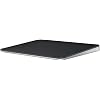
Apple Magic Trackpad - Black Multi-Touch Surface ​​​​​​​

  • Based on 0 reviews
Condition: New
Checking for the best price...
$149.00 Why this price?

Buy Now, Pay Later


As low as $24.83 / mo
  • – 6-month term
  • – No impact on credit
  • – Instant approval decision
  • – Secure and straightforward checkout

Ready to go? Add this product to your cart and select a plan during checkout.

Payment plans are offered through our trusted finance partners Klarna, Affirm, Afterpay, Apple Pay, and PayTomorrow. No-credit-needed leasing options through Acima may also be available at checkout.

Learn more about financing & leasing here.

Selected Option

Free shipping on this product

FREE refund/replacement until Jan 15, 2026

To qualify for a full refund, items must be returned in their original, unused condition. If an item is returned in a used, damaged, or materially different state, you may be granted a partial refund.

To initiate a return, please visit our Returns Center.

View our full returns policy here.


Availability: Only 3 left in stock, order soon!
Fulfilled by Amazon

Arrives Monday, Mar 16
Order within 14 hours and 23 minutes
Available payment plans shown during checkout

Protection Plan Protect Your Purchase
Checking for protection plans...

Style: USB-C


Color: Black


Features

  • Magic Trackpad is wireless and rechargeable, and it includes the full range of Multi-Touch gestures and Force Touch technology.
  • Sensors underneath the trackpad surface detect subtle differences in the amount of pressure you apply, bringing more functionality to your fingertips and enabling a deeper connection to your content.
  • It features a large edge-to-edge glass surface area, making scrolling and swiping through your favourite content more productive and comfortable than ever.
  • Magic Trackpad pairs automatically with your Mac, so you can get to work straightaway.
  • The rechargeable battery will power it for about a month or more between charges.

Brand: Apple


Compatible Devices: Mac


Connectivity Technology: Bluetooth


Color: Black


Special Feature: Lightweight, Portable, Rechargeable, Touch Scroll, Wireless


Product Dimensions: ‎6.89 x 5.1 x 0.98 inches


Item Weight: ‎11.3 ounces


Manufacturer: ‎Apple


Item model number: ‎MXKA3AM/A


Batteries: ‎1 Lithium Ion batteries required. (included)


Date First Available: ‎October 28, 2024


Frequently asked questions

If you place your order now, the estimated arrival date for this product is: Monday, Mar 16

Yes, absolutely! You may return this product for a full refund within 30 days of receiving it.

To initiate a return, please visit our Returns Center.

View our full returns policy here.

  • Klarna Financing
  • Affirm Pay in 4
  • Affirm Financing
  • Afterpay Financing
  • PayTomorrow Financing
  • Financing through Apple Pay
Leasing options through Acima may also be available during checkout.

Learn more about financing & leasing here.

Top Amazon Reviews


  • A Must-Have for Mac Users
Style: USB-C Color: Black
If you own a Mac, the Apple Magic Trackpad truly feels like a natural extension of your system. The multi-touch surface is incredibly responsive, and the gestures are smooth and intuitive — making navigation, switching between apps, and managing multitasking an absolute breeze. I primarily use mine while working from home, and it’s been a game-changer for productivity. The wireless connection is flawless, the battery life is excellent, and it charges quickly with the included USB-C to Lightning cable. I also love the larger surface area compared to a MacBook’s built-in trackpad — it gives me plenty of space without feeling bulky. The black finish looks modern and professional, and pairs nicely with other Apple accessories. It’s also much more ergonomic for long work sessions than using a traditional mouse, especially if you’re already used to Mac gestures. It’s not cheap, but worth every dollar for the quality, design, and integration with macOS. If you’re a Mac user — especially someone working remotely or doing creative work — this is an upgrade that genuinely improves the experience. ... show more
Reviewed in the United States on July 19, 2025 by hrh

  • Great Trackpad!
Style: USB-C Color: Black
Works seamlessly as expected and super long lasting battery with everyday use. Perfect addition to my setup.
Reviewed in the United States on November 3, 2025 by Jeff Patryn

  • Smooth, Responsive, and the Best Gesture Experience on macOS
Style: USB-C Color: Black
The Apple Magic Trackpad in Black is an absolute game-changer if you’re in the Apple ecosystem. I’ve used plenty of trackpads and mice over the years, but nothing comes close to how smooth, accurate, and intuitive this one feels. The multi-touch surface is incredibly responsive — gestures like swiping between desktops, pinch-to-zoom, and Mission Control feel instant and natural. The black finish looks premium and stylish, especially if you’re going for a modern, minimalist desk setup. It pairs perfectly with the black Magic Keyboard and the overall build quality is exactly what you’d expect from Apple: solid, sleek, and high-end. Force Touch is another huge plus. The click feels consistent everywhere on the surface, and the haptic feedback makes it feel like a physical click even though it isn’t. It’s comfortable for long work sessions and noticeably easier on the wrist compared to a mouse. Battery life is excellent — it lasts weeks on a single charge, and you can keep using it while it’s plugged in. Pairing is instant and reliable with zero lag. If you want the smoothest navigation experience on macOS or you’re building a clean desktop layout, the Magic Trackpad is absolutely worth it. It makes everyday computing feel faster, easier, and more enjoyable. ... show more
Reviewed in the United States on December 7, 2025 by Bill Welcher

  • Best trackpad for your Mac
Style: USB-C Color: Black
It is the best trackpad in the market, and the actually improved battery life. Now with usb c and in black: exceptional.
Reviewed in the United States on November 15, 2025 by Edu

  • Works on linux
Style: Lightning Color: White
The magic trackpad works out of the box on linux. Specifically, it works on the distribution release I use, ubuntu 22.04.3 LTS. I tried two other trackpads with usb receivers, logitech and perixx. The logitech was very flaky, but I bought it used, and it may have been defective to begin with, or damaged by its previous owner. I also don't think logitech makes it any more. The perixx was a reasonable deal given the price, but it required a touch that was a bit heavy and did not always pick up movement or taps. The magic trackpad, although not perfect, has a smoother surface, takes a lighter touch, and is more responsive and consistent in its behavior. The battery in my case lasts one to two months before I have to recharge — YMMV. The trackpad behaves the same way as the builtin touchpad on my laptop, supporting single, double, and two-finger taps, and it allows me to drag objects around the screen. There is a third party driver on github which enables three-finger gestures. I don't remember the name. I'll make some recommendations regarding the trackpad setup on ubuntu, using a combination of gui and terminal utilities. If you only want to use a gui interface or are not interested in a slightly off-label configuration, or if you don't use ubuntu or any of its derivative distributions (or maybe if you don't use apt or a gnome desktop), you can disregard the rest of the review. Configuration and usage recommendations for ubuntu: The open source bluetooth driver package included with debian and debian-based linuces, such as ubuntu, is called "bluez". Ubuntu LTS (long-term support) ships with bluez 5.64, in spite of the fact that stable debian (version 12, code-name "Bookworm") ships with 5.66. I'd recommend an upgrade to the later version. The easiest way to pair a new device is to use the settings/bluetooth page in the (gnome) gui desktop. Once paired, the system retains the definition, but the connection is lost during a reboot or suspend. If you are using bluez 5.66 or above, you can force a reconnection just by pressing down on the trackpad to produce a click (just tapping won't do it). The click inserts a bluetooth icon in the panel at the top the screen. After a few seconds, the pointer responds to additional trackpad events. Click-to-reconnect works both before and after login. Pointer movement and clicks work on the login page; taps are post-login only. If you are using bluez version 5.64, you will have to explicitly reconnect after logging in. In my opinion, the easiest option is to reconnect with a shell script. Obtain the trackpad's mac address by clicking on the "magic trackpad" link in the settings/bluetooth device listing, or by executing "bluetoothctl devices" in a terminal window. (I'll use A1:B2:C3:D4:E5:F6 as a sample address — obviously, you should substitute your own.) Create a shell script with the single line, bluetoothctl connect A1:B2:C3:D4:E5:F6 and move or copy it to a directory in the path. For the script file name, use something short and suggestive, like "tpad". Then, whenever you reboot, or wake up from suspension, open a terminal window with the keyboard shortcut, ctrl+alt+t [control, alt, and the letter T], then type "tpad", and press return. If for some reason you want to disconnect and stay live, create a script containing the line, bluetoothctl disconnect A1:B2:C3:D4:E5:F6 The simplest way of manually upgrading to bluez 5.66 is to search online for the package's file name, download, and install locally. If you're using an intel or amd PC with a 64-bit OS (and you probably are), the name is bluez_5.66-1_amd64.deb If you have a different architecture, search for debian packages stable admin and follow the link. ("admin" refers to the administrative utilities page.) Find "bluez (5.66-1)" on the admin page and click on the link. Go to the bottom of the package page and select the architecture of your choice. After the download, in a terminal window, change to the download directory and install the package with sudo apt install ./bluez_5.66-1_amd64.deb Normal apt upgrades will not replace 5.66 until a later version is added to the repository. To see what you have on your system, execute dpkg -l bluez ... show more
Reviewed in the United States on November 1, 2023 by Burnham Wood

  • Overall great hardware, somewhat lacking in the software
Style: Lightning Color: White
Mechanically this is a great trackpad, I would give it 5 stars if it weren't for one glaring issue...the support software is sorely lacking. There are a lot of settings people often want to customize like a higher degree of touch/tap sensitivity, finger and swipe functions, touch zones, etc, that the Mac system software just isn't equipped to handle, there's very limited options for all of that. The good news is there are 3rd party apps that you can buy that will give you all the extra customization ability, so the hardware itself is more than capable of a much higher level of function, Apple just doesn't provide it, so you have to pay extra for it. Once you get over that hurdle, it works as well as I could hope for. ... show more
Reviewed in the United States on July 24, 2025 by Scott

Can't find a product?

Find it on Amazon first, then paste the link below.
Checking for best price...