Search  for anything...

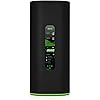
AmpliFi Alien WiFi 6 WiFi System, Seamless Whole Home Wireless Internet Coverage, WiFi Router with Touchscreen Display, 4 Gigabit Ethernet Ports, Ethernet Cable, and MeshPoint

  • Based on 135 reviews
Condition: New
Checking for the best price...
$759.00 Why this price?
Save $8.93 was $767.93

Buy Now, Pay Later


As low as / mo
  • – Up to 36-month term if approved
  • – No impact on credit to apply
  • – Instant approval decision
  • – Secure and straightforward checkout

Ready to go? Add this product to your cart and select a plan during checkout.

Payment plans are offered through our trusted finance partners Klarna, Affirm, Afterpay, Zip, Apple Pay, and Google Pay. No-credit-needed leasing options through Acima may also be available at checkout.

Learn more about financing & leasing here.

Free shipping on this product

FREE 30-day refund/replacement

To qualify for a full refund, items must be returned in their original, unused condition. If an item is returned in a used, damaged, or materially different state, you may be granted a partial refund.

To initiate a return, please visit our Returns Center.

View our full returns policy here.


Availability: In Stock.
Fulfilled by Amazon

Arrives Monday, Oct 19
Order within 17 hours and 26 minutes
Available payment plans shown during checkout

Protection Plan Protect Your Purchase
Checking for protection plans...

Features

  • WiFi 6 performance
  • Router with 4-Port Gigabit Ethernet switch
  • MeshPoint with (1) Gigabit Ethernet port

Description

Tri-Band Wi–Fi 6 System. Polished Performance. Elegantly designed AmpliFi Alien brings revolutionary Wi-Fi 6 benefits to your home. Increase your network capacity by 4x and boost coverage by 2x, while reducing battery drain in mobile devices. AmpliFi Alien comes with 2.4/5 GHz Wi-Fi 6 and 5 GHz Wi-Fi 5 radios. They deliver 7685 Mbps total capacity and 16 spatial streams from a single AmpliFi Alien unit. Easily mesh multiple units over the air to build virtually unlimited Wi-Fi capacity in your home.

Brand: AmpliFi


Model Name: AmpliFi Alien


Special Feature: WPS


Frequency Band Class: Tri-Band


Wireless Communication Standard: 802.11ax


Compatible Devices: Personal Computer


Recommended Uses For Product: Home


Included Components: Router, Mesh Point


Connectivity Technology: Wi-Fi


Color: Black


Other Special Features of the Product: WPS


Frequency Band Class: Tri-Band


Wireless Compability: 802.11ax


Compatible Devices: Personal Computer


Antenna Location: Home


Connectivity Technology: Wi-Fi


Antenna Type: Fixed


Operating System: AmpliFiOS


Security Protocol: WPS, WPA3


Number of Ports: 1


Control Method: App


Data Transfer Rate: 1733 megabits_per_second


LAN Port Bandwidth: 5 ghz


Maximum Upstream Data Transfer Rate: 3842 megabits_per_second


Router Firewall Security Level: High


Wi-Fi Generation: WiFi 6


Router Network Type: Wireless


Connectivity Protocol: Ethernet, Wi-Fi


Controller Type: Switch


Coverage: whole home


Frequency: 5 GHz


Brand: AmpliFi


Model Name: AmpliFi Alien


Built-In Media: Router, Mesh Point


Model Number: AFI-ALN


Unit Count: 1 Count


UPC: 817882028158


Number of Items: 1


Manufacturer: Ubiquiti


Mfr Part Number: AFI-ALN


Color: Black


Frequently asked questions

If you place your order now, the estimated arrival date for this product is: Monday, Oct 19

Yes, absolutely! You may return this product for a full refund within 30 days of receiving it.

To initiate a return, please visit our Returns Center.

View our full returns policy here.

  • Klarna Financing
  • Affirm Pay in 4
  • Affirm Financing
  • Afterpay Financing
  • Zip Pay in 4
  • Financing through Apple Pay
  • Financing through Google Pay
Leasing options through Acima may also be available during checkout.

Learn more about financing & leasing here.

Top Amazon Reviews


  • Outstanding mesh network system! (Updated 11/2025)
Where to start. I'm an IT professional with a couple decades of experience, so to say I've been around the block a few times supporting computers, networks and servers is an understatement. With that said, I've had a heck of a time in my home residence of 2,600 square feet of finding a wireless solution which worked reliably. When I purchased my house back in 2008, an old Linksys G router covered the whole house with no issues. However, these days there is a lot of network competition in the area and being how I'm located in a court, I have a number of other homes surrounding my residence. I've been through probably eight routers and mesh systems in the last 10 years, trying to keep my home network operating correctly. As I've added additional items, like Echo devices, smart thermostats, Ring cameras, smart outlets, smart lighting and locks, I now have almost 60 devices on my home network. To get everything to work somewhat reliably I had an extender or two around the house. The worst offenders were the Ring cameras (junk) and my iPhone. Earlier this year I purchased a TP-Link AX11000 and centrally located it in the house. Initially things looked promising but that was short lived and I've struggled with disconnects and such since installation. Seeing as I could still return it to Costco, I decided to pull the trigger on the Amplifi Alien Mesh setup. While it's pricey, I figured if it didn't work, I'd just send it back to Amazon. When it arrives and you open the box, you can see the quality. The router and MeshPoint are quite large and extremely well packaged. Everything came across as highly professional and at that point I was hopeful for a positive experience. After installing the app and following the basic instructions, I was able to create my WIFI SSID to match my old router, change the subnet on the local network, provision port forwarding and the DHCP server scope. All very easy through the app. After a firmware update which the app initiated, my home network was up and running. I made a few tweaks here and there to the settings, including accessing the web based interface which allows you to enable/disable several additional options. All told, it was very easy to set up and configure. I placed the main router downstairs and put the MeshPoint upstairs, about 25-30 feet away. The app allows you to select the MeshPoint and you can immediately see your signal strength between both devices which is really nice. It even shows that on the main page of the app but it's a little easier to see when you select the MeshPoint directly. My signal strength was right about dead center in the green, so I left everything where it was. I've now had the setup for about five days and during those five days (with no extenders or any of that old crap I had to use to make things work) I've not had a single issue. This thing has ran like a top. My iPhone which I'd have to switch WIFI on/off several times per day because it would hang has been rock solid. Even my Ring cameras which would never work consistently with my past three setups (Nighthawk Router, Orbi Mesh and AX11000) work fine with the Amplifi Alien. Single strength around my property is quite good as well. The LCD on the router seemed like a gimmick at first, but it's nice that I can walk by and check the status very easily. If the router has issues, it will also tell you via the LCD display. I also like that you can click on your WIFI devices and it gives you an overall percent rating of connectivity. For example, my devices show a combined 87% signal strength and you can scroll through the screen easily to see which devices might have poor connectivity. None of my devices do which is a huge upgrade from the past. I paid full price for this setup and am only writing the review because finding something which worked here has been problematic. I would have preferred to solve the problem with less expense, but if everything continues to work then it's money well spent. I've not had the urge to throw my iPhone through the nearest wall in almost a week! That's a plus! In terms of cons, I'd say the lack of support for dynamic DNS updates is pretty glaring. I pay for NO-IP because my past two routers supported that, but in this product, none of the typical vendors are supported which I found odd. That's really about it IMO besides the price being a bit up there and availability of the kit from Amplifi. It was a bit of an impulse buy when I saw it on Amazon and in-stock, but I'm happy to report the purchase was well worth it. Update March 2022: No issues to report even though I’ve added more wireless devices. Everything continues to work as expected. I’ve applied routine firmware upgrades and that’s it. I have zero regrets. Update November 2025: I ran this system through March of 2025. At that point I replaced it with a more robust Unifi setup with five access points all hardwired at 2.5GBE. The Amplifi Alien served me well, but as more and more network saturation occurred, I started getting some random hiccups with connectivity. I know that some of these can suffer radio failures, but mine ran rock solid and still do when retired. I think the downside to this set up was the fact you couldn't source or add additional mesh points to it without buying another main router. The Unifi hardware and management is so flexible so I'm a little stumped why they made the hardware components fixed and not pairable. Overall, it's still a good setup, but I outgrew it with time. ... show more
Reviewed in the United States on September 28, 2020 by David W.

  • QUIT WORKING AT ALMOST 2-YEARS
Worked for almost 2-years then mesh point quit working. There is absolute NO CUSTOMER SERVICE. I emailed them and they never responded so I’m left out in the cold. After our purchase we also tried to purchase a second mesh-point unit and it’s basically impossible unless you purchase a whole complete set. The reason we purchased this is because we needed a reliable mesh system that could grow yet being a reliable product. What I found out is that the owners of this company “Amplify Alien” is that they make high end commercial grade routers and have basically left this on it’s own….. Apparently home consumers are not important enough. Its very sad because this had such great potential, their lack of technical support kills the deal. ... show more
Reviewed in the United States on February 20, 2026 by A.R.A

  • The set up was very. easy and performance is outstanding
This replaced an old Apple AirPort Extreme with 3 bridged Express units to extend the reach. Wow!!! What a difference in wifi speed and capacity over a 10 year old system. Incredibly easy to set up. I used the same name for my SSID and password so that I did not have to change 30 (yes, 30 wifi connected) devices. I did not realize I had so many but when you have multiple PCs, phones, tablets, wifi enabled lights, cameras, Amazon echos, Apple TVs, etc, it adds up very quickly. There are several great unboxing and setup videos on the web (google Amplifi Alien) so I won't get into any details about that. I will discuss the app (mostly great but could use a few improvements) and a problem I encountered twice that was resolved. The app is great. As I stated earlier, it told me I had 30 devices in an organized, easy to see, descriptive list. It show the instantaneous traffic data rates for each device. It also includes performance testing between the router and internet (similar to Sppedtest.net) that you can launch from the app and even directly from the touchscreen on the router itself (btw, the touch screen on the router is very cool...much more useful than a blinking light!) The functions on the app are mostly self explanatory. You can pause Internet access to individual devices, groups of devices (they call this a profile) or all of the devices. You can turn on and off the guest access and even turn off the primary wifi password for 2 minutes if you have a group of people that need to access your wifi and you don't want to share the password. The app's main interface shows the router and meshpoint as well as the status of the connection between the two units. If you touch the graphic of the router, it takes you to a menu to change the router settings. Same for the meshpoint. When you are on the meshpoint edit menu, it shows you the signal strength between the meshpoint and the router (mine are wifi connected) and tells you whether the router and meshpoint are too close or too far from each other. That is a great feature. At the top of the app's main screen, it says "Everything is great" (meaning everything is working). But it still said "Everything is great" even though I lost the connection between the router and the meshpoint a couple of times (will discuss this shortly). So the "Everything is great" message should have indicated a problem (hopefully they will add this feature) and pushed a notification to my phone that everything is not great. The app also lets you start a communication with the support team. The app can also send the support team a support log that reports on the activity just before you experienced a problem. I had to do this twice when my meshpoint stopped communicating with the router. When you start the support messaging function from the app, an automated bot called "Bobby" asks you a few questions. Bobby needs more work to be useful. I just asked Bobby to communicate with a person and it moved me to the support queue. I think the issues with my meshpoint had to do with where I placed it. The first time, it was behind a TV. When I moved it from behind the TV and cycled the power, it reconnected. The second time, it was on the floor next to the same TV. It had run for a day without a problem but then disconnected. During the second outage, I unplugged it, waited about a minute and plugged it back in but it did not reconnect. The support person suggested I move the unit closer to the router and try it again. I did and it reconnected immediately. That action of moving the meshpoint closer to the router is something Bobby should recommend rather than just repeating the same questions when you tell it you are having a meshpoint issue. Those are the only issues I had, and using the messaging app with support worked well. Response was under 1 hour and you can reopen the conversation if you have the same problem. One additional point about the meshpoint. It only has lights...no touchscreen. If you turned off the LED using the settings in the app, it is just a dark cylinder (whether it is working or not). When the meshpoint is not working or disconnected, you can easily see the status from the app's main screen. Turning the LED off made it a little confusing to tell what was going on when I tried to power the meshpoint off and on. You can set the meshpoint to night mode where the LED turns off at a defined time if the light from the meshpoint bothers you at night. Another recommendation would be to change the color LED on the meshpoint to red when it is not communicating with the base. As for reach of the wifi signal and wifi performance, both are much better than my old Apple Airport (the difference is extraordinary). BTW, I could have rented wifi equipment from my ISP and bought wifi extenders. I believe owning my own wifi router affords me better privacy. Time will tell if the hardware is reliable but outside of the two issues (that could have been self inflicted) everything is working now. I have had the unit about 1 week. Based on my experience, I would definitely buy this again and would recommend it to friends. ... show more
Reviewed in the United States on September 24, 2020 by Houston Gadget Guy

  • Reliable, versatile, and excellent android app,
This has been a reliable solution for me to improve Wi-Fi performance in a roughly 2,000 sq ft house. It uses a graph to guide you in setting up the mesh Wi-Fi access point at an optimum distance from the base unit. It is highly configurable but lacks a comprehensive pdf manual. The manufacturer web site and other web sources contain all the information you need however. I gave it 5 stars because of its outstanding performance and reliability in my setting. You should not have router functions enabled in both your ISP gateway and the Amplifi Alien, or you will have lower performance because of double NAT firewall and other problems. So one of them must be placed into bridge mode to disable its router functions. Because ATT gateways cannot be placed into bridge mode, I turned off the Wi-Fi in my ATT gateway and put the Ubiquiti Amplifi Alien into bridge mode. That turns off the Amplfi Alien's router functions and uses it only as the sole Wi-Fi access point (the ATT gateway continues handling all router functions). The Amplifi Alien has an excellent Android app for initial setup and for all Wi-Fi management. I wish it also had a comparable Windows web portal with all management functions but it doesn't. The web portal only has some additional advanced functions not found in the Android app and is therefore mainly an adjunct management tool. In my opinion, the base unit should have a small PC fan blowing on it to keep the temps below 120F. Otherwise depending on ambient airflow it could reach 140F or so and I am not sure of the longevity at those temps. This is probably true for most Wi-Fi routers. There is a good guest Wi-Fi network to isolate visiting users from your home network. The Wi-Fi mesh system is most useful in conjunction with a good Wi-Fi network signal analyzer app for your smartphone (available from Google Play Store). That allows you to find lesser used Wi-Fi frequency channels in your neighborhood and select them so your Wi-Fi can avoid conflicts and dropped signals. In short I found it to be a worthwhile investment, and now have strong W-Fi signals throughout the house. ... show more
Reviewed in the United States on November 10, 2024 by The geeks shall inherit the earth

  • Seems to be working well
I replaced an Apple Extreme tower router and node. These were very old. The system set up easily. It is a little difficult to get the cable and power plugged into the bottom of the units. I have not seen any speed increase because my ISP limits my speed based on my purchased package. The only thing I found difficult was connecting the mesh unit with a cable to the main unit. It seems to be working only with WiFi. When I plug a cable from an ethernet port into the mesh unit, WiFi stops working or is spotty, even after rebooting , or trying to troubleshoot this. I can't seem to find information as to why. But the range is nice and everything connected without much trouble. (cameras, laptops, phones, iPads, Apple TVs, and so on). ... show more
Reviewed in the United States on October 26, 2024 by SM

  • Never Again. Don’t Believe the Hype
I’ve never written a review before, but this system pushed me to the edge. Setting this thing up was an absolute nightmare. The mesh points didn’t sync, the router kept showing “no internet,” and no matter how many times I reset or unplugged things, it still wouldn’t work without jumping through hoops. Turns out I had to call my ISP (Spectrum) to get them to even recognize the new hardware. Why isn’t this automatic in 2025? Their app is pretty but useless when things go wrong. You’d think a high-end brand like Ubiquiti would make things plug-and-play, but nope — they’ve overcomplicated the simplest tasks, like checking if you’re actually connected to the mesh point or figuring out which device is slowing things down. And don’t even think about swapping devices or returning something — Ubiquiti/AmpliFi clearly tracks everything down to the serial number and will lock you out if they detect anything they don’t like. For a home network system, that’s absurd. I bought it, I own it, let me use it how I want. Save your money. Go with something more user-friendly like TP-Link Deco or even Google Nest Wi-Fi. This system made me want to throw it out the window. Total regret. ... show more
Reviewed in the United States on August 18, 2025 by Andrea Cabarcas

  • Worth every penny and more!
**********Caveat: I have been a retail shareholder in UI for over 10 years********** I know, most people see the price and run away thinking there's no way it's worth that". You could not be more wrong. I've professionally been in IT Infrastructure as a Master Technical Consultant for over 20 years now, working with some of the largest most recognizable companies, banks, financial institutions, and government agencies across the globe. If you are tired of the slow speeds and low signal strength of your cheap Linksys/Cisco, Netgear, Asus, etc junk, then this is what will cure those ailments. I own and live in a two-story 3000+ sq ft home in the rural countryside. I had an enterprise-grade Ubiquiti wifi mesh system running off a Juniper Networks powered network with a Juniper SRX firewall/gateway appliance. My ISP is a small hometown telco that offers only FTTH(Fibre To The Home) in speeds up to 1GB/s. I was tired of the expense of running a 42u cabinet full of servers, switches and routers, even though it's my lab and used for work. I wanted a Wifi Mesh system that could meet my demanding needs: I work from home every day, a teenager who LIVES on the 'Net, plus half a dozen WiFi security cams, Xbox, PS5, Smart TV's, Echo shows, iPads, iPhones, etc. I saw the price of this ($869 at the time of this writing) and decided it was worth a shot to be able to shut down and only use my rack of equipment as-needed. 1.) It took all of 5 minutes to install the base router and get it setup. Very simple, very elegant. 2.) I setup the meshpoint in my upstairs attic to serve my teen son's needs. It took less than 5 minutes. 3.) The system requires an iOS/Android device to install the Amplifi Management app used to configure/manage the system. 4.) The initial and follow-up testing showed equal raw performance to my lab equipment. It enabled my entire house and neighbor's house to have strong Wifi signal no matter the location (yes, I share my 1GB/s with both of my neighbors......aka Love Thy Neighbor). 5.) It has simple to understand options for prioritizing traffic, monitoring performance, firmware updates, as well as a separate Guest-Network. The configuration options of enterprise-grade equipment conveyed in a way normal consumers can understand. Overall, this will save me ~$300 a month on power consumption while providing better performance signal-wise than the PoE Unifi AP's I was previously using. EASY. You DO NOT HAVE TO BE A PROFRESSIONAL to install and successfully use this system. If you want a set-it-and-forget-it internet/wifi solution that leaves ZERO doubt, this Amplifi Alien is the perfect answer to that equation. ... show more
Reviewed in the United States on February 14, 2021 by Noel Lucas

  • Good while it works
It worked really well while it lasted. I bought this in 2021 and about 5 years later the main router stopped connecting to the mesh point - thus cutting off the corner of the house only serviced by the mesh point. Consider if the price per working year is worth it.
Reviewed in the United States on July 16, 2026 by Anonymous

Can't find a product?

Find it on Amazon first, then paste the link below.
Checking for best price...