




Amazon Fire TV Stick 4K Select (newest model), start streaming in 4K, AI-powered search, and free & live TV, find shows faster with Alexa+
Condition: New


Buy Now, Pay Later
As low as
$4
/ mo
Learn more
- – 4-month term
- – No impact on credit to apply
- – Instant approval decision
- – Secure and straightforward checkout
Ready to go? Add this product to your cart and select a plan during checkout.
Payment plans are offered through our trusted finance partners Klarna, Affirm, Afterpay, Zip, Apple Pay, and Google Pay. No-credit-needed leasing options through Acima may also be available at checkout.
Learn more about financing & leasing here.
Free shipping on this product
30-day returns
Learn more
FREE 30-day refund/replacement
To qualify for a full refund, items must be returned in their original, unused condition. If an item is returned in a used, damaged, or materially different state, you may be granted a partial refund.
To initiate a return, please visit our Returns Center.
View our full returns policy here.
Availability:
Only 1 left in stock, order soon!
Arrives
Tuesday, Sep 22
Features
- Essential 4K streaming Get everything you need to stream in brilliant 4K Ultra HD with High Dynamic Range 10+ (HDR10+).
- The newest Fire TV experience (2026) Our biggest update to Fire TV has a new, modern design that gets you to your entertainment fast. Browse dedicated content categories, pin more of your favorite apps, and get personalized recommendations from Alexa+. Spend less time scrolling, and more time watching.
- Make your TV even smarter Fire TV gives you instant access to a world of content, tailor-made recommendations, and Alexa, all backed by fast performance.
- All your favorite apps in one place Experience endless entertainment with access to Prime Video, Netflix, YouTube, Disney+, Apple TV+, HBO Max, Hulu, Peacock, Paramount+, and thousands more. Easily discover what to watch from hundreds of thousands of movies and TV episodes (subscription fees may apply), including free, ad-supported content.
- Getting set up is easy Plug in and connect to Wi-Fi for smooth streaming.
- Alexa is at your fingertips Press and ask Alexa to search and launch shows across your apps.
- Play Xbox games Stream Call of Duty: Black Ops 7, Hogwarts Legacy, Outer Worlds 2, Ninja Gaiden 4, and hundreds of games on your Fire TV Stick 4K Select with Xbox Game Pass via cloud gaming. Xbox Game Pass subscription and compatible controller required. Each sold separately.
- Control your compatible smart home Alexa checks the weather, dims the lights, streams music, and more.
Frequently asked questions
If you place your order now, the estimated arrival date for this product is:
Tuesday, Sep 22
Yes, absolutely! You may return this product for a full refund within 30 days of receiving it.
To initiate a return, please visit our Returns Center.
View our full returns policy here.
To initiate a return, please visit our Returns Center.
View our full returns policy here.
- Klarna Financing
- Affirm Pay in 4
- Affirm Financing
- Afterpay Financing
- Zip Pay in 4
- Financing through Apple Pay
- Financing through Google Pay
Learn more about financing & leasing here.


Top Amazon Reviews
I wish everything I bought worked this well! I’m genuinely impressed with this Fire TV Stick, especially considering how inexpensive it is. We purchased it partly because we’re planning to travel quite a bit and loved the idea of essentially being able to take our TV setup with us. I tested it at our rental, set everything up on the living room TV, and then later moved it to the bedroom TV. The entire transition took maybe three minutes. Plugged it in, switched the input, and there was everything I had already set up. It was ridiculously easy. The interface is easy to use, streaming works beautifully, and having all of our apps and services in one little device that we can toss into a suitcase is fantastic. For the price, I honestly can’t believe how much functionality you get. My ONLY minor criticism is that it seems to go to sleep fairly quickly when I pause something. I went through the settings looking for a way to extend the sleep time and couldn’t find one. I’d love to see Amazon add that option. Other than that, 5 stars all day long. In a world where so much technology seems to be released before anyone has actually tested whether it works properly, this was a refreshing experience. Easy setup, easy to move between TVs, great performance, and an incredible value. We’ll absolutely be traveling with it!
...
show more
Reviewed in the United States on September 9, 2026 by LA
Loaded the Fires Stick Select on Vizeo tv. Went relativley easy...Then after it auto downloaded latest software, trouble started. Unable to load any of my apps like Netflix, HBO Max, etc. onto the Home page. Called customer service and got tech support quickly. Tech had me reboot system, but no change to this problem. After 35 minutes or so on phone, Tech had me return Stick and ordered me a new one. Tech unable to solve issue but he tried and was helpful. I shall see if it was just this specific unit or is one more issue that the Select models seem to have. Stay tuned. Just received a replacment Firestick Select. It worked perfectly. Took no time at all to load up all my streaming sites. Amazon provided great service to solve the issue.
...
show more
Reviewed in the United States on August 8, 2026 by Rich
Amazon's latest entry, the Amazon Fire TV Stick 4K Select, aims to bring crisp Ultra HD playback and cutting-edge software to an incredibly accessible price point. After integrating this newest model into my home theater setup, here is my definitive breakdown of where it excels and where it cuts corners. The Major Upgrade: AI-Powered Search and Interface The marquee feature of this new model is its revamped, AI-powered voice search integration. Powered by the Alexa Voice Remote, the system has moved past rigid keyword matching. You can now use natural, conversational language like "find me a gritty sci-fi movie from the 90s that is free to watch," and the AI correctly parses the request across multiple streaming apps simultaneously. The recommendations feel genuinely tailored rather than just pushed by sponsors, making content discovery significantly less frustrating than on older generations. Aesthetic and Performance Visually, the device delivers a flawless 4K Ultra HD picture with excellent contrast pop thanks to integrated HDR10+ and HLG support. Colors are vibrant, and navigation through major apps like Netflix, Prime Video, and YouTube is smooth and snappy, powered by a highly responsive quad-core processor. Setting up takes less than five minutes: you simply plug it into an open HDMI port, connect to power, and link your account. The Elephant in the Room: Vega OS The most critical change under the hood is that this device drops the traditional Android-based Fire OS in favor of Amazon's new custom-built, Linux-based Vega OS. For the casual user, the interface looks exactly the same, and all massive streaming platforms function perfectly. However, because it is a brand-new operating system, some smaller niche apps, custom media players, and VPNs are not yet available in the app store. More importantly for tech enthusiasts, sideloading apps is completely blocked, and developer mode is unavailable. Hardware Limitations To keep the price low, Amazon equipped the 4K Select with Wi-Fi 5 (802.11ac) instead of the faster Wi-Fi 6 or 6E found on higher-end sticks. While Wi-Fi 5 handles 4K streaming perfectly fine if your router is nearby, it may struggle if your television is on the opposite side of the house. Additionally, the 8GB of internal storage fills up incredibly fast once you download a handful of heavy apps. Pros Incredible value for a 4K HDR10+ streaming device. AI-powered search is brilliant at understanding complex, conversational prompts. Effortless plug-and-play setup. Smooth, lag-free navigation through main streaming apps. Cons Vega OS prevents sideloading and lacks developer options entirely. App library is slightly limited for niche services and VPNs compared to Android-based sticks. Restricted to Wi-Fi 5 and tight 8GB storage. Final Verdict The Amazon Fire TV Stick 4K Select is an exceptional, budget-friendly option for 90% of households. If you just want to plug it into your TV, watch Netflix in beautiful 4K, and use a remarkably smart voice assistant to find your shows, it is an easy recommendation. However, if you are a power user who relies on custom Android apps, sideloading, or advanced network tweaks, you should skip this model and look toward the Fire TV Stick 4K Max instead.
...
show more
Reviewed in the United States on July 14, 2026 by Char


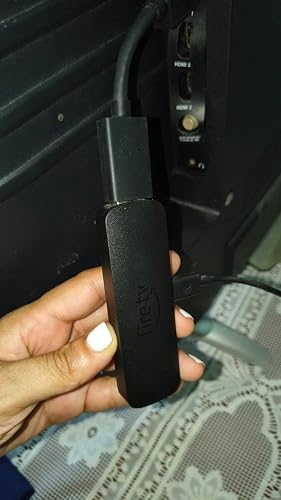
I’ve been using this Fire TV Stick for a few months now, and honestly, it has been a total lifesaver. My TV's built-in apps were getting so slow and laggy, but plugging this in completely solved the problem. It runs smoothly, hasn't glitched once, and the picture quality is fantastic. Really easy to set up and use every day. Highly recommend it if you want a hassle-free streaming experience! 🫴💕👌 Llevo varios meses usando este Fire TV Stick y la verdad me ha funcionado de maravilla. La plataforma de mi televisor ya estaba muy lenta, pero conectar este aparato solucionó la situación por completo. Es superrápido, no me ha dado ni una sola falla en todo este tiempo y la imagen se ve excelente. Es facilísimo de usar y muy práctico. ¡Súper recomendado si buscas algo confiable y sin complicaciones!
...
show more
Reviewed in the United States on September 7, 2026 by Ruhama Caraballo Nuñez
The Amazon Fire TV Stick 4K Select has been working great and is a noticeable upgrade from older streaming devices. Setup was quick and straightforward, and once connected to Wi-Fi, I was up and streaming in just a few minutes. The picture quality is excellent, and apps open quickly without much waiting. The interface is easy to navigate, and having all my favorite streaming services in one place makes watching TV much more convenient. The remote is simple to use, and I really like the voice-control feature for finding shows and movies without having to type everything out. Overall, this is a fast, compact streaming device that delivers great picture quality without taking up any space. A very good value and an easy way to upgrade an older TV.
...
show more
Reviewed in the United States on August 11, 2026 by joseph D Pergolotti
Hmm...well, I purchased a new one from Amazon yet it showed up all taped up and stuff. Everything was there, I mean, it was just quite evident the device I received was not new. New to me, is that it? Jokes on me? I'm just joshing. A little passive-aggression before bed ought to help me sleep.ha So this one plugs in like all the others. It works the same as all the others. Having Alexa Plus on the remote is handy. Some nights the TV just sits on Amazon Fire home screen and Alexa and I dive into quantum mechanics, physics, every kind of science imaginable and don't get her started on the Universe! That's the one that "really lights up my circuits"-end quote.lol But yeah, the microphone remote is awesome to have for sure. Man these remotes...they're super thin and don't have much to them and I am constantly looking for mine. I have a 4k Max Firestick in my living room...same d@mn problem. In the couch, under the couch, under the coffee table's bottom shelf and a whole LOT of the time...under the cat.haha My point, now that I thought of one, is it'd be killer to have it like the Roku Ultra remote, man. The Roku has a "find remote button" on it and the remote starts beeping and stays on long enough to find it too. Just that would be sweet, but Roku took it one more step and put that ⅛" headphone jack on it. That is...just...no words so nice. It beats batteries DOWN. Hard. And fast...like, 3 hours at high volume. But, eh...fair trade. Wait, I should be writing this in a suggestion box I think, not a review. Is that a thing? Amazon taking suggestions? The settings are easy to...set. It's plug-and-play ready to go out of the box with passwords and stuff already programmed. Nice to alleviate that migraine...and somehow it links right up to wifi even tho they don't know the password...all my Amazon stuff does that. I have all the different streaming gizmos. I like to call them the "Eternity Stones of Streaming". Roku and Chromecast, Xumo, etc etc But I definitely, 100% use the firesticks way more than the rest. Combined even. For sure. Just easiest and fastest. Oh, and this one does Xbox like the Max. I'm telling you a week or so after I got a firestick device that let me use Xbox live and actually play games I sold my Xbox console, kept 2 wireless controllers and game on this thing. It's the same. And , the Xbox controller doubles as a regular firestick remote as well. Yes, I learned that because I am always loosing this slippy lil firestick remote. Does everyone know you can expand the memory on the firesticks? I use an OTG cable and then either a flash drive or SD card. You can hold too many apps if you wanted. You can download your latest bootleg 'still in theaters' movie from Limewire onto a flash drive, take it to a friend's place and pop it in the firestick. BOOM. There it is. Showing up with the new movies! I dont know if these do the Amazon Sidewalk thing like echo devices, and then again I don't know anyone that bothers to turn it off. But, in case you're that person and I just don't know you, I'd check to see.
...
show more
Reviewed in the United States on May 12, 2026 by Dan Miner
Easy to set up! Breathed new life into our 10-year old Samsung 4K TV. The Fire Stick became the "brain" for our older TV. We needed something to support our streaming-only TV: YouTube, Amazon Prime, Netflix. Our TV no longer had the system updates and memory to be able to handle YouTube without stuttering and freezing. By plugging the Fire Stick in, it handles all the processing and streaming and we now basically use the TV as a monitor. Plus, the Fire Stick can control the TV power, volume, streaming channels, and so on. It's now the main remote we use! Inexpensive solution to a big problem.
...
show more
Reviewed in the United States on September 9, 2026 by KimC


Preface: I've used FireTV devices for quite a while now, and have learned to appreciate what separates them from their competition, but also some of the annoying quirks that they struggle with sometimes. This device, with VegaOS manages to do away with most of the quirks, but also takes away some of the reason why I buy FireTV devices in the first place. Hardware: I'll get this out of the way quickly, since it's basically unchanged and is perhaps the least-impactful aspect of any Fire TV device. Yes, it has a micro-USB port for power, get over it. Amazon probably has a warehouse full of them, and for a connector that you plug in once in a device's life... it's not really impactful. People will always fuss about the lack of USB-c, but they're missing the point. The remote is nicer than my previous remotes, seems more solidly built and feels better in the hand. Unsure how it'll last, but maybe it'll make less creaky noises after a year of service than previous remotes. Software: This is the big one, and I'm approaching this from someone who has been thoroughly annoyed by various quirks on past FireTV devices. Yes, this device doesn't support sideloading, but to be honest, the only time I sideloaded, was to put the steamlink app onto a FireTV. Everything else I wanted was available from the Amazon appstore. Valve eventually was able to put the steamlink app onto the appstore, and I fully expect they'll make it available again in the coming months - even Amazon's Luna and Xbox's cloud streaming apps aren't available so I'm guessing Valve isn't late... so far. My previous Fire TV devices have experienced endless oddities, such as apps crashing to the homescreen, or navigating the menus slowing down for no good reason. It's annoying, and buggy... and I suspect it's to do with android as this device does none of that. It works and it works pretty reliably as far as I can tell. There's no slowdowns and no responsiveness issues, which is sublime. Software support: This is the biggest complaint I can levy against the device and the reason why I dropped a star. I would have dropped more, but I expect these issues to be fixed in the coming weeks (hopefully not months). Codec support is subpar on this device. It's dropped support for the VC-1 codec and Dolby Vision, something that people who made home videos on windows, or who rip blu-ray disks might use to stream media to this device. Now you have to transcode it to HEVC, AVC, or AV1, which is an inherently lossy process. To be honest, most people won't care about this, unless you use Plex, Jellyfin, or Emby. Audio is in a worse state, with no local decoding of TrueHD, or DTS-HD MA audio codecs. Thankfully I've started pre-processing my personal media server's libraries into PCM/WAV audio, mostly because previous FireTV devices struggled with it too - I wish I didn't have to waste that much space on it, or that I could use FLAC, but they only support 2-channel FLAC, not 8-channel (needed for 7.1 surround audio). Perhaps the worst issue with codec support however, is that Plex cannot even utilize the full capabilities of this device for some reason. The attached pictures shows the intro to Tron: Legacy being bit-crushed to mush (just look at the macro-blocking at the top and bottom of the frame), because as the picture of Plex Dash shows, it's transcoding a 28mbps Blu-Ray rip to 8mbps. This is why I've always used FireTV devices in the past: if you look at the developer website from Amazon for any other FireTV device, you'll see a codec list as long as my arm - It's great! But this device cuts it down to only a handful. Ancillary stuff: The device was very easy to set up. Since I setup previous Amazon devices and allowed them to "Save Passwords to Amazon", this device was able to automatically connect and log into my Amazon account with no fuss. Wi-Fi 5.0 is a little bit of a letdown, but I've not noticed any issues. Conclusion and the future: This probably is the future of FireTV devices. People will complain that Amazon made VegaOS to kill sideloading, but they're wrong. It's obvious this device was built to hit a lower price-point than their other devices - it's the first time a non-sale price for a 4K FireTV device has been below $50, and that's because it comes with Wi-Fi 5 and 1GB of RAM, not the 1.5GB seen in the previous 4K FireTV stick, or the 2GB seen in the 4K Max or Cube. Android was not only giving FireTV persistent bugs and oddities, but consuming more RAM for no good reason. I would love to put this device into regular service with my family's primary TV, but I can't. I'm trying to build a larger personal media library with my media server, but I run into an issue: My personal media library cost me hundreds to thousands of dollars for the blu-ray disks I purchased for it over the years... it's not cheaper than streaming (even amortized over a decade), but it is higher quality. So I focus my efforts on maintaining that quality - it is, after all, the only advantage I have over streaming services. If this device cannot maintain that quality, if I cannot stream the high-bitrate films I have to it, then it invalidates all the work I put into that server. I'm not going to do that, so instead it will exist as a back-up until something breaks and I don't want to troubleshoot it. If you use a media server, with high-bitrate films, I'd strongly advise against this device until Amazon and the media servers have better support for them. If you don't use personal media, and instead stream directly from Prime Video, HBO Max, Disney, etc. it's a no-brainer. Get this, it'll be a million more times reliable.
...
show more
Reviewed in the United States on October 30, 2025 by Sportutegirl