Search  for anything...

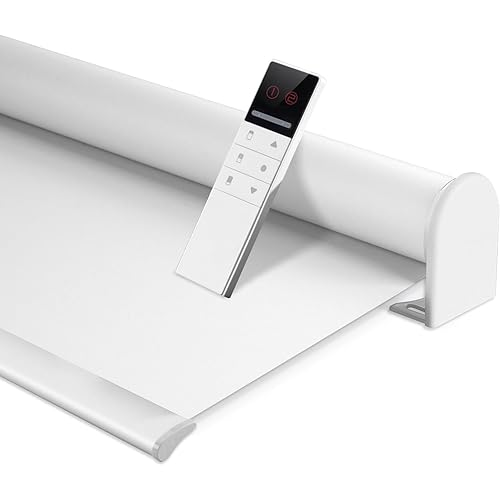
Allesin Motorized Blinds with Remote | Automatic Blackout Roller Shades, Easy Install & Smart Control Electric Blinds for Home Office, Living Room (Gray 31" W x 72" H)

  • Based on 304 reviews
Condition: New
Checking for the best price...
$64.98 Why this price?
Save $6.00 was $70.98

Buy Now, Pay Later


As low as $10.83 / mo
  • – 6-month term
  • – No impact on credit to apply
  • – Instant approval decision
  • – Secure and straightforward checkout

Ready to go? Add this product to your cart and select a plan during checkout.

Payment plans are offered through our trusted finance partners Klarna, Affirm, Afterpay, Zip, Apple Pay, and Google Pay. No-credit-needed leasing options through Acima may also be available at checkout.

Learn more about financing & leasing here.

Selected Option

Free shipping on this product

FREE 30-day refund/replacement

To qualify for a full refund, items must be returned in their original, unused condition. If an item is returned in a used, damaged, or materially different state, you may be granted a partial refund.

To initiate a return, please visit our Returns Center.

View our full returns policy here.


Availability: In Stock.
Fulfilled by Amazon

Arrives Friday, Sep 18
Order within 2 hours and 42 minutes
Available payment plans shown during checkout

Protection Plan Protect Your Purchase
Checking for protection plans...

Color: Gray


Size: 31"W x 72"H


Features

  • Eco-Friendly FabricEnjoy 100% blackout with our innovative triple-layer fabric. Designed for motorized blinds, this material provides UV protection, thermal insulation, and increased privacy, serving as the ultimate functional solution for any living space. To achieve optimal blackout effect, ensure a snug fit after installation, we recommend using an outside mount method
  • Remote ControlControl your remote shades easily from anywhere with the included singlechannel remote. Its admin mode allows you to customize travel limits and adjust motor speed for personalized operation. To expand control, an optional 15channel remote (B0FHKT51RR) is available for managing multiple smart shades at once
  • App & Voice ControlUnlock smart functionality with our Smart Hub accessories. The compact USB Converter (Sold separately: B0BVDSX6B3) provides basic connectivity for single-device control via Tuya app or Alexa. For expanded whole-home automation, the Smart Bridge (Sold separately: B0CC22FQX6) supports seamless control of up to 30 motorized shades simultaneously through the Tuya app, Alexa, or Google Assistant
  • Energy-Saving & Quiet MotorExperience near-silent operation below 30dB and ultra-long battery life. Powered by AA batteries (included), the super energy-saving motor delivers up to six months of effortless use on a single battery replacement. No need to use an extra charging cables, giving you complete freedom and convenience in your daily routine
  • Selection Size GuideFabric width = Order width 1". To ensure your blinds fit seamlessly, please measure the inside width (W) of your window frame where the blinds will be mounted, as shown in the How to Choose Order Size diagram. Please refer to the example below: Measure the minimum width (W) of your window frame. If 34 14" W < 34 12", please select Order Width 34".For better light blocking, we recommend outside mounting. Simply add 4 cm to both the order width and height

Description

STEP 1: Set Highest Point Use the button on the front to adjust the shade at the position you want. Press "up" for 2", the motor rotates once.This position is set as the highest point. STEP 2: Set Lowest Point Use the button on the front to adjust the shade at the position you want. Press "down" for 2", the motor rotates once.This position is set as the lowest point. Motor reversing The running direction of the blinds is oppsite to what shows on the emitter button Method 1:Press both together until the motor rotates once Method 2:Press "M" key 10" motor rotates 3 times Pressing the button a different number of times will result in different functions. STEP 1:Battery Version-Install the dry battery STEP 2: Press the motor "'M" button for 2", the motor rotates back and forth once. The motor enters the matching state, (Valid for 60 seconds) STEP 3: The switch selects "admin" mode STEP 4: Long press "S" for 2" The motor will rotate back and forth once. Match successfully. A motor can match one or more emitters Emitters need to be matched. Basic Motorized Blinds Upgraded Motorized Blinds All-in-One Shades USB Converter(2.4G) 15-Channel Remote PVC Light Blocking Strips Smart WiFi Bridge(2.4G)

Material: Polyester


Product Dimensions: 72"L x 31"W


Brand: Allesin


Color: Gray


Opacity: Blackout inches


Opacity: Blackout inches


Operation Mode: Automatic


Additional Features: Blackout, Routless, Window Treatments


Closure Type: Roller


Compatible Devices: Standard Windows


Mounting Type: Inside Mount, Outside Mount


Water Resistance Level: Not Water Resistant


Control Type: Motorized


Item Dimensions L x W: 72"L x 31"W


Number of Items: 1


Size: 31"W x 72"H


Number Of Panels: 1


Color: Gray


Shape: Rectangular


Brand Name: Allesin


Recommended Uses For Product: Indoor


Specific Uses For Product: Window


Included Components: Batteries, Blackout Shade, Bottom Bar, Headrail, Remote, Roller Shade


Model Number: 0b808868-d735-4ab5-acd1-6d1193949a6e


Manufacturer: Allesin


Material Type: Polyester


Lining Description: Blackout material


Frequently asked questions

If you place your order now, the estimated arrival date for this product is: Friday, Sep 18

Yes, absolutely! You may return this product for a full refund within 30 days of receiving it.

To initiate a return, please visit our Returns Center.

View our full returns policy here.

  • Klarna Financing
  • Affirm Pay in 4
  • Affirm Financing
  • Afterpay Financing
  • Zip Pay in 4
  • Financing through Apple Pay
  • Financing through Google Pay
Leasing options through Acima may also be available during checkout.

Learn more about financing & leasing here.
Top Amazon Reviews


  • Excellent
Color: Gray Size: 35"W x 72"H
These curtains are great, I highly recommend them. I bought them for my living room and kitchen, and they really help keep out the steam and light.
Reviewed in the United States on July 31, 2026 by Lissandra Luis Felipe

  • Works as advertised and look great!
Color: Cloud-patterned Size: 34"W x 72"H
Excellent blinds at an excellent price point! We really like the fabric and the automation that you can achieve with their WiFi-hub. We are slowly upgrading the whole house with them; hoping they are durable and last a long time!
Reviewed in the United States on June 28, 2026 by AS802

  • HORRIBLE Physical Design
Color: Cold White Size: 23"W x 72"H
Possibly the worst physical design of any Zigbee device I have ever used. When these blinds are connected and stable, they’re great: they’re responsive, the battery life is awesome (I’m six months in and haven’t had to charge them yet), and the fabric is very nice. That said, one of my five blinds had some fraying where the material was cut, and the loose threads occasionally get caught in the axle (which is annoying, but honestly not even close to the main problem). A few weeks in I eventually ran into an issue where several blinds became completely unresponsive and disappeared from my Zigbee mesh. Probably something I did on my end, but either way, a quick reset/rebind should have done the trick. For WEEKS I corresponded with customer service (who were of course just middlemen and were no use whatsoever) while tracking down manuals, random setup guides, FCC filings, component datasheets, and every alleged button sequence I could find because the included documentation is so hilariously incomplete. The instructions claim that holding the button until the blind jogs four times performs a factory reset. It does not perform a complete factory reset. It forgets the physical position limits and remote settings, but apparently does absolutely nothing useful to reset the separate Zigbee controller. The Aubor app couldn’t find the blinds over Bluetooth, the Tuya bridge I purchased specifically to try to recover them couldn’t bind them, and no combination of presses, holds, prayers, threats, or curses would make them rejoin. I thought whatever, I'm gonna toss them our for SmartWings anyways, so I disassembled one and figured it out. These blinds contain three largely separate systems: - An HC32L130 controller for the motor, physical buttons, position limits, and calibration - A CMT2300A 433.92-MHz radio for the included physical remote - A completely separate Iton TZ8258-27A1/Telink TLSR8258 module for Zigbee The advertised “factory reset” resets the MOTOR CONTROLLER, but not necessarily the Zigbee module. Better yet, the rechargeable battery is permanently connected using welded terminals, so there is no removable battery, power switch, accessible reset button, or any other normal way to electrically restart the Zigbee processor when it gets stuck. The only obvious external UART-shaped opening is unused; it arrived with nothing connected to it except a silicone plug covering the hole. In other words, the Zigbee processor can become stuck indefinitely, and the manufacturer failed to provide the incredibly advanced feature known as “turning it off and on again.” After so much digging I finally recovered every affected blind by directly resetting the TZ8258 Zigbee module. This is obviously not an official procedure; it requires disassembly, may void your warranty, and involves working around electronics that remain powered because the battery cannot be disconnected lol Do not attempt it unless you are comfortable doing that. Here is the procedure that worked on my exact hardware: 1. Pair the included 433-MHz remote FIRST. Pairing the remote after recovering Zigbee caused one of my blinds to stop responding to Zigbee again, although the physical remote continued working. 2. Record the blind’s Zigbee IEEE address. 3. If using Zigbee2MQTT, remove the stale device entry. Try ordinary removal first; if it times out, use Force Remove. Do NOT blocklist it. 4. Enable permit-join. 5. Disconnect USB-C charging and disassemble the blind far enough to expose the TZ8258-27A1 module. 6. Orient the module so “ITON / TZ8258-27A1” reads normally from left to right, the metal antenna strip is above the text, and the small circular pin-one marker is in the upper-left corner. 7. On the RIGHT edge of the module is a vertical row of ten gold contacts. Counting downward from the top: - First contact: GND - Second contact: RF—DO NOT TOUCH THIS ONE - Third contact: GND - Fourth contact: RESET 8. Carefully bridge ONLY the third and fourth contacts from the top for approximately half a second, then release them. 9. The blind should announce itself, join, and complete its Zigbee interview. Rename it, test movement from your Zigbee controller, and verify that the physical remote still works before reassembling everything. This immediately recovered blinds that had been unusable for months. A tiny recessed button connecting RESET to GND would have prevented this entire nightmare. Proper firmware could also include a watchdog, a genuine Zigbee factory-reset command, or at least a button sequence that resets the Zigbee processor instead of merely erasing the motor’s position limits. Instead, an owner apparently needs to locate FCC filings, identify the individual processors on the circuit board, find the Zigbee module’s pinout, disassemble the blind, and manually short its reset pin just to perform the electronic equivalent of restarting a frozen light bulb. Again: when they work, they’re genuinely good blinds. The battery life is excellent, the material is nice, and they respond well. But the Zigbee reset design, documentation, serviceability, and customer support are astonishingly bad. I should not have needed to reverse-engineer a $400 set of window blinds because the manufacturer couldn’t be bothered to expose a reset button for the actual Zigbee processor. These are genuinely good, quality-built blinds WHEN THEY WORK, but the fact that they forgot to include a RESET BUTTON of all things was incredibly overlooked and I won't be buying from this company again. I should not have needed FCC filings, board-level component identification, and direct pin access to perform the equivalent of turning a smart-home device off and back on. So dumb. ... show more
Reviewed in the United States on August 16, 2026 by Jeff Bezos

  • This is a great product.
Color: White Size: 38"W x 72"H
These blinds were simple to install and work perfectly. It is nice to be able to open and close them from a distance. Making life easier.
Reviewed in the United States on June 9, 2026 by Louise

  • Works great with Home Assistant ZHA
Color: Cold White Size: 31"W x 72"H
Works great with Home Assistant ZHA for remote control. If paired before setting limits click reconfigure on device page to relearn limits. Will be absolutely buying more.
Reviewed in the United States on August 2, 2026 by Lisa L.

  • Smooth, Quiet Motorized Blinds With Excellent Blackout Performance
Color: Gray Size: 36"W x 72"H
I installed these Allesin motorized blackout roller shades in a room where light control and convenience were both important, and overall they’ve performed well. The motorized operation is smooth and noticeably quieter than I expected, and the remote control makes it easy to adjust the shades without constantly walking across the room. Once installed, the blackout material does a good job reducing outside light and improving privacy. Installation was more straightforward than I anticipated for powered blinds, and the overall appearance is clean and modern once mounted. The automatic operation adds a nice convenience factor, especially for larger windows or areas where manually adjusting blinds repeatedly becomes annoying. The ability to quickly raise or lower multiple shades remotely also gives the room a more polished feel. The reason this isn’t a 5-star rating is that setup and smart-control integration require a little patience depending on your home setup and expectations. The hardware itself works well, but the instructions and initial configuration process could be more refined and beginner-friendly. Once everything is configured correctly, though, the blinds function reliably and provide a very nice upgrade over traditional roller shades. ... show more
Reviewed in the United States on May 27, 2026 by Jeff Stokes

  • very useful
Color: White Size: 50"W x 72"H
bought for my invalid Mother and she loves being able to raise and lower the blind while in her chair! Works great!! This is my 2nd one I bought!
Reviewed in the United States on August 5, 2026 by LuAnn Bolsinger

  • The evening sun is blocked.
Color: White Size: 31"W x 72"H
Easy install. I allowed three inches from edge so the blind can be adjusted left or right as needed. Also the motorized up and down with the remote is so convenient. Now I can keep the sun out of my eyes in the evening coming from the patio doors. Love it.
Reviewed in the United States on February 27, 2026 by Bill

Can't find a product?

Find it on Amazon first, then paste the link below.
Checking for best price...