






Buy Now, Pay Later
- – 6-month term
- – No impact on credit to apply
- – Instant approval decision
- – Secure and straightforward checkout
Ready to go? Add this product to your cart and select a plan during checkout.
Payment plans are offered through our trusted finance partners Klarna, Affirm, Afterpay, Zip, Apple Pay, and Google Pay. No-credit-needed leasing options through Acima may also be available at checkout.
Learn more about financing & leasing here.
Selected Option
FREE 30-day refund/replacement
To qualify for a full refund, items must be returned in their original, unused condition. If an item is returned in a used, damaged, or materially different state, you may be granted a partial refund.
To initiate a return, please visit our Returns Center.
View our full returns policy here.


At a glance
- Condition
- New
- Color
- Gray
- Model
- DS0602
- Hardware Interface
- HDMI
- Warranty
- 1 Year
- Works with
- #1 in DisplayLink Adapter
Features 5
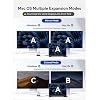
- Beat The Mac Display Limit:Unlike basic HDMI adapters, this displaylink adapter uses advanced displaylink dual monitor adapter tech to extend screens without relying on your laptops native video output. Works with macOS & Windowsmust install the driver (download link included). Note: Unplug only when the computer is off.
- 100W PD Fast ChargingThis Acasis USB-C to dual HDMI DisplayLink adapter keeps your MacBook Pro/Air (M1M4/Neo) or Dell/HP laptop powered while you work. Built-in USB-C PD port supports 100W input and 90W output no more power worries during long sessions.
- 3x USB-A Ports for Peripheralsdisplay link docking stations extended display can connect your mouse, keyboard, and flash drives effortlessly with 3x USB-A ports (480Mbps speed). Ideal for office setupsthough not for large file transfers
- Hybrid USB/A-C Cable The display link dock comes with a hybrid 2-in-1 cable for easy connection to USB-C, USB-A, Thunderbolt 3/4, and USB 4 ports versatile compatibility across devices. Once connected, effortlessly mirror or extend your screen for greater productivity.
- Note: HDCP-protected streaming apps (Netflix, Disney+, Hulu, Prime Video) are not supported by DisplayLink. For entertainment, use a standard display adapter instead. Productivity, coding, and office apps work fully.
Description
Q: Why does my system ask for permission to record my screen? A: This is a standard security prompt for DisplayLink. The permission is required because the technology transmits video signals via USB. It needs to capture your screen content to display it on the external monitor. Q: Is this screen recording process safe? This is a legitimate functional requirement, not privacy theft. The process is secure when using official drivers, and you maintain full control over this permission in your system settings. Q: If the monitor is not displaying after installing DisplayLink software, please follow these steps: A: 1.Try using another HDMI port on the dock. 2.Try using a different HDMI cable. 3.Test with another monitor. If the issue persists, please contact our support team.
Specs 14
| Brand | ACASIS |
|---|---|
| Color | Gray |
| Hardware Interface | HDMI |
| Total USB Ports | 3 |
| Number of Ports | 6 |
| Total HDMI Ports | 2 |
| Number of Items | 1 |
| Number of Packs | 1 |
| Unit Count | 1 Count |
| Total Number of HDMI Ports | 2 |
| UPC | 686585053183 |
| Item Highlight | USB C DisplayLink Docking Station with 2*HDMI,3*USB-A Displaylink Adapter for Data Analysis / Multitasking Driver Required |
| Manufacturer | ACASIS |
| Model Number | DS0602 |
No specs match.
Frequently asked questions
To initiate a return, please visit our Returns Center.
View our full returns policy here.
- Klarna Financing
- Affirm Pay in 4
- Affirm Financing
- Afterpay Financing
- Zip Pay in 4
- Financing through Apple Pay
- Financing through Google Pay
Learn more about financing & leasing here.


