




3D Printer for Kids and Beginners,Geeetech Mini 3D Printers with Auto Leveling,High Speed and Fully Open Source,Fully Assembled Direct Drive Extruder,for Home and School,Print Area 3.94×4.33×3.94 in
Condition: New


$199.99
Save $75.00
was $274.99
Buy Now, Pay Later
As low as
$33.33
/ mo
Learn more
- – 6-month term
- – No impact on credit to apply
- – Instant approval decision
- – Secure and straightforward checkout
Ready to go? Add this product to your cart and select a plan during checkout.
Payment plans are offered through our trusted finance partners Klarna, Affirm, Afterpay, Zip, Apple Pay, and Google Pay. No-credit-needed leasing options through Acima may also be available at checkout.
Learn more about financing & leasing here.
Selected Option
Free shipping on this product
30-day returns
Learn more
FREE 30-day refund/replacement
To qualify for a full refund, items must be returned in their original, unused condition. If an item is returned in a used, damaged, or materially different state, you may be granted a partial refund.
To initiate a return, please visit our Returns Center.
View our full returns policy here.
Availability:
In Stock.
Arrives
Wednesday, Nov 4
Recently Viewed


At a glance
- Condition
- New
- Color
- blue
- Model
- GIANTARM-M1-0900
- Dimensions
- 3.94"D x 4.33"W x 3.94"H
- Weight
- 9.8 lb
- Material
- Acrylic
Features 5
- High-Speed & Premium Quality Print:Geeetech 3D pinters has large-capacity nozzle,a 50W hot-end heating rod,and efficient heat dissipation,improve pinting stability and reliability further.Insert TF Card,plug-n--play,with a printing speed of up to 250mm/,save printing time,our printer turns complexity into creativity-fueling simplicity,greatly reducing the threshold for beginners
- Direct Drive Extruder:M1 mini 3D printer uses a dual-drive metal gear with a gear ratio of up to 1:5,greater torque, greater extrusion force,higher printing accuracy, and can easily print 0.5kg TPU/PLA consumables.Print area 3.944.333.94 in.Note: No worries if you need use 1kg filaments,filament holder profile we have provided it on the details page.
- Auto-Leveling & Heated Platform: This small 3d printer has a 16-Point full-auto leveling technology which makes printing more simple and more precise ,ensure a smooth printing process every time.With flexible and removable magnetic build plate, reduce model warpage issues,you can remove the models easily and easy cleaning of the platform
- Perfect for Kids and Beginners:Out of the box,fully assembled 3d printers is super easy to operate and does not require a complex setup,knob operation, one button in/out filament,even those with no prior experience can quickly master it,experience the convenience and reliability of this 3D printer.With 2.4 LCD color screen,high-brightness lighting,and PEI print plate.A good idea as a surprise gift on a birthday or holiday, for school teaching, or a shop crafts and toys DIY, etc.
- Friendly Warranty:We offer 30 days of worry-free return/replacement for this 3d printer, 12-month free repair and lifetime professional technical support. If you have any questions, please contact us,we will reply within 24 hours
Specs 7
| Brand | GIANTARM |
|---|---|
| Material | Acrylic |
| Color | blue |
| Product Dimensions | 3.94"D x 4.33"W x 3.94"H |
| Item Weight | 9.8 pounds |
| Item model number | GIANTARM-M1-0900 |
| Manufacturer | Gaintarm |
No specs match.
Frequently asked questions
If you place your order now, the estimated arrival date for this product is:
Wednesday, Nov 4
Yes, absolutely! You may return this product for a full refund within 30 days of receiving it.
To initiate a return, please visit our Returns Center.
View our full returns policy here.
To initiate a return, please visit our Returns Center.
View our full returns policy here.
- Klarna Financing
- Affirm Pay in 4
- Affirm Financing
- Afterpay Financing
- Zip Pay in 4
- Financing through Apple Pay
- Financing through Google Pay
Learn more about financing & leasing here.
Similar Products







Top Amazon Reviews
A Great Introduction to the Entire 3D Printing Process!
Color: blue


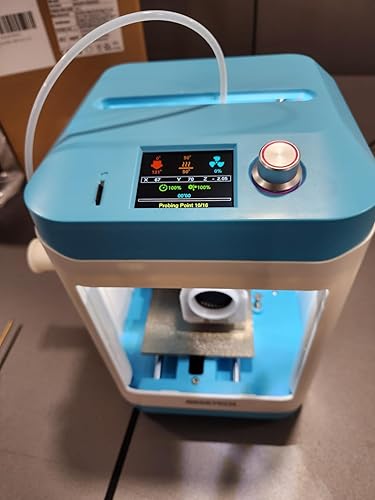


A little background to start. I have been 3D printing for 20+ years. do I know everything about 3D printers, No, but I have plenty of experience. I have another Geeetech printer, as one of 7 current printers. I am also a technology teacher with experience with many different printers. With that stated, is this a take it out of the box and it does everything for you type of printer? No, it is the type of printer that you use as a teaching tool. It is not for someone that wants little trinkets to just "AutoMagically" appear out of thin air. This printer will allow someone to learn about 3D printing, providing a good background experience to allow them to understand the process and troubleshoot when an STL has problems. It is simple, easy, inexpensive. In fact, as several users have complained about, the little printer, "as designed" does not hold a standard roll of PLA. However Geeetech has an STL file on their website, that is designed to be printed on this machine, that will allow the use of the full sized spools. That is what learning to 3D print is all about! Find a problem that 3D printing can solve, print that design! Will a young person need some help with this printer? Probably, but Youtube is an amazing teaching tool and the number of videos concerning this printer is steadily growing. The help is out there if you or your child are willing to learn. The printer came double boxed. amazingly, even the outer Amazon box was in great condition. The factory box was even better and with all of the foam support within, the printer arrived totally unscathed. Unboxing is easy, excepting for removing the black foam that supports everything on the inside of the case and removing the zip ties that hold the printhead securely in place. Remove those carefully and make sure you only cut the zip ties. I cut them in several places, just to make them easier to remove. Once that is done, attach the Bowden tube to the coupler and the printhead, attach the spool holder to the side, plug in the power, and you are ready to turn the machine on. The manual does a decent job of walking you through getting everything ready to print and the included MicroSD card has some files that are already sliced and ready to print. The auto bed leveling is a great addition for this printer. on many of the other inexpensive printers, the constant adjusting of the bed is really a pain in the rear! This feature has become a "Standard" requirement for all printers in this day and age. To begin with, I printed the Benchy, that is included on the SD card, using BL standard Blue PLA. For not being tuned specifically for the printer, it printed very well. The stringing in the picture can be tuned out, and that would make the print even better. For a second print, I wanted to get the spool off the table, where it was just rolling back and forth during printing, and onto the side of the printer. I down loaded the file from the Geeetech website but I also found a design online that would be a quicker print, as it is smaller, and uses the stock filament holder. I sliced the file with a .20 layer height and sent it off to print. an hour and a half later, I was able to get the spool off the table and onto the side of the machine. Much better! There are other files included on the SD card but I wanted to try prints that were not Pre-Sliced to get a better idea of what the printer could do. Included on the MicroSD card is a slicer that is recommended. Since I have Prusa Slicer already installed on my PC, I looked to see if there was a printer profile for the Mini.(I use this slicer with my other Geeetech printer), and what do you know, there is a profile there. Once I had loaded up the profile, it had a "Generic" PLA profile available. I picked an axolotl keychain, imported the file, choose a .16 layer height with tree supports, sliced the file, saved it to the SD card, put the card back into the mini, changed the filament to a nice "rainbow" matte PLA filament, and sent the file off to the printer. The supports looked great but when I tried to remove them, I ran into my first problem. When removing the first support, the bottom layer under the head pulled off with the supports. The nozzle temperature of the generic profile was too low for the matte PLA and the layer adhesion suffered. I changed the temp in the slicer up ten degrees, resliced the model and printed it again, this time with zero supports. This time the print came out great. Once the plate cooled, the piece just popped right off the plate. Testing the layers showed that the increase in temperature was perfect. I then tried the cat keychain with the same settings and it also came out great. As a wrap-up for my initial use of the printer, This printer is a solidly built little printer that can easily fit on the same desk as a laptop, keyboard, and mouse. It isn't nearly as noisy as several of my other printers but once the fan is running, it is not silent. Printing the adapter for the full size spools is a recommended first upgrade to the printer. Is this a mini-replacement that beats the newest flagship $2500 printer on the market, no, but it also isn't $2500! This is a low cost, easy to learn from printer for someone that isn't afraid to learn something new. It is a great introduction to the entire 3d printing process and fun way to learn alongside your kids or students. I have really enjoyed this cute little printer so far and I plan to use it with all of the neighborhood kids who have found out that I know how to 3D print the gadgets and gizmos that they like. I will use the printer to teach them how to print their own items, so I don't have to use production machines to do so, and in the long run, you never know which one might catch the 3D printing bug and get their parent to buy them their own printer. That is the best part of teaching young people and part of why I enjoy printing so much.
...
show more
Reviewed in the United States on April 21, 2025 by GorillaBob
My look like a toy, but it is a real 3D printer
Color: blue


What an intriguing product! This printer defies easy classification. Although I am not an expert on 3D printers, I have gained experience with several different models over the years. I began my journey with a popular bed slinger approximately six years ago and quickly fell in love with 3D printing, eventually owning a total of six bed-slingers at one point. As is often the case with technological advancements, I have since transitioned to Core XY printers. This particular printer incorporates elements of both designs, and I will elaborate on that later. 3D printing has brought me immense joy by enabling me to bring my imagination to life. Additionally, there are numerous models available for free download online. Friends and family have also benefited from my 3D printing journey. As a grandparent, it is my pleasure to spoil my grandchildren; they have enjoyed everything from printed toys to personalized unicorn light switch covers. Therefore, when I discovered the Geeetech M1 mini printer, I immediately thought of my grandchildren. What better way to introduce them to the world of 3D printing firsthand than with a printer designed specifically for children? I have seen printers in the past that claim to be designed for children, but I have always been skeptical. As anyone with experience in 3D printing knows, inconsistencies in the printing process can lead to significant frustration. This frustration has caused many individuals to abandon the hobby, and I did not want that to happen to my grandchildren. Therefore, I decided to take a leap of faith and purchase the M1 Mini. The M1 Mini arrived exceptionally well-packaged. After unboxing and removing all the packing materials, zip ties, and screws, I powered up the unit. After all, who needs to read the instructions for a simple bed slinger? I loaded the supplied filament, selected a model from the SD card, and hit print. However, it did not print, so I checked the display to determine the issue. I was surprised to see a message indicating that the unit had not been balanced. At that moment, I realized I should have read the instructions. This brings me back to my earlier statement regarding the classification of this printer: this is no toy. The printer underwent automatic calibration to optimize print quality, and this feature alone contributes to more successful prints. I decided to explore the printer further to understand its construction and the features it offers. So, I did what most of us do: I turned to the internet to read articles and watch videos. I will not reiterate information that can easily be found online. The pictures display sample prints I sliced and highlight various points of interest. Here is what I discovered: Pros: 1) Easy to use. I tried to think like someone with no printing experience. Aside from bed adhesion issues on one print, it just works. 2) The display is user-friendly. Although the menus are straightforward, they may present a challenge for individuals with no prior experience. However, after a brief period, beginners will find it easy to navigate. 3) Build quality. The printer exhibits excellent build quality, designed to maintain simplicity. 4) By utilizing UltiMaker Cura slicing software and your own USB-B cable, you can print directly from a computer. I dislike printing from an SD card. While this may not be a significant concern for some, it is for me. The profiles can be found on the company's website. 5) The printer produces excellent results with PLA and PLA+. Although I have not tested it with TPU, the documentation indicates that it is compatible. 6) You can use a standard 1 kg spool of filament. 7) The removable build plate makes it easy to remove prints. Cons: 1) While the build quality seems satisfactory, the extensive use of plastic raises concerns regarding its long-term durability. 2) Adult supervision is required, as there is no guard in place to prevent individuals from placing their hands in the printer during operation. The nozzle can reach temperatures of up to 230°C. 3) There are Orca slicer profiles available on the website; however, the Orca software cannot send a file directly to the printer using a USB-B cable. Orca is my favorite slicer. 4) Space is required behind the printer. Please refer to the included picture. While it may not seem significant, it is important to keep this in mind. Yes, I acknowledge that the criticisms may seem nitpicky, but no printer is perfect. That said, this is a fully functional 3D printer. While it may resemble a toy, its features and print quality are impressive and hard to overlook. Will it print as well and possess all the features of a printer that costs two to three times as much? The answer is no. The build plate is relatively small, but if I had included this as one of the drawbacks, I believe it would miss the point of the printer. However, does the M1 Mini open the door to 3D printing for children? Without a doubt, the answer is yes. Will the kids be satisfied with what they can print? I believe they will be. The only real question I have is regarding its long-term durability, but hopefully, it is sufficient to teach the necessary skills to transition to a much larger all-metal printer. So, the real question is: Do I believe the printer meets or exceeds its intended purpose for the target audience? I can say unequivocally, yes—and even more so.
...
show more
Reviewed in the United States on July 6, 2025 by J M
Easy to use 3D Printer!
Color: blue

As a fairly recent owner of an older model 3D printer and a new reviewer, I was excited to try the new Geeetech M1 3D printer from the Giantarm storefront: FLYTRON-authorized by Geeetech. I was especially interested to see if the ease of use would be appropriate for my grandkids and the M1 has impressed me across the board. My impressions on this mini size 3d printer: It's a small print form 3D printer with an approximately 4” x 4” x 4.25” print bed. It comes with an extra nozzle, a few tools, a manual and the setup that was really easy to follow. The printer provides up to a 250mm/s print speed. I like that it has incorporated newer firmware features to make fast 3D printing easy for everyone. This printer even includes an automatic nozzle wiper to keep the print nozzle clean! I have a larger and older 3D printer that did not come with these features and there was an involved process for me to learn how to add them to get similar quality to this 3D printer right out of the box. It has a spring steel PEI plate so you don’t need to mess with glue to get 3D prints to stick to the bed during the print process and it has an easy-to-use color touchscreen allowing this printer to be operated quickly and easily, which is a big advantage, especially for children or older adults like me. While the printer is initially set up to use .5Kg rolls of filament, it includes a printable file for a snap in adapter which lets you use standard 1kg filament rolls. It has very stable axes that ensure a smooth, stable and fast printing environment. It will print PLA, PLA+ and TPU filaments. This 3D printer is very quiet during printing, (I turned off the sound notifications!). The LED lights allow you to keep an eye on the process. The printer has an automatic bed leveling system, automatically setting up the print bed which greatly reduces the learning curve for beginners. It also has a filament break detection where if your filament breaks or runs out, the printer will automatically pause printing to reduce the chance of a print failure. Final thoughts: I would highly recommend the Geeetech M1 3D printer as it is an excellent product that works right out of the box for adults and kids to be introduced to the wonderful world of 3D printing for small models without a steep learning curve.
...
show more
Reviewed in the United States on April 12, 2025 by W. Corley
Save your money and time.
Color: blue


I don't even know where to start on how terrible this printer is. For reference, my 3D printing experience is with the Bambu A1 mini, Bambu A1, and Creality K2 plus. First off, this is NOT kid friendly. Why? 1. It is open and not enclosed. Kids could easily touch the cables, screws, electronic board, etc. 2. The only way to print anything is to learn a slicer and manually save a file into the SD card. This is a very old style compared to the newer printers with apps you can print from. I don't know a single kid who can do that without help. Secondly, there are so so so many basic missing features that newer printers usually have. 1. There are no sensors to detect tangled filament. It just kept printing air. I printed the cat file that came on the SD card and the filament that came with the printer. During printing it kinked and got stuck, but the printer kept on printing away which leads me to my next point ... 2. No way to resume a print that failed. 3. Automating the Z height. They did include a feature to lower your Z height, but that should be something they can automate like other newer printers do. 4. There is no count down time showing how much time is left in the print. Even old old printers did this. Thirdly, they didn't think the features through. You can't even fit a standard 1kg roll of filament on the spool rod without covering the tube that pulls in the filament and having it rest on the power cord. In Conclusion, the company seems years behind the 3D printer game. Is the printer cute and small? Yes, very small... Too small actually. Is it functional? No. I wouldn't want this even if it were free. An old Ender printer is better than this in my opinion.
...
show more
Reviewed in the United States on April 18, 2025 by Mikurie
Good quality for the price
Color: blue
Easy to set up and use even for a 10 year old. Very safe. Good quality and hours of fun! Works quickly.
Reviewed in the United States on March 27, 2026 by Ali Berg
EXCELLENT QUALITY, VERY QUITE, IT IS PERFECT FOR SMALL SPACES.
Color: blue


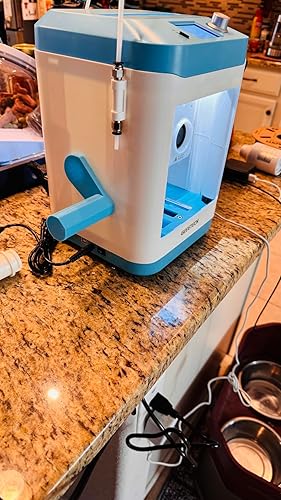
First of all, this is a really solid little printer. It came very well packed and protected. It comes with an extra nozzle and a few tools and a manual. I had to tighten the belts underneath because they were loose, but it was fairly easy to do, four screws. I have other large printers that my wife feels a little intimidated with, so I'm planning to give this one to her because I think is the perfect printer for her to learn 3D printing. I was surprised with how fast it prints, and the setup was really easy. There are some things to keep in mind though, specially if you don't have any experience with 3D printing. The screw on the side of the extruder does not need to be tight, like on other printers. I was having a hard time getting the filament to flow trough, but when I loosened the screw a bit, the filament started to flow. On my other printers that screw needs to be tight, but on this one, you just need to loosen it up a bit. The spool holder that comes with the printer interferes with the power plug, but they sent me a file to print a different type of spool holder that allowed me to placed the filament roll a bit higher, so that took care of the problem, although since I like to use filament dryer spool holders that made no difference to me. One feature I really loved is the filament unload feature, I'm surprised my other printers don't have that feature, and it is really good because it helps to keep the nozzle clean, and loading the filament is really easy. Another feature I like is the cleaning spool little mat on the back of the bed. That is a great tool because it cleans your nozzle right before you start the print. I printed with PLA and it did an excellent, and clean, job. The bed is pretty small, you have roughly an area to actually print of about 80 X 80mm. The bed itself is about 100 X100mm. To transfer files to the printer I used the included SD card. The printer doesn't have WiFi or bluetooth but that's no big deal, and it comes with the slicer software as well. This is an excellent printer to teach your kids 3D printing and the size is perfect for small places as well. It will fit pretty much anywhere! I was very impressed with the quality. The screen is very easy to use and you only need the little knob on the side to navigate the menu. The menu screen is very clear and colorful and very easy to understand. You can find videos that show you how to setup the printer as well on YouTube. Another great feature I love is the fact that this printer is very quiet! I was amazed with how quiet it is. It really is a fun little printer and a great way to learn for begginers. Highly recommended!
...
show more
Reviewed in the United States on March 6, 2025 by David P.
Not kid friendly and poor quality
Color: blue
This product is not kid friendly at all. I had tried 2 different units from them and both had issues. As the other truthful reviews said you need to have your kids learn how to splice or they are just going to make the same standard 12 items. Even those don’t come out quality or easily. I opened tickets directly with the manufacturer who is in Asia and didn’t help in getting this product to work after a week of messages back and forth. Update: the customer service provided by Daniel was tremendous. Truly. He worked and did everything he could to make sure I was happy. Unfortunately the product wasn’t as good as Daniel’s customer service.
...
show more
Reviewed in the United States on March 21, 2026 by Chris Giovanniello
Great for a beginner that wants small single-color prints
Color: blue


I've got a few 3D printers, but this is my first small printer designed for kids. Some important things to know It can print roughly 4" X 4" X 4". You set up (slice) the print on a computer and save it to a microSD (supplied). Insert the microSD card into the printer to print it. By default, it can hold a .5 kg spool, but you can easily find (search "Geeetech M1 Printer 1KG Filament Spool Holder") a print an adapter that holds a 1 kg spool. 1kg is the most common available filemant. There is no cover or door on the front or back, so keep your hands away when printing. It does have a self-leveling feature in the menu. This is a great benefit for both children and adults. It does come with a small amount of sample filament. The supplied microsd card has a bunch of sample prints ready to print, and the program that you'd need to slice your own prints. Just insert the card and you are ready to print. Printing accuracy is spot on. The quality rivals my more expensive printers. About the experience. The printer arrived double-boxed and was in perfect condition. Instructions were right on top and are easy to follow. When you get to the part of cutting the zip ties that hold the print head during shipping, make sure you cut all of them. I had 3 zip ties, but only saw 2 at first. It was obvious when I turned it on and it tried to move the print head that it wasn't happy. I cut the remaining tie, and all was well. I went into the menu system, which is easy to use, and let it self-level. After that was complete, I selected one of the print jobs already supplied and let it print. The files are nicely named with the amount of time it will take to print. After that, you just sit back and wait for it to finish. I've printed quite a few things and attached some of them to this review. Everything I have printed has come out as expected. It is a single-color printer, so items like the corn in the picture were done in multiple stages and attached together. I have no problem recommending this printer for someone just getting started and who wants to print small items. It's a great little printer that works right out of the box.
...
show more
Reviewed in the United States on July 6, 2025 by David