Search  for anything...

Wyze AXE5400 Tri-Band Wi-Fi 6E Mesh Router Pro, Covers up to 4000 Sq. Ft, 150+ Devices, Replaces Legacy Routers for Whole Home Coverage, Supports Wired Backhaul, 1x1 Gbps & 2x1 Gbps Ports - 2 Pack

  • Based on 0 reviews
Condition: New
Checking for the best price...
$178.88 Why this price?
Save $101.10 was $279.98

Buy Now, Pay Later


As low as $29.81 / mo
  • – 6-month term
  • – No impact on credit to apply
  • – Instant approval decision
  • – Secure and straightforward checkout

Ready to go? Add this product to your cart and select a plan during checkout.

Payment plans are offered through our trusted finance partners Klarna, Affirm, Afterpay, Apple Pay, and PayTomorrow. No-credit-needed leasing options through Acima may also be available at checkout.

Learn more about financing & leasing here.

Selected Option

Free shipping on this product

FREE 30-day refund/replacement

To qualify for a full refund, items must be returned in their original, unused condition. If an item is returned in a used, damaged, or materially different state, you may be granted a partial refund.

To initiate a return, please visit our Returns Center.

View our full returns policy here.


Availability: Only 8 left in stock, order soon!
Fulfilled by Amazon

Arrives Thursday, May 14
Order within 23 hours and 2 minutes
Available payment plans shown during checkout

Protection Plan Protect Your Purchase
Checking for protection plans...

Style: Wi-Fi 6E


Pattern Name: Mesh Router


Size: 2-Pack


Features

  • Wi-Fi is finally easy with Wyze Mesh Router Pro. Experience Wi-Fi like it always should have been: no dead zones, no buffering, whole-home coverage, fast speeds, plus easy in-app setup, parental controls and network management.
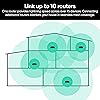
  • Significantly more coverage than traditional router systems - Unlike older systems that use just one router to stretch coverage to your whole home, Wyze Mesh Router Pro uses mesh technology so you can expand your coverage with up to 10 routers. Just 3 Wyze Mesh Router Pros cover up to 6000 square feet.
  • 500% faster internet speeds than traditional routers - With AXE5400 Tri-Band Wi-Fi 6E get a whopping 2.5Gbps of internet speed and aggregated Wi-Fi speeds of 5.4 Gbps. With direct access to the new 6 GHz band when using Wi-Fi 6E devices, youll get lower latency across your network, even for non Wi-Fi 6E devices.
  • Wyzes Mesh Technology allows your network to expand seamlessly, without the need for 3rd party extenders or boosters. As you move throughout your home, the Wyze Mesh Router Pro network seamlessly connects you to the nearest router, never dropping a FaceTime call or pausing a video. Wyze Mesh Router Pro supports up to 150 plus devices on a 2-router network, the more routers you add, the more devices your network can support.
  • Gets better over time - Receive automatic updates to help keep your network safe and secure. Set up robust parental controls, prioritize devices, run a speed test, and even group devices by rooms and floors to turn them off at certain times of day in the Wyze app.

Description

Wyze Mesh Router Pro brings you the absolute best in home Wi-Fi for a fraction of the cost. Experience the blazing fast, never-buffer-again, 2.5Gbps speeds of Tri-Band Wi-Fi 6E. Mesh Technology allows your network to expand seamlessly, without the need for 3rd party extenders or boosters. As you move throughout your home, the Wyze Mesh Router Pro network seamlessly connects you to the nearest router to your device, never dropping a FaceTime call or pausing a video. Unlike older systems that use just one router to stretch coverage to your whole home, Wyze Mesh Router Pro uses mesh technology so you can expand your coverage with up to 10 routers to cover over 20,000 sq. ft. Each Wyze Mesh Router Pro supports up to 75+ devices, so the more routers you add, the more devices your network can handle. The highly-rated Wyze app is the command center for your home network. Set up parental controls, prioritize devices, run a speed test, and even group devices by rooms and floors to turn them off at certain times of day. Setup has also never been easier. The Wyze app walks you through it, step by step, even guiding you through the placement of each router so you know you’re getting the best possible home coverage.

Brand: WYZE


Model Name: Wyze Mesh Router Pro


Special Feature: Access Point Mode, Guest Mode, Remote Access


Frequency Band Class: Tri-Band


Wireless Communication Standard: 802.11ax


Compatible Devices: Personal Computer


Recommended Uses For Product: Business, Gaming, Home


Included Components: 2 x Wyze Mesh Router Pro, Quick Start Guide, 3' Ethernet Cable, 2 x Power Adapters 12V 2A


Connectivity Technology: Bluetooth, Ethernet, USB, Wi-Fi


Color: Black


Other Special Features of the Product: Access Point Mode, Guest Mode, Remote Access


Frequency Band Class: Tri-Band


Wireless Compability: 802.11ax


Compatible Devices: Personal Computer


Antenna Location: Business, Gaming, Home


Connectivity Technology: Bluetooth, Ethernet, USB, Wi-Fi


Antenna Type: Internal


Operating System: ZyNOS


Security Protocol: WPA2-PSK, WPA3-PSK, WPA-PSK


Number of Ports: 2


Control Method: App


Data Transfer Rate: 5.4 Gigabits Per Second


LAN Port Bandwidth: 10/100/1000/2500 Mbps


Voltage: 12 Volts


Maximum Upstream Data Transfer Rate: 2500 Megabits Per Second


RAM Memory Installed: 1 GB


Number of Antennas: 6


Wi-Fi Generation: Wi-Fi 6E


Has Internet Connectivity: Yes


Router Network Type: Mesh


Is Modem Compatible: No


Connectivity Protocol: Wi-Fi, Ethernet, Bluetooth, USB


Coverage: Up to 2000 square feet per router


Controller Type: App Control, Push Button


Frequency: 6 GHz


Brand: WYZE


Model Name: Wyze Mesh Router Pro


Built-In Media: 2 x Wyze Mesh Router Pro, Quick Start Guide, 3' Ethernet Cable, 2 x Power Adapters 12V 2A


Model Number: WF6ETBMRS


UPC: 810083470825


Manufacturer: Wyze


Mfr Part Number: WF6ETBMRS


Item Type Name: Wyze Router


Warranty Description: 1 year manufacturer


Item Dimensions L x W x H: 5.43"L x 5.43"W x 1.89"H


Color: Black


Has Security Updates: Yes


Frequently asked questions

If you place your order now, the estimated arrival date for this product is: Thursday, May 14

Yes, absolutely! You may return this product for a full refund within 30 days of receiving it.

To initiate a return, please visit our Returns Center.

View our full returns policy here.

  • Klarna Financing
  • Affirm Pay in 4
  • Affirm Financing
  • Afterpay Financing
  • PayTomorrow Financing
  • Financing through Apple Pay
Leasing options through Acima may also be available during checkout.

Learn more about financing & leasing here.

Top Amazon Reviews


  • Outstanding Performance & Affordability
Style: Wi-Fi 6E Pattern Name: Mesh Router Size: 2-Pack
I gave a long winded detailed review below, but for those that just want it short & simple: Wyze Mesh Pro 6E (2 pack) exceeded every expectation I had, was extremely easy to setup, it works very well & I am beyond happy! As a former Network Engineer I've been through countless numbers of Router models & manufacturers. I already had a Wi-Fi 6E router, the problem I had was the amount of devices being used, which was causing random slowdowns and/or buffering, minor issues with channel crosstalk from neighbors Wi-Fi & very minor signal strength issues in one area of the house. The Wi-Fi 6E router I already had, did support Mesh Networking, but to add another unit was near $250-300.00USD! I happened upon this Wyze Mesh Pro Wi-Fi 6E (2) Pack on sale for Cyber Monday. The price was very reasonable & it had very good ratings. The package arrived yesterday & within less than 20 minutes if that, the old router was removed, the Wyze Mesh Pro #1 & #2 were both installed & working great! Now 20 mins might sound like a long time, so allow me to layout the setup process. Unboxed, unplugged & removed old router, rebooted modem, connected Wyze Mesh Pro #1 & using the Wyze smartphone app I simply followed the prompts & answered the questions (the questions are not overly technical or confusing at all), when I got to the final step I had 2 options 1) Add Another Mesh? or 2) Finished. I still had Wyze Mesh Pro #2 to setup, so I chose "Add Another Mesh?". The app prompted me to take the next box to the area it was to be placed & plug it into power. After it booted up the app again asked the same questions as before & then I ended up on the same last screen & I chose "Finished". The app then synced the mesh network, rebooted itself, asked if I wanted to get the latest firmware & I chose "yes" so it downloaded the new firmware, then updated Wyze Mesh Pro #1, then Wyze Mesh Pro #2 & rebooted itself again. After that everything worked like it always had, only considerably better! Now there are no slowdowns and/or buffering anywhere, the mesh network automatically distributes the device load based on distance to the nearest box & the amount of devices already in use on that box. There are absolutely zero signal issues of any kind! It will automatically adjust the 3 channels to the most optimal channels available to avoid interference etc. Lastly, I have 1GB (1,000Mbps) Internet, with the old router I usually got around 800-850Mbps & that would drop the farther away from the router you went, but I could get 980Mbps standing next to the router. With the new Wyze Mesh Pro I'm getting 1,150-1,275Mbps regardless of where I am in the house! That's with just (2) of the Mesh Pro boxes, the system supports up to (10). ... show more
Reviewed in the United States on December 1, 2023 by Realistic Reviewer

  • No complaints, Internet is lightning fast
Style: Wi-Fi 6E Pattern Name: Mesh Router Size: 2-Pack
I upgraded to this from another mesh system due to my previous system being out and outdated. I’ve been a huge fan of Wyze for awhile and decided to give this a try. I thought for sure I would more than two due to the size of my home (2400sqft) but based on the locations that I put these (each side of the house) it covers my entire property perfectly fine. I have front and back exterior cameras and I haven’t had any connection issues. Furthermore, I have 5 cameras, thermostat, sprinkler system, along with the standard home internet supported items (TVs, video games, etc) and I haven’t had any connection issues, I am running 1gb DL speed as a reference. The WiFi is strong in all areas of my house. ... show more
Reviewed in the United States on July 6, 2025 by Fabian Lopez

  • Horrible support for intermittent restarts
Style: Wi-Fi 6E Pattern Name: Mesh Router Size: 2-Pack
I wanted to like this router from the product videos touting the power. Wyze marketed their router as from a “little guy” but with great engineers compared to the big network companies. What I bought was a device with hardware failures that couldn’t be fixed after being bounced around between many entry-level support agents who knew less about wireless infrastructure than I did. As the Wyze Mesh Router Pro main unit and satellite would on the daily restart themselves and drop connection for all devices for a minute or two (status LED turns orange), I went back to our Verizon FiOS WiFi router rental which I thankfully hadn’t returned yet. The Verizon router did not have the range of the Wyze Mesh Router Pro but it never dropped devices. So many emails asking rudimentary questions like if I was using devices that use WEP. (If my devices only support WEP and the router was setup with WPA, they couldn’t even connect!) The incompetence of the support agents was infuriating. I asked for a replacement unit and was asked to use the Wyze app to send a support log for engineering to review. I had already done many hard resets by holding the paperclip in the back for 15 seconds, and setting the router up again which is a very slow process. But when the connection was dropped again I sent the log right away and was given once again requests to modify some settings… yet I had set the device up with essentially the default settings. Were the device settings not included in the logs or did just nobody review them? I started to think that if the Verizon FiOS router worked perfectly maybe it was my house, so I broke down and bought a Netgear Orbi mesh WiFi system which I’ve been using now for weeks without a single drop. The Netgear main router and satellite are in exactly the same positions as the Wyze were. It sucks I’m out a couple hundred bucks because of a company that has such poor support that I went out of the return policy yet they won’t support and replace a router which is only two months old. Avoid this product for the poor support alone. ... show more
Reviewed in the United States on October 31, 2023 by J. Williams

  • Super reliable !
Style: Wi-Fi 6E Pattern Name: Mesh Router Size: 2-Pack
Great router , but the best part , it’s so simple to setup and now I have owned it for 7 months and never had 1 problem
Reviewed in the United States on July 7, 2025 by Duy Truong

  • Fire and Forget
Style: Wi-Fi 6E Pattern Name: Mesh Router Size: 1-Pack
If you just want to plug something in, set it up with a mobile app, then forget about it forever this is for you. Very nice so far, no issues, but be warned - very hot. Totally normal but don't put it somewhere confined w/ no airflow - Little to NO admin controls. There's even a firewall/threat detection service that can block CDNs and URLs and no you can't turn it off... So Probably a 5 star purchase if you want to set and forget. Administrator/DevOps types: Probably not for you. You can't really see any logs or metrics. You can't fine tune much other than the radio channels used. If you grew up with hardware from the 2000s and earlier it will be totally alien. For custom preferences and more control look elsewhere. ... show more
Reviewed in the United States on July 12, 2024 by Max Dobeck

Can't find a product?

Find it on Amazon first, then paste the link below.
Checking for best price...