Search  for anything...

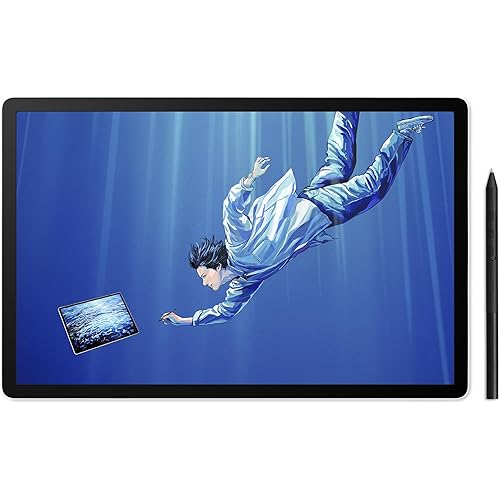
Wacom One 13 Touch Drawing Tablet with Screen, 13.3" HD Full-Laminated Touchscreen Digital Art Pad with Creative Software and Training, Graphics Drawing Tablet for Mac, Windows PC, Chromebook

  • Based on 183 reviews
Condition: New
Checking for the best price...
$499.95 Why this price?
Holiday Deal · 17% off was $599.95

Buy Now, Pay Later


As low as / mo
  • – Up to 36-month term if approved
  • – No impact on credit
  • – Instant approval decision
  • – Secure and straightforward checkout

Ready to go? Add this product to your cart and select a plan during checkout.

Payment plans are offered through our trusted finance partners Klarna, Affirm, Afterpay, Apple Pay, and PayTomorrow. No-credit-needed leasing options through Acima may also be available at checkout.

Learn more about financing & leasing here.

Selected Option

Free shipping on this product
This item's return window has been extended for the holiday season: FREE refund/replacement until Jan 31, 2026

To qualify for a full refund, items must be returned in their original, unused condition. If an item is returned in a used, damaged, or materially different state, you may be granted a partial refund.

To initiate a return, please visit our Returns Center.

View our full returns policy here.


Availability: 19 left in stock
Fulfilled by Amazon

Arrives Monday, Dec 22
Order within 14 hours and 51 minutes
Available payment plans shown during checkout

Protection Plan Protect Your Purchase
Checking for protection plans...

Size: 13" Display


Features

  • Touchscreen Display: Animation tablet features 13.3" HD display and anti-glare paper-like display designed for digital pen starters, drawing, editing photos, or visual communication
  • Precision Pen Performance: Included Wacom One Pen features natural tilt recognition, virtually lag-free tracking, 4096 levels of pressure sensitivity, and 2 customizable switches
  • Optimal Efficiency: Shortcut buttons on the pen can be customized for your favorite keyboard shortcuts like undo or copy/paste, helping you stay immersed in your art
  • Multiple Compatibility: Connect to Windows PC, Mac, Chromebook, and Android smartphones/tablets via USB-C (some devices require 2nd USB-C plus power adapter or HDMI 3-in-1 cable)
  • Includes: Wacom One 13 touchscreen display tablet, battery-free Wacom One Pen, power adapter, 2 USB-C cables, and quick start guide

Description

The Wacom One 13 graphics drawing tablet helps the digital arts beginner illustrate, edit images, or design with a natural feel of pen and paper. Whether you're sketching, painting, creating animations, or communicating your ideas, this full-color 13.3” HD graphics tablet is equipped with everything you need to express your artistic vision. Featuring a thin and light design, this creative pen tablet includes a fully-laminated anti-glare screen and its compact size is perfect for anyone with creative dreams but limited desk space. The multi-touch touchscreen graphics tablet display allows you to interact with your content with your fingers as well as the pen on screen. Use natural gestures like panning, zooming, and rotating to enjoy a completely immersive experience in your creative process. The drawing pad with display works with Windows PC, macOS, and some Android devices, and comes with the battery-free Wacom One pen. With 4,096 levels of pressure, the cordless One pen can be customized to your liking with 2 programmable buttons, has no parallax, and virtually no lag for a smoother workflow. Our pen's Electro Magnetic Resonance (EMR) tech draws power from your tablet, meaning you never need to charge it. The computer design display is a great option for students and aspiring artists seeking a remarkable entry-level drawing tablet with stylus type pen. Level up your digital art skills by creating comics, manga, concept art, illustrations, fashion design, photography, video editing, motion graphics, and more.

Brand: Wacom


Connectivity Technology: USB


Pressure Sensitivity: 4096 Levels


Operating System: Windows


Special Feature: Full Lamination


Product Dimensions: 13.2 x 8.7 x 0.1 inches


Item Weight: 1.9 pounds


Item model number: DTH134W0A


Batteries: 1 Lithium Polymer batteries required. (included)


Date First Available: October 5, 2023


Manufacturer: Wacom Technology Corporation


Frequently asked questions

If you place your order now, the estimated arrival date for this product is: Monday, Dec 22

Yes, absolutely! You may return this product for a full refund within 30 days of receiving it.

To initiate a return, please visit our Returns Center.

View our full returns policy here.

  • Klarna Financing
  • Affirm Pay in 4
  • Affirm Financing
  • Afterpay Financing
  • PayTomorrow Financing
  • Financing through Apple Pay
Leasing options through Acima may also be available during checkout.

Learn more about financing & leasing here.

Top Amazon Reviews


  • Great tablet for use during Zoom meetings for sketches and annotation to convey ideas better.
Size: Small
I am not an artist, and I use this pad for quick sketches during Zoom meetings and on-screen annotations. This tablet is the perfect size, sitting on my desk for quick sketches or highlights during a Zoom meeting. I also use it for quick diagrams or sketches, which come out more naturally than trying to do the same with a mouse. I work in the software and infrastructure engineering field, so I purchased this device to help me with sketching and sharing ideas during my Zoom calls. Sure, you can use a mouse to annotate or draw, but it comes out looking like something written by my left foot. The drawing tablet allows for a high level of precision in pen control, and I can literally sketch out ideas, plans, and diagrams right while talking with my team on Zoom. The size of this tablet is perfect for my needs. It's not too large and fits nicely on my desk next to my keyboard. The EMR pen used with the tablet frequently works with other E-Ink and EMR-type devices, so depending on the e-ink tablet you are using, you can just use the same pen to scribble on the pad. This worked fine for me when I was using Amazon Scribe; however, after switching, the ceramic nib of the Supernote Manta does not work well with this pad. Regardless, I have the native stylus sitting nearby, so I can just grab that and go. I am using this device with an older Apple MacBook Pro M1, and it has been working flawlessly through the many operating system upgrades (which I cannot say the same for my older HP laser printer). Ultimately, it's a great device that meets my needs. ... show more
Reviewed in the United States on November 30, 2025 by AP

  • Don’t Waste Your Money on This Lemon
Size: Medium
Bought this Wacom One (DTC133) thinking it’d be great for digital notes at work, but what a massive disappointment. It worked fine for about a week—smooth pressure, no issues—then bam, ghost strokes everywhere, registering input when the pen’s not even touching the screen. Tried everything: updated drivers (latest 6.4.11-1), swapped nibs, cleaned the channel, toggled Windows Ink, adjusted pressure curves, even firmware updates. Nothing fixed this glitchy mess. This thing’s unreliable as a sailor on Saturday morning right out of the box. Wacom’s support is a joke, and their “fixes” are just busywork. If you’re looking for a pen tablet that doesn’t fail after a few days, skip this overpriced garbage and go with something else. Sending mine back for a refund—stick to a mouse or real paper if you value your sanity. Total waste of time and cash. ... show more
Reviewed in the United States on October 6, 2025 by Joe Rumberger

  • Easy, useful, make sure you have the right holes/adapter!
Size: Small
Great product :) I bought it for taking course notes and personal/leisure drawing about 2-3 weeks ago and I found it to be vastly, immensely worth it. It connects with my Macbook very easily (cord and Bluetooth), and the Bluetooth specifically is very simple. At first, I couldn't find the device on my Bluetooth connections, but all I did was restart my computer and hold down that side button and it worked! Battery lasts pretty long (maybe a few days of regular, 4-5 hours use) and of course, you can charge it while using it. You will need a USB->USB-C adapter if you use an older computer that uses the tradition rectangular USB-drive. ... show more
Reviewed in the United States on October 29, 2025 by Nika Pur

  • READ REVIEW BEFORE BUYING
Size: 12" Display
LOVE LOVE LOVE THIS THING! 5/5 Stars! The only thing to keep in mind is that if you have a PC that is NOT compatible with USB-C display, YOU WILL HAVE TO BUY THE DISPLAY CONVERTOR FROM WACOM DIRECTLY. It sucks and idk why it doesn't come with it but it's the sad reality of the situation. Most modern laptops and all Apple devices after 2023 will have this compatibility but custom built PCs will more than likely not have this function so please be aware of that. ... show more
Reviewed in the United States on August 11, 2025 by Ronnie

  • Overall it works great
Size: 13" Display
It works overall all very well. Sometimes it’s buggy and I have to reboot the Wacom or the software.
Reviewed in the United States on March 31, 2025 by jonathan pitcher

  • Great portable sketch pad!
Size: 12" Display
I have been using this new Wacom One 12 for a few days now. I am no stranger to Wacom. I have a Cintiq which is permanent on my desktop and wanted a small one to be able to move to other locations without using a power cable. This fit the bill. It is very small. There are no pull out legs on the back. I use Art Pucks to angle the tablet and that seems to work fine. The pen does work well and having two buttons on it is a big deal for me. Tilt is ok and drawing is smooth. Laminated display with -0- parallax. The build quality is good. I found no issues with the screen or the pen. Keep in mind this is not the same experience as drawing on my 4K Cintiq but it sure fits the bill for sketching on the go. I chose not to go with the Wacom One 13 touch because I never use the touch function on the Cintiq I already own. I also, did not want to go with another brand as both my Mac mini M1 and Macbook Pro already have the Wacom drivers installed and having to remove them each time I want to use another brand device is just too much bother. The package comes with everything you will need to get setup except a stand. This is more than double the price of other brands but as always it is a Wacom and I am hoping to get years of use out of this. Did I mention it is small? You adjust to it quickly. I do recommend if you have the extra money to spend. ... show more
Reviewed in the United States on September 18, 2023 by LindaFus

  • OK drawing tablet, but won't work with most USB C hubs
Size: 14" Display
This seems to work well as a drawing tablet, however it's connectivity is problematic. It only has a USB C connection which has to carry the video via DisplayPort Alt, data for the pen, and power via PD. There is no separate power input. This means that almost no USB C hubs will work because they don't supply power over their USB C video ports. Directly connecting to a laptop will likely work. However the laptop USB C must supply both power and DisplayPort Alt connection. ... show more
Reviewed in the United States on October 1, 2025 by Ralph

Can't find a product?

Find it on Amazon first, then paste the link below.
Checking for best price...