Search  for anything...

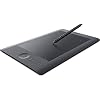
Wacom Intuos Pro Pen and Touch Tablet, Medium (PTH651) (International)

  • Based on 1,022 reviews
Condition: Used - Very Good
Checking for the best price...
$247.99 Why this price?

Buy Now, Pay Later


As low as $41.33 / mo
  • – 6-month term
  • – No impact on credit to apply
  • – Instant approval decision
  • – Secure and straightforward checkout

Ready to go? Add this product to your cart and select a plan during checkout.

Payment plans are offered through our trusted finance partners Klarna, Affirm, Afterpay, Zip, Apple Pay, and Google Pay. No-credit-needed leasing options through Acima may also be available at checkout.

Learn more about financing & leasing here.

Free shipping on this product

This item is eligible for return within 30 days of receipt

To qualify for a full refund, items must be returned in their original, unused condition. If an item is returned in a used, damaged, or materially different state, you may be granted a partial refund.

To initiate a return, please visit our Returns Center.

View our full returns policy here.


Availability: Only 1 left in stock, order soon!
Fulfilled by McCallister LLC

Arrives Sunday, Sep 20
Order within 7 hours and 35 minutes
Available payment plans shown during checkout

Protection Plan Protect Your Purchase
Checking for protection plans...

Features

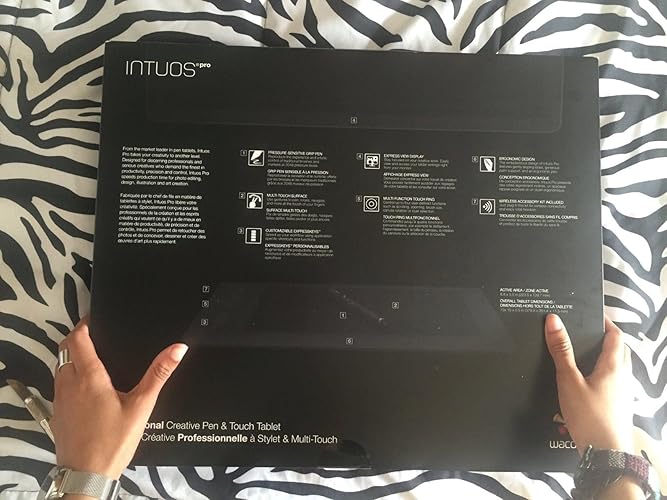
  • Quickly and professionally edit photos and create digital artwork using natural pen control
  • Wireless accessory kit included; System Requirements:USB port, Windows 7 or later (64bit),Mac OS 10.10 or later, Bluetooth Classic for wireless connection to PC or Mac,Bluetooth LE for wireless connection to mobile devices (in paper mode)
  • 2048 levels of pen pressure sensitivity in both pen tip and eraser
  • Zoom, scroll, navigate your artwork with multi-touch surface and gestures
  • 8 customizable application specific Express Keys and multi-function touch ring with 4 customizable buttons

Description

Wacom Intuos Pro Pen and Touch Tablet, Medium (International).

Brand: Wacom


Connectivity Technology: Wireless,Usb Port,Bluetooth


Pressure Sensitivity: 2048 levels


Operating System: Windows


Special Feature: Pen


Brand: Wacom


Model Name: FBA_PTH651


Built-In Media: pen, nibs, intuos pro


Target Audience: Teacher


Model Number: PTH651


Global Trade Identification Number: 90


Number of Items: 1


Manufacturer: Wacom, Inc


UPC: 753218990990


Item Type Name: Wacom PTH651 Intuos Pro Pen and Touch Tablet, Medium (International)


Mfr Part Number: PTH651


Warranty Description: 2 years


Connectivity Technology: Wireless,Usb Port,Bluetooth


Pressure Sensitivity: 2048 levels


Operating System: Windows


Additional Features: Pen


Specific Uses For Product: business, personal


Compatible Devices: Personal Computer


Native Resolution: 2048 levels


Screen Size: 6.7 inches


Item Weight: 2.2 pounds


Active Surface Area: 8.8 x 5.5


Color: Black


Frequently asked questions

If you place your order now, the estimated arrival date for this product is: Sunday, Sep 20

Yes, absolutely! You may return this product for a full refund within 30 days of receiving it.

To initiate a return, please visit our Returns Center.

View our full returns policy here.

  • Klarna Financing
  • Affirm Pay in 4
  • Affirm Financing
  • Afterpay Financing
  • Zip Pay in 4
  • Financing through Apple Pay
  • Financing through Google Pay
Leasing options through Acima may also be available during checkout.

Learn more about financing & leasing here.

Top Amazon Reviews


  • I really like this a lot
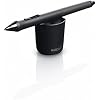
I ordered the medium tablet. I really like this a lot! it's my second Wacom product I've ever own (the first being my "Cube i7 Stylus Tablet" imported from China. It has a Wacom digitizer built in it, but because the pen is very small and the tablet is tempered glass, it's very difficult to draw on.). The Pro is actually bigger than I thought (looks more like a large). And it takes a little bit to get used to, but it's a great product. When I draw on the tablet, it really feels and sounds like paper because of the matte finish. What my box included: - The tablet - The Pen with eraser and left & right buttons on the side. - Changeable color rings (red, white, grey, and black). - Pen stand with changeable nib tips inside. - Installation disc. - USB to plug into the computer for charging or wired use. - Battery and sensor (for wireless use). Several questions from interested buyers: 1: Does the tablet have a switch for "Touch-On" or "Touch-Off". 2: Is the tablet very responsive with palm rejection? 3: Can the tablet be used as a mouse? 4: Can I draw with my left hand or any position if I switch the tablet around? 5: Does it work best wired or wireless? 1: When I first got the tablet, there was already a "Touch-On/Touch-Off" button. There's 8 Express Keys on the tablet, including the circle button. The "Touch" button was on the bottom of the "Settings" Express Key, which looks like a line on it. It might be different for some consumers. 2: Yes, the tablet is very responsive with palm rejection. I haven't had one problem drawing while my hand was resting on the tablet. 3: Yes, it's a pretty good mouse when used with your fingers. You can also customize various gestures. As for using the pen for a mouse, it's not so good. I would avoid it. It's pretty bad. 4: Yes! You can adjust the tablet in any position. But you have to set it up manually first before flipping the actual tablet around. After you've installed the Wacom drivers, search for "Wacom Tablet Properties" on your PC (Since I got Windows 10, I typed it in the Cortana Search Bar). Near "Tools", click on "Grip Pen". you will see three tabs listed below: "Pen", "Eraser", and "Mapping". Click on "Mapping". Next, you will see an image of a computer screen, a tablet, and a red-like box linking them to each other. On the right side of it, it reads: "Orientation". Select which orientation you want. I use "ExpressKeys Right" for my left hand and flip my tablet over. And you're done! 5: I hear a lot of complaints from users that the USB cord gets loose, and so it loses it's connectivity. So far, that hasn't happened to me. I don't move my tablet, so I never had it shutting off on me. Therefore, it works great. As for wireless, I haven't tried it yet. I sit at my desk a lot, so there's no need to get up to move around and use it. It's a great edition, but I don't need it. However, when I get the chance, I hope to try it out and do an update on it. *Some suggestions for consumers ready to buy this tablet:* -If you're a novice to drawing and just doing it for a hobby, I would not get this product. I would go for the "Wacom Intuos Art" or "Manga" line. They're pretty cheap. -If you're looking to get serious with your career but you never used a Wacom tablet, I suggest this one for starters. It's the most commonly used by Illustrators and Graphic Designers. - If you're a total pro, but not comfortable looking at a screen and drawing on a tablet at the same time, then go for the "Wacom Cintiq" line. But be warned: It's quite expensive! (At least $900 - $2,000 depending on the size.) Here are some suggested tablet sizes that perhaps fit best with your PC display: *Less than 12 inches = small tablet *12 - 23 inch screen = medium tablet *23 inches and up = large tablet ... show more
Reviewed in the United States on March 22, 2016 by Abria

  • Glad to be back using a Wacom tablet
My very first tablet was a tiny little Wacom Graphire 4, which served me well for near on ten years before I switched it out - and even then, it had less to do with the performance of the tablet and more to do with the deterioration of the soft plastic of the pen and scroll wheel. Other than its age, it was golden - easy to install, easy to use, was EXTREMELY sturdy (I'm sure I could have dropped that thing from the roof and it would have been fine), and all in all a great tablet for a first-time digital artist. When I retired it, I decided that for my next tablet I'd try out a lesser known brand, thinking I would save some money and support the smaller guy. So I bought a Monoprice, a pretty big size that had great reviews.... The only problem -- the thing never ONCE installed correctly (I tried so many different times). Figuring out the drivers with Monoprice was the absolute LEAST user-friendly process I've experienced with software. There was intermittent lag time from pen to screen, the nib sensitivity was crap and the nib itself wore down in a month, customer support sucked... Sometimes I plugged it in and the thing didn't even respond before the sixth try. I got it to an acceptable working condition, but the thing never ran 100% the way it was supposed to, and I kind of hated using it for the two years I've had it. Came back to Wacom with the Intuos Pro Touch, and it's like seeing an old friend again! I love this tablet! The install disc didn't read on my computer, but it was easy enough to get the drivers from Wacom's website, and once I did that, they WORKED the way they were supposed to, THE FIRST TIME. I chose the medium size, which is plenty of room to work on my 27XW monitor. The levels in the nib are a dream, and I didn't realize how much I missed having the eraser feature on the pen itself until I got it back. The hotkeys and four-function scroll wheel are a cool added bonus for me, and have already been super convenient in the short time I've been working with this tablet. The touch function is really cool too - and useful for my particular setup (I work on an external monitor through my laptop - sometimes mousing can be a bit of an unnatural reach). I love that you can turn the touch feature on and off, and that when you hit a hotkey the tablet "reminds" you via your screen what the key does. TBH I never had an issue with nib wear in the past, and though I've seen some comments here addressing how quickly the nib wears down, I honestly don't see it being a problem in the future. Maybe I just have a light touch (in fact, I never needed to replace the nib on my old Graphire even once). The durability feels good - definitely like I could use this tablet for the next ten years, like my old Graphire. Honestly.... if you're beyond a beginning digital artist's level and are serious about the quality of the tool you're buying, and looking at the price tag thinking you might try out a cheaper brand first - don't waste your time. Wacom is the best, hands down. ... show more
Reviewed in the United States on June 8, 2016 by Erica

  • Handy Pros and Cons from a Long-Time and Daily Professional User
I've been using Wacom tablets since they were Beige and had two different cables, one for the pin port and one for the wall. I noticed a lot of first-time-tablet-user ratings so thought my two cents could be helpful. I'm upgrading from an Intuos 3 Medium, which still works great but I literally wore the surface off the tablet (in the middle, most common area) after many years of daily use. I'm a professional designer and use a Wacom every day, which is who this tablet is mostly aimed at. I don't use a mouse at all, from every day tasks to high end retouching, my right hand is pen and tablet. I skipped the 4 and 5 because the 3 was still doing just great. PROS * Best tablet I've used yet. If you do this even remotely for a living, 300 dollars is a small investment in your work. If you are looking to try a pen tablet and are concerned on price get the cheaper Intuos models and try it out. From a usability perspective using a pen is far more natural for your hand than a mouse, which could help with carpal tunnel/wrist strain potentially. One thing I will say is the Pro stylus is far better in size than the little pen on the base (white) Intuos tablets. I hated using that little thing and got rid of the one I had for traveling almost immediately. * The USB cable connection issue seems to have been solved, mine snaps in just fine and stays there. * Touch is a nice feature that I use occasionally for web browsing. It's nice how easy it is to toggle this on and off with a physical button on the tablet itself. * Lots of nibs (and nib remover) included in the base of the pen stand. Handy they include these instead of selling you an extra $40 kit as they did in days past for something so necessary to the product. * Pen pressure and overall working feel are great. Texture of the tablet feels right, a little more matte/toothy than the Intuos3 I used previously. * If you care about such things, it looks and feels great. The black is slick, nice fit and finish on the tablet surface and slightly rubberized surrounding areas. CONS Only minor quibbles here. * I don't use the buttons on the tablet much, never have. That's what my left hand and the keyboard are for. With their current position I sometimes lay my pen hand on them but this has never caused any issues, just a brief HUD popping up on screen. * As other reviewers have noted, the black standard nibs seem to wear down rather quickly. I can attest to this. After only a few weeks I've already replaced one. N/A * I have no opinion on the wireless option since it sits on my desk and plugs in to a USB port not more than a foot away. No need to waste batteries to have one cable off your desk. I couldn't imagine using a tablet in my lap from across the room, but if that's what you do then the option is there and I'm sure their are reviews of it. * For what it's worth I'm using a maxed out 2013 15" Macbook Pro hooked up to a Thunderbolt Display, so a lot of horsepower. Some reviewers seemed to have issues with a laggy computer, but if you use a tablet like this there's a good chance you've got a decent setup. I can't comment on any input issues, everything is smooth. * I've never had installation or driver problems from Wacom, maybe I got lucky. Just go to the site and download it. Not sure why they even bother including CDs in the package anymore. * Intuos Confusion - As someone who works in branding I could argue both directions on this, but it's not even remotely a dealbreaker. It's pretty clear what the Pro and Consumer (old Bamboo) differences are. Color and price for starters, but if you're new to the space I could see how this could take some digging to figure out. * Wacom is pretty much the industry standard. I don't have any opinions on other brands of tablet personally but have heard frustrations from friends and colleagues who tried to save a few bucks on a 'knockoff' brand. I'm sure there are other decent options, but this is the flagship. * Surface wear: Of course I can see some marks and sheen on the surface of the tablet, I drag and push a piece of plastic all over it every day. So far nothing to complain about. It's like a stainless steel sink, it's going to have scratches from doing what it's for. All in all best tablet you can buy. I've yet to try a Cintiq for work but maybe someday. I personally like the Medium size. Small is too small for the type of work I do and I found it uncomfortable, though having not used the larger version I can't comment on that. Friends with larger tablets love them, so there's that nugget. Happy de-mousing. ... show more
Reviewed in the United States on September 28, 2014 by Andy Sheffield

  • Good tablet; most problems with it are essentially superficial in nature.
I purchased this tablet after trying out a few other, cheaper options. The Wacom Intuos (the lower-end version of the line) was a disappointment to me, and I tried out a different brand which was even further below my expectations, but when I finally gave in and ordered this one, paying a bit more for it, I was pleased with what I got. A few small criticisms, but overall I'm quite happy with its performance. It offers good pressure sensitivity, and the express keys work well for me. My last good tablet was a Bamboo and had four express keys, so upgrading to eight of them was pretty nice. The touch function can be a little annoying at times (and I haven't found the right settings to fix that, which was easier to do on my Bamboo). For now, I've been using the tablet with Touch turned off. It kept scrolling, clicking and selecting when my hand brushed the surface, and no amount of fiddling with the touch sensitivity seemed to solve that problem; on the Bamboo, it was easy to adjust the settings and stop the accidental clicks/scrolling. On the bright side, having eight express keys gave me the perfect chance to bind Zoom In and Zoom Out functions to a couple of those extra buttons (and, there's always that multi-function touch ring which I'm working on getting the hang of). The pen stylus has a great selection of nibs to choose from, which is great for me. The felt nibs do an interesting job of adding friction, but so far I have primarily used the plain black ones for most of my sketching. The only thing I don't like about the pen is the texture of it; it isn't a typical smooth plastic, but rather it has a 'velvety' kind of finish, making it soft to the touch--and a magnet for lint and dust. I find myself regularly needing to wipe it with a (very lightly) damp cleaning cloth to rid it of the particles and dust clinging to its surface. That may not be a big deal to most others, but for me, it's still a 'new' device, and I like it to look new. The dust problems with the pen take away from that. Finally, I clearly got lucky in terms of the USB port on the tablet; I haven't noticed any loose fittings or bad connections on mine, although I know a lot of reviewers had problems with that. If mine starts to loosen over time, I will try to update this review to report on it. All told, it's a good tablet with good performance, but the touch functions on the main surface and the finish of the pen itself detract from my overall opinion, giving it a solid four stars in my book. If you don't want to use the touch function and you don't care if your pen looks dirty all the time, you may well love this tablet more than I do. ... show more
Reviewed in the United States on October 19, 2014 by Christina

  • Really the only choice for Professionals before the Cintiq
If anyone tries to tell you that the Intuous Sketch comes even close to this product, be wary. As a student I have breached into the professional art world several years ago and found that expensive equipment did the job in a superior way but was just impossibly out of my budget. In an attempt to make a smart purchase I hesitated on buying the Pro and bought the sketch. What I found was a subpar pen pressure that only works for someone who is new to the field. I returned it and bought this product and now I want to explain why it is superior to the others on the current market: 1. Size: Even at a medium the Intuous Pro is a size adjustment on the former standards (the Intuous 4 and 5, which I have had both of) of size. It's large enough that I wouldn't really consider getting a bigger size as the product fits cozily into a backpack or a carrier bag. Any bigger and you might have to pick a different piece of equipment. 2. The pen pressure on it is perfect. I rely on pen pressure for all of my works in order to use opacity, line size, and blending to the best capacity. The cheaper alternative to this tablet has pen pressure that is frustrating while this tablet feels like an extension of my hand. 3. Price: Now I know the price is daunting. . .but comparatively it is acceptable. Your other choices are tablets that are too expensive or too cheap. Either you spend a third of the price and get a tablet incapable of detecting pressure that easily wears down pen nibs or you spend three times the cost to get the industry's standard Cintiq. . .in a small size. To get the right size of a Cintiq to hold up in the current industry you're likely to spend about 1300-2000 dollars easily. The Intuous Pro is the best bet for someone who wants to work with professional quality but doesn't have the bank account to look at a Cintiq yet. My biggest complaint is the complaint a lot of people have: I am sick of the cop out of a pen that needs the nibs replaced. I work in an art department and Cintiq's themselves come with pens that do not wear down. It is unfair of a company to make the less pricey choices cost more over time (though a very, very long time) due to accessories that did not exist before. If 30 students in an art department can check out the same pens for an entire semester without needing a nib changed, so should people who buy this product. That being said I am happy I bought this and would not return it. It is an investment I can guarantee with my pride as both a student and a professional. ... show more
Reviewed in the United States on January 19, 2017 by Jordi L.

  • Completely invaluable tool that overcomes a few minor quirks
TL;DR: I love, love, love my Intuos Pro! You probably already know whether or not you need this. If it's going to fit your workflow, you cannot live without it. If its strengths exist outside your workflow ... well, don't force it into doing something it's not designed to do. If you spend a significant amount of time in Photoshop (or similar), then this is absolutely invaluable. I can't imagine going back to a mouse for my digital art and photo retouching. I will say that I find the pen and tablet to be less useful in Illustrator than I had hoped. Illustrator requires so many shortcuts that it's difficult to completely ditch the keyboard and mouse. It certainly has its place in Illustrator, but I could go back to 100% Intuos-free on Illustrator and not complain too much. I've read that some video editors use the Intuos in Premiere ... not sure why. I tried it for about half and hour and I just couldn't make it feel natural. Again, no need to force it into doing something it's not designed to do. I have, however, found some really useful applications in After Effects (esp. rotoscoping). There are a few other quirks that I'm not totally in love with. First, Wacom doesn't make a case for the Intuos Pro Medium ... !!!! Huh??! They do sell a case that they SAY fits it, but it was designed for the Intuos 5 and does NOT fit the Pro. I had to make my own case, which was actually kind of fun, but this was a bit of a surprise to me. I've also found that the drivers can be a bit wonky. A couple of times, my PC workstation has decided not to recognize the tablet. A restart fixed it, but I don't know what the deal is. My iMac has been more reliable, but I have also had that problem once or twice, too. Maybe I just abuse my poor tablet, but the nibs seem to last about a week or two at most before I have to replace them. I strongly recommend the hard felt nibs when you're looking for a replacement. They are cheaper on the Wacom website than on Amazon, and they come with free shipping over there, too! In the end, this is an essential tool for my work in Photoshop. YMMV, but I haven't found it to be nearly as essential (though helpful!) outside of PS. Like I said earlier ... if you need this, you already know you need this. Just do yourself a favor and get it! ... show more
Reviewed in the United States on February 20, 2017 by SchnauzerFace

  • Workaround fix for loose USB port and cable - UPDATE, Wacom has corrected issue
I went from an Intuos4 (whose USB port connectors finally snapped off) to the Pro, skipped the 5, so for me it's a good upgrade and I concur with all the positive reviews. Wacom is superior. (NOTE: I will leave the following review as first written in November 2013, when I gave it 4 stars for the reason stated, but PLEASE SEE THE UPDATE BELOW! Wacom has finally corrected the issue)… However, as others have mentioned, Wacom has still not addressed the issue of ill-designed USB ports and cords, the reason for my deducting one star. The little piece with the connections inside the casing is poorly affixed (I took my 4 apart and saw that the very thin copper wires were attached with tiny bits of solder to the circuit board, and that's it, nothing else held the connection piece in place), and the cord itself doesn't fit snugly, so it jiggles around, jiggling the connection piece with it. Here's my workaround so the cord doesn't wiggle and is firmly in place (see the video, too, taken after the fact, but it will makes things clearer): I took one of the black rubber-like rings the pen came packaged in and cut out a tiny rectangular piece 3/8" x 3/16" x the thickness of the ring. With the cord plugged into the tablet, I wedged the piece under it, squeezing the thickness. It takes some doing because you have to compress the thickness and force it in little by little (I was able to use my nail). I cut a smaller piece and wedged it in to one side of the plug. The cord is now tightly in place, but it could be removed if necessary. I plan on never unplugging it, though, even when going wireless, a small compromise to ensure that the tablet will last. UPDATE 3/7/16: One customer just wrote that, out of curiosity, he looked inside his recently purchased small Intous Pro, and found a metal piece holding the USB port in place. He included an image. So, I called Wacom to see if they have, indeed, corrected the loose USB connection problem on all of the Intuos Pro tablets now being shipped—the answer is YES! Wacom has added a metal clip on the mother board that allows for movement of the USB cord, but that secures the connecting wires. So buyers/users need no longer be concerned that the wires will break. By the way, the fix, which actually was very quick and easy to do, is still holding strong after 2 1/2 years, and I've had no problems. I don't regret buying the Intuos Pro, because in every other way it is superior. ... show more
Reviewed in the United States on November 19, 2013 by Christine Woods

  • Overpriced, scratches easy, nibs are un-usable except 1, good battery life, bad for left handed people
This product is pretty decent. I was EXTREMELY careful while drawing on it because I hate when my things get scratches but the material they used for the screen is a scratch magnet. It's like the screen is a fine sand paper that just wants you to destroy it with every stroke. So within the first 2 or 3 days I had one HUGE scratch going from the lower right side of the screen almost all the way to the left side. Even though I press as light as a feather it still found a ways to ruin itself. This product comes with some "nibs" which are basically stylus tips. Almost all of them are designed to scratch your screen and do NOT feel nice to draw with after the first 10 strokes. You need to be careful with the plastic tip ones because as if you were using a real pencil, the side you draw on will dull while the other side becomes sharp as a tack. So if you should rotate you pen at that point and try to draw a line, you will carve out a gash in your screen without even knowing it until it's too late. There is only one nib in the bunch that comes with this that doesn't do that and that's the rubber tip one. Too bad they only provide one of those and 5 of the bad ones. The battery life is really good, I'd draw on it for house unplugged and it would last a few days, then plug it in for an hour or two and it's good for the next few days. I will say that it will NEVER get to 100% charge. It only fills to about 95 or so percent before it stops charging. So you never get to see the little green light on the side. The wireless function is great and it connects in a few seconds every time. I'm left handed so this kind of sucked to use at the start becasue all of the touch buttons and things on the left hand side were always activating and popping up and scrolling, it was a really bad time. Turning on 'left handed mode' does nothing for that problem. I had to go in to the settings and turn off all the side buttons and touch controls. But for this price and to turn off all of the extra stuff, it's a bummer and feels like a waste of money. Also flipping it over so the buttons are on the right inverts the controls making it impossible to use. The pen feels kinda nice although the 'eraser' side should NEVER be used. It is like taking a chisel to your screen and doesn't erase anything unless you press down hard enough to piece the product. Just use a macro to erase. There is a very small gap in between the screen and the outer plastic but it's just the right size to catch dust, specks, glitter etc and you can not get it out again. So if you don't like permanent garbage stuck in your tablet, find some way to fill in that mini-moat. Over all it is a decent product but is definitely not worth almost 350 dollars. I'd say at most this product is worth $100 on a good day. Way overprices. ... show more
Reviewed in the United States on December 2, 2016 by Marco A.

Can't find a product?

Find it on Amazon first, then paste the link below.
Checking for best price...