Search  for anything...

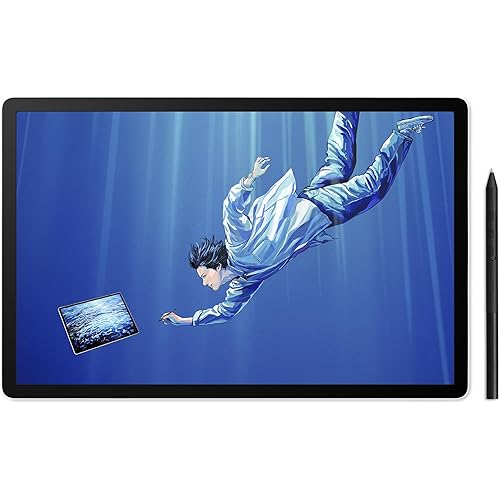
Wacom Intuos Pro Medium, Bluetooth Graphic Drawing Tablet with ProPen 3

  • Based on 268 reviews
Condition: New
Checking for the best price...
$299.95 Why this price?
Save $80.00 was $379.95

Buy Now, Pay Later


As low as $49.99 / mo
  • – 6-month term
  • – No impact on credit to apply
  • – Instant approval decision
  • – Secure and straightforward checkout

Ready to go? Add this product to your cart and select a plan during checkout.

Payment plans are offered through our trusted finance partners Klarna, Affirm, Afterpay, Zip, Apple Pay, and Google Pay. No-credit-needed leasing options through Acima may also be available at checkout.

Learn more about financing & leasing here.

Selected Option

Free shipping on this product

FREE 30-day refund/replacement

To qualify for a full refund, items must be returned in their original, unused condition. If an item is returned in a used, damaged, or materially different state, you may be granted a partial refund.

To initiate a return, please visit our Returns Center.

View our full returns policy here.


Availability: In Stock.
Fulfilled by Amazon

Arrives Monday, Aug 24
Order within 3 hours and 26 minutes
Available payment plans shown during checkout

Protection Plan Protect Your Purchase
Checking for protection plans...

Size: Medium


Features

  • WACOMS BEST PEN TECHNOLOGY: Pro Pen 3 offers amazing precision, 8192 pressure levels, tilt support & lag-free tracking for smooth, precise strokes; choose slim, straight or flared grip, adjust balance & button layout for precision and comfort
  • DIAL INTO PRODUCTIVITY: Speed up and stay in the creative flow with 10 customizable tablet ExpressKeys & 2 mechanical dials conveniently located at the top of the tablet and close to your keyboard for efficiency
  • DESIGNED FOR MODERN MONITORS: With a versatile 16:9 format perfect for multiple monitors and wide displays; medium size has a large active area with a small footprint 11.4 x 8.1 / 291 x 206 mm
  • SLEEK AND STURDY: Measuring 4mm at its thinnest this professional-grade drawing tablet feels like pen-on-paper on your desk, combined with the robust durability of magnesium making it equally suited for your office or life on the go
  • WIRELESS FREEDOM: use Intuos Pro with USB or connect wirelessly via Bluetooth to multiple computers with a simple switch

Description

Create with unmatched quality and experience a seamless flow with Intuos Pro - the professional’s choice in drawing tablets. Harness the power of decades of industry expertise with Intuos Pro - a tool designed to meet your creative needs with exceptional durability, precision, and efficiency, so you can create professional-grade results. Ergonomically crafted for long hours and trusted by top artists worldwide, Intuos Pro’s redesigned features minimize interruptions, letting you fully immerse in your workflow. This is more than a drawing tablet; it’s the definitive tool for creators who seek the best in quality, consistency, and control. At the heart of Intuos Pro is the Wacom Pro Pen 3, the culmination of 40 years of innovation, delivering Wacom’s most sensitive, accurate, and natural pen performance yet. Amazing stroke performance isn’t all – it's also customizable through different grip and button configurations, multiple nib options, and an adjustable weight so it can be configured to your preferences. Equipped with three programmable pen buttons, it provides easy access to essential commands, letting you focus on your work without interruption. Wacom Pro Pen 3 is battery-free, eliminating downtime and is designed for artists who prioritize both comfort and precision. Intuos Pro is thoughtfully redesigned for creative professionals, offering a perfect blend of efficiency and flexibility. Its ExpressKeys and mechanical dial are positioned along the top for easy access, accommodating both right- and left-handed use. The dial streamlines workflows in 3D sculpting, motion graphics, and photo or video editing with precise control over navigation, adjustments, and timeline scrubbing. Paired with the customizable shortcut keys, it provides quick access to essential tools, enabling instant activation of commands like undo/redo, brush size and tool switching. This ergonomic design keeps you fully immersed in a seamless, highly productive creative process. Built for reliability, Intuos Pro seamlessly supports Windows & Mac, delivering consistent performance across creative software. It features a lightweight ultra-thin magnesium alloy back case that’s durable enough to move between hybrid and mobile workspaces. With a versatile 16:9 format perfect for multiple monitors and wide displays, Intuos Pro adapts to a range of creative needs. Available in three sizes, it accommodates diverse work styles...whether you’re editing photos, creating 3D / motion graphics, or painting detailed illustrations. Connect your graphics tablet to your computer using the included USB-A cable (and USB-C adapter if needed for your computer) or go wireless with Bluetooth. Intuos Pro features a convenient switch, allowing you to pair to multiple computers (like home and office) and easily toggle between USB connection and the paired computers. Built for precision and speed, this graphics tablet integrates seamlessly with leading apps like Adobe Illustrator, Photoshop, ZBrush, After Effects, Mocha Pro, and Maya, empowering you to work faster and with exceptional control. With free trials of Capture One, Clip Studio Paint EX, and MASV file transfer available when you register your tablet, Intuos Pro offers fresh ways to expand your creative toolkit and effortlessly share your work. For over 40 years, Wacom has been the choice for creatives seeking quality and reliability. Wacom’s dedication to quality and craftsmanship has established the Intuos Pro as the gold standard in pen tablets. With a focus on innovation, stability and an unparalleled pen experience, Intuos Pro has become the trusted companion for artists everywhere. In choosing Wacom Intuos Pro, you’re not just purchasing a drawing tablet; you’re investing in a legacy of quality and reliability that has been the backbone of the creative industry for decades.

Brand: Wacom


Connectivity Technology: Bluetooth, USB-C to USB-A, USB-C to USB-C


Pressure Sensitivity: 8192 levels


Operating System: Windows 10 or later, macOS 13 or later


Special Feature: 10 Expresskeys, Bluetooth


Brand: Wacom


Model Name: Wacom Intuos Pro Medium (2025)


Built-In Media: Pen Stand, Replacement Nib set, Nib Removal Tool, USB Cable, USB-A to USB-C Adaptor, Wacom Intuos Pro Medium, Wacom Pro Pen 3, Grips, Balance Weight, Button Covers


Target Audience: Animator, Artist, Designer


Model Number: PTK670K0A


Number of Items: 1


Manufacturer: Wacom Technology Corporation


UPC: 753218984050


Unit Count: 1 Count


Number of Packs: 1


External Testing Certification: Não aplicável


Mfr Part Number: PTK670K0A


Warranty Description: 2 year Manufacturer


Connectivity Technology: Bluetooth, USB-C to USB-A, USB-C to USB-C


Pressure Sensitivity: 8192 levels


Operating System: Windows 10 or later, macOS 13 or later


Additional Features: 10 Expresskeys, Bluetooth


Specific Uses For Product: Animation, Designing, Drawing


Compatible Devices: Mac / PC


Native Resolution: 5080 LPI


Item Weight: 14.56 ounces


Item Dimensions L x W: 11.5"L x 8.1"W


Active Surface Area: 8.7 x 5.8 inches


Color: Black


Frequently asked questions

If you place your order now, the estimated arrival date for this product is: Monday, Aug 24

Yes, absolutely! You may return this product for a full refund within 30 days of receiving it.

To initiate a return, please visit our Returns Center.

View our full returns policy here.

  • Klarna Financing
  • Affirm Pay in 4
  • Affirm Financing
  • Afterpay Financing
  • Zip Pay in 4
  • Financing through Apple Pay
  • Financing through Google Pay
Leasing options through Acima may also be available during checkout.

Learn more about financing & leasing here.

Top Amazon Reviews


  • Improvements are more "quality of life" vs an actual "necessary" upgrade vs the 2017s
Size: Medium
I already had the Wacom Intuos Pro 2017 (and have had all three sizes at various points) and overall was happy with it, but I decided the improvements of the 2025 model made it worth upgrading to: • Smaller physical footprint: I mainly work at my desk at home, but for the times when I take my laptop out to, say, a coffee shop, it's a more comfortable fit for both my laptop and Wacom 2025 Medium on a table versus the wider 2017s. I could fit the 2017 Medium but just barely, and it was a tight fit depending on the table size. With the 2025 that's no longer a problem. • Larger active area. While the active area on a 2017 Medium is adequate, depending on your monitor size it can still feel too crampt, but the 2025 active area is a lot more roomy. (This has the somewhat negative side effect of losing the bevels to rest your hand on, but the device is now thin enough that you get used to it pretty quick when you're on the edges; it's not a problem for me, but if you use it for drawing as opposed to photo editing it could be an issue.) • Third button on pen. I had the Wacom Movink briefly last year and while they included the Wacom Pro Pen 3, it was the barebones pen itself minus the grips, which I disliked. Fortunately for the Intuos Pros, they include all of the pen's accessories and I have the flair grip on the pen, which makes it great to use. I also love the third button (I rarely used the eraser button, so I don't miss that not being included here), as it enables more flexibility and convenience. • Bluetooth 5.3. I've seen multiple reviews, including here, going on about how bad the Bluetooth is, but I've noticed they are all on Windows 11, whereas I'm on a Mac, so I'm guessing the issue lies there. I've had issues with Wacoms drivers in the past on my Mac, so I'm just saying in this instance bluetooth works great; in face I've had ZERO connectivity issues on the 2025, whereas I regularly had problems on the 2017 even when plugged in, and it wasn't rare that I'd have to reboot the computer in order to get the tablet working again. That hasn't been an issue here. However, you can't ignore the complaints from the Windows 11 users, so if that's what you work on, be advised and maybe wait until Wacom fixes it. But on a Mac it's been an underrated bonus for it to "just work" when I power up my computer without having to make a fuss over connecting it, which was common on the 2017 (which has Bluetooth 4.2). Other things: • Photos don't do this device justice. People have complained that it looks "cheap", but when you actually have it in front of you and handle it, it is a premium device that is totally professional. • I use a Tourbox for my shortcut keys so I don't use the quick keys on the tablet itself, so their position at the top now instead of the side is a non-issue for me, and in fact is a net benefit in that it's allowed the device to be narrower (see above). • The 2025s no longer feature touch sensitivity, but I only used that feature as a cursor after I'd set the pen down to type something, so it's not a big loss for me. If touch was something you used extensively for actual editing (rotating the canvas, zooming in, etc), then you'll want to go with the 2017. In closing, this is a great recommendation, although if you feel the price is too steep, you can find great deals on used 2017s on eBay for less than half the price. ... show more
Reviewed in the United States on May 5, 2025 by Brian Rice

  • Great product for your buck
Size: Small
Good product and for anyone that only has bluetooth on their laptop/pc, this is a great choice for compatibility. The pen is responsive and it also has a lot options that you can choose from the stylus itself.
Reviewed in the United States on July 7, 2026 by Amber Urena

  • Great product
Size: Medium
As advertised and works great !!! Only small complaint is the Bluetooth loses connection temporarily but not serious keep it plugged with usb cord if annoyed by it
Reviewed in the United States on June 28, 2026 by Matthew List

  • Wacom Intuos Pro Large (2025)
Size: Large
Upgrading to the Wacom Intuos Pro Large (2025) has been a total game-changer for my design workflow! Having previously felt that my hand was always falling off the edge of medium-sized tablets, the massive 13.7 x 7.7-inch active area on this model finally gives me the room I need to breathe. Here’s why I’m loving it for my creative projects: The Pro Pen 3 is Next Level: It’s completely customizable, so I could adjust the weight, grip, and center of balance until it felt like a natural extension of my hand. It has near-zero lag and incredible pressure sensitivity that makes detailed line work feel effortless. Pro Shortcuts at My Fingertips: Moving the 10 ExpressKeys and those two mechanical dials to the top is such an ergonomic win. I’ve already mapped them to my most-used commands like undo, brush size, and timeline scrubbing, which has made my process so much faster. Perfect for Big Screens: If you use a large monitor or multiple displays, this is the one to get. It offers much higher fidelity for long, smooth strokes and lets me draw from the shoulder instead of just the wrist. Wireless Freedom: The Bluetooth 5.3 is super stable, and I’m getting about 16 hours of battery life, so I don't have to stay tethered to my desk all day. If you’re a serious artist or designer looking for a professional-grade tool that actually keeps up with you, this is worth every penny. It’s ultra-slim, sleek, and honestly just makes the whole creative process feel like "flow". ... show more
Reviewed in the United States on June 18, 2026 by Bret

  • Nice feel, but not sturdy enough.
Size: Small
It is a very nice tablet and I find that even the small size is comfortable. However, I noticed an issue where the pen is very delicate and eventually the button attachments will start to break after a while of consistent use. It could be that I am a little heavy handed, but I've done my best to be mindful of how hard I am pushing down on the buttons. Also, there seems to be an issue, where the tablet will disconnect from bluetooth on its own if you are not actively using it. A minor inconvenience, but nothing awful. Needless to say, I would recommend purchasing a small remote for shortcuts since this may be an issue for you in the future. Otherwise, pen responsiveness is wonderful and hardly experience hiccups when drawing. I think it could be a bit cheaper, not worth the $200 maybe $120. ... show more
Reviewed in the United States on December 21, 2025 by Seri

  • Wacom is still the best.
Size: Medium
Wacom is still the MVP at graphic tablets; they might not be cheap but they offer the top notch quality in the market, this tablet feels amazing and it was a great upgrade from my previous wacom tablet. Amazing product.
Reviewed in the United States on May 27, 2026 by José Camacho

  • I was a little disappointed!
Size: Small
I bought this to use with my laptop to take with me when I travel. I have been using the medium Intuos Pro for years now and have really loved it. I thought this would feel and act the same except for being smaller. I was wrong. The pen is totally different and actually feels a lot lighter and is thinner. The buttons on the pen move around and feel flimsy and when I accidently dropped the pen on the floor, one of the buttons popped out and I couldn't put it back in. The response time seemed to be delayed as well and it just didn't behave as my other tablet that I have grown to love. The other thing that I don't like about it is that the round scroll circle on the pad is located on the top of the pad and not on the far left as is the case with my other Intuos Pro Medium. Because it is located on the top, it is really inconvenient to use and slowed me down considerably. For the price point I'm very disappointed and was expecting a better made and behaving product. ... show more
Reviewed in the United States on December 29, 2025 by shanskan

  • I Love It! What an upgrade!
Size: Small
First thing is the size, this thing just disappears under my hand and is smooth to the stroke. Really start to forget I’m not just drawing on the table. After that it’s powerful, I’ve had no issues connecting to my Mac mini (m4) and MacBook (m1) or switching between the two. They dual Bluetooth channels is awesome when switching between. I have connected via a cable, but I imagine it’s just the same. Also, the express key and dial are awesome, I haven’t customized them, but having them within quick reach is an easy workflow. The X3 pen is phenomenal, it just feels great. The friction is great. The weight is great. The nibs are great. I’ve just been having a really amazing time with it. The tilt accuracy and pressure sensitivity really fine tune the work I’m doing. And the buttons are easy to use and become intuitive to operate. This is a portable power house in small form. It lives on my desk and doesn’t clutter it up. And when I’m on the go it easily disappears in my bag. It’s becoming indispensable in my daily work flow. ... show more
Reviewed in the United States on May 21, 2025 by E.Johnson

Can't find a product?

Find it on Amazon first, then paste the link below.
Checking for best price...