Search  for anything...

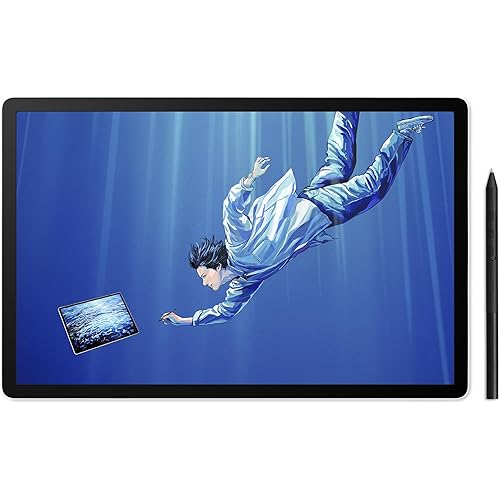
Wacom Cintiq 27QHD - DTK2700, DTK-2700

  • Based on 129 reviews
Condition: Used - Very Good
Checking for the best price...
$1,695.00 Why this price?

Buy Now, Pay Later


As low as / mo
  • – Up to 36-month term if approved
  • – No impact on credit to apply
  • – Instant approval decision
  • – Secure and straightforward checkout

Ready to go? Add this product to your cart and select a plan during checkout.

Payment plans are offered through our trusted finance partners Klarna, Affirm, Afterpay, Apple Pay, and PayTomorrow. No-credit-needed leasing options through Acima may also be available at checkout.

Learn more about financing & leasing here.

Free shipping on this product

This item is eligible for return within 30 days of receipt

To qualify for a full refund, items must be returned in their original, unused condition. If an item is returned in a used, damaged, or materially different state, you may be granted a partial refund.

To initiate a return, please visit our Returns Center.

View our full returns policy here.


Availability: Only 1 left in stock, order soon!
Fulfilled by Newfangled Networks

Arrives Jul 1 – Jul 5
Order within 11 hours and 52 minutes
Available payment plans shown during checkout

Protection Plan Protect Your Purchase
Checking for protection plans...

Features

  • 68.58 cm (27.0 ') , 2560 x 1449, 16:9, 2048 Pressure Levels, DisplayPort, HDMI, 4 x USB3.0, w / Pro Pen

Description

The Cintiq 27QHD creative pen displays set a new standard in color and resolution. The most natural form of creative expression meets an advanced interface design that re-imagines the creative workflow so you don’t have to adapt to the tool—the tool adapts to you.

Brand: Wacom


Connectivity Technology: HDMI


Pressure Sensitivity: 2048 Levels


Operating System: Windows, macOS


Special Feature: Pen


Brand: Wacom


Model Name: cintiq


Built-In Media: Power Cord, HDMI Cable


Target Audience: Teacher


Model Number: DTK-2700


Global Trade Identification Number: 11


Manufacturer: Wacom


Mfr Part Number: DTK-2700


Color: Black


Connectivity Technology: HDMI


Pressure Sensitivity: 2048 Levels


Operating System: Windows, macOS


Additional Features: Pen


Specific Uses For Product: Painting, Drawing, Writing, Teaching


Compatible Devices: [Desktop, Laptop, Tablet, Wacom Devices]


Display Type: LCD


Native Resolution: 2560 x 1449


Screen Size: 27 Inches


Item Weight: 13200 Grams


Item Dimensions L x W: 18.31"L x 30.31"W


Active Surface Area: [EO] Estimated based on screen size 0.06858 m^2


Frequently asked questions

If you place your order now, the estimated arrival date for this product is: Jul 1 – Jul 5

Yes, absolutely! You may return this product for a full refund within 30 days of receiving it.

To initiate a return, please visit our Returns Center.

View our full returns policy here.

  • Klarna Financing
  • Affirm Pay in 4
  • Affirm Financing
  • Afterpay Financing
  • PayTomorrow Financing
  • Financing through Apple Pay
Leasing options through Acima may also be available during checkout.

Learn more about financing & leasing here.

Top Amazon Reviews


  • A big purchase that I do not regret. Not one bit. A big purchase that I do not regret. Not one bit.
It's been a solid month since I got this pen display and had it running. I have been fawning over the Cintiq over it's various models for years now. I make a few bucks doing digital art so I couldn't justify footing the bill. I finally bit the bullet and tossed in my overtime at the o to 5. I wish I had done this sooner. I love this thing so much. Especially coupled with the ergotron arm, and my Autonymous Sit to stand desk. I highly recommend both these items. My rig is built for 3D and gaming, handles multiple displays with ease. I have years of experience with all the other Wacom tablets. I knew what to expect. Wacom now has a desktop center app that keeps your drivers updated as well as allowing easy customization and setting backups. I was deathly terrified of getting a lemon from all the bad reviews. This was not by a long shot. Everything installed with ease and I was working on a new piece 10 mins out the box. I use the DVI port and usb3 since my graphics card and mobo have the slots open. No lag issues. I used an Intuous 4 Pro before this and loved the heck out of it. Still do. It is now on backup and resting in its box. I get the same sensitivity and a bit more functionality while being able to draw direct. I can get more of a full feel with my traditional art abilities when I am working directly on a piece rather than feeling disassociated while drawing on tablet and looking at a screen. This purchased revitalized my will to do my artwork. The express key remote is awesome. Most of the functions I need were in it already for Photoshop. It's super simple to program the keys to new functions. I initially wanted the touch version of this tablet but ordered the standard by mistake. With the express key remote I don't even fret. My workflow has improved actually. I bought the ergotron arm to go with this and can simply move the device around as I would a sheet of paper while working in addition to the touch ring rotate function. I poured over other less expensive tablets and read possibly hundreds of reviews. All the bad reviews for this model almost scared me out of it. When I pulled the trigger and it arrived at my door I was on edge. After booting up, I was in awe and relieved. A huge gorgeous display. No bad pixels, no dead pixels, no installation issues. The colors are different from my main display but it's not bad. I color check using both screens frequently to make sure my work is where I want it to be. This is one of the best purchases I have made in 2017 and I do not regret it. This is a full five star from me. If you are on the fence. Just take the dive and consider it an investment in yourself. ... show more
Reviewed in the United States on August 14, 2017 Reviewed in the United States on August 14, 2017 by Tristan Hardy

  • don't trust wacom don't trust wacom
I'm done with wacom. I'm a professional 3D artist, I used 3 cintiqs across my career and I never got a headache-free experience with them. This is my last issue with my 2017 27HQ tablet. I have these vertical smudges that pretty much ruined my workflow, I can never trust what I'm painting. So be careful putting that much money into a tablet, because this is what you might get a couple years later, for free. Not including all the pen issues, colors issues, extreme glare on the glass panel, the sheer bulkiness of this model etc. I think it's time to buy a huion for my next tablet because they have 27 inches, for literally half the price wacom is making us pay, including their ridiculous 600 dollars stands. ... show more
Reviewed in the United States on October 9, 2025 Reviewed in the United States on October 9, 2025 by Michael

  • High quality, reliable, worth the steep price
Wacom is very expensive but you really do get what you pay for. Previously I had a Yiynova tablet monitor I had bought for $500 and it was a janky, buggy, flimsy, thing with bad screen colors that barely survived 2 years. It makes me appreciate the quality of a Wacom so much more. The construction is solid, the pen is solid, the software is easy and reliable, the colors are great, even the cables with the 27QHD are noticeably high quality. They unfurl smoothly without any memory of being folded. If the glossy drawing on glass feel bothers you, I recommend the light gray felt tips that are inside the pen holder. They're hard at first, but after breaking in and smooshing a bit they give a more pencil on paper kind of feeling, The downside is that they do wear out after a few weeks of solid use but replacements can be purchased. There's a handful of low ratings on this, which are notably from 2015, when this model initially came out. I think those problems have been mostly resolved now. I've worked on a 27QHD for over a year at my job before finally buying one of my own for home/freelance use, it's been a consistently reliable piece of well crafted hardware. If you can afford the steep price, you won't be disappointed. ... show more
Reviewed in the United States on May 18, 2017 by Teddy K.

  • Overall the 27qhd is an amazing tablet. Easy to set up and easy to ...
Overall the 27qhd is an amazing tablet. Easy to set up and easy to use. I've been doing multiple projects since I got it nearly a month ago and it has made my digital art so much better and easier to do. The only reason I don't give it 5 stars is the lack of some kind of stand. It naturally sits at a 5 degree angle and there's little legs on it that push it up to 20 degrees. I wish there was a stand with it so I could put it up more. Right now it sits across my entire desk and takes up all of the space. I knew it was a big tablet but I wasn't prepared for it to essentially limit me to digital only work. I also am struggling to keep the cat away from it because it sits petty flat. I just wish I could stand it up a bit more to free up desk space for working on more traditional work and to keep the cat from being able to try and step on it. ... show more
Reviewed in the United States on April 10, 2018 by Ashly Blanscet

  • Animator recommends 27QHD
I'm an animator who uses the program TVPaint. I purchased the 27QHD in January 2018 and am very happy with it. Some reviewers have had problems, but as of this update (January 2020), not only does it still work like new, it has become indispensable. I initially ordered the smaller, less expensive 22-inch (22HD) Wacom Cintiq and returned it on sight. The cables on the 22HD are built into the machine (emerging from a hole in the back) and the cable that connects to the computer is obsolete. I immediately exchanged it for the 27-inch and am glad I did. The 27QHD uses an HDMI connection and has four USB ports, two on each side of the monitor, which are useful for added accessories, like my desk tablet that I'm using for tasks that don't involve drawing. With the larger monitor size, I can have a lot of tool boxes open in the software without having to reduce the size of the image being worked on. Animation is time-consuming enough without having to constantly adjust the workspace. If you expect your artwork will be projected larger onto a screen, the bigger monitor is also great for seeing detail without zooming in and out all the time. Of course the biggest selling point is drawing directly on the monitor, which I find to be the most precise way to put a line down exactly where you need it to be. I didn't get the touchscreen version (27QHD Touch) and I don't regret it. I've heard that it's buggy, but that's not why. Whenever I'm animating, I'm grateful that only the pen effects the image, generating precise line widths. If touching the screen with my hands also generated marks and moved things around it would drive me crazy every time I brushed against the screen. The only drawback is that with the non-touch version, it took me a while to figure out that those three glowing icons at the top of the monitor are touch activated buttons that open configuration windows. Note that a stand is not included with the 27QHD. Expect to need a stand for this. The Amazon Basics Premium Single Monitor Stand is as good as the reviews say. To attach it to the 27QHD requires an adapter (Monoprice 200X200mm Bracket Universal Adapter, also available on Amazon), which is a piece of metal with holes in the right places. I found this out watching reviews of the 27QHD on YouTube. I have a big desk and the stand is a metal arm that's flexible enough to position the monitor in ways that are comfortable for drawing. The 27QHD is a good-sized monitor (18 x 30 inches total) and lighter than it looks, but size and weight cease to be a concern once the stand is in place. It suspends the monitor above the desk and against the wall, taking up surprisingly little space. I can see my entire desk! The 27QHD also comes with a remote. The idea being to make your most-used buttons easy to access. I never use it. Fortunately, the remote isn't essential for functionality. The black area that frames the screen contains magnets that are there for holding the remote, but the magnets are only in a few places. Instead, I use adhesive Velcro to stick items to that area, including the stylus and a small mirror, which comes in handy while animating. Being able to store tools on the monitor's frame, right next to the screen is an unexpected bonus. ... show more
Reviewed in the United States on February 24, 2018 by Andrew Hoffmann

  • Hardware Failures Abundant Hardware Failures Abundant
I have been using Wacom’s Intuos products for well over a year and found that no other graphic-tablet manufacturer can hold a candle to their precision and durability. I finally decided to pull the trigger on a Cintiq to get rid of the disconnect of hand and screen. I ordered the Wacom Cintiq 27HD and was elated when it arrived on my doorstep. It felt like Christmas morning as I tore through the box and attached it to my ErgoStand that I purchased separately. I’m a leftie so this model intrigued me as it does away with the static buttons on both sides of the device in favor of the ExpressKey Remote. This piece of aluminum has all the buttons you ever need and a traditional TouchRing which can be altered to suit three different functions. What really makes the special is it’s magnetic and can be placed around the bezel of the Cintiq. My artwork is heavily line-based and the precision of the pen really improved my work. I found myself re-working pages within my current project as it loosened up my drawings considerably. I also can’t speak high enough about the utility of the pen. While it is the same standard Intuos pen that comes with most of their professional hardware, it has always been incredibly ergonomic and functional. My problem with this device is not from how the device performs when working properly, it is that the hardware never seems to work properly. 
While using it on my first day I noticed that the ExpressKey Remote TouchRing stopped responding for a few minutes. It quickly resumed normal function and I did not think anything of it. The next day when I saw down to work I noticed that the ring once again did not function, so I began to troubleshoot. After trying a different machine and a different operating system I came to the conclusion that it was nothing I could fix. I contacted Wacom support through e-mail and was told it would be forty-eight hours until a reply. After four days of no communication, I posted on their European forum for support. I received one reply from a Wacom representative and several replies from other people who experienced a similar issue. They had me run diagnostics and found the TouchRing was bad but offered no resolution. I found a temporary fix that would resolve the issue for short periods of time, but it would return. American support responded after a whole week telling me to just uninstall and reinstall the drivers. Completely ignoring the message I sent to them that said that had already been performed. After two weeks of no support I tried to call Wacom over the phone support which simply told me to leave a voicemail and then promptly told me voicemail was too full. I sent e-mails requesting support to every single Wacom e-mail I could find. Finally I received a call from Wacom and the representative apologized about the service, offered to send me a while new unit and arranged so I could keep the one I had until the new one arrived. He did a wonderful job at making me feel taken care of and as a cherry on top upgraded me to the 27HD with Touch and gave me his direct contact information to make sure I have no more problems. After a few days the new Cintiq arrives and I set up and power it on. I notice that the display is somewhat red but perform some color calibrations and it is looking great. I open an new document and begin working only to immediately notice a bright red pixel in the center of the display. I contacted the representative via e-mail and am awaiting a response. I have worked for a large consumer electronics company in the past. I know failure rates for most electronics hover around 7%. I can accept problems. I can’t accept the initial customer service I received nor the fact that two times in a row I have encounter defective units. It seems their quality assurance is like their customer service, lack luster. ... show more
Reviewed in the United States on February 21, 2015 Reviewed in the United States on February 21, 2015 by Jared J Gabel

  • Simply badass
I cannot believe I waited a decade to invest in this incredible piece of hardware. And yes, I bought the 'older' 27 QHD (2560 x 1440) a month before the release of the ALL NEW 4k Cintiq Pro 24". It don matta. Paying $1900 for the tech I've needed for years far outweighs waiting a few more months for the latest and greatest version for $600 more. Besides I have many friends and colleagues that have various models of the Cintiq and rarely have had issues. Some have had no issues at all, and the older tech has outlasted numerous desktop machines and computer updates. If you are an illustrator, animator, photo retoucher, or in any profession that requires the serious use of a tablet, or putting digital 'pen to paper'. Get it now. Like most tech, I only use the Cintiq to a fraction of it's potential and it still has doubled my productivity. There is a lot of functionality that I need to experiment with. I have watched many Youtube videos tutorials and gleaned a lot of information from other folks in my field. I would check out, on Youtube: • Lawrence Mann's reviews, unboxing etc. • Adam Duff's LUCIDPIXUL reviews, comparisons etc. And people who are conflicted by technology and art, this is simply another tool. It is an amazingly powerful and liberating tool. If you are into any type of art where your work ends up being digitized, or presented digitally, this allows you to skip the analog step, work faster, more efficiently and control your end product. Shut yur art hole and buy it. Keep drawing! ... show more
Reviewed in the United States on March 1, 2018 by Joyce Robinson

  • CINTIQ AWESOME,.....PACKAGING NOT
I LOVE MY CINTIQ!! This machine is a beast, I didn't realize how huge and heavy it was until it arrived. There were some minor qwerks when installing but once everything was set up it was beautiful! I used to own an intuos 4 tablet(awesome product, loved it as well) and that lasted me a good while. For me though, it was drawing on the tablet and seeing how it appeared on screen which was a bit difficult but eventually I got used to it. But I am soo very happy to own a cintiq in which feels a lot normal to be drawing and seeing on the same screen. As great as the product is, I was very disappointed in the condition the packaging was in. The product came in perfectly fine, nothing broken or stolen; but the box itself (which was also huge) was OPENED. This was a $2000 product and for it to be delivered OPENED was appalling. The delivery man told me that that's how the product came, he even wrote on his report that if anything is missing or broken it'll be noted. Like I said the product and everything was there but for AMAZON to ship or use a delivery service (I think it was UPS) to so recklessly package and deliver such an expensive product it completely ridiculous...I like amazon they have great deals but I wouldn't recommend anyone purchasing any more expensive items from this online retailer. Might as well pay a little more some where else, where you can physical see and touch the product before buying. ... show more
Reviewed in the United States on November 27, 2015 by Visual Stimulation

Can't find a product?

Find it on Amazon first, then paste the link below.
Checking for best price...