Buy Now, Pay Later
- – Up to 36-month term if approved
- – No impact on credit to apply
- – Instant approval decision
- – Secure and straightforward checkout
Ready to go? Add this product to your cart and select a plan during checkout.
Payment plans are offered through our trusted finance partners Klarna, Affirm, Afterpay, Zip, Apple Pay, and Google Pay. No-credit-needed leasing options through Acima may also be available at checkout.
Learn more about financing & leasing here.
Selected Option
FREE 30-day refund/replacement
To qualify for a full refund, items must be returned in their original, unused condition. If an item is returned in a used, damaged, or materially different state, you may be granted a partial refund.
To initiate a return, please visit our Returns Center.
View our full returns policy here.





Size: 16" non-touch
Features
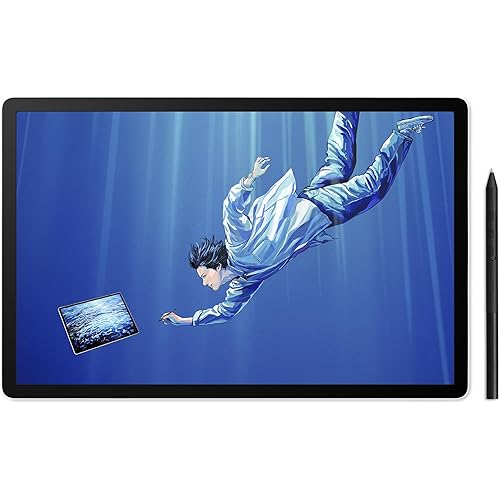
- IMMERSIVE CREATIVE CANVAS: 16" IPS display with 2.5K WQXGA resolution (2560 x 1600) delivers sharp, crisp, detailed visuals for digital art and design
- WACOMS BEST PEN TECHNOLOGY: Pro Pen 3 with 8192 pressure levels responds to your lightest touch; includes tilt support, 3 shortcut keys for tool access, and a holder that mounts to either side of the display with adjustable angle for quick access
- CINEMATIC COLOR DISPLAY: 99% DCI-P3 and 100% sRGB coverage with 8-bit color depth delivers the wide color gamut used in modern displays and digital media - see your artwork as it's meant to be viewed
- READY TO CREATE: Built-in fold-out legs provide a 20-degree working angle or purchase adjustable stand for personalized comfort
- CONNECTION: includes USB-C cable to connect to Windows/Mac computers with DisplayPort Alt Mode or Thunderbolt 3 or 4 input (computers without DP Alt or TB 3 or 4 input require additional cables)
Description
Dive into creativity with the new Wacom Cintiq - a professional display tablet that combines the natural feel of traditional drawing with cutting-edge digital precision. Its ultra-responsive stylus, crisp resolution, and anti-glare surface deliver an authentic pen-on-paper experience for illustrators, designers, and digital artists ready to explore their full potential. Choose the compact Cintiq 16, the expansive Cintiq 24 or get hands-on with the Cintiq 24 Touch. Cintiq 16 delivers exceptional clarity with its vibrant IPS display with a 2.5K WQXGA (2560 x 1600) resolution, empowering intricate line work, high-res painting, and pixel-accurate edits with stunning detail. Wacom Cintiq features the slim Pro Pen 3, representing 40 years of innovation in Wacom's most sensitive and accurate pen performance. This battery-free pen delivers 8,192 pressure levels, 3 programmable switches, and ±60-degree tilt support for unparalleled control. With 5080 LPI resolution, it tracks every stroke with precision - ideal for detailed illustration, photo retouching, and complex design. The premium standard in digital pen technology. Cintiq 16 display balances generous workspace with desk-friendly portability. The high-resolution slim bezel maximizes your creative canvas while maintaining a compact footprint. Experience true-to-life colors with rich gradients and nuanced shading that bring your digital artwork to life. The optically bonded, anti-glare etched glass creates near-zero parallax, placing your cursor directly beneath the pen tip for precise control. The fan-less design ensures whisper-quiet operation and cooler surface temperatures for comfortable extended sessions. With fluid, responsive pen strokes and striking visual contrast, Cintiq 16 delivers the professional-grade performance that graphic designers, illustrators, and animators trust. Cintiq 16 includes built-in fold-out legs that raise the display to a 20° angle for a comfortable working position right out of the box. It also features 75x75 VESA mounts, so you can add a compatible arm or stand - like the Wacom Adjustable Stand (ACK651KZ sold separately) - for even more flexibility. Cables connect your pen display to your computer, delivering video, pen data, and power. With Cintiq 16, the included USB-C cable can carry all three - if your computer has a USB-C port with DisplayPort Alt Mode or Thunderbolt 3/4. If your computer doesn't have a compatible USB-C port, you may need to purchase additional cables; these could include an HDMI to Mini HDMI cable (for video) and a USB-A to USB-C cable (for pen data) - depending on the ports on your computer. With a flat back and edge-to-edge screen, Wacom Cintiq is designed to lie flush on your desk - ideal for artists who prefer working directly on a tabletop like drawing on paper. Rear-facing ports and thoughtful cable management help keep your workspace clean and distraction-free. Whether you're upgrading from an entry-level tool or switching from a competitor, Wacom Cintiq delivers the trusted performance and durability artists expect - without compromise. The Cintiq 16 combines an accessible price with Wacom's industry-leading pen technology, refined through decades of innovation and perfect for those ready to level up their digital art. For creatives who want more space, the Cintiq 24 and 24 Touch offer a generously-sized canvas backed by the same reliable pen technology artists have trusted for over 40 years. With Wacom, you don't have to choose between quality and cost - you get both.
Brand: Wacom
Connectivity Technology: USB-C cable to connect to Windows/Mac computers with DisplayPort Alt Mode or Thunderbolt 3 or 4 input (computers without DP Alt or TB 3 or 4 input require additional cables) See more
Pressure Sensitivity: 8192 levels
Operating System: Android 8.0 and above, Windows 10 or later, macOS 13 or later
Special Feature: 16" IPS LCD, 60° Tilt Support, 8-bit color depth, Anti-Glare Glass, built in fold out legs
Brand: Wacom
Model Name: Wacom Cintiq 16
Built-In Media: AC Adapter, Two USB-C to C Cables, Wacom Pro Pen 3, built in fold out legs
Target Audience: 3D CAD, Designer, Digital Artists
Model Number: DTK168K0A
Number of Items: 1
Manufacturer: Wacom Technology Corporation
UPC: 753218984081
Item Highlight: Advanced pen experience with precise control for serious artists creating illustrations, comics, animations and digital art
Unit Count: 1 Count
Number of Packs: 1
Mfr Part Number: DTK168K0A
Warranty Description: 1 year manufacturer
Connectivity Technology: USB-C cable to connect to Windows/Mac computers with DisplayPort Alt Mode or Thunderbolt 3 or 4 input (computers without DP Alt or TB 3 or 4 input require additional cables)
Pressure Sensitivity: 8192 levels
Operating System: Android 8.0 and above, Windows 10 or later, macOS 13 or later
Additional Features: 16" IPS LCD, 60° Tilt Support, 8-bit color depth, Anti-Glare Glass, built in fold out legs
Specific Uses For Product: 3D Modelling, Animation, Designing
Compatible Devices: Mac /PC
Display Type: LCD
Native Resolution: 2560x1600
Screen Size: 16 inches
Item Weight: 4.5 pounds
Item Dimensions L x W: 15.1"L x 10.2"W
Active Surface Area: 13.6 x 8.5 inches
Color: Black
Frequently asked questions
To initiate a return, please visit our Returns Center.
View our full returns policy here.
- Klarna Financing
- Affirm Pay in 4
- Affirm Financing
- Afterpay Financing
- Zip Pay in 4
- Financing through Apple Pay
- Financing through Google Pay
Learn more about financing & leasing here.
Similar Products




Top Amazon Reviews