Search  for anything...

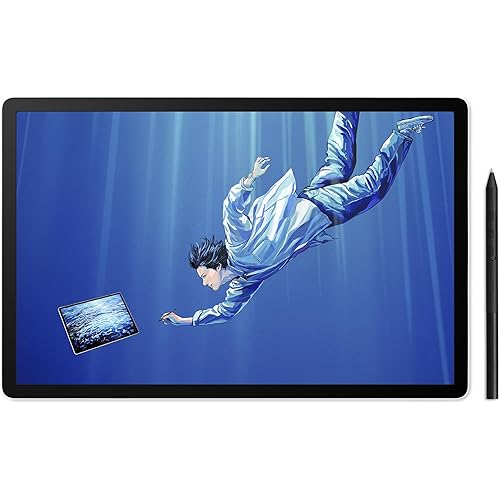
Wacom Cintiq 13HD Interactive Pen Display, DTK1300 (Old Version)

  • Based on 730 reviews
Condition: Used - Like New
Checking for the best price...
$458.49 Why this price?

Buy Now, Pay Later


As low as / mo
  • – Up to 36-month term if approved
  • – No impact on credit
  • – Instant approval decision
  • – Secure and straightforward checkout

Ready to go? Add this product to your cart and select a plan during checkout.

Payment plans are offered through our trusted finance partners Klarna, Affirm, Afterpay, Apple Pay, and PayTomorrow. No-credit-needed leasing options through Acima may also be available at checkout.

Learn more about financing & leasing here.

Free shipping on this product

Returnable until Jan 31, 2025

To qualify for a full refund, items must be returned in their original, unused condition. If an item is returned in a used, damaged, or materially different state, you may be granted a partial refund.

To initiate a return, please visit our Returns Center.

View our full returns policy here.


Availability: Only 1 left in stock, order soon!
Fulfilled by Evolith's Art Supply

Arrives Dec 31 – Jan 18
Order within 1 hour and 16 minutes
Available payment plans shown during checkout

Protection Plan Protect Your Purchase
Checking for protection plans...

Features

  • Enjoy the natural creative experience of working directly on screen;Aspect Ratio :16 : 9
  • Pressure (2048 levels) and tilt sensitive Wacom Pro Pen performs like traditional brushes, pencils and markers
  • Premium, 13.3 inches, HD Display (1920 X 1080) with wide viewing angle,get a HDMI to Mini Display Port adapter to connect the DTK1300 to a Macbook Pro
  • 3 Position display stand (included)
  • Comfortable, compact, lightweight design
  • Simple set up to PC or Mac with 3 in 1 cable
  • Easy shortcut access with our 4 time saving, customizable ExpressKeys, Rocker ring
  • NOTE: Refer the User manual before use

Description

Experience the power of a high-performance Cintiq in a compact, slim design. It may be small, but the Cintiq 13HD offers you many of the advantages of the larger desktop Cintiq versions, like the four time-saving, customizable ExpressKeys, the Rocker Ring, and the Home Button for easy shortcut access - all equally as comfortable to use whether you're right or left handed. Its high-resolution HD (1920 x 1080), LCD display with LED backlighting features a 178 viewing angle, displays 16.7 million colors, and ensures that your work looks great in any working position you choose. And choose you can: the detachable stand adjusts to three different working angles and you can also use the Cintiq 13HD flat on your desktop, or hold it in your lap like a sketchbook. And the Cintiq 13HD offers even more: Wacom's powerful new Pro Pen. With 2048 levels of pressure sensitivity, tilt recognition, and a more comfortable, ergonomic design, the new Pro Pen provides precise control and a better feel than ever. The new Pro Pen comes in a compact carrying case that includes storage for the extra nibs and color rings that help you easily personalize and identify your pen. Aspect ratio - 16 - 09 - 00 Viewing angle - 178 (89 /89 ) H, (89 /89 ) V Contrast Ratio - 700 - 1 Brightness - 250 cd/m2 Response Rate - 25 ms Active area - 293.8 x 165.2mm Color Gamut - 75% Adobe RGB Industry standard pre-sets - 6500 K whitepoint default Graphics Input - HDMI Pressure Levels - 2048, both pen tip and eraser Tilt Range - 40 degrees Tilt recognition - +-60 levels Switches - Tip switch, 2 side switches, eraser Nibs - 5 standard, 3 felt, 1 stroke Pen box Pen stand Grip; Latex-free silicone rubber Resolution - 5080 lines per inch ExpressKeys - 4 customizable, application-specific Rocker ring and Home button - 4 position customizable Radial menu Precison mode Stand adjustability; 3 angl

Brand: Wacom


Connectivity Technology: HDMI, USB


Pressure Sensitivity: 2048 Levels


Operating System: Mac, PC


Special Feature: Pen


Standing screen display size: ‎13.3 Inches


Screen Resolution: ‎1920x1080


Max Screen Resolution: ‎1920 x 1080


RAM: ‎2 GB


Wireless Type: ‎Bluetooth


Number of USB 2.0 Ports: ‎1


Brand: ‎Wacom


Series: ‎cintiq


Item model number: ‎DTK1300


Operating System: ‎Mac, PC


Item Weight: ‎2.64 pounds


Product Dimensions: ‎14.75 x 0.53 x 9.76 inches


Item Dimensions LxWxH: ‎14.75 x 0.53 x 9.76 inches


Color: ‎Black


Rear Webcam Resolution: ‎508 Lines Per Inch


Number of Processors: ‎2


Batteries: ‎1 Product Specific batteries required.


Manufacturer: ‎Wacom


Language: ‎English


Is Discontinued By Manufacturer: ‎No


Date First Available: ‎March 19, 2013


Frequently asked questions

If you place your order now, the estimated arrival date for this product is: Dec 31 – Jan 18

Yes, absolutely! You may return this product for a full refund within 30 days of receiving it.

To initiate a return, please visit our Returns Center.

View our full returns policy here.

  • Klarna Financing
  • Affirm Pay in 4
  • Affirm Financing
  • Afterpay Financing
  • PayTomorrow Financing
  • Financing through Apple Pay
Leasing options through Acima may also be available during checkout.

Learn more about financing & leasing here.

Top Amazon Reviews


  • Having Fun with My New Display Tablet
I've been using the Wacom Intuos 5/Pro small tablet for a few years. I found the size to be perfect for my small desk area and the overall tablet size to be similar in size to my 13" rMBPro. I'm an avid user of Photoshop and Illustrator as well as other drawing packages. I've read about the Cintiq tablets and their capabilities. It wasn't until I saw them in person at a trade show that I knew I was missing out on a truly awesome product. I was watching a person draw on the 22HD version. It was amazing and I was hooked. At the time I didn't realize how large the 22HD was. In addition to having the product brochures, I did some further research on my own and read the available reviews and comments. Though I really liked the larger 22HD, I knew it wasn't practical for me (e.g. desk space, portability, costs). I ordered the 13HD. All I can say is...it's an amazing drawing tablet. I downloaded/installed the Mac version of the driver and immediately made the connections between my 13" rMBPro and my new tablet. (Yes, there's a new nest of cables that developed). I went through the tablet/pen calibration and proceeded to enjoy my new drawing gadget. I opened up Photoshop and Illustrator and created a few designs/graphics. I have to admit that I was hooked and enjoyed the experience of using this beautiful tablet. By default, my tablet was in "mirror displays" mode with my rMBPro and my IPS screen. Whatever I was drawing or moving around on my tablet showed the same results on my laptop and my IPS screen. I then unchecked "Mirror Displays" to see what my three screens would look like and I ended up with three separate screens where I could drag my mouse from my laptop to the tablet and then onto the the IPS screen. It took me a few minutes to get used to the "extra screen space" across the three devices. At times, I thought lost my mouse pointer. The Pro Pen is beautiful and feels great in my hand. A bit more natural than the regular pen that's included with the Intuos 5/Pro tablet. I like having the included case to store the pen when not in use. It's very sturdy and I like that I can throw it my bag and go. Inside the case are additional nibs, color rings, and the nib removal tool. Also included is the round desktop pen stand. The included 3-in-1 cable has a connector on one end that goes into the display tablet. On the other end are three connectors: USB, HDMI, and a power connector. The USB and HDMI goes into my laptop and the power connector goes into the included power brick that gets plugged into surge protector. Note: The HDMI actually goes into an HDMI/MiniDisplay Port adapter I have on my laptop. My laptop's HDMI port is being used by my IPS monitor. I'm glad I went with this smaller display tablet. I did have buyer's remorse (several times) before I hit the purchase button and while I was waiting for shipping and delivery. That buyer's remorse went away once I opened the box and held the tablet in my hands. After the cables were plugged in and I turned on the tablet it was just pure joy that I was experiencing. I will be back with updates on the tablet usage and any other accessories I come across. ** Update 12/19/14 ** Screen Protector: I've ordered the POSRUS Antiglare Touch Screen Protector. It should be arriving in a few days. Will post updates on install and usage. NOTE: I left the original plastic protector on my display/tablet until my screen protector arrives. ** Update 12/19/14 ** Protective Case: I was visiting my local big box store and decided to look at their laptop cases. I actually found a really nice 15" laptop cover/case for my Cintiq tablet. It's called Bex and made by Targus. It's a 15" laptop sleeve (padded) with a zipper around the main case/sleeve. There's a wide zippered pocket on the outside where my pen case and cables can go into. The tablet fits beautifully inside this case/sleeve. Not too tight and not too big. It was as if this case was made for my Cintiq ** Update 12/23/14 ** I have received the POSRUS Antiglare Touch Screen Protector. I watched a general install video which helped in the installation steps. I pulled a corner off of tab #1 to start the initial placement of the protector. Basically I installed from the upper left corner, made my way down to the lower left corner, and then over to the right side of the display/tablet. All the while, removing any bubbles that appeared using the included cardboard card. I may have lifted the protector two or three times in the middle when large bubbles formed. I then took the included cardboard and gently pushed the bubbles from the center towards the edges. A few tiny bubbles remained, but disappeared after a day or two. ** Update 01/25/15 ** I have been using my display with both Mac and Windows laptops for a few weeks. I have gotten so comfortable with using it that I now use it as my secondary display. I'm not chained to my desk. One of my laptops is on a mobile cart and can be moved from room to room. My Wacom Cintiq goes with me along with my laptop. I've had no issues with using my Cintiq on my lap or on my mobile cart. I'm happy the included cable is long. I guess there was a purpose for that and I don't feel restricted of where my Cintiq is placed. This 3in1 cable is made well and have had no issues with it. Kind of reminds me of the days when I used to have a pad of drawing/sketch paper and would sit on the couch and draw for hours. Hint: leaving the original plastic protector on my display/tablet helped keep the dust off the device until the POSRUS protector arrived. ** 07/10/15 ** I now use this tablet two different ways. When I'm away from my desk, the tablet sits on my lap. At my desk, I'm now using the included desk stand. It has 3 different cutouts that can be lifted up and supports the back the tablet. The front of the desk stand base has a protruding lip that snaps/grabs into the bottom base of the tablet. I find the low angle works just fine and I don't notice any fatigue. After several months of use, this is still a great tablet and well worth the money. ... show more
Reviewed in the United States on December 19, 2014 by S. Gable

  • All that AND a bag of chips
I'd been working as a freelance graphic artist for years with my very old and battered Intuos 3 when I finally decided it was time to upgrade. I did a lot of research before making the Cintiq purchase, since a grand is a hefty amount to spend on one device. Was it worth it? Absolutely. Wacom products are worth every penny and then some. If you've used a pen tablet before, you'll know there is a learning curve involved, a disconnect that happens when you are looking at the screen while drawing, instead of at your hand. While some adapt, I was never able to become 100% comfortable with my Intuos and digital art was something that stressed me out at times. The Cintiq combines all the comfort of traditional art with the convenience of digital. It has improved my work flow, and significantly improved my working speed. There is no learning curve. You plug it in and its as if you've never worked with anything else. In that alone, it has more than paid for itself. I want to mention a few points that were not covered when I was deciding the make the purchase. I work on a laptop, it's a 16 inch as far as I remember. Some people voiced a concern that the menus and buttons on the Cintiq display, at 13 inches, were too small and finicky. I have not had this issue. I hardly notice the difference between the size of my laptop and the Cintiq display, especially considering that you naturally sit a bit closer to the Cintiq than a monitor. So for those of you worried about the 13 inch size, in my opinion, it is the perfect size; fits nicely on a smallish desk without compromising visibility. Considering the next size up is over 20 inches, nearly double, if you aren't working for Disney, the Cintiq 13HD should be perfect. I looked into a LOT of different Cintiq-esque devices, but none had the stellar reviews of the Cintiq. Although you can get them for as cheap as $400 with a bigger display, reviewers complain of glassy screen texture, unresponsive pen, bulky size and so on. The Cintiq performs as advertised; you will forget you are working on a digital monitor. The Cintiq's pen and monitor is responsive, precise and the whole package is sleek-looking and feels very high-end. The extra replacement nibs are very appreciated as well as functional, as the price of a textured screen is more friction which equals pen nibs that wear out more quickly. My laptop luckily has all the required ports (USB and HDMI) so I did not need to use any adapters and as such, I have experienced no lag between strokes, even very quick ones. I can do cross-hatching as naturally and as fast as if I were using a physical pen. I highly recommend buying the PORSUS screen protector for the Cintiq, it is a very worthy $20 investment to protect the $1000 screen. http://www.amazon.com/gp/product/B00CICTUOK/ref=oh_aui_detailpage_o02_s00?ie=UTF8&psc=1 You will not even notice it's on. My only complaint would be the wiring. What's good is that the wires can be easily purchased and replaced, as they are not permanently attached to the device, but rather plugged in. This is good because the wires are quite fiddly, not to mention unwieldy. You need to plug the device into a USB hub, an HDMI port and an electrical outlet all at once. This is nit-picking, but it seems such a shame to have this beautiful, slim, sleek, tablet-like device and have to bulk it up with all these wires all over the place. As a final note, I have noticed some questions regarding the Cintiq; it is a monitor that you can draw on. So whatever you can do on your computer, you can do on the Cintiq, including browsing the internet, drawing in Photoshop or playing a video game. It's a second display that you access directly with a pen instead of through a mouse. It doesn't work without your computer connected, so if anything seems slow, it is often the computer at fault, not the Cintiq. To sum up, an amazing bit of technology, very worth it for professional artists and also hobbyists that can afford the price tag. Don't hesitate to buy, it really is the best thing in the market. :) ... show more
Reviewed in the United States on January 21, 2015 by Hamdy Ahmed Eldahan

Can't find a product?

Find it on Amazon first, then paste the link below.
Checking for best price...