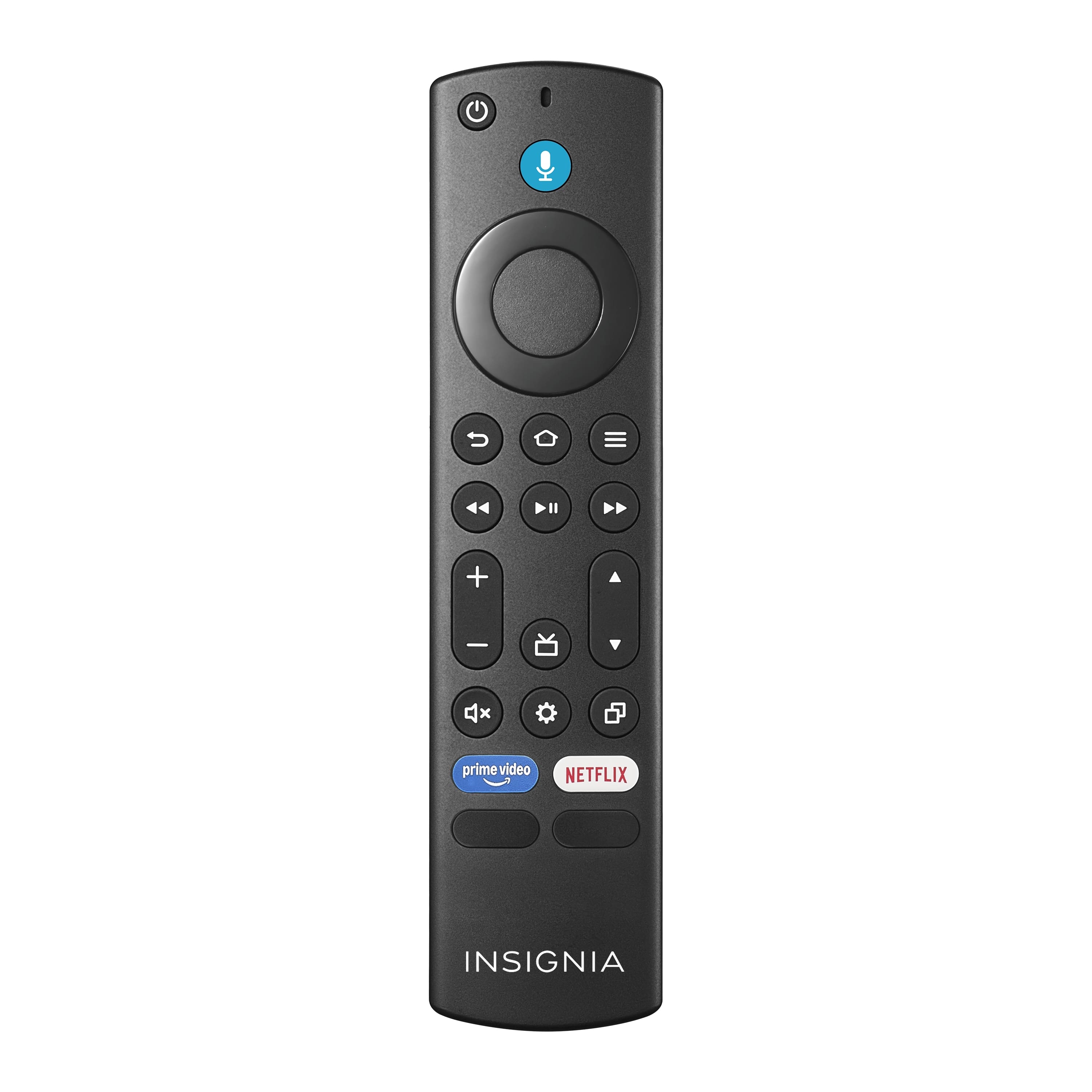
Voice Remote Fire Control Replacement for Fire Stick 4K Max/4K (1st/2nd Gen), HD, Stick Lite, Firestick (2nd/3rd Gen), Fire Cube (1st/2nd/3rd Gen), Fire Smart TV (3rd Gen), Fire Omni Series/Insignia


Buy Now, Pay Later
- – 4-month term
- – No impact on credit to apply
- – Instant approval decision
- – Secure and straightforward checkout
Ready to go? Add this product to your cart and select a plan during checkout.
Payment plans are offered through our trusted finance partners Klarna, Affirm, Afterpay, Zip, Apple Pay, and Google Pay. No-credit-needed leasing options through Acima may also be available at checkout.
Learn more about financing & leasing here.
Selected Option
FREE refund/replacement until Jan 31, 2027 Learn more
To qualify for a full refund, items must be returned in their original, unused condition. If an item is returned in a used, damaged, or materially different state, you may be granted a partial refund.
To initiate a return, please visit our Returns Center.
View our full returns policy here.
Recently Viewed


At a glance
- Condition
- New
- Color
- green hulu
- Special Feature
- Voice Search
- Controller Type
- Voice Control
- Maximum Range
- 40 feet
- Warranty
- 1 Year
- Works with
- Television
Features 5
- Compatible with TV Devices: Stick 4K (1st & 2nd Gen), Stick 4K Max (1st Gen), HD, Stick Lite, Stick (2nd & 3rd Gen), Cube (1st/2nd/3rd Gen), and Smart TVs (3rd Gen). Also works with Insignia/Toshiba/Pioneer TV
- Not Compatible: This remote does not work with Smart TVs (1st & 2nd Gen), TV Stick (1st Gen), or TV Edition smart TVs (such as Samsung / Roku TV models)
- Voice & 4 Shortcut Keys: Use voice commands to search for content, check weather, play music, and troubleshoot common issues. Four onetouch shortcut buttons provide instant access to your favorite apps and channels less browsing, more enjoying.
- Easy to Pair: 1. Please provide 2 AAA batteries (batteries are NOT included with this product). 2. Enter Pairing Mode: Hold down the home button for about 10 seconds until the LED light blinks rapidly. 3. Wait about 30-60 seconds. When the LED blinks, the remote will automatically pair with your device
- What You Get & Simple Setup: Package includes: 1 Voice Remote Control (batteries not included). Pairing: Press and hold the Home button for 1015 seconds. The LED indicator will slowly flash amber for about 10 seconds, then begin flashing rapidly indicating the remote is in pairing mode and ready to use
Description
What should I do if the VOLUME +/-, MUTE, and Power buttons don’t work after pairing the new remote ? Pressing the HOME button, go to Settings > Equipment Control > Manage Equipment > TV > Change TV. Follow the on-screen instructions to allow the remote to learn your TV’s functions. Once the setup is complete function properly. The remote will not pair? Try: 1) Remove old remote in TV Settings; 2) Unplug TV 2 min; 3) Use fresh batteries; 4) Hold Home 10–15s until LED flashes; 5) Wait 10s. If still failing, tell us the step, LED status, and TV model
Specs 13
| Brand | WOLAOYNN |
|---|---|
| Special Feature | Voice Search |
| Color | green hulu |
| Max Number of Supported Devices | 1 |
| Additional Features | Voice Search |
| Maximum Number of Supported Devices | 1 |
| Connectivity Technology | Infrared |
| Controller Type | Voice Control |
| Maximum Range | 40 feet |
| Number of Items | 1 |
| Unit Count | 1 Count |
| Number of Packs | 1 |
| Manufacturer | WOLAOYNN |
No specs match.
Frequently asked questions
To initiate a return, please visit our Returns Center.
View our full returns policy here.
- Klarna Financing
- Affirm Pay in 4
- Affirm Financing
- Afterpay Financing
- Zip Pay in 4
- Financing through Apple Pay
- Financing through Google Pay
Learn more about financing & leasing here.