Search  for anything...

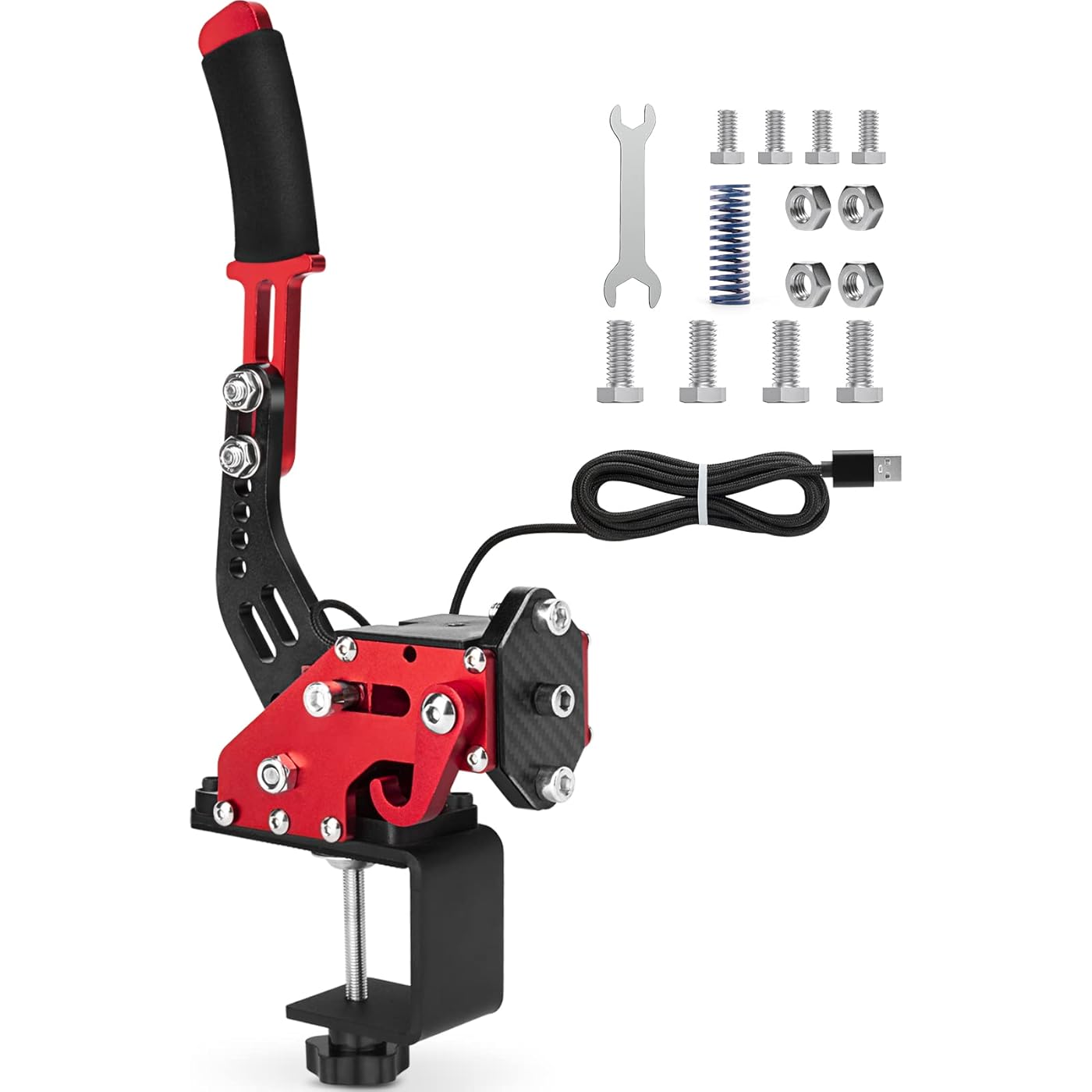
aikeec 64Bit PC USB Handbrake, Upgrade SIM Racing Games Handbrake for LO GITECH G25 G27 G29 T500 T300 THRUST MASTER FANATECOSW DIRT RALLY, 2M Nylon Cable/Reinforced Spring/Red+Clamp

  • Based on 2,249 reviews
Condition: New
Checking for the best price...
$58.99 Why this price?
Save $141.00 was $199.99

Buy Now, Pay Later


As low as $9.83 / mo
  • – 6-month term
  • – No impact on credit to apply
  • – Instant approval decision
  • – Secure and straightforward checkout

Ready to go? Add this product to your cart and select a plan during checkout.

Payment plans are offered through our trusted finance partners Klarna, Affirm, Afterpay, Apple Pay, and PayTomorrow. No-credit-needed leasing options through Acima may also be available at checkout.

Learn more about financing & leasing here.

Selected Option

Free shipping on this product

FREE 30-day refund/replacement

To qualify for a full refund, items must be returned in their original, unused condition. If an item is returned in a used, damaged, or materially different state, you may be granted a partial refund.

To initiate a return, please visit our Returns Center.

View our full returns policy here.


Availability: In Stock.
Fulfilled by Amazon

Arrives Tuesday, May 5
Order within 17 hours and 9 minutes
Available payment plans shown during checkout

Protection Plan Protect Your Purchase
Checking for protection plans...

Size: WithClamp


Color: Red


Features

  • Poweful Compatibility:The USB handbrake is compatible with various models of sim racing steering wheel on PC Windows. Support for Logitech G27 G25 G29 G920 G923 T500 T300 . Soft remind: Not applicable for X BOX ONE PS4/5, MAC, Only for a PC Windows.
  • Independent Additional Game Equipment:The USB handbrake is independent additional game equipment for controlling racing games. No need to install drivers. Connect directly to USB Port. USB cable connection is convenient, easy to install on the computer.
  • Durable Structure & Flexible Adjustability: You can adjust the handle to your preferred height. Plus the adjustment of the angle fits your need. The handbrake is suitable for different steering wheel seats, brackets, and cockpit.
  • Realistic Drift Experience More Precision: The hall sensor adopts automatic calibration Technology. Accuracy does not decrease over time. The non-contact plus Hall sensor provides you the same experience as realistic car driving. The USB handbrake is more accurate with higher Precision.

Compatible Devices: PC


Controller Type: Sim Racing Handbrake


Connectivity Technology: USB


Additional Features: Motion Sensing


Button Quantity: 16


Hardware Platform: PC


Power Source: Corded Electric,Usb Cable


Compatible Video Game Console Models: Sony PlayStation 4


Package Quantity: 1


Item Dimensions: 8 x 7 x 5 inches


Item Dimensions D x W x H: 5.9"D x 5.9"W x 11.8"H


Brand Name: aikeec


Manufacturer: aikeec


Model Number: 121


Manufacturer Part Number: SKU014740009


Color: Red


Frequently asked questions

If you place your order now, the estimated arrival date for this product is: Tuesday, May 5

Yes, absolutely! You may return this product for a full refund within 30 days of receiving it.

To initiate a return, please visit our Returns Center.

View our full returns policy here.

  • Klarna Financing
  • Affirm Pay in 4
  • Affirm Financing
  • Afterpay Financing
  • PayTomorrow Financing
  • Financing through Apple Pay
Leasing options through Acima may also be available during checkout.

Learn more about financing & leasing here.

Top Amazon Reviews


  • Is good. What can I say?
Size: WithClamp T1 Color: Black
Works on PC via USB Type-B. Has a particular input range that's explained in the manual: about the first 20-30% of physical input isn't registered (mine is around 30%, which is an estimation), so 31% through 100-ish% of input is the actual 0% to 100% output in-game; not an issue for me since I can always adjust the deadzones in-game (maybe not possible for all games). Haven't confirmed stated console incompatibility since I don't use console (the hardware won't be recognized by the console, or something along those lines). Even with instructions, the tightening adjustment is confusing—I don't want to over-tighten or unscrew it completely, and would like to know on some level how far I am from either scenario, like maybe an engraved notch and number that denotes how many turns from that point is possible/allowed/recommended, etc... I think it's just that I want to know how far I can push it, and be able to adjust it with some amount of easily repeatable measurable accuracy. Mine has some hang (idk the word for it), in which if I guide it as it resets to its resting position (instead of letting go completely, I hold it, helping bring it to position); most noticeable when done slowly; total hang accounts for about 15-20-ish% of input, so it's negligible, but I still adjusted the deadzones in-game just in case. Oh yeah, assembly instructions were fun—it's only fastening the adjustable lever/handle, and installing the clamp mount system, which is grate. Would suggest a stick-on foam pad for the circular surface of the clamp, just so it isn't metal on metal/metal on wood/etc... ... show more
Reviewed in the United States on January 28, 2026 by Adrian

  • Great Handbrake, easy to setup
Size: WithClamp T1 Color: Black
Works great, has no connectivity issues (on PC, have not tried on consoles) No complaints from me, just needs to be properly set up in each game it’s used in.
Reviewed in the United States on March 18, 2026 by Max Henderson

  • Good with les money
Size: WithClamp T1 Color: Black
Pretty good. Playing fun with it. Easy and rear brakes for drift
Reviewed in the United States on March 26, 2026 by Eric

  • Came in USED, Not New
Size: WithClamp T1 Color: Black
Handbrake worked but it looked like somebody returned it. The unit had scratches from previous screws and pieces of hair in the box.
Reviewed in the United States on February 22, 2026 by cool

  • Wasn't entirely sure I needed a handbrake at first but I immediately loved it
Size: With Clamp S1 Color: Blue
Not a detailed review on the item itself but my way of recommending getting a USB handbrake in the first place. I'm using this with just one game: Dirt Rally 2.0 on PC. With a Vive VR headset and a G920 wheel + H-pattern shifter. It's set up on my desk and I sit on a $15 IKEA folding chair. Meaning I don't have a high-class "rig" to brag about. I've been getting pretty into Dirt Rally ever since they added Oculus VR support in June 2016. I used Revive to support my Vive with pretty consistent reliability. I tell everyone it's some of the most exhilarating fun you can have with a video game. With VR not only was it really exciting but my stage times improved INSTANTLY and I became a far better driver. So, yeah, I was one of those "no VR, no buy" comment guys. But hey, we got our wish in the end! But for me there was still something missing in terms of control. The level of awkwardness that came with using the B-button on the wheel as the handbrake was a real pain. Having to anchor my thumb on a button while really needing to be free to manipulate the wheel was bad - and it just wasn't fun. I got this USB hand brake (the simpler version with a clamp included). Set-up was uneventful, just plugged it into my Win10 and it detected. I mounted it to my desk to the right of my shifter. In Dirt Rally 2.0 I found and adjusted minimal configuration options and went to test it in the rally school free-roam stage. I was able to discover that it was an analog controller. Lighter pulls applied the rear brakes lightly. I could modulate the hand-braking force. It felt great in my hand. In Dirt Rally 2.0, in the Greece stages (DLC) my favorite stage is Fourteka Kourva. It's a dry gravel course with at least 6 hairpins if my memory is correct, including one right at the beginning that despite having driven through it perhaps 300+ times since 2016 (lots of restarts helps) I've never really felt good at it in my 4WD Group-B Lancia Delta S4. With VR, my new handbrake and now forcing myself to use the full manual H-shifter and clutch pedal I had now entered basically a level of full control that I had been lacking up until this point. I entered that first hairpin... and immediately it felt different. I slammed the brakes, put in the clutch, cranked the wheel to the right and pulled the handbrake. I feathered the handbrake out of natural instinct and around swung the rear as I maintained revs with the throttle. The moment the nose was pointed in the right direction I let go of the handbrake and clutch at the same time and off like a rocket shot down the road. It felt completely natural. There was 5 more hairpins to navigate on this under-three-minute stage and every hairpin felt like it was faster than any previous attempts with just the B-button. I was so glad I bought a handbrake controller. I've only spent around 5 hours or so with it so far, but I've been totally content with it. It was a great investment and I only wish I had gotten it earlier. ... show more
Reviewed in the United States on September 23, 2019 by K.G.23

Can't find a product?

Find it on Amazon first, then paste the link below.
Checking for best price...