Search  for anything...

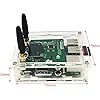
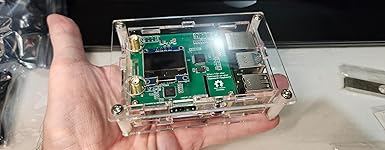
Upgraded Duplex DMR Hotspot WLAN Ethernet Port Assembled Radio Station WiFi Digital Voice Modem Support DMR Dstar YSF P25 Fusion Antenna Raspbery P Model 2B Two Colors OLED 2 TimeSlots

  • Based on 0 reviews
Condition: New
Checking for the best price...
$152.72 Why this price?
Save $206.28 was $359.00

Buy Now, Pay Later


As low as $25.45 / mo
  • – 6-month term
  • – No impact on credit to apply
  • – Instant approval decision
  • – Secure and straightforward checkout

Ready to go? Add this product to your cart and select a plan during checkout.

Payment plans are offered through our trusted finance partners Klarna, Affirm, Afterpay, Apple Pay, and PayTomorrow. No-credit-needed leasing options through Acima may also be available at checkout.

Learn more about financing & leasing here.

Free shipping on this product

FREE 30-day refund/replacement

To qualify for a full refund, items must be returned in their original, unused condition. If an item is returned in a used, damaged, or materially different state, you may be granted a partial refund.

To initiate a return, please visit our Returns Center.

View our full returns policy here.


Availability: In Stock.
Fulfilled by Amazon

Arrives Wednesday, Jun 3
Order within 5 hours and 31 minutes
Available payment plans shown during checkout

Protection Plan Protect Your Purchase
Checking for protection plans...

Features

  • Suit for Raspbery P Model 2B. Support:DMR,YSF, D-STAR, P25. Support both Simplex and Duplex mode.
  • Frequency: Support 430~450Mhz, UHF
  • Two Time Slots: Support receive in one Frequency and transfer in another frequency.
  • Upgraded Network: Support two networking methods, support wifi wireless connection and wired connection to the router directly.
  • Power Supply: 5V, Mobile charger or a USB cable connected to your computer or laptop. Best service: if need help, contact us, we will reply within 6 hours

Description

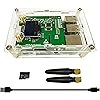
We have done Most settings for pi-star in the TF card. You will find it more easier to get it work.1.we have set it to duplex mode.2.we have choose OLED type 33.we have choose STM32 GPIO type4.we have set a tmp wifi parameters, ssid:m100,password:abc12345.5.we have set the tx frequency to 439.550.000 and rx .you do not need to set tx and rx offset, default 0 is ok.First time to use,Suggest to Connect the hotspot to the router by a network cable directly. So you do no need to set the wifi.All you need to set are:1) your callsign2) your dmrid3) your hotspot security4) your Walkie Talkie tx freq to 433.550.000 and rx to 439.550.000, opposite to the hotspot ones.Support:DMR,YSF,D-STAR, P25,Support:Duplex mode,Single mode.Basic Setup: 433.550000MHZ DMRWIFI SSID:Need the 2.4GHz SSID as the Pi Zero W doesn't support 5.8GHzSoftware:Pi-StarPower supply: Mobile charger or a USB cable connected to your computer or laptop. The Hotspot will also work mobile in your vehicle if you tether it to your mobile phone network.Shell:Acrylic Shell,See clearly.Antenna: 2 antennas for UHFLEDs:on board leds to show status, with status words on shell,Screen:Two Colors Oled, Yellow and Blue.Note: All designs will be contributed on MMDVM open source project.Package content:1. Raspbery P Model 2B x12. Duplex MMDVM hotspot board x13. OLED display x1 (installed on board)4. 8G TFT card x15. Wireless wifi module x15. Acrylic Shell x16. 433Mhz UHF Antenna x27. Usb Cable x18. User Manual

Brand: Mokxihit


Connectivity Technology: USB


Compatible Devices: Laptop


Product Dimensions: 5.9"L x 3.9"W x 1.6"H


Color: Green


Connectivity Technology: USB


Compatible Devices: Laptop


Number of Ethernet Ports: 2


Number of Ports: 2


Item Dimensions L x W x H: 5.9"L x 3.9"W x 1.6"H


Color: Green


Brand: Mokxihit


Modem Type: Digital


UPC: 768472380098


Manufacturer: IWatson Electronics


Unit Count: 1.0 Count


Warranty Description: 2


Frequently asked questions

If you place your order now, the estimated arrival date for this product is: Wednesday, Jun 3

Yes, absolutely! You may return this product for a full refund within 30 days of receiving it.

To initiate a return, please visit our Returns Center.

View our full returns policy here.

  • Klarna Financing
  • Affirm Pay in 4
  • Affirm Financing
  • Afterpay Financing
  • PayTomorrow Financing
  • Financing through Apple Pay
Leasing options through Acima may also be available during checkout.

Learn more about financing & leasing here.

Top Amazon Reviews


  • It's awesome and simple
Just fantastic experience. Despite my radio. I got a Baofeng DM32 for my first DMR radio. But it can't reliably hit the DMR repeater from inside the house. Spotty at best. So I got this DMR Hotspot. I spent 3 days pulling my hair out, infuriated. I used 3 different AIs (Grok/Gemini/ChatGPT) to help me figure out why I couldn't hit the DMR hotspot with my radio. I contacted support. Something I hardly ever do. They were helpful and fantastic and arrived at the same conclusion the 3 AIs came to. Something was wrong with the MMDVM hat hardware wise. They sent me a new one. While I was waiting for the replacement hat, I got real deep into the troubleshooting. I was flashing firmware on it and running pistar-mmdvmcal to do RSSI tests. At one point I forgot the change the frequency from TX to RX and that's how I figured it out. Turns out the Baofeng DM32 radio has a bug that defaults to the Talkaround feature being stuck on. It's stuck in simplex mode unless you select the "forbid talkaround" checkbox on that channel. It would TX on the RX frequency, and didn't display that it was doing that. As soon as I figured out I'd spent 3 days trying to talk simplex to a duplex mmdvm hat, it worked perfectly. Egg on my face, but glad I finally figured it out. Nothing wrong with the DMR Hotspot, it was a bug on my radio and it never dawned on me to open up CubicSDR on the RTL-SDR and verify I'm actually transmitting on the frequency I think I'm transmitting on. My own idiocy aside, the point is that support was fantastic, the device was VERY easy to learn and setup, and I highly recommend the device. Make SURE you buy a real, legit Raspberry 3 power supply. Phone chargers do not work, as they provide enough to power up the device, but not with the duplex hat and pi-star services; it will get undervoltage errors and constantly restart services. I found a rather nice power supply with an on-off switch on the cable near the microUSB end. Very nice to have. My recommendation is to grab ImageUSB and make a .BIN file backup of the microSD card right away, before you even try to boot up. That way you can re-flash that .BIN file (it's like an ISO) back to the microSD to revert it to factory. I also put a bigger/nicer microSD card in, flashing that .BIN file to the other card, and simply growing the partition. Overall, great product, does exactly what it is supposed to. Great support. My only problem was a buggy radio misleading me. ... show more
Reviewed in the United States on March 17, 2026 by Phil

  • Fine Product - Works As Expected
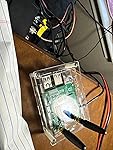
Let's first talk about the case. At first, I didn't think I was going to like the housing. It rattles, the plastic sides slide around, and well, it just wasn't as nice looking as another I've purchased. I was going to order or print something different. There were other priorities and time went on, and I hadn't changed out the housing. I'm glad I didn't get to it. It really grew on me, to the point where I actually love it. It's "chunky feeling," it rattles, well you get the pic. Fun case! The boards and screen are fine. No issues with the included, mSD card, preloaded with pi-star. This is a 2B Raspberry Pi, therefore you know it does not have onboard WiFi. It does come with a perfectly working, cheap, tiny, USB wireless NIC. I did / do use the WiFi for any interactions, including first startup. It is the tiny screen, but honestly I'm never looking at either of my hotspots running, as I'm using an OLD Chromebook to open up a few browser windows, 2 are the pi-star applications for both hotspots, recolored light blues for this hotspot and dark blue colors for my other hotspot pi-star window. That's a good tip if you are looking at several hotspots at the same time, recolor then all differently so you know at a glance what hotspot you're looking at. Wow, long read, sorry about that. If you have reached this point, buy the thing already! Hi-hi Oh, this one didn't come with a USB (micro) cable and the A/C adapter. I have a zillion of them all over the house. I do hear some others that have had problems with power warnings on their Raspberry Pi, especially the 4. I've never had an issue with any I run as long as I'm using 15 watt or higher adaptor. I run some on 5 volt, 3 amp adaptors and at least 2 Raspberry Pi boards on 5 volt, 6 amps. Have fun and hope to catch you down the log! 73 N8LEJ ... show more
Reviewed in the United States on September 24, 2024 by Trevor

  • Deception!!!!
This is not a true duplex board. Works great for simplex, but is not a true duplex board. I bought 2 of these and when I tried to set up myDMR for duplex it would not work. I used chat GPT to determine that both of these boards are NOT duplex boards. This company tries to pass it off as one by putting two antennas on it. Do NOT buy this if you are expecting duplex operation. They are deceitful and deceptive. I should get my money back or sent two new duplex anble boards even though they are not eligible for return now. I am very disappointed and dissatisfied!!!!!! ... show more
Reviewed in the United States on November 28, 2025 by Belinda DePrisco

  • Great little device
The media could not be loaded. I have been a ham for 24+yrs. Wanted to try getting into digital after a break from radio. After lots of reading I decided to buy this Hotspot. Setup was east as..pi. I was up & making contacts in about 10 mins after getting the item. I even used the online wifi configuration file maker. Then dropped that file onto the sd cards boot menu. No problems what so ever. Hight recommended this box. I may buy a 2nd to keep in the car for mobile use. Update: After owning it a while it's been. A great unit. I've done some modifications. Designed a new top to incorporate a 50mm fan for cooling. Plus switch the TX/RX antenna configuration. Where the TX is horizontal & the RX is vertical. This helps a bunch for duplex operations. It helps eliminate some of the desense that occurs when the antennas are side by side vertical. Cross polarized antennas offer more antennuation between the TX/RX ports. Before that I wasn't able to get very far away without dropping out due to the TX desensitized the RX port when running in duplex mode. Also I've discovered the unit will do VHF & UHF. It won't crossband though. So that wasn't a solution to the add enough frequency separation. I recommend UHF use though. Because you can get 5Mhz of frequency separation for duplex mode. 73 N4FOX ... show more
Reviewed in the United States on August 9, 2024 by Justin Priami

Can't find a product?

Find it on Amazon first, then paste the link below.
Checking for best price...