Search  for anything...

Uogic Pen for Microsoft Surface, 90-Day Battery Life, Smooth Writing, Palm Rejection, 1024 Levels Pressure, Flex & Soft HB Nib, for Surface (Pro, Studio, Book, Laptop, Go)

  • Based on 4,516 reviews
Condition: New
Checking for the best price...
$23.99 Why this price?
Save $9.00 was $32.99

Buy Now, Pay Later


As low as $5 / mo
  • – 4-month term
  • – No impact on credit to apply
  • – Instant approval decision
  • – Secure and straightforward checkout

Ready to go? Add this product to your cart and select a plan during checkout.

Payment plans are offered through our trusted finance partners Klarna, Affirm, Afterpay, Zip, Apple Pay, and Google Pay. No-credit-needed leasing options through Acima may also be available at checkout.

Learn more about financing & leasing here.

Selected Option

Free shipping on this product

FREE 30-day refund/replacement

To qualify for a full refund, items must be returned in their original, unused condition. If an item is returned in a used, damaged, or materially different state, you may be granted a partial refund.

To initiate a return, please visit our Returns Center.

View our full returns policy here.


Availability: In Stock.
Fulfilled by Amazon

Arrives Saturday, Oct 3
Order within 15 hours and 16 minutes
Available payment plans shown during checkout

Protection Plan Protect Your Purchase
Checking for protection plans...

Color: Silver


Features

  • Low Power Consumption & Extended Usage Equipped with the latest power-saving technology, the Uogic Surface Stylus offers an impressive 1500-hour runtime with a replaceable AAAA battery, ensuring uninterrupted work or study, making it ideal for creators, professionals, and students who frequently take notes or draw.
  • Accurate & Smooth Writing The Uogic Active Stylus Pen is pressure-sensitive, delivering a natural writing experience similar to a traditional pencil. The pre-installed HB tip ensures a flexible, soft, and low-latency performance. Plus, we include two extra pen tips (H & 2H), so you never have to worry about tip wear.
  • Palm Rejection The Uogic Surface Pencil features palm-rejection technology, letting you rest your hand comfortably on the screen while writing. Ink flows smoothly from the pen tip to the screen with virtually no lag, ensuring your hand wont leave any accidental marks.
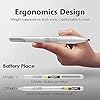
  • Comfortable & Portable Designed with ergonomics in mind, the pen fits naturally in your hand for effortless use. The built-in clip ensures easy portability, making it perfect for writing on the go. An intuitive rubber eraser and replaceable battery allow for uninterrupted creativity anytime, anywhere.
  • Wide Compatibility Surface Pro (3rd/4th/5th/6th/7th/7+/8th/9th/10th/X gen), Surface Duo (1st/2nd gen), Surface Go (1st/2nd/3rd gen), Surface Book (1st/2nd/3rd gen), Surface Studio (1st/2nd/2+ gen), Surface Laptop (1st/2nd/3rd/4th/5th gen), and other touchscreen devices running Windows 10 or 11 and supporting MPP 1.5 or MPP 2.0.
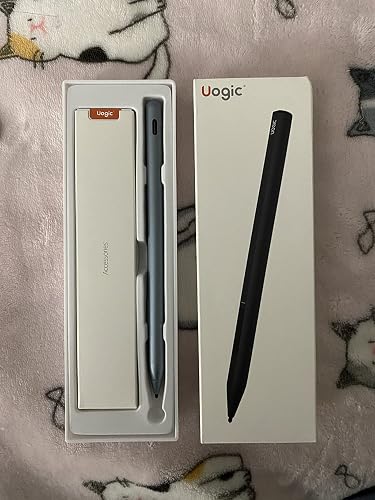
  • What You Get You'll receive a Stylus Pen with tip, 2 x Replacement tips, a user manual, and friendly customer service. We also offer a 12-month warranty. If you have any questions, please don't hesitate to contact us; we're available to assist you 24 hours a day.

Color: Silver


Brand: UOGIC


Material: Aluminum


Number of Batteries: 1 Lithium Ion batteries required. (included)


Item Weight: 20 g


Battery Average Life Standby: 1500 hours


Compatible Devices: Surface Pro 10/9/8/7+/7/6/5/4/3/X. Surface Duo/Duo 2. Surface Go/Go2/Go3. Surface Book/Book 2/Book 3. Surface Studio 1st Gen/Studio 2/Studio 2+. Surface Laptop 1/2/3/4/5/Studio. Other touchscreen devices running Windows 10 or 11 and supporting MPP 1.5 or MPP 2.0. See more


Item dimensions L x W x H: 5.71 x 0.38 x 0.38 inches


Battery Description: Alkaline


Number of Packs: 1


Brand: UOGIC


Model Number: UG-F94-S-JP-NEW


Number of Packs: 1


UPC: 645312981502


Unit Count: 1 Count


Manufacturer: Uogic


Mfr Part Number: UG-F94-S-JP-NEW


Warranty Description: 1 Year Manufacture


Number of Batteries: 1 Lithium Ion batteries required. (included)


Battery Average Life Standby: 1500 hours


Compatible Devices: Surface Pro 10/9/8/7+/7/6/5/4/3/X. Surface Duo/Duo 2. Surface Go/Go2/Go3. Surface Book/Book 2/Book 3. Surface Studio 1st Gen/Studio 2/Studio 2+. Surface Laptop 1/2/3/4/5/Studio. Other touchscreen devices running Windows 10 or 11 and supporting MPP 1.5 or MPP 2.0.


Battery Description: Alkaline


Pressure Sensitivity: 1024 levels


Minimum Required Operating System Version: Windows 10, Windows 11


Compatible Tablet Computer Models: Microsoft Surface Duo, Microsoft Surface Go, Microsoft Surface Pro 10


Item Weight: 20 g


Item Dimensions: 5.71 x 0.38 x 0.38 inches


Color: Silver


Enclosure Material: Aluminum


Frequently asked questions

If you place your order now, the estimated arrival date for this product is: Saturday, Oct 3

Yes, absolutely! You may return this product for a full refund within 30 days of receiving it.

To initiate a return, please visit our Returns Center.

View our full returns policy here.

  • Klarna Financing
  • Affirm Pay in 4
  • Affirm Financing
  • Afterpay Financing
  • Zip Pay in 4
  • Financing through Apple Pay
  • Financing through Google Pay
Leasing options through Acima may also be available during checkout.

Learn more about financing & leasing here.

Top Amazon Reviews


  • Amazing Stylus
Color: Black
I bought the Microsoft surface pro 7 last year and after purchasing the keyboard and everything else, I did not want to spend $100 for a “Microsoft brand name” stylus. I did a bunch of research and decided I would try this one. I am a college student and constantly take notes and write on my surface pro. This pen has been perfect for everything I’ve needed! There are multiple tips that you can put on it depending on how thin or thick you want your line, it senses how hard you are pushing to make the line thicker or thinner, and it never has to be charged. It comes with a battery to put in it, and since purchasing it in September of last year I have not had to change it once. It automatically connects to my screen when I am using it and does not read my fingers/hand unless I remove the stylus from the screen, so I can rest my hand on the screen without any problems. Each of the buttons work perfectly. One is for erasing and the other is for “right clicking”. Overall, it has been perfect I cannot recommend this stylus more! ... show more
Reviewed in the United States on March 18, 2022 by Kylee

  • Best stylus pen I’ve used for a great price!
I love this stylus! I use a Microsoft Surface Pro 7 for school and write my notes and study with the tablet and this Uogic stylus. - First, I love the lightweight it feel in my hand. It’s also ergonomically sleek for easy holding while writing. - I’ve had no issues with the touchscreen and accuracy abilities of the stylus. It turns on immediately and responds immediately when I use it on the screen. Very pressure sensitive I barely have to press down. The taps you hear in the video is just how the pen sounds against the screen saver on my tablet. - NO BATTERIES! Love that it’s rechargeable. The hassle of finding a good brand for batteries that last you is not a problem with this stylus. I received this pen 6 days ago and charged it for an hour before I started using it. I HAVE NOT CHARGED IT SINCE. I have to use my tablet every single day to study so I use the stylus for many hours. Battery lasts very long! - I haven’t encountered any cons with this product. Highly recommend! ... show more
Reviewed in the United States on March 3, 2022 by Juli S.

  • Great Pen for Surface Pro
Color: Black
This pen works perfectly for the notes that I take on my Surface Pro 6. The only issue I have run into is the placement of the buttons on the pen. Occasionally I will accidentally click them because of the pen positioning in my hand. This isn't a deal breaker though! With a tiny alteration to my grip, I was able to resolve this issue. I highly recommend this product for similar uses! ... show more
Reviewed in the United States on January 27, 2024 by Kat Cab

  • Cost Effective Alternative to a Genuine Stylus Pen
Color: Silver
Paired it with my Surface Pro 4. Loved the original Microsoft Stylus Pen that came with the Surface Pro. Pen Finally broke but too expensive for me for just buy the pen. Once you've had and used a pen with your laptop, you never want to go back. This one works well. Very responsive, though it does take the pen a few seconds to reconnect/respond on the screen every once in awhile. Maybe it disconnects temporarily to conserve battery. Has two buttons on the side. No top button/eraser like a genuine Stylus pen. I rarely ever used it except with Microsoft Notes anyway. If you don't do a lot of writing, you'll never miss that button/eraser. The top most button on the pen is like your right mouse button (right clicking). Battery life is excellent. Uses a AAAA battery. Not common. I can never find these physically in any store and I always order them online in at least packs of 8 so I have extras when I need to replace them. ... show more
Reviewed in the United States on December 7, 2025 by Heraldo

  • 5 Stars for what it is
Color: Silver
I’m glad that affordable replacement options like this exist. My 80 dollar surface pro 7 pen magically stopped working (after 6 months of use) three days before a research paper was due. First world problems, bleh, I know… but I use the pen to annotate and highlight literally hundreds of pages a week for graduate school. I’ll air my grievances about that garbage pen over on their Amazon page, but it literally felt like I’d lost a limb lmao. School demands do not cease to exist when/if technology fails. This cheap alternative was delivered the very next day. I like the weight distribution on it better… but I miss the magnetic attachment. That aside, this saved my life and will likely get me through the remaining 7 weeks of my degree. Eventually I’ll switch back to the Microsoft Pen when/if I can afford to throw away 80 dollars every 6 months. Until then, you can buy three of these and still wind up paying less! If it happens to poop out in the next couple of months I won’t be NEAR as upset as I was about the Microsoft pen. ... show more
Reviewed in the United States on March 25, 2022 by Trevor Parker

  • lithium ion battery not included
Color: Silver
It came with an alkaline battery, not a lithium ion battery. The pen, itself, works nicely.
Reviewed in the United States on April 29, 2026 by Can't Sing

  • Great replacement for stock Surface pen
I bought another Uogic stylus a few months ago – the model with Bluetooth support and a button on the end. I really like that stylus, but its one drawback is that it has a unique, proprietary charger. I haven’t had to worry too much about it because that stylus has great battery life (I’m a college student using it to take lots of notes, and it lasts probably 2 or 3 weeks on a single charge), but it’s still a concern having to keep track of the charger because that’s the only way to charge the stylus. I bought this stylus specifically because it has a USB-C charger, like pretty much all of my other devices – including the one I use it on, my Surface Pro 7. Hugely more convenient, especially on the off chance that it dies during the school day, because I already carry USB-C chargers. The pen writes great, the pressure sensitivity is just as good as Microsoft’s stylus and having the eraser and right-click buttons on the side is much more convenient than flipping the pen over to erase things, as you have to do with Microsoft’s. I also like that the pen is quite a bit lighter than Microsoft’s, but it’s also longer – my hands seem to be a little bigger than the original pen was designed for, so this pen seems to balance better. The only drawback to this pen is that without the Bluetooth connection, there’s no option for a multi-function button, which both Microsoft’s stylus and the other Uogic model have. This might not be a problem for you if you don’t use that extra function, but I haven’t found myself missing it. ... show more
Reviewed in the United States on February 15, 2022 by Richard

  • not what I had expected
Color: Silver
I don't like an aluminum body now that I see it won't attach to the laptop like the last one using the magnet feature. I would not have picked it had I known this. At this point, it's not serving a useful feature and can just scratch stuff in addition to hampering grip. If I put a little lotion on my hands, it just slips around my hand. I took a long time to decide on this type and did so because of the rounded tip. Thus, I deducted another star when I received it and found that the replacement tips, which I thought would be good to have around, are not the same. That seems wrong. Next point of irritation, I put in the battery it came with and my computer says the battery only has 22%. So, before I got to use it, I already ended up irritated with the device. I should also mention that directions are poor. I logged into Amazon to look at the order in order to find out what the buttons do because that was not in the directions so I figured I'd write this review while I'm here. I have one big issue that nags me pertaining to pairing. As soon as I plugged in the battery, it started working and my comptuer recognized it. I didn't have to tell my comptuer it was my device. IS THAT A CONCERN MY BRAIN SAID? MAYBE SOMEONE KNOWS...I'm going to ask around but because of this I may just return it. I think I should have given it permission to be on my computer first, which I did not. I was trying to figure out how to do that by coming on Amazon and looking around to see if anyone posted information. There was nothing about that in the directions. I just realized it was working and thought, "huh, that doesn't seem like a good thing." There was nobody else around me with which I could check if they had access to it too but I won't be leaving it paired. Sadly, the more I read over what I wrote, I can't think of a strong positive, thus I can't think of a good reason to go through the trouble of keeping it. I like the tip it had installed but I don't want to get used to it and not have the same replacement tips so the only good thing is actually not such a good thing. I am editing this response to include this: I downrated to 1 star after email exchanges with the seller which proved to be a waste of my time. I was contacted by the seller and replied to explain my concerns and ask for information. I was essentially told to trust that everything is fine with this product regarding my security risk. I feel this is insulting and wasteful of my time. They asked to assist with my concerns just to provide no useful information. I informed that I told my computer to "forget" the device due to concerns of leaving it connected and that the pen did not pair again afterwards. I informed of steps I took to get to reconnect which did not work. The reply from the seller did not even acknowledge my raising the issue that I didn't have a functioning pen. Edit again: 4/2020. I was contacted by the company and offered money to remove my review. I will not as I think this is wrong. I chose instead to report it here. They said they appreciated my comments and have enacted changes, though couldn’t bother to provide details if what was changed. The email to me was poorly composed, showing to me lack of interest in communicating clearly, an issue I raised originally. ... show more
Reviewed in the United States on January 1, 2020 by Dennis & Veronica

Can't find a product?

Find it on Amazon first, then paste the link below.
Checking for best price...