Search  for anything...

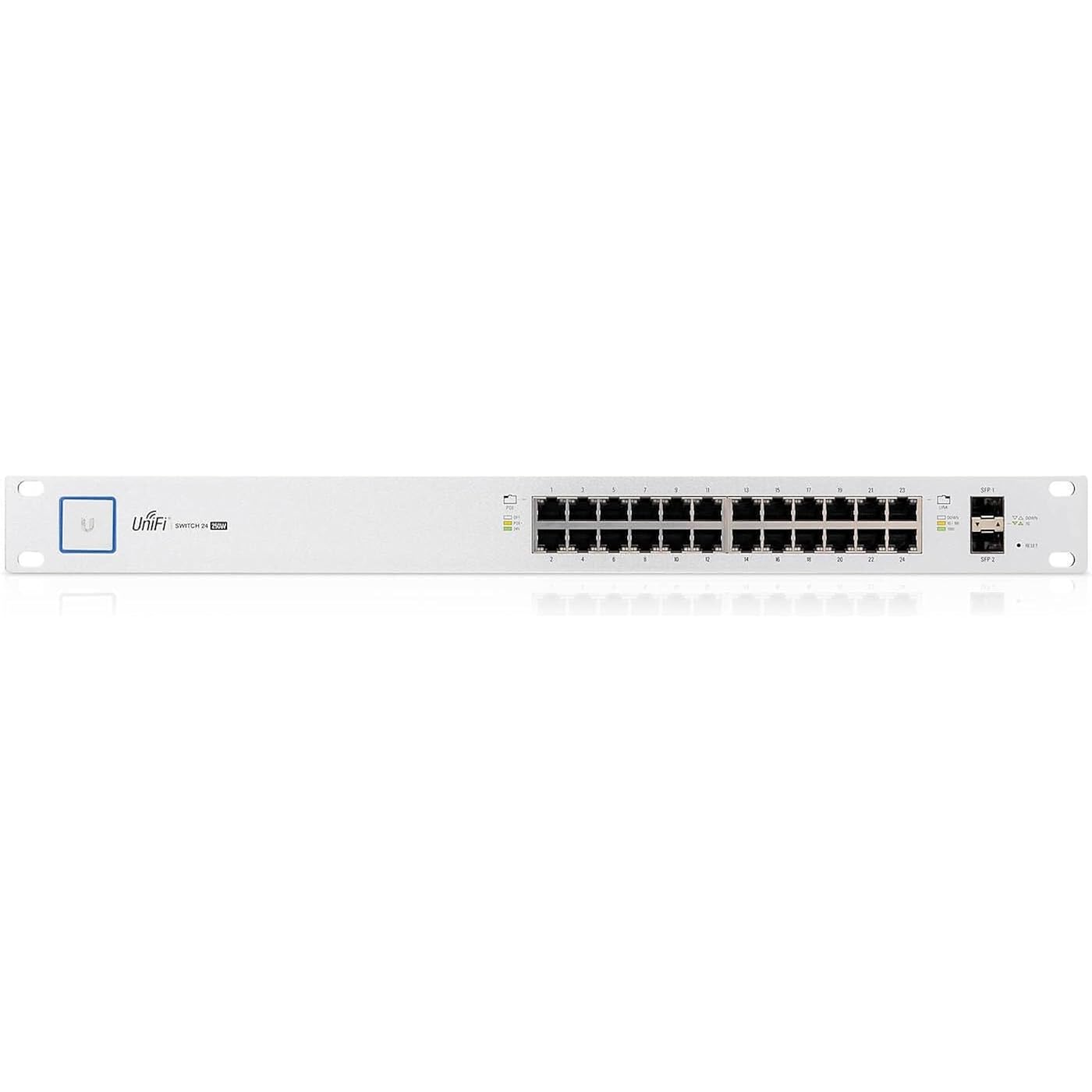
Ubiquiti UniFi Switch - 24 Ports Managed (US-24-250W),White
  • Based on 663 reviews
Condition: Used - Good
Checking for the best price...
$369.99 Why this price?

Buy Now, Pay Later


As low as / mo
  • – Up to 36-month term if approved
  • – No impact on credit to apply
  • – Instant approval decision
  • – Secure and straightforward checkout

Ready to go? Add this product to your cart and select a plan during checkout.

Payment plans are offered through our trusted finance partners Klarna, Affirm, Afterpay, Zip, Apple Pay, and Google Pay. No-credit-needed leasing options through Acima may also be available at checkout.

Learn more about financing & leasing here.

Free shipping on this product

This item is eligible for return within 30 days of receipt

To qualify for a full refund, items must be returned in their original, unused condition. If an item is returned in a used, damaged, or materially different state, you may be granted a partial refund.

To initiate a return, please visit our Returns Center.

View our full returns policy here.


Availability: Only 3 left in stock, order soon!
Fulfilled by Elpis Tech - SN info recorded

Arrives Monday, Aug 17
Order within 20 hours and 15 minutes
Available payment plans shown during checkout

Protection Plan Protect Your Purchase
Checking for protection plans...

Features

  • The UniFi Switch delivers the forwarding capacity to simultaneously process traffic on all ports at line rate without any packet loss | Up to 3 fan levels
  • Product dimensions 19.09 L x 11.24 W x 1.72 H | Ports quantity 24 | Background noise level 27.5 dB | Power method 100-240VAC/50-60 Hz | Weight 10.4 lbs. | Max power consumption 250W | Operating temperature 23 to 104 F
  • The UniFi Switch features auto-sensing IEEE 802.3af/at PoE to power multiple devices on the network | Switching Capacity 52 Gbps
  • Two SFP ports support uplinks of up to 1 Gbps | For high-capacity uplinks, each 48-port model includes two SFP+ ports for uplinks of up to 10 Gbps
  • Each switch port offers custom settings: port name, PoE, network/VLAN configuration, and operation mode (switching, mirroring, or aggregate) - as well as 802.1X Authentication and Radius VLAN support

Description

Powerful Enterprise Switch Models: The UniFi Switch delivers the forwarding capacity to simultaneously process traffic on all ports at line rate without any packet loss. Total non-blocking throughput: up to 26 Gbps for 24-port models and up to 70 Gbps for 48-port models. Advanced Port Management: Each switch port offers custom settings: port name, PoE, network/VLAN configuration, and operation mode (switching, mirroring, or aggregate) - as well as 802.1X Authentication and Radius VLAN support. Optical Fiber Connectivity: Two SFP ports support uplinks of up to 1 Gbps. For high-capacity uplinks, each 48-port model includes two SFP+ ports for uplinks of up to 10 Gbps. Convenient PoE+ Support: The UniFi Switch features auto-sensing IEEE 802.3af/at PoE to power multiple devices on the network. Breakthrough Value: The UniFi Switch provides top price/performance value: a full-featured, enterprise-class switch starting at $399 USD MSRP. Seamless Integration: The UniFi Switch integrates seamlessly into the UniFi Software-Defined Networking (SDN) platform to create a highly scalable, end-to-end system of network devices across multiple locations — all controlled from a single interface.

Brand: Ubiquiti Networks


Number of Ports: 24


Color: White


Compatible Devices: PC; Mac


Product Dimensions: 19.09"L x 11.24"W x 1.72"H


Number of Ports: 24


Compatible Devices: PC; Mac


Voltage: 240 Volts


Upper Temperature Rating: 104 Degrees Fahrenheit


Interface: PoE, SFP


Data Transfer Rate: 1 Gigabits Per Second


Switch Type: Temperature Switch


Platform: No Operating System


Color: White


Case Material Type: Plastic


Item Dimensions L x W x H: 19.09"L x 11.24"W x 1.72"H


Item Weight: 10.4 Pounds


Brand: Ubiquiti Networks


Warranty Description: Manufacturer


Global Trade Identification Number: 62, 66, 49


Manufacturer: Ubiquiti


UPC: 609722639187 760488877562 680392660992 053926243518 810354020766 796594430858 810354023149 817882023061


Model Number: US-24-250W


Mfr Part Number: US-24-250W


Unit Count: 1.0 Count


Frequently asked questions

If you place your order now, the estimated arrival date for this product is: Monday, Aug 17

Yes, absolutely! You may return this product for a full refund within 30 days of receiving it.

To initiate a return, please visit our Returns Center.

View our full returns policy here.

  • Klarna Financing
  • Affirm Pay in 4
  • Affirm Financing
  • Afterpay Financing
  • Zip Pay in 4
  • Financing through Apple Pay
  • Financing through Google Pay
Leasing options through Acima may also be available during checkout.

Learn more about financing & leasing here.

Top Amazon Reviews


  • Great hardware, software could offer richer monitoring tools
NOTE: I bought 4 different models of this switch line from Amazon but since I can’t submit more than 1 review I will cover the 4 models in the same review. 1) UBIQUITI UNIFI SWITCH - 24 PORTS MANAGED (US-24-250W) This Ubiquity switch is built like a tank, with a solid box and good cooling and hit the spot perfectly for my needs. (I considered the Edgerouter line before but I didn't have a need for routing functionality so I stayed away. I also used some Toughswitch-8 switches but found them to run quite hot and occasionally flake out) The performance of this switch is more than enough for my needs. The POE is a huge feature for me - I use Unifi access points and video cameras so the built-in passive POE saves me a lot of power injectors (I don't use 802.3af POE, but it's nice to know it's there.) The switch integrates nicely into the PC-resident Unify management software that I was already using for my access point. If you are not a "Unify shop" and the switch is the only thing you'll manage with the software it may be a tougher sell to have to install and run the server software on a PC (but frankly I think hardware like this is a big argument for becoming a Unify shop.) I only wish the Unify software offered better monitoring and stats of the switch's hardware, particularly on traffic stats. All you get are totals of how much upstream and downstream data has run through the switch and each port since the switch was last started. I would like to get real time throughput stats in bytes/s and packets/s for each port (to see if a link needs to be upgraded to gigabit, if I am experiencing a storm etc.) I would also like to see what MAC addresses are being served by each port in the switch (something my no-frills 5-port mikrotik RB260 switches readily give me.) Note that there appears to be a way to get into the switch opening a debug terminal, for all I know that route may offer some of these capabilities. However I never managed to bring up the debug terminal from the Unify software (I always get a "Connection Error"), and in any case to be of widespread utility these capabilities should be in the GUI itself. BOTTOM LINE: This solid switch from Ubiquity hits the spot right on (especially if you have other Unify products) and it has lots of future potential. 2) UBIQUITI NETWORKS 8-PORT UNIFI SWITCH, 150W (US-8-150W) This switch is simply an 8-port version of item 1) above and it deserves the same highly positive review. One notable difference is that it does not have a cooling fan, which elicits mixed feelings. On one hand it is great that the switch can work silently in settings where noise matters (i.e. anywhere away from the wiring cabinet) and it is also great that the switch is reasonably small for a switch with an on-board power supply. Kudos to the hardware designers for pulling those off. On the other hand having an onboard power supply puts the switch squarely in the enterprise switch class, where reliability and long hardware life is paramount even in harsh/hot environments. The ideal would have been for this switch to include a fan (hopefully in the same form factor) while giving the user the option to turn set it on off/on/auto. In the off mode the switch would become the equivalent of the switch as currently offered. BOTTOM LINE: Another great switch from Ubiquity, time will tell how reliable/long lived it is with no active cooling. 3) UBIQUITI US-8-60W UNIFI SWITCH and 4) UBIQUITI US-8 UNIFI SWITCH While all 4 switches reviewed here share the same data handling capabilities and management software, these last 2 switches are in a class of their own. The first thing you notice is that they are both super small, a great form factor to stash in all kinds of small cabinets. Part of that size reduction stems from the fact that the power supply is not built in, it is the external cord-mounted type. (I hope that Ubiquity will come out with a 5-port version in a similarly tight form factor.) These two switches dramatically part company from their bigger brothers – 1) and 2) - in their PoE support. Let’s compare: - The built-in power supply switches – items 1) and 2) above - do a marvelously elegant job handling PoE. Each of their ports offers a choice of “legacy” (24V passive) PoE on pins 4-5-7-8 or 802.3ax on pins 1-2-3-6. This means they can power the entire line of traditional Ubiquity 24V devices (and that of other compatible manufacturers like Mikrotik), and they can power all current and future 802.3ax devices. Such 802.3ax compatible devices are starting to show up in the Ubiquity lineup (e.g. the G3 Dome cameras, the Unify HD access points.) Note that these switches will never let you burn a passive 24V legacy device as they never put out anything higher than 24V on pins 4-5-7-8. - The US-8-60W – item 3) above - drops 24V passive PoE support. That is a big loss if you have a collection of passive 24V legacy devices (as of today most Ubiquity PoE devices fall in this class.) You can buy an adapter form Ubiquity to handle these devices with this switch but it costs about $ 25 per device, and if you are going to tolerate dongles you might as well keep using a separate power injector (you won’t have remote control capability but that is a relatively small loss.) So this switch is a big bet on the bright 802.3ax future; if you are not in a hurry to make that jump you may want to hold off buying it (In my case I put the switch to work handling a couple G3 Dome cameras.) - The US-8 also drops 24V passive PoE support while it adds PoE In support, accepting both 802.3ax and 48V passive PoE. The PoE Out support in US-8 – item 4) above – is on the idiosyncratic side. Like the US-8-60W the switch drops 24V passive support, aiming at a future ruled by 802.3ax. The switch can output 802.3ac PoE on port 8 provided the switch is fed with 802.3at PoE. But if you feed the switch with the DC adapter port 8 will output a non-802.3x compliant 48V PoE on Port 8. With a little more circuitry the switch could have been made to output 802.3ac in the DC-fed case, instead of outputting a non-802.3ax compliant flavor of high voltage PoE. Also, this switch has the capability to output 48V passive to pins 4-5-7-8 or port 8, so if you make a mistake you could burn 24V passive devices with it. BOTTOM LINE: The size and performance of these two switches makes them very attractive for any tight quarters. If you don’t need PoE the switches are a no-brainer purchase. If you need PoE you should make sure they support the kind of PoE that your devices need. ... show more
Reviewed in the United States on March 15, 2017 by Technology enthusiast

  • An excellent choice for a managed, PoE capable switch! An excellent choice for a managed, PoE capable switch!
The 250W version of the UniFi 24-port managed switch exceeded my expectations! Plenty of experience with UniFi APs and the associated controller led me to the selection of this device for the following reasons: 1.) Single pane of glass management: If you're already running another UniFi device and have a pre-existing instance of the UniFi Controller (via local install, VM, AWS instance, or cloud key), adopting this switch and making the necessary adjustments to its configuration are very intuitive. Provisioning VLANs and assigning per-port configurations are far more complex in other vendor's UIs and solutions. At a glance, you can quickly discern connected MAC address, link speed, and whether or not PoE is in use. Configuration changes apply quickly with no disruption. Updating firmware revisions is also incredibly simple. No TFTP, SFTP, other protocols/solutions are required as long as you have a running UniFi controller. 2.) 24V Passive and PoE+ capabilities: While the current-generation UAP-AC-Pro can operate with either PoE specification, the lesser APs and legacy APs require 24V Passive distribution capability within the switch or use of an injector. This switch supports the full gamut of UniFi APs without issue, along with the other miscellaneous UniFi portfolio offerings. While the 250W rating will cap the total number of PoE-enabled devices one can run, it's a balanced compromise for environments that won't be loading the switch ports up with an overabundance of PoE endpoints. The 500W variant of this switch better addresses that market. 3.) Price: If you watch very, very carefully, you can get a pretty spectacular deal on this switch from Amazon. 4.) Build Quality and Noise Considerations: The construction and aesthetics of this switch are unequaled at this price point. It's clean, minimalist, and has the necessary indicators that provide the ability to know what its doing using nothing more than a quick glance. The labels and LEDs do the job well and are clear. As a point of reference, this switch makes less fan noise than an HP V1910 switch with the stock delta fan. It's not silent, but it would be far more tolerable if you are forced to keep the switch out in the open or within close proximity to other equipment. Minor caveats of note include: 1.) Port Aggregation: Ports that will be aggregated (e.g. LACP/LLDP interfaces) are limited to a quantity of four, and follow in series from the first port defined for the aggregated link. Selecting Port 2 (as an example) will allow you to aggregate Ports 2 through 5. There are cabling considerations to be processed and accounted for if you're using aggregation. 2.) Availability: Procuring this switch at list price (or slightly better than list price) can be a challenge. As long as you're not in a rush, you won't be gouged. 3.) Dependency on the UniFi Controller. Once configured, the controller won't be required to run 24/7. If you want to make a change, you need an active controller that has adopted all UniFi products. Many options exist to fulfill this purpose including the UniFi Cloud Key, a VM, an AWS instance, or running the controller on a PC of your choosing. Weigh the pros and cons of each before making the commitment to the best option in this space. None of these caveats detract from what is another excellent product made by Ubiquiti. ... show more
Reviewed in the United States on July 20, 2016 Reviewed in the United States on July 20, 2016 by James Resiter

  • WIthout a doubt, the best ecosystem to get into.
I cannot begin to put into words how happy I am to "switch" to the UniFi ecosystem. We completely redid our networking kit for our small business and went with the controller, USG, POE switch, and 4 mesh APs. Just wow. Setup was an absolute breeze. The controller methodology where you have one device that manages the settings as opposed to each device doing their own, wow. Once I get everything plugged in and found the controller, provisioning, updating firmware, and configuring everything was somehow a pleasant experience as opposed to any Cisco gear I've worked with in the past. VLAN, isolated networks, firewall, everything was a breeze. The best test was when I was off-site and the owner wanted a new AP. I ordered another UniFi mesh AP to his business and just told him to place it where he wanted and plug it into the nearest Ethernet port. Thanks to POE, no need for power outlets. Since all ports go to this switch, I was able to go onto the UniFi app on my phone and press one button to provision the new AP that the system already found. No copying over network settings, no gateway config, nothing of the sort. One-click provision and everything was brought to the new system. Literally, 10 seconds of my time and I haven't touched it since. With the UniFi system, I was back to spending time on determining requirements instead of spending time in settings. I would highly recommend this setup. ... show more
Reviewed in the United States on October 26, 2018 by Andy

  • Great for home network Great for home network
Works well if you would like to setup a serious network in your home, office etc. I bought a new house and I am an IT Engineer by trade, so I was looking forward to installing this product, along with their secure gateway, cloud key and access points. The setup is fairly straight forward, plug in, power up and use the cloud key to configure and update the unit. Once the unit is up and running, you can add the secure gateway and access points. Remember everything is done via the cloud key (if you bought one). Management is very easy, many options like STP, RSTP, port configuration, you can really do a lot with it. Not noisy at all. I converted my coat closet into a small LAN room and mounted this on the wall. ... show more
Reviewed in the United States on August 1, 2016 Reviewed in the United States on August 1, 2016 by MY303V8

  • Great Switch
ill start by saying this is a great switch. I bought this switch to replace a non Poe switch. I run 6 Poe cameras with it and it works great. Easy to switch over the Poe type in the management page(with the cloud key). Only uses about 4-5 watts per camera. I love ubiquiti equiptment and have all thier equip. In my opnion this is not for the novice as it can be a little troubling at times to get setup. other than that it works exactly as i need it to. ... show more
Reviewed in the United States on August 23, 2019 by Matthew

  • Excellent PoE Switch, Ubiquiti Unifi Does Management Right, Best In All Unifi Networks
The Unifi system is great integration of network components and centralized management. This PoE switch is excellent as part of that Unifi system and an excellent switch itself. When I first started using the Unifi system it was a little bit of a learning curve, but now that I'm with the system I love it. What keeps me with the Unifi system besides the management is the commercial quality. It's all well made and this switch is designed for professional use and with 2 SFP ports. It provides plenty of PoE power budget this switch has never fallen short. In 2 years installing and managing Unifi components I've yet to have a failure. Because the Unifi system has been so good and this switch model has served well for multiple clients I'm giving this switch 5 stars. It's very good on its own, but shines as part of a Unifi network. ... show more
Reviewed in the United States on April 7, 2018 by Stephanie Sullivan

  • Fantastic switch, UniFi software and price point makes it
This switch does its job very well, and the UniFi software presents all the management and fine tuning in one easy interface. I've got this paired with a UniFi AC Access point behind a pfSense router machine. The options available in pfSense seem more advanced compared to what a UniFi gateway might get me, though they don't integrate with the pretty UI yet. The switch and AP together are great though, no issues at all. Updating firmware and software is also exceptionally simple through the management UI, so I know I'll have things up-to-date easily. ... show more
Reviewed in the United States on January 16, 2017 by Nathaniel Moseley

  • Great switch, but requires Security Gateway to enable some standard smart switch features
it works. It simply works, which is great. The interface is good, and it has some good features but it doesn't have all of the features I would expect from a Cisco switch, however, when pared with the security gateway it seems to have a fairly complete package. I'm managing mine via the Cloud Key Pro. The interface is simple enough I can show my wife things, but in depth enough that I can do most things without accessing the CLI. ... show more
Reviewed in the United States on April 28, 2020 by Joseph Gastrich

Can't find a product?

Find it on Amazon first, then paste the link below.
Checking for best price...