Search  for anything...

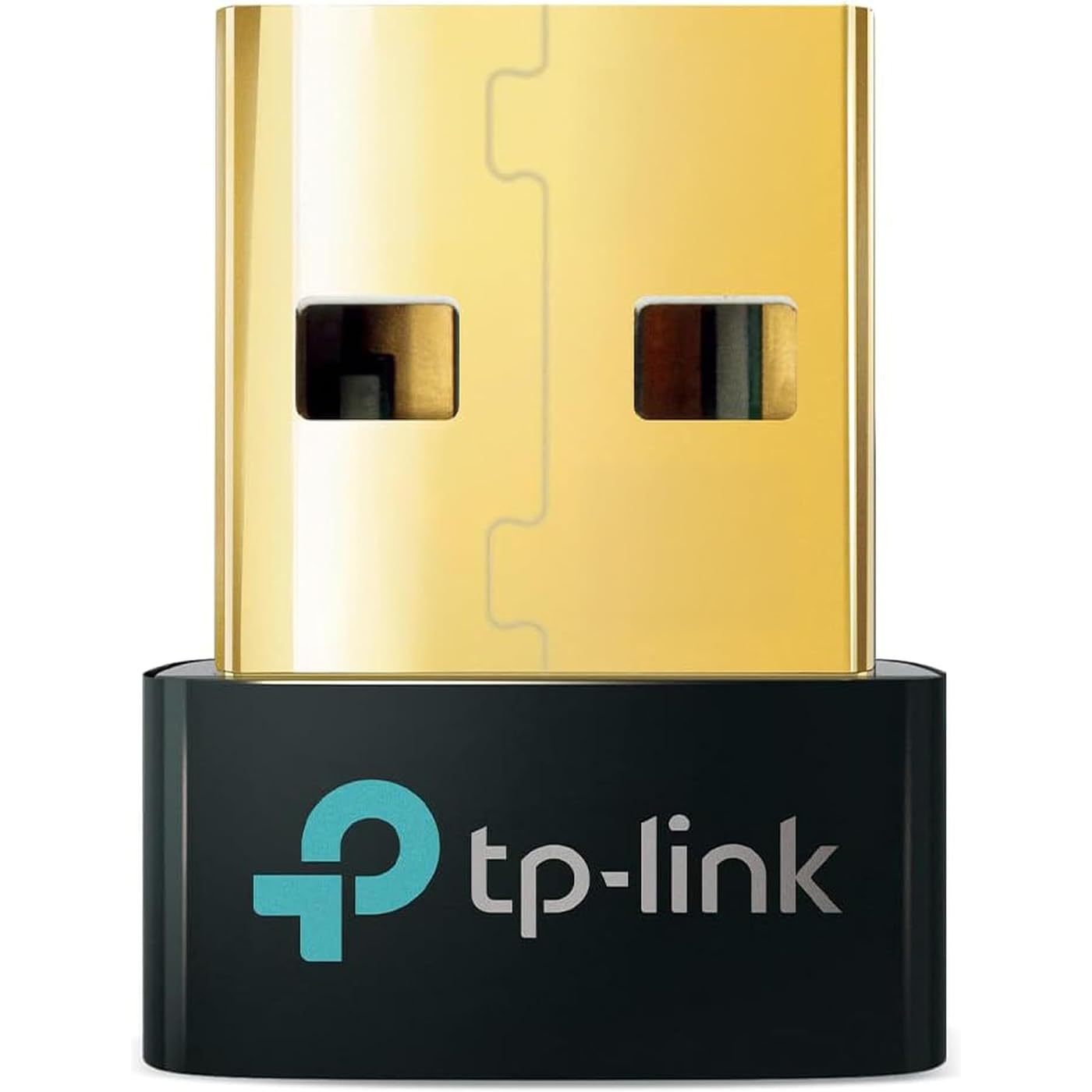
TP-Link USB Bluetooth Adapter for PC - Bluetooth 5.4 Dongle Receiver, Plug and Play, Nano Design, EDR & BLE, Supports Windows 11/10/8.1/7 for Desktop, Laptop, Keyboard, Mouse, etc (UB500)

  • Based on 11,777 reviews
Condition: New
Checking for the best price...
$12.99 Why this price?
Save $12.00 was $24.99

Buy Now, Pay Later


As low as $3 / mo
  • – 4-month term
  • – No impact on credit to apply
  • – Instant approval decision
  • – Secure and straightforward checkout

Ready to go? Add this product to your cart and select a plan during checkout.

Payment plans are offered through our trusted finance partners Klarna, Affirm, Afterpay, Apple Pay, and PayTomorrow. No-credit-needed leasing options through Acima may also be available at checkout.

Learn more about financing & leasing here.

Selected Option

Free shipping on this product

FREE 30-day refund/replacement

To qualify for a full refund, items must be returned in their original, unused condition. If an item is returned in a used, damaged, or materially different state, you may be granted a partial refund.

To initiate a return, please visit our Returns Center.

View our full returns policy here.


Availability: In Stock.
Fulfilled by Amazon

Arrives Friday, Jul 17
Order within 23 hours and 29 minutes
Available payment plans shown during checkout

Protection Plan Protect Your Purchase
Checking for protection plans...

Style: Bluetooth 5.0


Features

  • Bluetooth 5.4 + Broad Compatibility - Provides Bluetooth 5.4 plus EDR technology and is backward compatible with Bluetooth V5.3/5.0/4.2/4.0/3.0/2.1/2.0/1.1.
  • Faster Speed, Extended Range - Get up to 2x faster data transfer and 4x broader coverage compared to Bluetooth 4.0 perfect for smooth audio streaming and stable connections.
  • EDR and BLE Technology - This Bluetooth dongle is quipped with enhanced data rate and Bluetooth low energy, UB500 has greatly improved data transfer speed and operates at the optimal rate of power consumption
  • Nano-Sized - A sleek, ultra-small design means you can insert the Nano Bluetooth receiver into any USB port and simply keep it there regardless of whether you are traveling or at home
  • Plug & Play with Free Driver Support - Plug and play for Windows 8.1/10/11 (internet required). Supports Win7 (driver required and can be downloaded from website for free). Download the latest driver from TP-Link website to utilize Bluetooth 5.4
  • Reliable Multi-Device Support - Enables wireless communication with Bluetooth-enabled desktop, printers, phones and headsets. Utilizes Bluetooth low energy technology for energy-saving wireless connectivity
  • Compatibility NOTE: UB500 is for Windows PCs only and does not support macOS, Linux, TVs, or Windows 8. Not for direct console use (PS5/PS4/Xbox), but controllers can be connected via PC. Two UB500 cannot pair with each other
  • Setup Tip - Disable any existing internal Bluetooth in Device Manager before using UB500 to avoid driver conflicts.

Description

UB500 is highly portable and much smaller than a flash drive. Plug and play in Windows 8/8.1/10/11 systems to enjoy a wireless communication with Bluetooth- enabled devices. This Bluetooth adapter supports advanced Bluetooth 5.4 with EDR and Bluetooth low energy technology, enabling wireless connectivity a wide range of devices such as computers, printers, phones, headsets, speakers, keyboards, controllers, etc. Note: Plug and play for Windows 8.1, Windows 10, and Windows 11 (make sure your computer is connected to the internet).

Brand: TP-Link


Hardware Interface: Bluetooth 5


Color: Golden,Black


Compatible Devices: Laptop


Product Dimensions: 0.74"L x 0.58"W x 0.27"H


Data Link Protocol: Bluetooth


Data Transfer Rate: 2 Megabits Per Second


Item Weight: 2 Grams


UPC:


Compatible Operating System Family: Windows


Hardware Interface: Bluetooth 5


Compatible Devices: Laptop


Data Link Protocol: Bluetooth


Data Transfer Rate: 2 Megabits Per Second


Compatible Operating System Family: Windows


Minimum Required Operating System Version: Windows 8


Item Dimensions L x W x H: 0.74"L x 0.58"W x 0.27"H


Item Weight: 2 Grams


Color: Golden,Black


Brand: TP-Link


UPC: 840030703447


Manufacturer: TP-Link


Mfr Part Number: UB500


Model Number: UB500


Unit Count: 1.0 Count


Warranty Description: 2 year manufacturer


Built-In Media: Bluetooth 5.4 Nano USB Adapter UB500, Quick Installation Guide


Item Type Name: Bluetooth Adapter


Frequently asked questions

If you place your order now, the estimated arrival date for this product is: Friday, Jul 17

Yes, absolutely! You may return this product for a full refund within 30 days of receiving it.

To initiate a return, please visit our Returns Center.

View our full returns policy here.

  • Klarna Financing
  • Affirm Pay in 4
  • Affirm Financing
  • Afterpay Financing
  • PayTomorrow Financing
  • Financing through Apple Pay
Leasing options through Acima may also be available during checkout.

Learn more about financing & leasing here.

Top Amazon Reviews


  • Plug and Play Set-Up, Super Easy and Convenient for Older PCs, Worked Like a Charm for my Needs!
Style: Bluetooth 5.4
This TP-Link USB bluetooth adapter is absolutely fantastic and does exactly what it promises with no hassle. I picked it up to replace a failed bluetooth module on my older PC, and it's been working perfectly, truly plug-and-play with no complicated setup or immediate driver support needed. It fit easily in the standard USB ports, instantly connected and set itself up, and started working flawlessly. Seems to be pretty durable and well built so far, and big added bonus that you get bluetooth 5.4 support (one of the latest and greatest) while still being backward compatible with older devices. The small nano size keeps it out of the way, connection speeds are fast and stable, and the price makes it a great value. If you need to add or restore bluetooth to your desktop or laptop, this is an easy, reliable, and highly recommended solution! ... show more
Reviewed in the United States on November 16, 2025 by Collin M.

  • Amazing all around. Instant setup. No dropouts. Extremely inexpensive. A true 10 out of 10 device.
Style: Bluetooth 5.4
I love theseTP-Link Bluetooth USB nano adapters. I've purchased 3 of them so far to bestow Bluetooth on all my 15+ year old computers. First they are truly plug-n-play when using Windows 10 (and probably 11 as well). I plug in the adapter and Windows sets it up in about 2 seconds. Within 15 seconds I've already connected my Soundcore Bluetooth headphones. Second, the range is stunning. I have a 3-level 3,800sq ft house stuffed with endless opportunities for interference - a room full of computers, another room serving as a full blown music studio, and several racks of electronics on all metal shelving. With this adapter plugged into a front USB port on a 17 year old PC on the main level of the house, I get absolutely no dropouts as a I move about the house - even to the remotest, inteference ridden areas of the house. Tuly amazing. I could not be happier with this inexpensive device. ... show more
Reviewed in the United States on March 1, 2026 by Life is Short

  • Works great out of the box, even with Linux
Style: Bluetooth 5.4
I plugged it in to my Windows 10 computer and was able to connect to my keyboard and bluetooth speaker right away. Then I tried it on my Linux computer and had no trouble connecting to the speaker and my phone, and transferring a file back and forth. The keyboard initially wasn't working on Linux, but after restarting the computer it worked just fine. I'm using Linux Mint 21.1 (≈ Ubuntu 22.04) with kernel version 5.15. ... show more
Reviewed in the United States on April 4, 2026 by c

  • Simple way to add Bluetooth to a desktop
Style: Bluetooth 5.4
This worked exactly as expected. I used it to add Bluetooth to a Windows 10 desktop that didn’t have it built in, and setup was quick and easy. I’ve been using it with a wireless Xbox controller for gaming, and it’s been reliable with no issues. A simple, effective solution if you need Bluetooth on a PC. ... show more
Reviewed in the United States on April 1, 2026 by Graham Collins

  • Multiple Device - Audio Stutter
Style: Bluetooth 5.4
Now I am giving this thing a 4 on Functionality, because the Bluetooth is fine, but there can be issues. Your probably getting this for an older system. There lies a problem. If you have a newer Bluetooth mouse which takes up as much bandwidth as your external Bluetooth speakers, choose one or the other because you WILL have audio Stuttering, Choppy audio or a delayed cursor flying all over the screen. For older systems; An older system will juggle the signal between two devices first, then since the thing is old, route them over your only PCI/USB controller, then through software. You get latency and choppy audio. This is a bandwidth bottleneck. It's built nice and easy to push in. It functions. ... show more
Reviewed in the United States on January 16, 2026 by Fler M

  • Make sure you use the right drivers if you're planning to use this with PSVR2. Works perfect!
Style: Bluetooth 5.4
This review is specifically for those considering this device to use on your PC with the PSVR2 controllers. My experience has been pretty spotty using these VR2 controllers on my PC. At first, I tried using my motherboard's built in bluetooth (Gigabyte B650 Gaming) and that was horrible, only briefly connecting. So I tried the TP-Link UB500 which is also one of the recommended adapters on Sony's website. I also placed this adapter on an open USB 3.0 port on the front of my ATX case and that did work, but only for a few minutes. Then, I realized these should be placed on a USB 2.0 port, so I did that. In addition, I also added a 3 foot USB extension cable to that front port (recommended for a cleaner signal) and finally I was off and running, playing Half Life Alyx which is an awesome game! However, after getting to around chapter 2, I started noticing that my left controller would get laggy and unresponsive. Eventually, I would often play the game limiting my movement to literal inches from the bluetooth adapter, which is super frustrating when you're dealing with combines. Anyway, I dug in further and for me, the issue was with the drivers! I was using TP-link's latest driver on their website, 1.9.1051.3012. However, I also found that TP-link addressed the driver issue directly back when Sony created the adapter to use on the PC. The driver version TP-link specifically recommended was 1.9.1038.3020. So I went into device manager and uninstalled the 1051 driver and installed the 1038 driver. And that didn't work. Frustrated, I finally went in and also removed the vr2 bluetooth controllers from device manager and restarted my PC, reconnected said controllers via bluetooth, and I am now blissfully playing Alyx and even using a modified play area that is much larger than the default play area. So far, I have gotten zero lag on either controller and have often found myself at least a good 4 to 5 feet away from the bluetooth adapter! Hope this helps someone! Oh, I should also mention I am not using the official Sony branded adapter for the headset, but it has worked great from day one. ... show more
Reviewed in the United States on February 18, 2026 by aa240sx

  • Spend the extra couple of dollars on this quality adapter
Style: Bluetooth 5.4
If you're buying any other kind of off-brand BT adapter to save a buck, you're wasting your money. I did the same thing and had nothing but issues with constant disconnects, especially on my wireless controllers. After purchasing this adapter, no issues, no lag, no disconnects. Sometimes you realize that there's a reason there are brand names. ... show more
Reviewed in the United States on April 1, 2026 by Brent W.

Can't find a product?

Find it on Amazon first, then paste the link below.
Checking for best price...