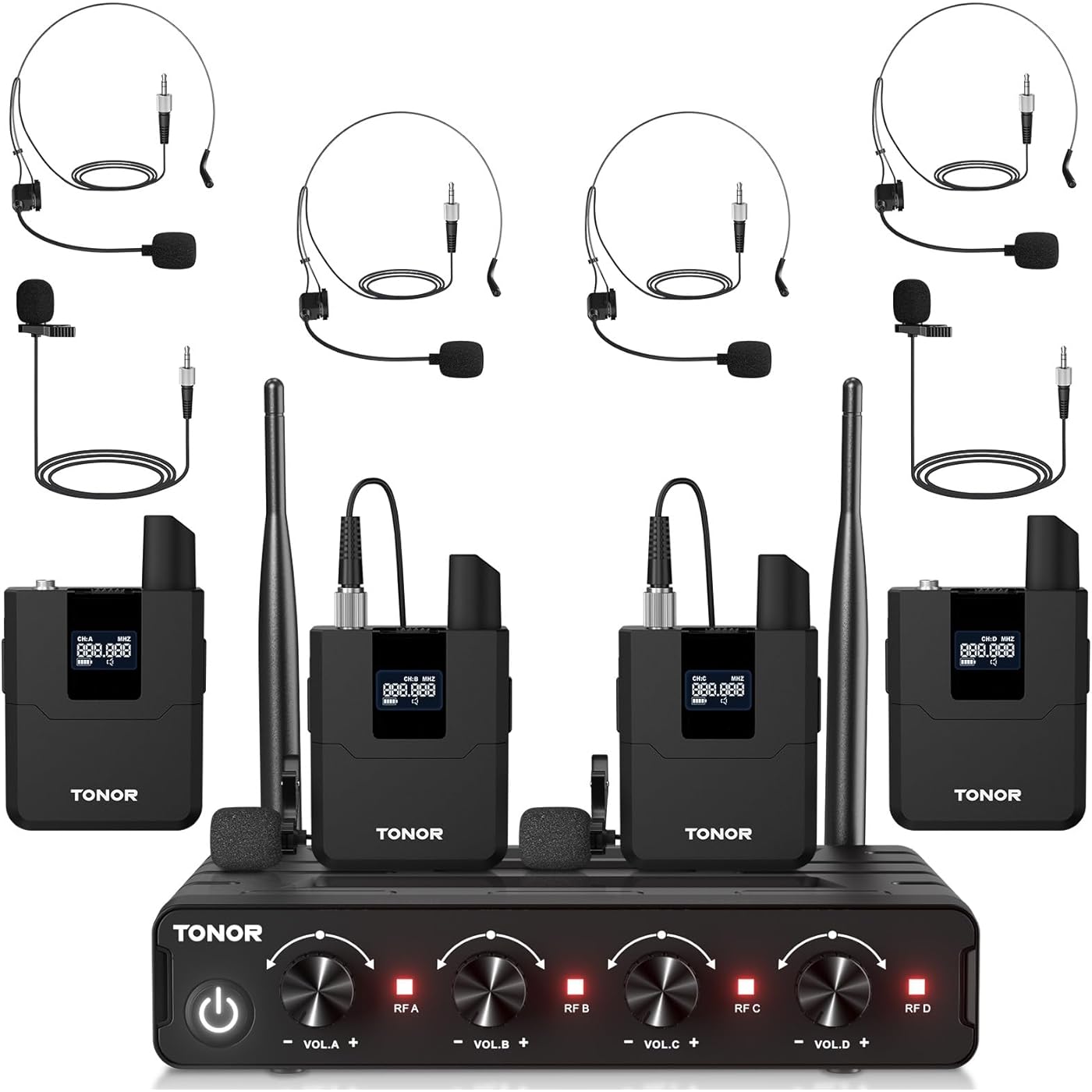
TONOR Wireless Microphones System with UHF Headset/Lavalier Lapel Mics, Bodypack Transmitter, Receiver, 4 * 10 Channels, 60 m/200ft Range for Church Conference Performance Singing Karaoke PA Speaker




Buy Now, Pay Later
- – 6-month term
- – No impact on credit to apply
- – Instant approval decision
- – Secure and straightforward checkout
Ready to go? Add this product to your cart and select a plan during checkout.
Payment plans are offered through our trusted finance partners Klarna, Affirm, Afterpay, Zip, Apple Pay, and Google Pay. No-credit-needed leasing options through Acima may also be available at checkout.
Learn more about financing & leasing here.
Selected Option
FREE 30-day refund/replacement
To qualify for a full refund, items must be returned in their original, unused condition. If an item is returned in a used, damaged, or materially different state, you may be granted a partial refund.
To initiate a return, please visit our Returns Center.
View our full returns policy here.
Recently Viewed


At a glance
- Condition
- New
- Set
- 4 Bodypack Mics
- Model
- TW366
- Color
- Black
- Connector Type
- 6.35 mm Jack
- Special Feature
- Stand
- Polar Pattern
- Unidirectional
- In the box
- 1 x 6.35mm audio cable1 x Power adapter1 x Manual4 x Bodypacks1 x Receiver4 x Headset microphones4 x Lavalier microphones
- Warranty
- 2 Years
- Works with
- Speaker
Features 5
- Amazing Sound Quality: With its high-quality cardioid dynamic capsule, this wireless microphone system guarantees exceptional sound reproduction, effectively eliminating background noise and feedback. Its perfect for various occasions like church gatherings, weddings, gym class, meetings, lectures or karaoke.
- Reliable Wireless Connectivity: Our receiver offers a remarkable operating range of 200ft/60m, enabling unrestricted presentations both indoors and outdoors. Supporting up to 4 simultaneous sets without interference, our 4-microphone system ensures stable wireless connections with 10 channels on each bodypack.
- Wide Compatibility: Our wireless microphone is compatible with various devices such as mixers, karaoke machines, amplifiers, and powered speakers. You can easily connect it using the included 1/4" (6.35mm) audio cable to achieve optimum sound output.
- Easy Setup: Just open the receiver and bodypack, and they will automatically pair. You can refer to the video guide for step-by-step instructions. The bodypack also features a convenient MUTE button to avoid disturbing others when multiple users are utilizing it. Each bodypack requires 2 AA batteries (not included).
- Package Includes: 4 x bodypacks, 2 x headset mics, 2 x lapel mics, 1 x receiver, 1 x 6.35mm audio cable, 1 x power adapter, and 1 x manual.
Description
This microphone provides outstanding sound quality by effectively minimizing background noise. It resumes the last set channel after power cord disconnection/reconnection. Click the SET button to change the frequency. Press the MUTE/VOL button to mute the sound or adjust the volume. The bodypack includes an XLR jack for easy and high-quality connection of headset and lavalier microphones. Slide the button to power the bodypack on or off. The LED light changes to green for power on and red for mute. Operated by 2 AA batteries, this microphone ensures extended usage without the hassle of charging. (Batteries are not included.) 1. Turn on the bodypack to check all are in order A, B, C or D. If the order is wrong, firstly turn off the bodypack to reset the order of the wrong one. 2. Long press the "SET" button for 5 seconds into the pairing mode. And restart the receiver. 3. Click the "SET" button to finish the pairing. When the red light on the receiver is on, the pairing is successful. 4. If there is more than one trouble mic, repeat 1-4 steps for others to finish pairing. 1. Use the 6.35mm audio cable (included) to connect the receiver MIX's port and the karaoke machine, mixer or other audio devices. 2. Erect the receiver's antennas, and connect the power cable. 3. Check if the transmitter is connected to the receiver successfully after turning on the device. 1. Turn off the bodypack, hold the SET button and then switch on the bodypack. 2. Wait for about 10 seconds to switch between A and B or C and D bodypack. 3. Release the set button after the LCD shows the switching. 1. Short press the "SET" button to change the frequency. 2. Click the "MUTE/VOL" button to turn on or mute the sound. Long press it for 3 seconds, and the LCD screen will flash. Then click the "MUTE/VOL" button and "SET" button to increase/decrease the volume (from 0-40 levels). 3. You can also adjust the volume by turning the volume knob on the receiver. TW364 TW844 TW822 TW842 TW362
Specs 19
| Recommended Uses For Product | Indoor/Outdoor |
|---|---|
| Brand | TONOR |
| Model Name | TW364 |
| Connectivity Technology | Auxiliary, UHF |
| Connector Type | 6.35 mm Jack |
| Special Feature | Stand |
| Color | Black |
| Polar Pattern | Unidirectional |
| Microphone Form Factor | Microphone System |
| Power Source | Battery Powered |
| Signal-to-Noise Ratio | 70 db |
| Number of Channels | 4 |
| Audible Noise | 70 db |
| Antenna Location | Indoor/Outdoor |
| Model Number | TW366 |
| Built-In Media | 1 x 6.35mm audio cable, 1 x Power adapter, 1 x Manual, 4 x Bodypacks, 1 x Receiver, 4 x Headset microphones, 4 x Lavalier microphones |
| Manufacturer | TONOR |
| Number of Items | 1 |
| Mfr Part Number | 24137 |
No specs match.
Frequently asked questions
To initiate a return, please visit our Returns Center.
View our full returns policy here.
- Klarna Financing
- Affirm Pay in 4
- Affirm Financing
- Afterpay Financing
- Zip Pay in 4
- Financing through Apple Pay
- Financing through Google Pay
Learn more about financing & leasing here.