Search  for anything...

Texas Instruments Graphing Calculator

  • Based on 0 reviews
Condition: New
Checking for the best price...
$159.99 Why this price?

Buy Now, Pay Later


As low as $26.67 / mo
  • – 6-month term
  • – No impact on credit to apply
  • – Instant approval decision
  • – Secure and straightforward checkout

Ready to go? Add this product to your cart and select a plan during checkout.

Payment plans are offered through our trusted finance partners Klarna, Affirm, Afterpay, Zip, Apple Pay, and Google Pay. No-credit-needed leasing options through Acima may also be available at checkout.

Learn more about financing & leasing here.

Selected Option

Free shipping on this product

FREE 30-day refund/replacement

To qualify for a full refund, items must be returned in their original, unused condition. If an item is returned in a used, damaged, or materially different state, you may be granted a partial refund.

To initiate a return, please visit our Returns Center.

View our full returns policy here.


Availability: In Stock.
Fulfilled by Amazon

Arrives Saturday, Aug 22
Order within 17 hours and 28 minutes
Available payment plans shown during checkout

Protection Plan Protect Your Purchase
Checking for protection plans...

Color: Purple, Lavender


Features

  • Advanced TI-84 Evo graphing calculator with a 3x faster processor for quicker calculations and smoother graphing performance
  • High-resolution 2.8-inch display with 50% more graphing space for clearer visualization of equations and data
  • Rechargeable lithium-ion battery with USB-C charging provides long-lasting power for classroom and exam use
  • Approved for major exams including SAT, ACT, AP, and IB with intuitive icon-based interface for easy navigation

Description

Texas Instruments Graphing Calculator, Rechargeable, Battery Powered, Lavender

Brand: Texas Instruments


Color: Purple, Lavender


Calculator Type: Graphing Calculator


Power Source: Battery Powered


Screen Size: 2.8 Inches


Calculator Type: Graphing Calculator


Power Source: Battery Powered


Screen Size: 2.8 Inches


Number of Batteries: 1 Nonstandard Battery batteries required. (included)


Display Type: LCD


Color: Purple, Lavender


Item Dimensions L x W: 7.57"L x 3.54"W


Brand: Texas Instruments


Model Name: Graphing Calculator


UPC: 033317210015


Manufacturer: Texas Instruments


Mfr Part Number: 84EVO/FC/1L1/A5


Model Number: 84EVO/FC/1L1/A5


Item Weight: 0.6 Pounds


Warranty Description: 1 year Manufacturer


Unit Count: 1.0 Count


Frequently asked questions

If you place your order now, the estimated arrival date for this product is: Saturday, Aug 22

Yes, absolutely! You may return this product for a full refund within 30 days of receiving it.

To initiate a return, please visit our Returns Center.

View our full returns policy here.

  • Klarna Financing
  • Affirm Pay in 4
  • Affirm Financing
  • Afterpay Financing
  • Zip Pay in 4
  • Financing through Apple Pay
  • Financing through Google Pay
Leasing options through Acima may also be available during checkout.

Learn more about financing & leasing here.

Top Amazon Reviews
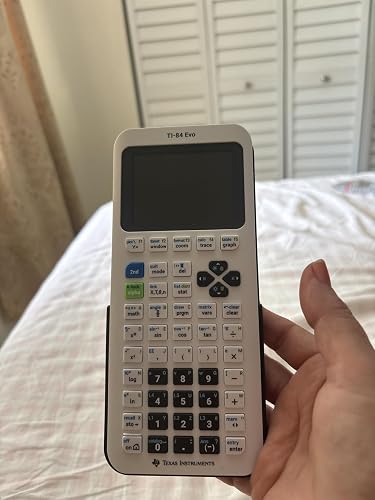

  • Not a huge upgrade but honestly, pretty good. Not a huge upgrade but honestly, pretty good.
Color: White
Is it a major change? No. But the little changes they made ,to me make sense. The buttons feel so much better, the screen text and icons make it feel so much more modern and although the graphs are larger now, the text (font) being smaller actually fits more too making the screen just feel right. Also I love the USB C port. Much more convenient. It is a little pricey yes but as someone that uses their calculator on a day to day for work (engineering), it isn't a big deal. I also love the black (dark) case/cover. If you're wondering if you need to upgrade from a TI-84 Plus CE (including the Python version), the answer is more than likely no. But if you are buying your first graphing calculator and you have the money to buy this one, it is a solid choice, it doesn't feel like it will be outdated anytime soon. One thing to note, and maybe its just me. As of today 05/03/2026, the TI Connect CE software does not support the new Evo. The Evo has its own online based software that lets you update and upload files to the calculator and vise versa. You also get a subscription to their online TI-84 Evo (essentially an emulator). It okay. I originally liked the TI connect Ce software because you can write programs (TI Basic code) on your computer and then transfer it over to the calculator but this doesn't work with the new Evo, at least for now. The online tool and emulator also don't let you do this so hopefully it is a change that comes soon but time will tell. Until then if you still use the Basic TI code, you'll have to do it manually on the calculator. Tedious but doable for simple programs. Other than that. Great purchase. I'd definitely recommend. ... show more
Reviewed in the United States on May 4, 2026 Reviewed in the United States on May 4, 2026 by Jose&Ale

  • Overpriced but nice and modern Overpriced but nice and modern
Color: White
Cool calculator after their long streak without releasing a new 84 series calculator. A bit over priced but the colors and quality are good and precise. The usb c charger is good for staying modern with the universal charging and overall it's a good calculator but can't wait for better software updates. a few minor mold defects on my product but its super small and probably something that will get fixed. overall the calculator looks good and has a lot of similar characteristics to the 84 plus ce. some of the buttons got moved around or changed on this calculator and it messes with muscle memory on the key presses. the "APPS" button is just gone sadly and replaced with a useless "function / function" button..... but {math}, {enter} does the same thing.. or just using parenthesis right. i assume the change was made for lower level understandings and comprehensions on division. overall though the design looks sleek and modern much like its predecessors. might use it for my AP physics and Calc BC tests in a few days. really just got the calculator so me and my friends could have first look at a new calc and so we could make jokes about "dropping evo calc at the bridge" (clash royale reference). but so far (1 day after launch is when im reviewing it. overnight delivery coming in clutch lol) its a cool calculator. would rate like 8/10 overall. just super pricey for what it is and much slower than a ti-nspire for the same value or cheaper. the functions are easy and nice to use but some buttons seem unnecessary. cant wait to see further development and updates to it and the modding community for it. ... show more
Reviewed in the United States on April 30, 2026 Reviewed in the United States on April 30, 2026 by Russ Steger

  • Gorgeous, modern and easy to use
Color: Green, Mint
I just snagged a TI‑84 Evo for my son and we love it! The mint color is gorgeous and feels fresh, and the matte finish feels so nice to the touch and doesn’t get greasy with fingerprints. The home screen is full of big, colorful icons (Graph, Stats, Geometry, etc.). It’s way easier for a kid to figure out where to go, no endless text menus. The icon UI means my son started using it right away; the old button shortcuts are still there for when he gets more advanced. Graphs look smooth, and the new “slice” tool lets you play with curves on the fly. The TI‑84 Evo looks cool, feels solid, and is easy for a kid to pick up. ... show more
Reviewed in the United States on May 5, 2026 by Cooper M.

  • Get the 84+CE when it goes on sale. Get the 84+CE when it goes on sale.
Color: White
I’m the special kind of person who looks forward to a Texas Instruments calculator launch. I have an advance degree mathematics education, am certified in my state to teach math, and use these products 8 hours straight on a 6-days-a-week basis. These are my daily workhorses…You get the idea. This calculator doesn’t feel like an upgrade from the TI-84+CE. It has a slower startup time, the same screen size, and it can’t even simplify radicals like the TI-30xs. My recommendation to families interested in buying a graphing calculator is to buy the TI 84+CE when it goes on sale. ... show more
Reviewed in the United States on May 3, 2026 Reviewed in the United States on May 3, 2026 by Waters0112358

  • Not 3x as fast where it counts, actually slower than CE. Not 3x as fast where it counts, actually slower than CE.
Color: White
Want faster graphing? Go buy a TI-84 Plus CE Python instead. TI has intentionally put a speed limit on graphing and other TI-BASIC commands to make it just as slow as the original TI-84 Plus CE. Until this is removed, I see no reason for people to not just buy the CE Python for cheaper. You also lose the CE and 84+’s clock functionality, which is a bummer, though it wasn’t super useful in the first place. Come on TI, I know you can do better than this. That being said, it isn’t a bad piece of hardware The build quality is nice. the screen is still TN just like the CE but the screen tearing is no longer an issue, and the voltage issues resulting in checkerboarding on the more recent CEs seems to have been fixed. The buttons feel nice, and the OS is legitimately faster to navigate when TI isn’t artificially limiting the speed. TI-BASIC has been reimplemented from the ground up for the new ARM processor, and outside of needing a new file format (.8xp2 vs .8xp) and some of the quirks being taken out, it’s largely the same and feels pretty nice to work with outside of the artificial speed limit on graphing commands. Python is a bit better on here than the CE Python, certainly a little bit faster, but still not something I would actually want to use. You can still delete the Python app if you just want the extra space. 5.8/10 - Decent calculator, horrible design decisions on the OS. Why does it have a speed limit when it’s 3x faster??? So many issues could be solved with just a firmware update. Also, 160$ is way too much for this. Wait for it to drop to like 120$ or something if you can, or again, just buy a CE. ... show more
Reviewed in the United States on April 30, 2026 Reviewed in the United States on April 30, 2026 by NinWiidle

  • Pretty amazing calculator so far
Color: Pink
Pretty amazing calculator so far: I’ve been using and reaching for this model the most when I’m doing some calculations and it’s been pretty good, especially when making some careless mistakes. I don’t have to re-type a whole line and can just edit a specific variable/term with ease. Haven’t tried using other features yet, but there’s a manual and videos to show how to use them. ... show more
Reviewed in the United States on May 23, 2026 by Cristina Corpuz

  • Awesome calculator
Color: White
I upgraded from the TI-84 plus and I really enjoy using this calculator. It is familiar to use and is an easy switch from the older one. The higher processing power for graphs, improved button placement and USB C charging make it an awesome choice.
Reviewed in the United States on May 12, 2026 by Parker

  • Students Just Love to Do Math
Color: Purple, Lavender
I received my EVO about a week ago and I am actively using it to study Calculus. As a certified math teacher, I already believed the best overall calculator for math to be the TI-84. TI-Nspire is great for those seeking a degree in Physics or Engineering. My gorgeous lavender device is way faster at graphing and it has some really good modifications to the keys. Go online and see the new features, but if you are seeking a new calculator for 7th through 12th grade math or college courses (get a graphing calculator for homework even if the college refuses to allow one in class-it is a vital learning tool!), then purchase the Evo in your favorite color. ... show more
Reviewed in the United States on May 16, 2026 by Nuke

Can't find a product?

Find it on Amazon first, then paste the link below.
Checking for best price...